Keepassxc: Attributes not searched by default?
First off I must thank you for all your work (and for sharing it, like civilized people!). I use keepassxc daily, it is probably one of my most used programs on GNU/Linux; I don't know what I would do without it. I really do feel obligated to throw you guys few dollars, and I _will_ be doing so (probably recurring) once I am back to work. You certainly deserve it. For right now though, the very least I can do is let you know that the care you have taken, features implemented, etc. are _greatly_ appreciated! :beers:
Overview
I would expect search to include searching attributes by default, however apparently it does not.
Today I could not find some data that was listed in an attribute, until I searched attribute field specifically (with attr:xxx). Which is an OK workaround (for now) but I don't think this should be the default search behavior.
If I had not spent some time digging into this today (only today in fact I learned about the expanded search options (like attr:, which are very nice btw! :beers: )), I very likely would have missed the information I was looking for in my database completely (and perhaps then duplicated it somewhere else).
Therefore what I propose (and what this issue is about) is a change in the _default_ behavior.
Steps to Reproduce
- Put cursor / focus in search field / bar (or press Ctrl-F).
- Type part of the attribute value I am looking for.
- Results get filtered down to an empty list (no result).
Note that my search options "Case sensitive" and "Limit search to selected group" are both un-checked. I also made sure I was in the root folder (even though that shouldn't matter, especially with these settings).
Expected Behavior
Find the information I am looking for.
Actual Behavior
No matching result comes up.
Unless I do attr:xxx in which case I get what I am looking for. But I do not feel this should be the _default_ behaviour.
Context
I did a search for what I thought were relevant terms but did not find anything (apologies if I missed it).
I also read through some related issues as well as the related PR (among others) but I don't think these directly address this particular aspect.
KeePassXC - Version 2.4.3
Revision: 5d6ef0c
Qt 5.12.5
Debugging mode is disabled.
Operating system: Debian GNU/Linux bullseye/sid
CPU architecture: x86_64
Kernel: linux 5.4.0-4-amd64
Enabled extensions:
- Auto-Type
- Browser Integration
- SSH Agent
- KeeShare (only unsigned sharing)
- YubiKey
Cryptographic libraries:
libgcrypt 1.8.5
Operating System: GNU/Linux
Desktop Env: XFCE / i3-gaps wm
Windowing System: X11
 TRSx80
All 18 comments
Very unlikely this will be a default behavior.
 droidmonkey
on 4 May 2020
droidmonkey
on 4 May 2020
Thanks for the thumbs-up @TRSx80, really made my day.
Maybe an option to search in attributes can be added to the menu that appears when you click the question mark in the search field? The attr: syntax isn't really discoverable.
 wolframroesler
on 4 May 2020
wolframroesler
on 4 May 2020
Maybe same solution like recommended for default group search https://github.com/keepassxreboot/keepassxc/pull/4705#issuecomment-624603260 ?
Or a single combined option for both?
 ghost
on 6 May 2020
ghost
on 6 May 2020
Sorry for disappearing! Got busy; you know how it goes. :)
Anyway, to me the additional custom attributes are just as critical top level fields as username and password.
I honestly did not think this would be a controversial assertion.
One particular case (in fact the exact case that motivated me to lodge this issue) would be a group of SyncThing installations, where for each user on each machine you can have a username and password to log in to the web UI. So you need to leave those fields as is, for auto log in purposes[1]. However there is also a GUID which uniquely identifies that particular instance (combination of user and machine). I have a number of machines (and users) that I manage, and trying to sort all of that out without being able to search for the GUIDs is just more painful than it needs to be.
I'm sure you could quite easily come up with more examples.
I am struggling to comprehend what the downside would be in including those attributes into the default search (without requiring to put in attr:, which I did not even know about until I started looking in to this).
I cannot find it now, but there was another thread I read about search where it was discussed that the modern assumption of a general search box is that it would be searching everything by default, which I also agree with. And many people in that thread said the same, including devs, and so I don't understand how this would be any different?
Maybe someone can help me to understand?
[1] Yes I realize you could put either the name or password into an attribute field, and re-work your auto log-in to work anyway, so you could have the attribute you are looking for in a searchable field. But this to me is not only a workaround but also breaks the semantics of all of the fields involved.
TRSx80
on 21 Jun 2020
The attr: syntax isn't really discoverable.
Yes, this is part of what I am talking about. Never even knew about that wonderful functionality you worked so hard on @droidmonkey until I came digging into this issue! It's just hidden away!
TRSx80
on 21 Jun 2020
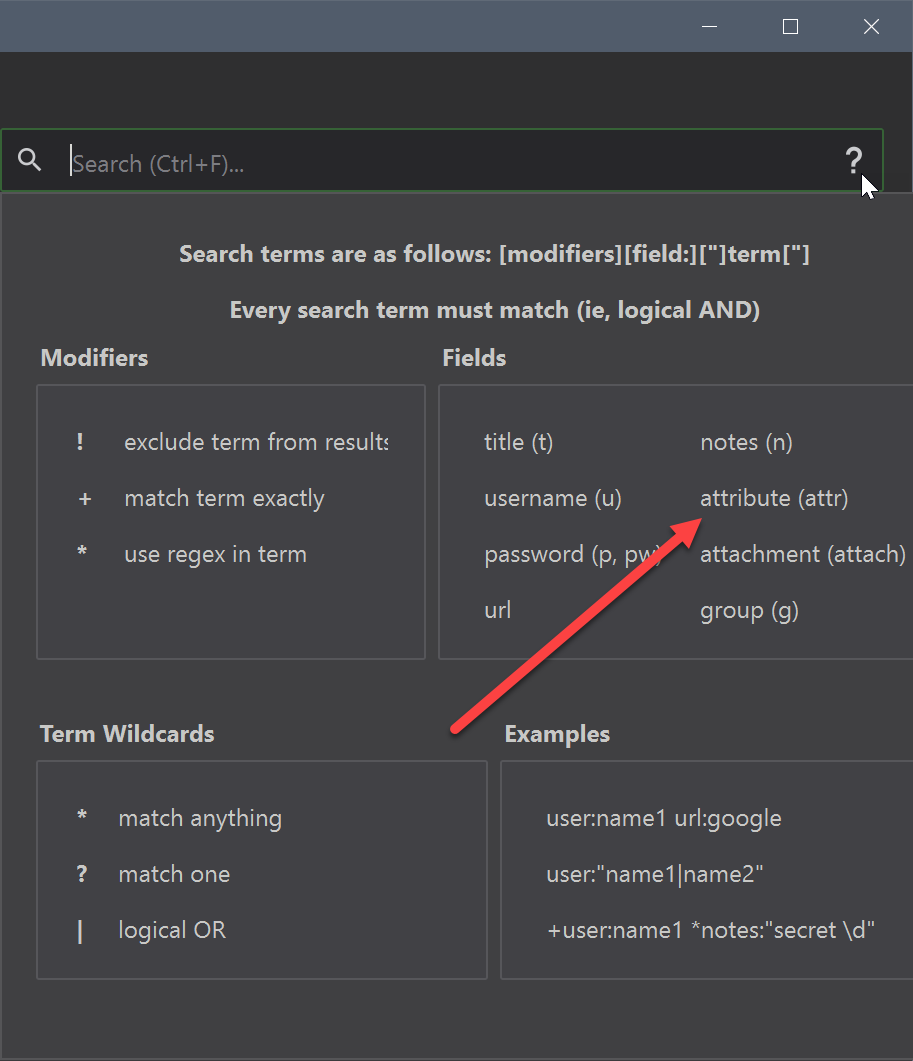
Fixed that problem
droidmonkey
on 21 Jun 2020
Ooh! Very nice! :smiley:
I still think it should be included in default search... :grin:
TRSx80
on 22 Jun 2020
I've never had to use t:, u:, p:, etc.. so it's counter intuitive that I would have to type something other than the text I'm searching for. I think the field prefix is an excellent way to limit/scope the search but everything should be searched by default. A setting somewhere with default fields to search would also be fine.
 nniesen
on 28 Sep 2020
nniesen
on 28 Sep 2020
Thanks for the bump, nniesen, I had forgot about this.
I just spent a good 20 minutes (at least) searching for some article I read recently, unfortunately without success. I think it was called "Tags are Dead" or something like that.
Anyway, one (of several good) points the author made was that various complicated classification schemes are a relic of a time when computing cycles were much more expensive than they are today. And conversely, they are so cheap nowadays that ubiquitous and fast full text search has become the norm, rather than the exception.
I agree with nniesen, if you are looking to narrow down to something more specific then you have several more tools available to you. Which is great. But I don't think that anything should really be excluded from the default search.
In fact, I would argue that the expectation of almost everyone nowadays if for the default to search everything. I would even go so far as to say that the onus is actually on those who would exclude such functionality to justify why it should be excluded, rather than on us to justify why it should be the default.
Finally, there was another long thread already in this project (can't find it at the moment either) where search was discussed, and the conclusion was essentially the same one I came to here. Therefore it is even inconsistent within the project itself not to "include everything as the default" so to speak.
TRSx80
on 29 Sep 2020
Another issue I've run into lately, with the current implementation, is trying to find and replace domain names. The domain names are in url, browser integration (attr), user name (u), and less frequently notes or title. It's not clear/documented which fields are included by default (I think everything but attr) and it doesn't work to do it in one search like "domain attr:domain" or "domain|attr:domain".
nniesen
on 8 Oct 2020
I guess the next step for people wanting ultimate freedom/customization would be to move to something like pass, as it essentially is just storing text files, you could put whatever you want in them. I haven't moved yet, as this is only a minor niggle to me when I am dealing with organizing my SyncThing instances. But maybe next time I get into that, I get annoyed enough to make the move. lol
Please do not in any way take this as disparaging towards developers. I greatly appreciate your work. And I have been a very happy user of KeePass based things for as long as I have been using a password manager (which is some years). Anyway, and in general, I have been moving slowly more and more towards (various formats of) text files as a "lowest common denominator" for some years now. And the more I learn how to write my own tools (in shell, Python, Emacs Lisp, etc.) the more that becomes a viable (and ultimately extensible) solution. The converse means that sort of solution is not for everybody. But I just wanted to mention it.
EDIT: And if anyone is interested in the article I mentioned once or twice up thread, I finally came across it again the other day (and this time made sure I added it to my notes :smile: ): Tagging is Broken.
Cheers! :beers:
TRSx80
on 26 Oct 2020
Pass offers the barest minimal protections. I would never endorse the product because it is very easy to expose all of your secrets to any program by using gpg-agent to remember your credentials. There is also no concept of a KDF so brute forcing is an option, in fact their encryption method is undocumented or at least not readily apparent from their website.
droidmonkey
on 26 Oct 2020
It's PGP, the worst possible way to encrypt stuff in 2020.
 phoerious
on 26 Oct 2020
phoerious
on 26 Oct 2020
It's PGP, the worst possible way to encrypt stuff in 2020.
@phoerious, care to elaborate why that is, and why you think that some of the leading security experts out there got this so wrong?
 awehrfritz
on 27 Oct 2020
awehrfritz
on 27 Oct 2020
PGP is an old standard that served us well 25 years ago, but has been superseded by much better and more secure encryption schemes that require less expert knowledge to not shoot yourself in the foot. The only reason that it's still around is that none of the better alternatives have gained widespread adoption and PGP remains the only system compatible with a sufficient critical mass of Unix geeks. I wouldn't be sad if we just let it die. Oh, and GnuPG as a software just sucks.
phoerious
on 28 Oct 2020
Thanks for sharing your view on this @phoerious.
I am not quite sure though if I share your view. Over the years I have come to realise that a key factor in all this is trust - trust in the people that develop and maintain the tools we use. This is one of the reasons why I regard pass as one of the best options out there, mostly because it relies on standard tools that have been vetted extensively, such as GnuPG and git, but also because it is developed/maintained by Jason A. Donenfeld (@zx2c4) who is well known for his major contributions to security critical parts of the Linux kernel, and his perseverance when it came to implementing things the "right way", e.g. when developing WireGuard.
I think that is also one of the main reasons why I have been considering KeePass(XC) over and over again, but never adopted it for real. I used KeePass for a short while over a decade ago, but it was a) too complicated to sync the database between devices and b) the frequent forks and clones of the project didn't really help to build trust into the developer community.
Just my 2 cents.
awehrfritz
on 28 Oct 2020
GnuPG hasn't had too many CVEs over the years (though it had its fair share of RCEs and sidechannel attacks), but that isn't even the point. It is just encryption done wrong resulting in vulnerabilities like eFail, which don't even appear in GnuPGs CVE list, but are in my opinion 100% GnuPGs fault (which IMHO was a complete disaster and a total loss, even if the CVE is marked as disputed with a rather low score).
phoerious
on 28 Oct 2020
I share almost the same exact thoughts as @awehrfritz (and thank you for posting that).
Any sort of warnings about security can of course be alarming, especially to the non-technical. Also, I am only a low level wizard in my own right. Therefore took the effort to make a post on the pass mailing list to discuss these concerns. It mostly ran its course already (I haven't logged into GitHub in a while); but here it is in case anyone following along would like to read further:
https://lists.zx2c4.com/pipermail/password-store/2020-October/004280.html
Some kind person on that list in turned linked to some older thread where PGP concerns were also brought up, but I will allow the reader to draw their own conclusions.
Cheers, everyone.
TRSx80
on 14 Nov 2020
Related issues
 TheZ3ro
·
3Comments
TheZ3ro
·
3Comments
 JosephHatfield
·
3Comments
JosephHatfield
·
3Comments
 813gan
·
3Comments
813gan
·
3Comments
 Throne3d
·
3Comments
Throne3d
·
3Comments
 n1trux
·
3Comments
n1trux
·
3Comments
Most helpful comment
Ooh! Very nice! :smiley:
I still think it should be included in default search... :grin: