Keepassxc: Favicons for certain sites constantly becoming empty
Expected Behavior
I expect my custom favicons to remain in place upon repeated cycles of opening and closing my KeePassXC database.
Current Behavior
Intermittently, but regularly, the favicons from some (specific, i.e. always the same) sites are missing upon opening a KeePassXC database. The entry in the custom icons selection UI is present and selectable, but is a thin, empty entry (i.e. it's invisible, but can be found by looking for a larger than usual gap between icons). The favicon can be re-downloaded and the old, presumably corrupt entry can be deleted.
A minor, low-priority issue of course. I'm happy to help debug further.
Steps to Reproduce
I'm honestly not sure of a fool-proof way to reproduce this, however my usage pattern is regularly opening multiple KeePassXC database files at once, and one site which it repeatedly occurs with is Blinkist.
Debug Info
KeePassXC - Version 2.5.3
Revision: f8c962b
Qt 5.14.1
Debugging mode is disabled.
Operating system: Manjaro Linux
CPU architecture: x86_64
Kernel: linux 5.4.18-1-MANJARO
Enabled extensions:
- Auto-Type
- Browser Integration
- SSH Agent
- KeeShare (signed and unsigned sharing)
- YubiKey
- Secret Service Integration
Cryptographic libraries:
libgcrypt 1.8.5
 quirk46
All 24 comments
I suppose your database got corrupted somehow. This it not an issue that would occur with a consistent kdbx file.
 phoerious
on 17 Feb 2020
phoerious
on 17 Feb 2020
Screenshot please
 droidmonkey
on 17 Feb 2020
droidmonkey
on 17 Feb 2020
It may be getting corrupted, however the fact that it's repeatedly corrupted in exactly the same minor way (favicons for one or two specific sites), across different databases (including new ones, not synced across devices by any means) on different installs of Manjaro KDE edition leads me to believe it's likely a minor issue within KeePassXC or its dependencies.
Screenshot of "emptied" icon upon opening DB:
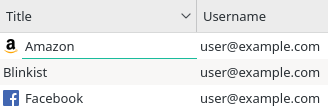
Screenshot of "emptied" icon in custom icon select UI:

quirk46
on 17 Feb 2020
The only relevant console output upon opening a database exhibiting this is:
QImage::scaled: Image is a null image
Another common aspect of the few sites exhibiting this behaviour for me is that they all use PNG favicons.
If there's any way for me to get / provide more verbose logging I'd be happy to help further.
quirk46
on 17 Feb 2020
Have you ever used an other KeePass application besides KeePassXC with this database? We explicitly prohibit invalid/null images from ever being loaded.
droidmonkey
on 17 Feb 2020
No, only KeePassXC.
quirk46
on 17 Feb 2020
Also been having the same issue for a few weeks now. At first it was one specific group + children being affected, now it has moved on to two different groups and their children (the original group and children are no longer affected for some reason).
Upon debugging with the icons that I knew kept causing problems, I did get the QImage::scaled: Image is a null image, but I also got the following:
libpng error: profile 'sRGB': 1000000h: length does not match profile
libpng error: profile 'GIMP built-in sRGB': 405AF734h: length does not match profile
libpng error: profile 'GIMP built-in sRGB': E07CB15Ah: length does not match profile
libpng error: profile 'GIMP built-in sRGB': 97EF34h: length does not match profile
Update: A potential workaround for anyone else with this issue is to go into GIMP, save via "Export As...", and uncheck the "Save color profile" option, then use that updated file as the icon. It seems to work for me so far, and doesn't produce any more errors in the terminal for those files.
Debug Info
KeePassXC - Version 2.5.3
Revision: f8c962b
Qt 5.14.1
Debugging mode is disabled.
Operating system: Manjaro Linux
CPU architecture: x86_64
Kernel: linux 5.5.7-1-MANJARO
Enabled extensions:
- Auto-Type
- Browser Integration
- SSH Agent
- KeeShare (signed and unsigned sharing)
- YubiKey
- Secret Service Integration
Cryptographic libraries:
libgcrypt 1.8.5
 somberdemise
on 8 Mar 2020
somberdemise
on 8 Mar 2020
This is definitely a Qt bug with the image libraries from your distro.
droidmonkey
on 8 Mar 2020
I'm having similar problems using KeePassXC 2.5.3 in macOS Catalina 10.14.6.
In my case the vault was originally created in KeePass for Windows and I used my own plugin to import a vault with custom icons. Then I opened the vault several times (without making any changes to it) in KeePassXC, all the custom icons were there as expected.
After downloading favicons and editing some entries I noticed all my custom icons disappeared (not sure exactly _when_). Upon subsequent openings, favicons also started to disappear.
Whenever I have some time I'll try to collect some more useful information other than this also affects KeePassXC in macOS.
Regards
 juanii
on 14 Mar 2020
juanii
on 14 Mar 2020
Yikes, the error chain likely started with your custom plugin unfortunately.
droidmonkey
on 14 Mar 2020
I'll check my code and perform some tests. Just to add some more information, the plugin uses the standard KeePass API to create the custom icons (creating a PwCustomIcon object, adding it to the database and assigning it to the entry) so no weird things there. What puzzles me is that the icons are OK as long as the database is not modified. It looks like they're corrupted only after editing and saving entries (even if you're editing _other_ entries, since I haven't even touched the ones with the disappearing custom icons). Seems like, when adding a new custom icon, _all_ of them are re-saved and something fails in the process.
While writing this I had a couple of ideas to try (avoiding using KeePass for Windows and an import plugin altogether). I'll post again in case I find anything useful.
Regards
juanii
on 14 Mar 2020
The way custom icons are stored and assigned to entries is less than ideal in the KDBX standard. Every entry just holds onto the index number of the custom icon they display. This index number is derived from the order the icons are loaded from the data blob in the KDBX file. This allows for off-by-one errors, shuffling, and other ridiculous problems if you are not very careful about reading/writing the icon blob.
This was incorrect, that is how attachments work, not icons.
droidmonkey
on 14 Mar 2020
I think I'm seeing a pattern… apparently the issue has something to do with the icon file format. Using 37signals site as test subject, I downloaded the favicon directly from the site (returns a Windows ICO file) and the icon never disappears. When using the DuckDuckGo service to download the favicon (returns a PNG file) the custom icon disappears.
The way I found to reproduce the issue is:
1) Download the favicon using DuckDuckGo service.
2) Close the database and reopen it.
3) Download _another_ favicon using DuckDuckGo service (may not be necessary to use DuckDuckGo service, didn't check)
4) Close the database and reopen it.
5) The icon downloaded in step 1 isn't there anymore.
If I don't use the DuckDuckGo service in step 1, then in step 5 the favicon is still there. This is consistent with the issue affecting the custom icons saved by my plugin, since those are in PNG format.
Following the suggestion from @somberdemise I checked the PNG file and it doesn't seem to have any color profile information so I'm not sure it's related. I'll see if I can correlate the issue to some property of the PNG files (e.g. the presence of alpha channel or something like that).
Regards
juanii
on 14 Mar 2020
If the icon is invalid from duckduckgo it would never be added to the database in the first place
droidmonkey
on 14 Mar 2020
Sorry, maybe I didn't explain myself clear. I don't mean the DuckDuckGo image is invalid, in fact it's a perfectly valid PNG image. What I meant is that the problem with the disappearing icons seems to be related to the handling of PNG images. I don't really know where that handling takes place. Since the issue is reproduced both in Linux and macOS, I guess it's not in a system library. Intuition points to a third party library, like Qt, but that's all speculation. I'm still testing with different image file formats to try and find what's exactly failing or how to exactly reproduce the issue.
juanii
on 14 Mar 2020
Screenshots of what you are observing would be incredibly helpful.
droidmonkey
on 14 Mar 2020
Definitely it's something with icons in PNG format. Just tried modifying my import plugin to convert icons to JPEG format instead of PNG, and these new databases do not suffer from this issue.
Not sure if a screenshot will be helpful at all, first the icon is in the list, and after closing and reopening the database it's gone, it's not even in the custom icons list. I'll try to create a small and short video of the exact steps to reproduce the issue and post a sample database. In the meantime I can give precise steps to reproduce the issue:
- Open the database with a custom icon in PNG format[1].
- Select any other entry and download its favicon[2].
- Close and reopen the database (PNG custom icon still there).
- Select a third entry and download its favicon[2].
- Close and reopen the database.
- Custom PNG icon is gone from the entry and from the custom icons list.
So, the issue arises ~after the _second_ time a favicon is downloaded~ (Edit 2: see next reply with the video, I could reproduce it downloading just one favicon). And when it happens, I could see in the system log the same error reported by @quirk46: QImage::scaled: Image is a null image.
Edit: Confirmed this happens creating a KDBX 4 database using KeePassXC. Just create an entry with a PNG custom icon (mine is 24 bit, alpha channel). Proceed with the steps above (close/reopen/download favicon/close/reopen/download 2nd favicon/close/reopen).
[1] Still not sure if it's _all_ PNG files or only certain files like 8 or 24 bit, alpha channel or not, etc. Other image formats might cause the issue too, but not Windows ICO and JPEG as these were the ones I tested.
[2] Contrary to what I thought before, the downloaded favicon format is not important, so it's the same if you're using DuckDuckGo service or not.
juanii
on 14 Mar 2020
Here you have it. I could even reproduce it within the _first_ time a favicon is downloaded. I did it as fast as possible and compressed the video as much as possible. Behind the KeePassXC window you can see the system console where the Qt error appears while opening the database for the last time.
icon.zip
Regards.
juanii
on 14 Mar 2020
OK I can absolutely reproduce this issue (on Windows 10)!
droidmonkey
on 14 Mar 2020
I traced the problem. This is either a bug in qcore or libpng. Qt uses libpng to read and write PNG images. For some reason the image can be read just fine and displayed in the UI. However when we try to "save" the image to PNG format to store in the database file, it fails. This is the error message from libpng:
libpng error: profile 'sRGB': 2000000h: length does not match profile
We should be checking to see if saving a PNG will fail on icon load and make sure not to write an empty icon to the database in the first place.
droidmonkey
on 14 Mar 2020
I debugged this further and tried forcing a standard image format (QImage::Format_ARGB32) in addition to checking PNG save failures. This did not fix the problem at all.
Interestingly enough this is the simplified error chain:
- Add "bad" PNG image, image will load and display just fine
- Save database, "bad" PNG image will save just fine
- Restart KeePassXC and unlock database, "bad" PNG loads just fine and displays
- Make any change that triggers a save, "bad" PNG will not save
- Lock/Unlock database, "bad" PNG is missing
It would appear that the error occurs when loading the previously saved PNG binary data. I tried one of my own PNG files and the error does not occur at all. Interestingly enough this only happens when KeePassXC is restarted.
droidmonkey
on 14 Mar 2020
For what its worth, this is the code in libpng that throws the error:
https://github.com/glennrp/libpng/blob/216387f6f7ee043df24a84ab2dc53d2827148b5e/png.c#L2025-L2028
droidmonkey
on 15 Mar 2020
Interestingly enough this only happens when KeePassXC is restarted.
As shown in my video, at least in macOS it also happens just (un)locking de database, no need to restart the application to trigger the error.
Thank you for looking into this issue! Though not really critical, I hope it can be fixed sometime. Meanwhile I worked around it using TIFF format for my custom icons. Converting favicons for 200+ sites is not really worth it so those will have to wait.
Regards.
juanii
on 15 Mar 2020
I can confirm with Qt 5.15 this problem no longer occurs. We will be deploying 2.6.0 with Qt 5.15 so this has been resolved.
droidmonkey
on 2 Jul 2020
Related issues
 guihkx
·
3Comments
guihkx
·
3Comments
 813gan
·
3Comments
813gan
·
3Comments
 MisterY
·
3Comments
MisterY
·
3Comments
 Throne3d
·
3Comments
Throne3d
·
3Comments
 amvasilyev
·
3Comments
amvasilyev
·
3Comments
Most helpful comment
As shown in my video, at least in macOS it also happens just (un)locking de database, no need to restart the application to trigger the error.
Thank you for looking into this issue! Though not really critical, I hope it can be fixed sometime. Meanwhile I worked around it using TIFF format for my custom icons. Converting favicons for 200+ sites is not really worth it so those will have to wait.
Regards.