Sometimes the Hardware Key gets triggered and starts going into a search mode/scan mode
The only way to stop it is through the Task Manager and shut down of Keepasssc.exe
(I don't use a hardware key)
When it finally stops, It gives a error code but I never captured the error box because it's only happened three times and I thought it was a fluke.
Possible Solution
KeePassXC - Current VERSION 2.53
Operating system: OS Win10 64bit
CPU architecture: Intel
 TonySarpano
All 12 comments
Are you referring to a Yubikey?
 droidmonkey
on 3 Feb 2020
droidmonkey
on 3 Feb 2020
Is the "Hardware Key" called Yubikey ?
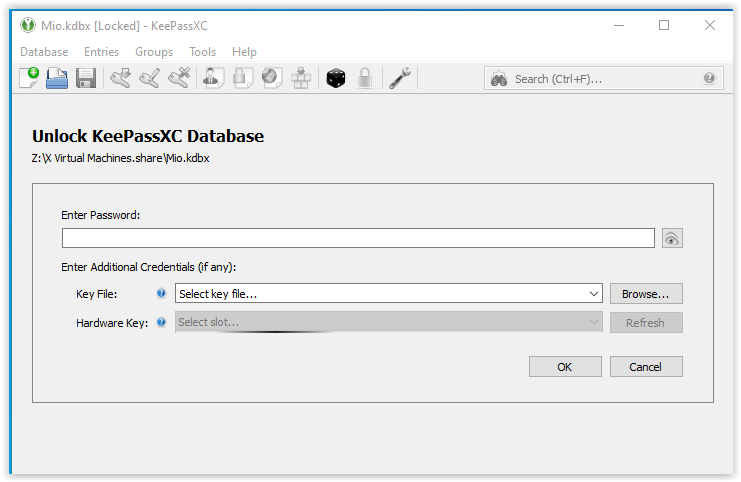
It's the opening screen for Keepassxc
unlocking keepasssc database
"Enter Password" then
"Key file" then
"Hardware Key" <<--
I wish I could duplicate the error but I'm not sure what prompts the Hardware Key line to start scanning. If it happens again, I promise to capture the error code box.
TonySarpano
on 3 Feb 2020
Do you have a Yubikey or only key or similar device?
droidmonkey
on 3 Feb 2020
No, I do not use "Yubikey"
Only a "key file" that holds the code password
Sorry, if I'm not describing the problem correctly.
TonySarpano
on 3 Feb 2020
You are describing the issue just fine, just trying to isolate the cause. The hardware key refresh should do absolutely nothing if there are no USB hardware keys plugged into the computer. Are you sure it is that causing the issue?
If you can provide a screenshot of the error message that would be extremely helpful.
droidmonkey
on 4 Feb 2020
I haven't seen the glitch again when I start Keepassxc. It was just weird when it happened.
I will capture the event if it happens again. Thanks droidmonkey
TonySarpano
on 5 Feb 2020
OK, I am going to close this for now then.
droidmonkey
on 5 Feb 2020
I encounter the same problem. It only happens on virtual machine.
Each time I try to open database, Hardware Key bar moves without end. After entering password KeePass freezes - it looks like it's still looking for hardware key.
Initially it happened once every few times. Now it happens every time.
Resetting setting to default changes nothing.
KeePassXC - Current VERSION 2.53
Operating system: Virtual Machine - Win10 64bit
CPU architecture: Intel
 keisimq
on 16 Mar 2020
keisimq
on 16 Mar 2020
Glad someone besides me seen it :) Thanks keisimq
Ok, This is weird because it just happened to me again. I wasn't going to say anything because I didn't want to be labeled a wacko or seeing things.
This is how mine happened, I opened Keepassxc and I forgot to enter my password and I minimized the program. I was surfing and needed to use Keepassxc to enter a web site. When the program box came up I noticed I forgot to enter the password because it was blank. I looked at the Hardware key and it was steady scrolling or looking for something. (same as Keisimq posted gif) I clicked on quitting the program and a box came up with a error msg. It looked like a memory call error.
I restarted keepassxc and no problems this time.
I can only think of one thing about the problem. If I open the program without entering a pw and leave the icon sitting in the tray for awhile, it might happen again,..not sure.
TonySarpano
on 16 Mar 2020
I think I'm having the same issue on stable, I tried the nightly version but its still happening.
I also got an error code but I forgot to take a screenshot.
Happens multiple times a week now :'(
KeePassXC - Version 2.6.0-snapshot
Revision: 0a61aa0
Operating system: Win10 64bit
CPU architecture: Intel
 alpha14
on 5 Apr 2020
alpha14
on 5 Apr 2020
I can confirm the issue on Linux with version 2.5.4. It probes the key, checkbox to disable HW key would be nice.
 Jenkler
on 26 Jul 2020
Jenkler
on 26 Jul 2020
Version 2.6.0 resolves this issue entirely
droidmonkey
on 26 Jul 2020
Related issues
 Throne3d
·
3Comments
Throne3d
·
3Comments
 guihkx
·
3Comments
guihkx
·
3Comments
 amvasilyev
·
3Comments
amvasilyev
·
3Comments
 lostfictions
·
3Comments
lostfictions
·
3Comments
 MountainX
·
3Comments
MountainX
·
3Comments
Most helpful comment
I encounter the same problem. It only happens on virtual machine.
Each time I try to open database, Hardware Key bar moves without end. After entering password KeePass freezes - it looks like it's still looking for hardware key.
Initially it happened once every few times. Now it happens every time.
Resetting setting to default changes nothing.
KeePassXC - Current VERSION 2.53
Operating system: Virtual Machine - Win10 64bit
CPU architecture: Intel