Keepassxc: Process umask setting is ignored when safe saves are disabled
Expected Behavior
Protection bits of saved databases should comply to the umask of the process.
Current Behavior
Protection bits of saved databases are always 0600 (user read, user write).
Possible Solution
None known.
Steps to Reproduce
- umask 0007 # DB should have 0660
- start keepassxc
- save database
- view protection bits of database
Context
Sharing the database on a shared directory is being quite difficult because the access rights are cut back to user-only.
Debug Info
KeePassXC - 2.3.4
Operating system: Debian Linux
CPU architecture: amd64
Kernel: 4.19.0-6-amd64
 sfuhrm
All 12 comments
I cannot replicate this issue on Ubuntu 19.10 saving to a local folder. This leads me to believe you have not setup your umask properly on your shared folder _or_ you have custom ACL's configured.
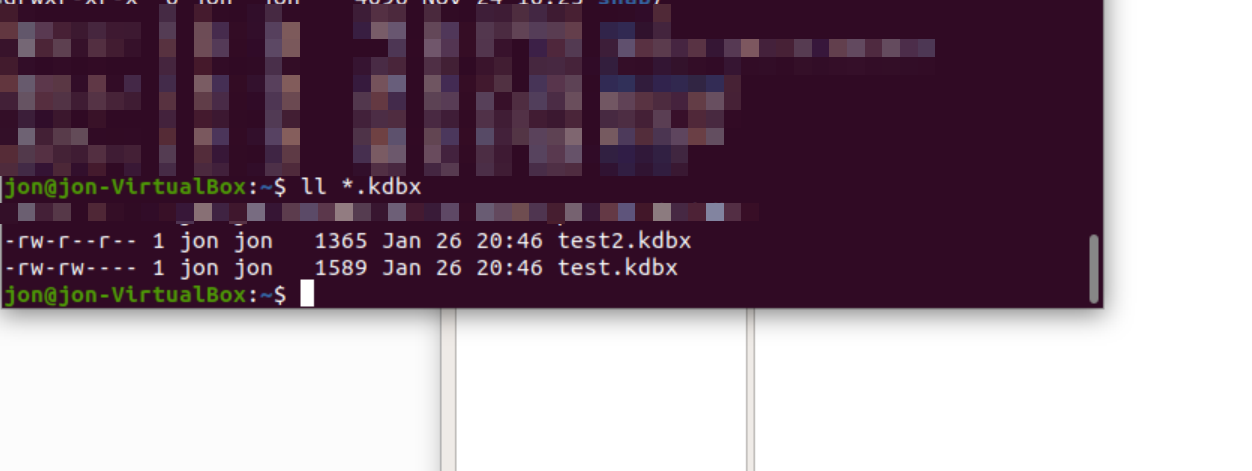
In the above image, test.kdbx was created under umask 0007 producing proper 0660. The other database, test2.kdbx, was created under umask 0022 producing proper 0644. I also modified test.kdbx under umask 0022 and it retained the original 0660.
 droidmonkey
on 27 Jan 2020
droidmonkey
on 27 Jan 2020
@droidmonkey thanks for your review!
I have no ACL configured:

And the directory is allright:

Unfortunately I don't know how to configure the umask of a directory, maybe you can help me here?
On my system it works like this:
Setup

Result
After saving a new database, 0600 set (but expected: 0666):

But the keepassxc process has the right umask according to its proc fs entry:

sfuhrm
on 27 Jan 2020
Is this the right version?
fury@cetus:~$ dpkg -l|grep keepassxc
ii  keepassxc                               2.3.4+dfsg.1-1                       amd64        Cross Platform Password Manager
You will want to upgrade to 2.5.3. You can use the snap package or AppImage distribution.
droidmonkey
on 27 Jan 2020
Well, 2.5.3 with AppImage:
fury@cetus:~$ umask 0000; bin/KeePassXC-2.5.3-x86_64.AppImage
same result:
-rw------- 1 fury fury 1605 Jan 27 18:43 Passwörter.kdbx
I'm confused.
sfuhrm
on 27 Jan 2020
It's gotta be something with your shared folder. Try to reproduce it on a local folder to test.
droidmonkey
on 27 Jan 2020
@droidmonkey I did the stuff in /tmp (root fs). The combination umask/touch showed that it works with this directory:
$ (umask 0000; touch 0000)
Results in
-rw-rw-rw- 1 fury fury 0 Jan 27 21:45 0000
Keepassxc somehow behaved differently:
$ (umask 0000; keepassxc)
Results in
-rw------- 1 fury fury 1365 Jan 27 21:46 123123.kdbx
Both output files reside in the same directory /tmp.
/dev/sdXX on / type ext4 (rw,relatime,discard,errors=remount-ro)
No network folders, no acl, no fancy stuff involved. I thought /tmp (on the ext4 root volume) would be a nice place to compare your and my results.
Do you have any ideas on how to find the difference?
sfuhrm
on 27 Jan 2020
We don't have any code that changes the permissions of files. If this is a bug its with Qt and not us. We just tell Qt where to save the file and it does all the work.
droidmonkey
on 27 Jan 2020
I've found at least this 2013 (!) Qt bug/feature.
Could this be the reason for the behaviour?
sfuhrm
on 27 Jan 2020
Huh, we do the same. So that means you are not using safe file saves. Enable safe file saves in the settings and this problem will go away.
This is a good find because we should be matching the umask after we move the temporary file to it's final location.
droidmonkey
on 27 Jan 2020
Yep! This solved it!
Thanks for your patience on this. You helped me a lot!
sfuhrm
on 27 Jan 2020
As of 2.6.0 we will be creating all new key files and databases with 0600 permissions regardless of the process umask. This follows with #2575.
droidmonkey
on 7 Jun 2020
Related issues
 haroldm
·
3Comments
haroldm
·
3Comments
 Throne3d
·
3Comments
Throne3d
·
3Comments
 guihkx
·
3Comments
guihkx
·
3Comments
 MisterY
·
3Comments
MisterY
·
3Comments
 bleepnetworks
·
3Comments
bleepnetworks
·
3Comments
Most helpful comment
Huh, we do the same. So that means you are not using safe file saves. Enable safe file saves in the settings and this problem will go away.
This is a good find because we should be matching the umask after we move the temporary file to it's final location.