Keepassxc: Health Check - Exclude entries from check
Summary
I have some entries, where the password is a PIN (only 4 digits) but here only 4 digits are allowed.
I also have entries where I have unsafe passwords that I can not change (password of the website of my karate teacher, password of the emails of the karate dojo, where I manage the emails, email account of my brother, where I backup his password in KeePassXC).
So a checkbox "Exclude from health check" when editing an entry would really be helpful!
But maybe I should create a new issue here for this feature?
 OLLI-S
All 23 comments
The new flag should exclude the entry not only from Health Check but also from the HIBP check (#1083).
 wolframroesler
on 21 Mar 2020
wolframroesler
on 21 Mar 2020
But once again the question is, how do we store the new flag in the kdbx file so that other KeePass clients stay compatible? Cf. #4293 for discussion.
wolframroesler
on 21 Mar 2020
A simple flag like that should be stored in the custom data of the entry. Custom data is meant to be non-user editable attributes for plugins to use. Core features like "password modified time" can also be stored there, but it is not appropriate (per the conversation had in that thread). The benefit to custom data is that all KeePass clients read it in and write it out regardless on whether they use it or not.
 droidmonkey
on 21 Mar 2020
droidmonkey
on 21 Mar 2020
The new flag should exclude the entry not only from Health Check but also from the HIBP check (#1083).
@wolframroesler Excellent idea, it makes no sense to check these passwords also against HIBP.
A simple flag like that should be stored in the custom data of the entry.
@droidmonkey I like the idea to store this flag in the custom data, also because there will be no problems with other KeePass clients.
And I would also store the Password Modification Date in the custom data, but this discussion is made in an other topic...
OLLI-S
on 22 Mar 2020
Also for usability: In the health check windows, one should be able to just do a right-click -> "exclude from this check" (probably split it to "this check"/"from all checks" etc. depending on what is useful).
 rugk
on 22 Mar 2020
rugk
on 22 Mar 2020
I rally love this idea @rugk has made.
Excluding entries is just one mouse click instead of many!
OLLI-S
on 22 Mar 2020
While @rugk's suggestion gives the user finely-grained control over the checking process, I'd rather keep it simple and have something like a single "this is a known bad password" flag for every entry. If the flag is set, the entry is excluded from Health Check and HIBP, and a new row "Number of known bad passwords" is added to the Statistics report. Setting and clearing the flag is possible from the entry editor dialog, and maybe it should also be possible to set (but, of course, not clear) it from the context menu of the Health Check and HIBP tables.
The flag is stored in custom data; hopefully the authors of other clients will pick it up instead of re-inventing it when they have a similar requirement. Still thinking about ways to document custom fields like this one in a way that other client authors can benefit from (some Wiki perhaps).
What do you think about that?
wolframroesler
on 28 Mar 2020
I like it, the flag should reset if the password is changed though
droidmonkey
on 28 Mar 2020
Not sure about that. The known bad flag usually means that the user can do nothing to improve the password (for example, my ATM PIN will always be four digits), so if the password changes (=I get a new banking card with a new PIN) it's probably still as bad as before. Do we really want to force the user to set the flag again? Wouldn't silently resetting the flag be surprising, like "why does this come up in Health Check again, I thought I set that flag"?
Which brings us to the question where in the edit dialog to put the checkbox for the known bad flag. On the "Properties" pane? Sounds logical (it has all the custom fields already) but people rarely go there, nobody will guess that this is where you set a crucial security flag (if you consider Health Check and HIBP crucial for your security workflow, inadvertently setting the flag for a password would reduce security). "Advanced" maybe? It's crowded already. "Entry" then, so it's in plain sight all the time? My idea is to put it prominently next to the password itself, so we don't need more vertical space. In this case, we don't have to clear the flag when the user changes the password because the user sees the checkbox all the time anyway.
wolframroesler
on 28 Mar 2020
How about this:

wolframroesler
on 28 Mar 2020
By the way, how long until the feature freeze for 2.6.0? Would be great if we could get this in along with Health Check and HIBP.
wolframroesler
on 28 Mar 2020
I don't want it on the main page, if anything this is an advanced feature. We can direct the user to the advanced tab to set it to ignore. This is an (rare) exception, not the norm.
droidmonkey
on 29 Mar 2020
How about this, then?

The "Advanced" page is quite full already, the attachment buttons even have some truncation on my system (the Additional Attributes buttons don't, for some reason). On my laptop's built-in screen I can't even make the window large enough to show the "known bad" checkbox without scrolling.
Wondering if there really should be a context menu in Health Check and HIBP to set the flag. It would be super easy to set the flag but difficult to clear it, and I'm afraid this asymmetry is going to cause problems when people set the flag by accident. Like, a user right-clicks Health Check and slips the mouse, and suddenly an entry (the one that happened be just under the one the user wanted) is gone from the report. How is the user supposed to find out which entry he clicked inadvertently? We could show a "do you really want to" message box but that would remove the convenience of having a context menu in the first place.
wolframroesler
on 29 Mar 2020
I really like the idea of @wolframroesler to show the checkbox directly behind the password field, because the checkbox belongs to the password, so these two fields should stand together.
It would not make any sense to "hide" this field in a separate tab and force the user so search for it.
There are some guidelines of visual design (Gestalt psychology) where this is written in.
Edit
So when I get some results from the password check telling me that there are some very weak passwords, I normally edit them and when the checkbox is behind the password field, then I just need less mouse clicks than having the field in an other tab.
Edit 2
I have 1010 entries in KeePassXC and I suppose that at least 80 - 100 entries are entries where I need the checkbox, because either these passwords are PIN numbers or these passwords are from family members or my karate teacher (where I can not change the passwords).
OLLI-S
on 29 Mar 2020
@wolframroesler By the way, I would name the checkbox Exclude from Security Checks.
A shorter name would be Exclude from Reports but the first one is more understandable.
OLLI-S
on 29 Mar 2020
Sorry but I totally disagree that this "belongs with the password". For the following reasons:
- This is an exception flag and should not be taken lightly
- This is actually an entry setting and may be used for more exclusions than just the password
- The main page is cluttered already and I just reduced the clutter by removing the repeat password field and inline password generator. I will not be adding to this view.
I like the naming suggestions "Exclude from [database] reports". Its clear, allows for additional uses, and short.
droidmonkey
on 29 Mar 2020
While @rugk's suggestion gives the user finely-grained control over the checking process, I'd rather keep it simple and have something like a single "this is a known bad password" flag for every entry.
Maybe yes, just a "exclude from health check", i.e. it automatically excludes it from _all_ health checks.
My main point was to have a context menu at all. This way, you can run this check once, and then exclude all these entries where "you know it is a bad password".
BTW, I do agree with @droidmonkey: put it somewhere in advanced. It is really rare, and if you have that context menu option @OLLI-S (maybe also with multi-select!), you can just select all these 80 passwords and right-click -> exclude.
This totally solves your (rare) use case, where you have many bad passwords.
(And no, I would not reset it when the password is changed, this just surprises users – _especially_ if that option is hidden in the "advanced" tab, as I'd want it to)
rugk
on 31 Mar 2020
This is actually an entry setting and may be used for more exclusions than just the password
Good point @droidmonkey. Changed implementation accordingly, also changed the checkbox text according to the suggestions from @rugk and @OLLI-S. Changing the password leaves the flag unchanged. PR submitted (#4542).
No context menu yet because of the "easy to set but difficult to reset" issue. Let's discuss how to handle the flag in context menus in #4533.
Would love to see this in 2.6.0, Health Check and HIBP really don't feel quite complete without it.
wolframroesler
on 3 Apr 2020
The context menu would be nice, but we can also simply place a text box below the results table that helps the user discover the feature:
You can exclude an entry from this report by double clicking it, going to the advanced tab, and checking the "Exclude from reports" item.
Although now that I write it out a context menu item is way easier!
droidmonkey
on 3 Apr 2020
I think I found a good solution that includes both a context menu and a checkbox to hide/show excluded items (in both Health Check and HIBP). Will implement it and see how it works out.
wolframroesler
on 3 Apr 2020
So, here's my solution. Already implemented and pushed on #4542.
First, we have a new checkbox in Health Check and HIBP to show all entries in the table, including those marked as "exclude from reports". The excluded entries are displayed in a lighter color in order to stand out visually.
Second, we have a context menu from which the user can toggle the "exclude from reports" flag. In the regular setting (check box "show excluded entries" not checked), this will make the entry disappear from the report; if the check box is checked, the entry will turn gray, and the user can right-click again and remove the "exclude from reports" flag. This solves the "easy to set but hard to reset" problem.
Heres' how it looks:
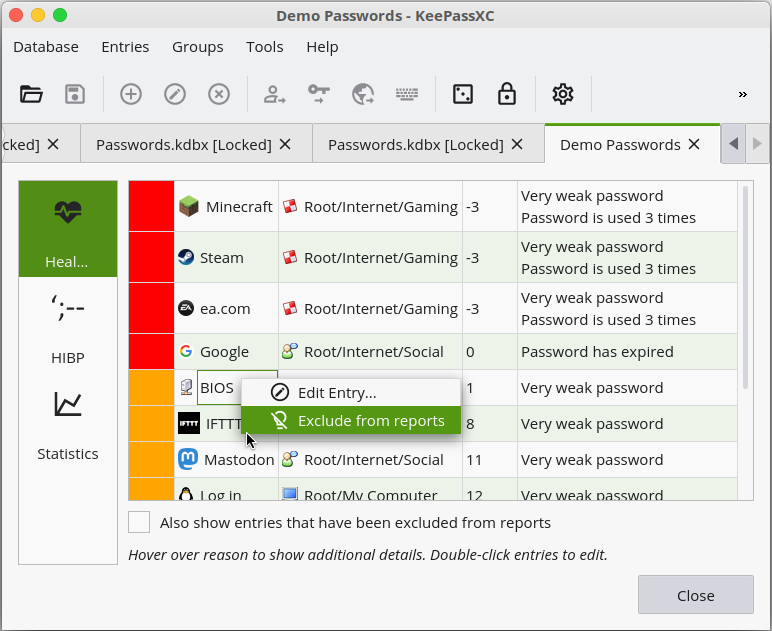
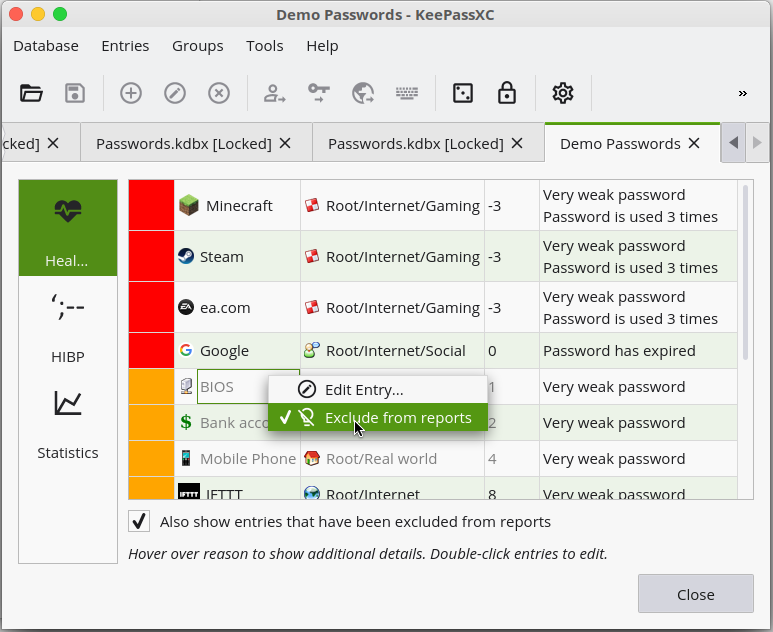
The screen shots are from Health Check, but in HIBP it's exactly the same.
Single selection only so far (cf. #4533).
wolframroesler
on 3 Apr 2020
That is PERFECT!
droidmonkey
on 3 Apr 2020
Wow, this is really a cool solution @wolframroesler
Can't wait to see this in the snapshot builds....
OLLI-S
on 4 Apr 2020
Related issues
 lostfictions
·
3Comments
lostfictions
·
3Comments
 Throne3d
·
3Comments
Throne3d
·
3Comments
 813gan
·
3Comments
813gan
·
3Comments
 shaneknysh
·
3Comments
shaneknysh
·
3Comments
 MountainX
·
3Comments
MountainX
·
3Comments
Most helpful comment
So, here's my solution. Already implemented and pushed on #4542.
First, we have a new checkbox in Health Check and HIBP to show all entries in the table, including those marked as "exclude from reports". The excluded entries are displayed in a lighter color in order to stand out visually.
Second, we have a context menu from which the user can toggle the "exclude from reports" flag. In the regular setting (check box "show excluded entries" not checked), this will make the entry disappear from the report; if the check box is checked, the entry will turn gray, and the user can right-click again and remove the "exclude from reports" flag. This solves the "easy to set but hard to reset" problem.
Heres' how it looks:
The screen shots are from Health Check, but in HIBP it's exactly the same.
Single selection only so far (cf. #4533).