Keepassxc: Not exiting on close of main window
Expected Behavior
When I click on the close X in the main window I expect that the window closes and the application exits.
Current Behavior
The window closes and the application no longer appears active in the task bar.
Possible Solution
None available
Steps to Reproduce
Not sure why this happens but it is not consistent.
1.
2.
3.
Context
I end up opening the task manager and manually ending the KeepassXC process.
Note:
Previous bug report was closed.
Debug Info
KeePassXC - Version 2.5.1
Revision: 0fd8836
Qt 5.13.1
Debugging mode is disabled.
Operating system: Windows 10 (10.0)
CPU architecture: x86_64
Kernel: winnt 10.0.18363
Enabled extensions:
- Auto-Type
- Browser Integration
- SSH Agent
- KeeShare (signed and unsigned sharing)
- YubiKey
Cryptographic libraries:
libgcrypt 1.8.5
 dpb657
All 66 comments
Do you have the setting: "Minimize instead of app exit" enabled? Is there a tray icon enabled?
 droidmonkey
on 3 Jan 2020
droidmonkey
on 3 Jan 2020
No the application is not available from the task bar either.
Get Outlook for Androidhttps://aka.ms/ghei36
From: Jonathan White notifications@github.com
Sent: Thursday, January 2, 2020 7:11:19 PM
To: keepassxreboot/keepassxc keepassxc@noreply.github.com
Cc: Darryl Philip Baker darryl.baker@northwestern.edu; Author author@noreply.github.com
Subject: Re: [keepassxreboot/keepassxc] Not exiting on close of main window (#4079)
Do you have the setting: "Minimize instead of app exit" enabled?
—
You are receiving this because you authored the thread.
Reply to this email directly, view it on GitHubhttps://urldefense.proofpoint.com/v2/url?u=https-3A__github.com_keepassxreboot_keepassxc_issues_4079-3Femail-5Fsource-3Dnotifications-26email-5Ftoken-3DAEOL6SJMINNZB2HQ3WE5XTDQ32GDPA5CNFSM4KCIH2B2YY3PNVWWK3TUL52HS4DFVREXG43VMVBW63LNMVXHJKTDN5WW2ZLOORPWSZGOEH776CY-23issuecomment-2D570425099&d=DwMCaQ&c=yHlS04HhBraes5BQ9ueu5zKhE7rtNXt_d012z2PA6ws&r=tdje61_VHSXp608oLofeaJnnzo2Sr9_Cdcp70bBEtQ8&m=8V_yopZO44LJthqnq5_JMEvVCAlD9SKoT8vpttIgsv4&s=sSx9HvmIsqN5jbgmqIjm6t4qStnWYFV3_cFWPy_zJhA&e=, or unsubscribehttps://urldefense.proofpoint.com/v2/url?u=https-3A__github.com_notifications_unsubscribe-2Dauth_AEOL6SNJ25XRWRS5MSBFDLTQ32GDPANCNFSM4KCIH2BQ&d=DwMCaQ&c=yHlS04HhBraes5BQ9ueu5zKhE7rtNXt_d012z2PA6ws&r=tdje61_VHSXp608oLofeaJnnzo2Sr9_Cdcp70bBEtQ8&m=8V_yopZO44LJthqnq5_JMEvVCAlD9SKoT8vpttIgsv4&s=yy9ZIPD4krAoOqML3rRnm3gHxj9ToFZS0DH8RBKOWJ0&e=.
dpb657
on 5 Jan 2020
I do not observe this behavior on Windows 10 at all
droidmonkey
on 5 Jan 2020
I have been in support for several decades and I understand the difficulty of an intermittent problem but, that is what I have. It may be related to KeepassXC being open for a long time or that the DB is on Google Drive but I have not been able to determine a way to make it repeatable on demand.
Get Outlook for Androidhttps://aka.ms/ghei36
From: Jonathan White notifications@github.com
Sent: Sunday, January 5, 2020 12:34:32 PM
To: keepassxreboot/keepassxc keepassxc@noreply.github.com
Cc: Darryl Philip Baker darryl.baker@northwestern.edu; Author author@noreply.github.com
Subject: Re: [keepassxreboot/keepassxc] Not exiting on close of main window (#4079)
I do not observe this behavior on Windows 10 at all
—
You are receiving this because you authored the thread.
Reply to this email directly, view it on GitHubhttps://urldefense.proofpoint.com/v2/url?u=https-3A__github.com_keepassxreboot_keepassxc_issues_4079-3Femail-5Fsource-3Dnotifications-26email-5Ftoken-3DAEOL6SLHYMD547UKJ2H6MH3Q4IR3RA5CNFSM4KCIH2B2YY3PNVWWK3TUL52HS4DFVREXG43VMVBW63LNMVXHJKTDN5WW2ZLOORPWSZGOEID4WBA-23issuecomment-2D570936068&d=DwMCaQ&c=yHlS04HhBraes5BQ9ueu5zKhE7rtNXt_d012z2PA6ws&r=tdje61_VHSXp608oLofeaJnnzo2Sr9_Cdcp70bBEtQ8&m=Jd9yh8T1J9W3LQ9IauendjuStSSYiklOtW4da8YjopY&s=D5_tVvoFBPtrzDVx7xJ2xqD3ggt-vKwYgfgWWqH33Nw&e=, or unsubscribehttps://urldefense.proofpoint.com/v2/url?u=https-3A__github.com_notifications_unsubscribe-2Dauth_AEOL6SKE2B27QZQXQAHCR73Q4IR3RANCNFSM4KCIH2BQ&d=DwMCaQ&c=yHlS04HhBraes5BQ9ueu5zKhE7rtNXt_d012z2PA6ws&r=tdje61_VHSXp608oLofeaJnnzo2Sr9_Cdcp70bBEtQ8&m=Jd9yh8T1J9W3LQ9IauendjuStSSYiklOtW4da8YjopY&s=gC_C8ty1T2VKmIec9QTlMx8q69KEdoJvH-FyEuQnjFg&e=.
dpb657
on 5 Jan 2020
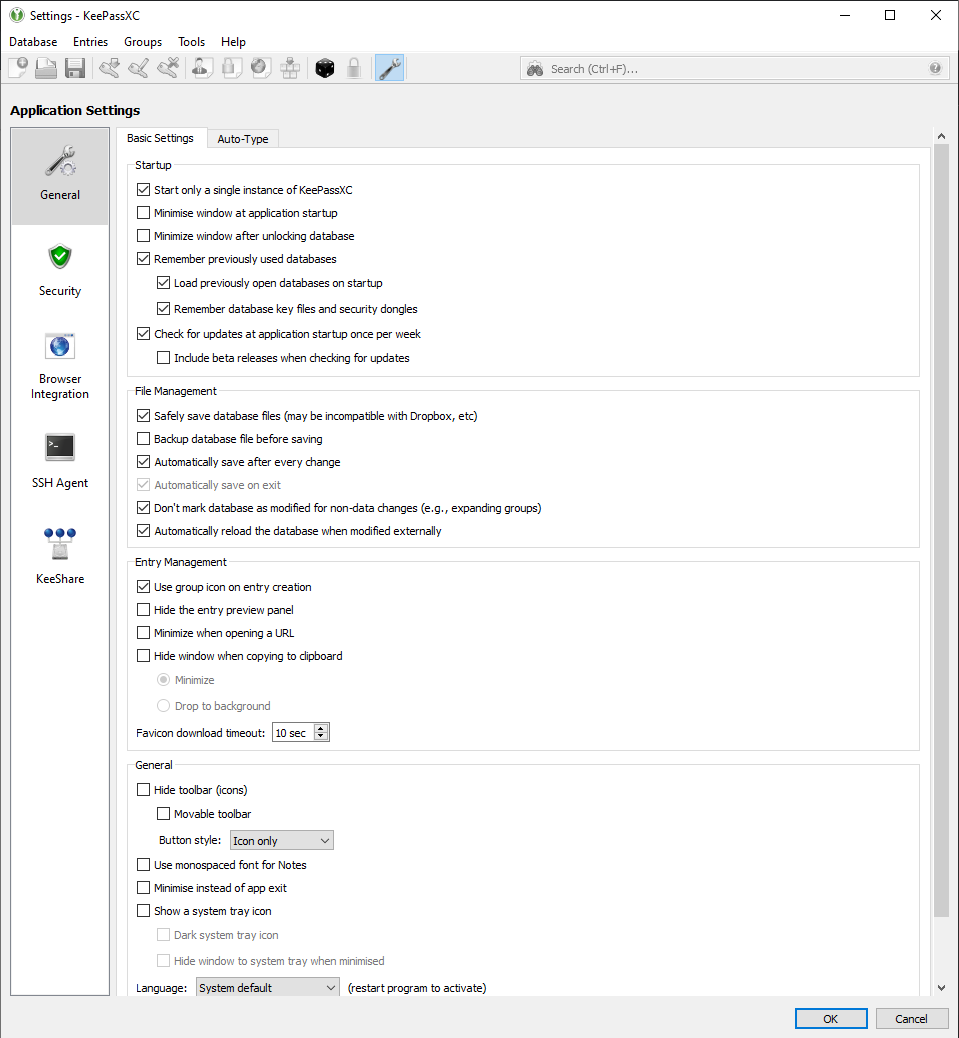
If you can find a way to reproduce it please let us know. A screenshot of your settings would be helpful to determine the exact state of the application.
droidmonkey
on 6 Jan 2020
For the record, I'm experiencing this exact issue too, with a Windows 10 64-bit system. It's been happening on both 2.5.1 and 2.5.2 releases downloaded from this repo's releases page, but I'm fairly certain it was not happening before that (version 2.5.0 and older). After upgrading to 2.5.1 was when I first noticed this issue happening.
Unfortunately, I can't consistently reproduce it either; most of the time the app terminates and re-opens as expected, but rarely (a couple times a week), it remains open in the background, and I have to kill the process via task manager before I can successfully re-launch the app.
My use case also includes often keeping the app open for several hours, and cloud syncing the password database (Dropbox), but I'm uncertain whether this is related to the issue.
I've also attached my settings screens below, in case it's helpful.

 Rainyan
on 6 Jan 2020
Rainyan
on 6 Jan 2020
Thank you for this! Can you enable the system tray icon for a while to see if the problem persists? Also do either of you have multiple monitors and/or using a docking station?
droidmonkey
on 6 Jan 2020
Just one monitor and no docking station on my end. I'll enable the system tray icon and report back if the problem persists.
Rainyan
on 6 Jan 2020
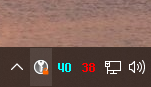
I've ran into the issue again with the app system tray icon enabled.
When this happens, the icon remains in the system tray, but it no longer reacts to mouse right or left clicks in any way. Hovering the mouse over the icon still highlights it, though (cursor not captured in this screenshot):
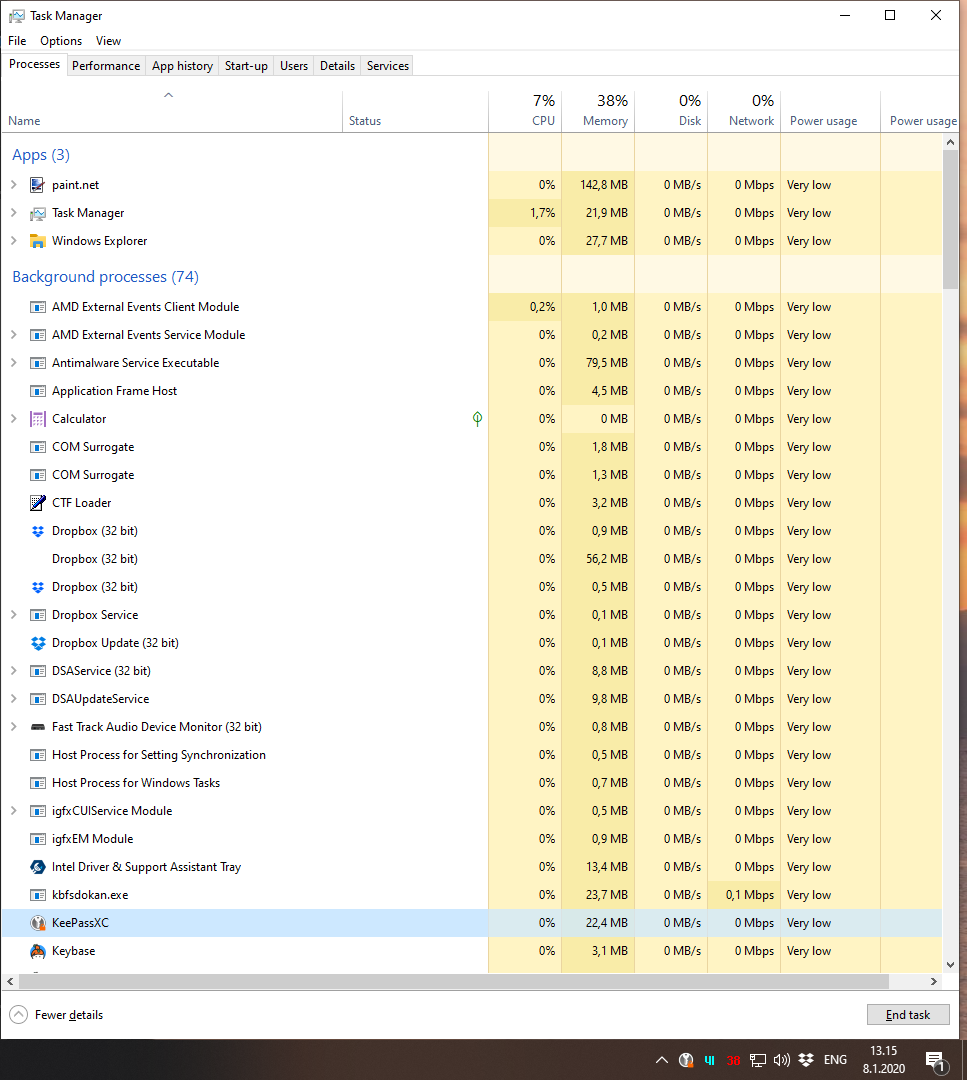
Here's the "hung" process visible in Windows task manager:
Trying to re-launch, the new process briefly flashes in the process list and then terminates (presumably because "Start only a single instance" is ticked in the settings):

Not sure how much this helps, as I still have no idea how to reproduce the issue. I could see about compiling with debug flags and attaching a debugger when this next happens, if that would be helpful.
Rainyan
on 8 Jan 2020
I would not see the task bar icon behavior in this way that since I have KeepassXC pinned to the task bar. What I did see was that I could not start a new KeepassXC using the task bar icon or any other method until using the task manager to end the KeepassXC process.
dpb657
on 8 Jan 2020
@dpb657 almost exactly the same issue, including the additional details in your posts, and as detailed in the closed #4143, on Windows 7 x64, only without any cloud-synching of passwords. - Sometimes the application will close successfully via systray, other times it not only will not close, but cannot be re-iniated, either, without firstly killing the running process.
 XyjpcpXNF6UGaQ
on 10 Jan 2020
XyjpcpXNF6UGaQ
on 10 Jan 2020
Your reply is terse beyond my ability to understand what you are trying to say. You reference a previously closed ticket that has no solution.
What is the solution, work around, or what more data do you need to fix this? The last time I saw this issue I captured a dump of the process if that will help.
dpb657
on 10 Jan 2020
My apologies, - I was not intending to answer your post; I was simply trying to add a reply to the effect that I, too, have the same issue and as already (clearly) detailed by yourself. I have also avoided the @ reference, this time, in order to avoid further confusion.
XyjpcpXNF6UGaQ
on 10 Jan 2020
I have the same issue. +1
 SmoochiesBoss
on 10 Jan 2020
SmoochiesBoss
on 10 Jan 2020
@dpb657 can you send the dump to [email protected]
droidmonkey
on 10 Jan 2020
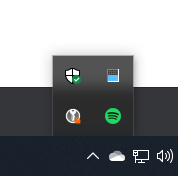
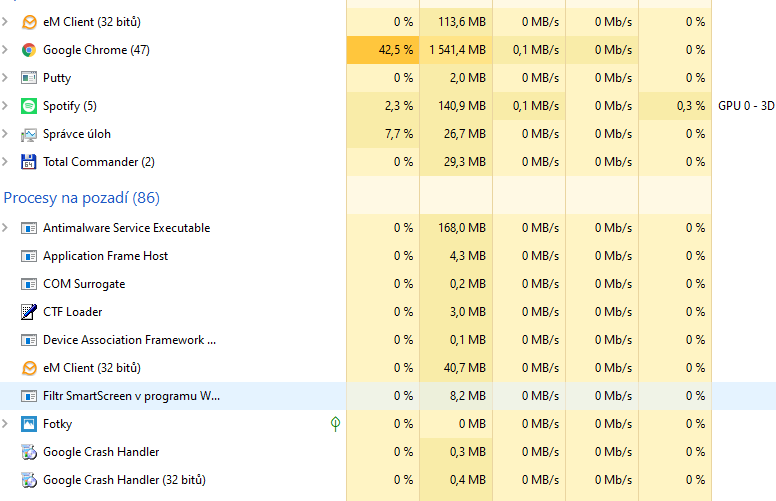
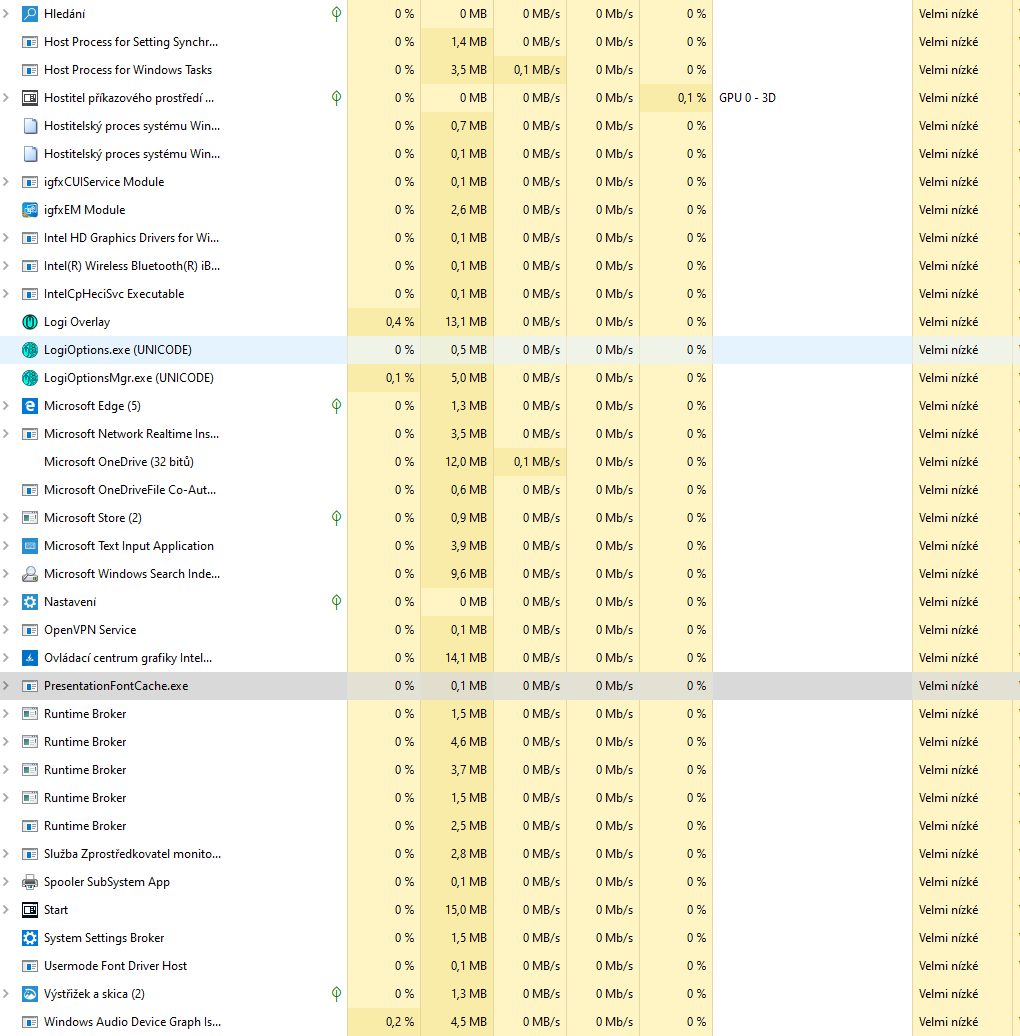
This problem still persists. When I try to quit the application. (Exit app from menu) does not terminate and stays in the toolbar.
The application cannot be terminated even through the task manager, it does not solve logout, hibernation, etc. It is necessary to restart the PC.
I have the lastest snapshot from 2020-04-01.
 wombat01
on 1 Apr 2020
wombat01
on 1 Apr 2020
The KeePassXC.exe process does not appear in your task manager screenshots. Am I missing something?
droidmonkey
on 1 Apr 2020
Yes, I quit the application, it hangs in the toolbar, and when I try to kill the process it is not in the task manager. It is therefore necessary to restart the PC.
wombat01
on 1 Apr 2020
If the process is not in the taskmanager then it is not running. Sometimes taskbar icons stick around when processes are force killed, usually hovering over the icon causes it to disappear.
droidmonkey
on 1 Apr 2020
No, the "process" stays somewhere and the application cannot be start (eg when upgrading) until the PC restart.
but I can't identify when this is happening. This behavior is not always. Ie. I update every time release (snapshot), but most of the time I can't close normally. If I try to quit eg after starting the application, everything is fine.
wombat01
on 1 Apr 2020
I don't have much to add, but can confirm this is still happening for me as well. Seems rarer, at least subjectively, but I end up having to kill the process from Task Manager after quitting the app maybe once or twice a week.
Using the currently latest release version 2.5.3 (Revision: f8c962b).
App settings are the same as previously posted in https://github.com/keepassxreboot/keepassxc/issues/4079#issuecomment-571097565
_Update_: This issue was fixed/has stopped happening to me entirely since updating to the release 2.6.0 (Revision: 0765954). :thumbsup: I was experiencing it from 2.5.1 until the 2.6.0. Db was Dropbox synced; details are as linked above in this comment.
Rainyan
on 1 Apr 2020
If I could kill, I have no problem, but I have no process, I have to restart.
wombat01
on 1 Apr 2020
Let me add a bit. The keepass process remains but it looks more like a service than an application after closing out of it. What I mean is rather than being at the top of the task manager window, where it is before closing out of it, keepass is listed down with the services like keepass-proxy and Google Chrome plugins.
dpb657
on 1 Apr 2020
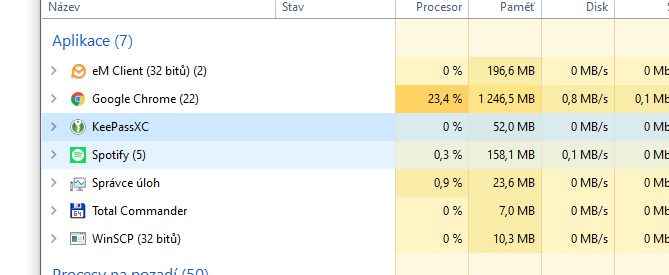
I only have this, what other process is used? When it appears described.
wombat01
on 1 Apr 2020
Go to the details tab of the task manager and sort by process name
droidmonkey
on 1 Apr 2020
Try going to the detail view and alphabetize the process list. I find a process called keepassxc which I can end. Then I can start a new KeepassXC application.
dpb657
on 1 Apr 2020
Yes, I also only have KeePassXC.exe, so better when closing the application, kill this process from task manager. If the GUI cannot be terminated correctly under certain circumstances.
wombat01
on 1 Apr 2020
It would be incredibly helpful if you can isolate the circumstances that cause the failure to close. The next time it happens try to enumerate exactly what you were doing prior to witnessing it.
droidmonkey
on 1 Apr 2020
Ok, but it will be difficult ;-) I can't think of any context.
wombat01
on 1 Apr 2020
Would it be helpful if I submit a dump of the keepassxc process in this state of limbo?
dpb657
on 1 Apr 2020
Only if you are running the snapshot build. Be aware if you have your personal database unlocked then the dump may contain your passwords. You can email a dump to [email protected] to increase security.
droidmonkey
on 1 Apr 2020
That does suck. I’m not running a snapshot build, but I can reliably duplicate the problem. It seems the longer I have the application running the more likely it is to leave the process behind that I have to kill the remaining process.
dpb657
on 1 Apr 2020
You can run a snapshot build easily by downloading one from https://snapshot.keepassxc.org
droidmonkey
on 1 Apr 2020
It wasn’t running the snapshot that was the issue, it was not sharing my unencrypted DB.
dpb657
on 1 Apr 2020
Thought about this just after hitting send on the last message. If I lock the database before closing the program is the data still in the clear? Isn’t keeping the database in memory in the clear a security issue anyway?
dpb657
on 1 Apr 2020
Yes we zero out (purge) the in memory database when it gets locked.
droidmonkey
on 1 Apr 2020
In the morning I tried reproducible and the same problem. I dare say it's somehow related with sleep mode.
wombat01
on 2 Apr 2020
Do you still want a dump of the hung remnant task? I can install a snapshot version if you do.
dpb657
on 2 Apr 2020
Yes I would love a dump
droidmonkey
on 2 Apr 2020
I have not been able to reproduce the issue with any of the snapshot images I have tried. To recreate the issue, I worked my way back through the snapshot versions from the latest. I’ve gone back as far as the 50102 snapshot but can’t reproduce the problem. I guess we can call it fixed in 2.6.X. If you have a 2.5.X snapshot to you would like me to try to reproduce the problem with, please provide a link. I am guessing the reason that it has to be a snapshot for the dump is that you need symbols that are stripped from the released versions.
dpb657
on 3 Apr 2020
Well that's good news! I can post a debug build of 2.5.3 because I want to make sure it is fixed. Will link to it here.
droidmonkey
on 3 Apr 2020
Anything new about this? Can I still help you find the problem? At the moment, the only way to exit the program correctly is via Task Manager> End Task
wombat01
on 1 May 2020
I am still having to use the Task Manager to force the exit of KeepassXC after it has been running for a while. The program seems to exit fine if it has not been running long. I do not have a good handle on how long is long enough to trigger the issue.
dpb657
on 1 May 2020
Ditto: I, too, usually have to force Keepass XC to close via Task Manager. Version 2.5.4 is a slight improvement on the situation, but I am uncertain what the problem is; although it appeared to be related to a Java issue in 2.5.3.
My operating system is Windows 7 x64.
XyjpcpXNF6UGaQ
on 1 May 2020
Same issue, I will post details in a bit.
EDIT:
KeePassXC - Version 2.5.4
Revision: c023bf9Qt 5.14.2
Debugging mode is disabled.Operating system: Windows 10 Version 1909
CPU architecture: x86_64
Kernel: winnt 10.0.18363Enabled extensions:
- Auto-Type
- Browser Integration
- SSH Agent
- KeeShare (signed and unsigned sharing)
- YubiKey
Cryptographic libraries:
libgcrypt 1.8.5
 a-vrma
on 16 May 2020
a-vrma
on 16 May 2020
I am very confident this is fixed in 2.6.0. Please try our snapshot: https://snapshot.keepassxc.org.
If it still persists I will reopen.
droidmonkey
on 22 May 2020
Thanks, I'll try. But I'm used to killing via the task manager :-)
wombat01
on 22 May 2020
Iit's better, the application "quits" but stays in the processes and needs to be killed manually. The shift is that the application did not close correctly and disappeared from the processes.
Snapshot from 05.06.
wombat01
on 6 Jun 2020
I may be late to the party, but every time this happened to me, it was tied to db sync conflict in Dropbox.
It always happened on the other side then where I did the conflict resolution and merge of databases.
And killing the exe from taskmanager was reliable cure.
Usually it either hanged after trying to close the app itself or few times also while trying to merge databases. So obviously it was tied to writing to already rewritten db file.
I just installed 2.6.0, so hopefully this is the issue of the past...
 johny-mnemonic
on 8 Jul 2020
johny-mnemonic
on 8 Jul 2020
2.6.0 Still the same issue.
`KeePassXC - Verze 2.6.0-snapshot
Typ sestavení: Snapshot
Revize: b6787d9
Qt 5.15.0
Ladící režim je vypnutý.
Operační systém: Windows 10 Version 2004
Architektura procesoru: x86_64
Jádro systému: winnt 10.0.20161
Zapnutá rozšíření:
- Automatické vyplňování
- Napojení na webový prohlížeč
- SSH agent
- KeeShare (podepsané a nepodepsané sdílení)
- YubiKey
Kryptografické knihovny:
libgcrypt 1.8.5
`
BTW is it normal for a simple password app to have almost 500 MB in size?
wombat01
on 9 Jul 2020
First you are not running 2.6.0, you are running a snapshot which has debugging symbols. Second, I absolutely cannot replicate this problem at all.
droidmonkey
on 10 Jul 2020
This means that KeePassXC-2.6.0-snapshot-Win64.zip 2020-07-09 13:56 is older than stable 2.6.0 Jul 7, 2020 - 22:30 CEST?
I'm trying all the new builds to see if the issue shows up. So now I have stable 2.6.0 and the issue is the same.
wombat01
on 10 Jul 2020
It's got to be with your computer. @dpb657 do you still experience this problem?
droidmonkey
on 10 Jul 2020
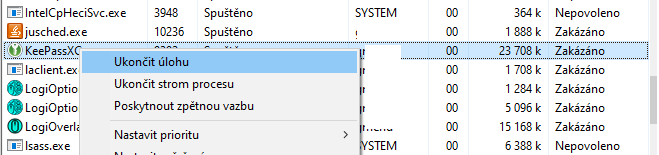
So I gave "stable" (portable) 2.6.0 a clean directory, the default config and the issue exactly the same as with snapshots.
So I have to kill process like this:
wombat01
on 11 Jul 2020
This might have something to do with your language, what language is keepassxc set to?
Also, please give EXACT steps to reproduce and settings that you have enabled/disabled.
droidmonkey
on 11 Jul 2020
The language is "System default" - Czech. Tested with default settings.
Reproduce easily, start and after a while (I have no idea what, but for example a few hours), when I want to quit, it is no longer possible, it stays hanging in the processes and it is necessary to kill manually.
edit: tried turn on a while ago approx. 2 hours ago, now I wanted to quit and it is no longer possible. No change during use (add / edit ..)
wombat01
on 11 Jul 2020
That is not exact. What state is the application in (maximized, minimized, hidden to tray), is the database locked or unlocked, do you have unsaved changes, etc.
droidmonkey
on 11 Jul 2020
Run by default, minimized on the toolbar .. not in the tray, unlocked database, no changes.
wombat01
on 11 Jul 2020
I ran that exact scenario in a debugger for 2 days and nothing happened.
droidmonkey
on 11 Jul 2020


(Impossible to turn on - at this point i can just kill the process and run)
wombat01
on 11 Jul 2020
at this moment this setting:
`
[General]
ConfigVersion=1
UpdateCheckMessageShown=true
AutoSaveAfterEveryChange=false
AutoSaveOnExit=false
UseAtomicSaves=false
AutoReloadOnChange=false
[GUI]
TrayIconAppearance=monochrome-light
[Browser]
CustomProxyLocation=
[KeeShare]
Own="\n
Foreign="\n
Active="\n
QuietSuccess=true
[Security]
LockDatabaseScreenLock=false
PasswordsHidden=false
PasswordsRepeatVisible=false
`
`
[General]
LastDir=C:/Users/xxx/OneDrive/Apps/Keepass2Android
LastDatabases=C:\Users\xxx\OneDrive\Apps\Keepass2Android\NewDatabase.kdbx
LastKeyFiles=@Variant(\0\0\0\x1c\0\0\0\0)
LastChallengeResponse=@Variant(\0\0\0\x1c\0\0\0\0)
LastActiveDatabase=C:\Users\xxx\OneDrive\Apps\Keepass2Android\NewDatabase.kdbx
LastOpenedDatabases=C:\Users\xxx\OneDrive\Apps\Keepass2Android\NewDatabase.kdbx
[GUI]
CheckForUpdatesNextCheck=1594920076
MainWindowGeometry=@ByteArray(\x1\xd9\xd0\xcb\0\x3\0\0\0\0\x3o\0\0\x1q\0\0\x6\x90\0\0\x3\xe8\0\0\x3p\0\0\x1\x90\0\0\x6\x8f\0\0\x3\xe7\0\0\0\0\0\0\0\0\n\0\0\0\x3p\0\0\x1\x90\0\0\x6\x8f\0\0\x3\xe7)
MainWindowState=@ByteArray(\0\0\0\xff\0\0\0\0\xfd\0\0\0\0\0\0\x3 \0\0\x2\a\0\0\0\x4\0\0\0\x4\0\0\0\b\0\0\0\b\xfc\0\0\0\x1\0\0\0\x2\0\0\0\x1\0\0\0\xe\0t\0o\0o\0l\0\x42\0\x61\0r\x1\0\0\0\0\xff\xff\xff\xff\0\0\0\0\0\0\0\0)
SplitterState=@Invalid()
PreviewSplitterState=@Invalid()
ListViewState="@ByteArray(\0\0\0\xff\0\0\0\0\0\0\0\x1\0\0\0\0\0\0\0\x1\x1\0\0\0\xe\0\0\0\0\0\0\0\x3\0\0\0\x4\0\0\0\x5\0\0\0\x6\0\0\0\a\0\0\0\b\0\0\0\t\0\0\0\n\0\0\0\v\0\0\0\x1\0\0\0\f\0\0\0\x2\0\0\0\r\0\0\0\xe\0\0\0\0\0\0\0\n\0\0\0\f\0\0\0\x1\0\0\0\x2\0\0\0\x3\0\0\0\x4\0\0\0\x5\0\0\0\x6\0\0\0\a\0\0\0\b\0\0\0\t\0\0\0\v\0\0\0\r\0\0\0\xe!;\0\0\0\a\0\0\0\a\0\0\0\x64\0\0\0\x6\0\0\0\x64\0\0\0\0\0\0\0\x64\0\0\0\x3\0\0\0\x64\0\0\0\r\0\0\0\x64\0\0\0\t\0\0\0\x64\0\0\0\v\0\0\0\x64\0\0\x2\x1e\0\0\0\xe\x1\x1\0\0\0\0\0\0\0\0\0\0\0\0\0\0\x64\0\0\0\x18\0\0\0\x81\0\0\0\0\0\0\0\xe\0\0\0\0\0\0\0\x1\0\0\0\0\0\0\0\x18\0\0\0\x1\0\0\0\x2\0\0\0\x18\0\0\0\x1\0\0\0\x2\0\0\0\x63\0\0\0\x1\0\0\0\0\0\0\0\x63\0\0\0\x1\0\0\0\0\0\0\0\0\0\0\0\x1\0\0\0\0\0\0\0\x63\0\0\0\x1\0\0\0\0\0\0\0\x63\0\0\0\x1\0\0\0\0\0\0\0\0\0\0\0\x1\0\0\0\0\0\0\0\0\0\0\0\x1\0\0\0\0\0\0\0\x62\0\0\0\x1\0\0\0\0\0\0\0\0\0\0\0\x1\0\0\0\0\0\0\0\0\0\0\0\x1\0\0\0\0\0\0\0\0\0\0\0\x1\0\0\0\0\0\0\x3\xe8\x1\0\0\0\x64)"
SearchViewState=@ByteArray()
[SSHAgent]
AuthSockOverride=
`
wombat01
on 11 Jul 2020
There are two possibilities: (1) the main window is being hidden as if there is a tray icon but there really is none so you cannot recover from that, (2) the application is in a crashed state.
I need your settings from AppData/Roaming/KeePassXC
droidmonkey
on 11 Jul 2020
`[General]
HideWindowOnCopy=false
MinimizeOnCopy=true
UpdateCheckMessageShown=true
SingleInstance=true
RememberLastDatabases=true
RememberLastKeyFiles=true
OpenPreviousDatabasesOnStartup=true
AutoSaveAfterEveryChange=true
AutoSaveOnExit=true
BackupBeforeSave=false
UseAtomicSaves=true
AutoReloadOnChange=true
MinimizeAfterUnlock=false
MinimizeOnOpenUrl=false
DropToBackgroundOnCopy=false
UseGroupIconOnEntryCreation=true
IgnoreGroupExpansion=true
AutoTypeEntryTitleMatch=true
AutoTypeEntryURLMatch=true
FaviconDownloadTimeout=10
GlobalAutoTypeKey=0
GlobalAutoTypeModifiers=0
AutoTypeDelay=25
AutoTypeStartDelay=500
ConfigVersion=1
[GUI]
CheckForUpdates=true
CheckForUpdatesNextCheck=1588957102
HideUsernames=false
HidePasswords=true
Language=system
HidePreviewPanel=false
HideToolbar=false
MovableToolbar=false
MonospaceNotes=false
ApplicationTheme=auto
ToolButtonStyle=0
ShowTrayIcon=false
DarkTrayIcon=false
MinimizeToTray=false
MinimizeOnClose=false
MinimizeOnStartup=false
CheckForUpdatesIncludeBetas=true
AdvancedSettings=true
[security]
passwordscleartext=true
HidePasswordPreviewPanel=false
passwordsrepeat=true
PasswordsHidden=false
[Browser]
Enabled=false
ShowNotification=true
BestMatchOnly=false
UnlockDatabase=true
MatchUrlScheme=true
SortByUsername=false
SupportBrowserProxy=true
UseCustomProxy=false
CustomProxyLocation=
UpdateBinaryPath=true
AllowExpiredCredentials=false
AlwaysAllowAccess=false
AlwaysAllowUpdate=false
HttpAuthPermission=false
SearchInAllDatabases=false
SupportKphFields=true
NoMigrationPrompt=false
[KeeShare]
QuietSuccess=true
Active="\n
Own="\n
Foreign="\n
[PasswordGenerator]
SpecialChars=false
ExcludedChars=
Length=14
LowerCase=false
UpperCase=false
Numbers=false
AdditionalChars=
`
wombat01
on 11 Jul 2020
Just to make sure you are not looking wrong way.
I am using 2.6.0 portable on Czech Windows 10 with KeePassXC set to "System default" language and I just tried stopping it and it stopped without any issue.
As I described before, I would bet that this issue is related to issue with accessing (writing to) DB file. Once app has issue with that, it gets stuck and don't even exit correctly (at least that's what used to happen on 2.5.x). I haven't experienced any issue on 2.6.0 so far though...
johny-mnemonic
on 11 Jul 2020
I use sync via OneDrive (system folder OneDrive) in the Windows 10. And still the same problem.
KeePassXC - Verze 2.6.1-snapshot
wombat01
on 2 Sep 2020
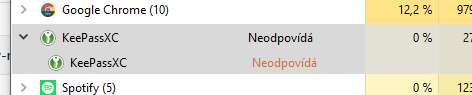
I tried to replace portable with a classic installation and the problem still persists with this difference.
*Quit via Menu> Exit
wombat01
on 18 Oct 2020
Related issues
 haroldm
·
3Comments
haroldm
·
3Comments
 bleepnetworks
·
3Comments
bleepnetworks
·
3Comments
 MountainX
·
3Comments
MountainX
·
3Comments
 amvasilyev
·
3Comments
amvasilyev
·
3Comments
 rugk
·
3Comments
rugk
·
3Comments