Summary
Removing the need to manually enter a passphrase for GPG private keys.
Desired Behavior
I expect the following behavior when I'm unlocking my KeePassXC database..
- Import private key if it doesn't exist yet.
- Do some magic (see
Possible Solution). - Being able to use any commands related to GPG without entering a passphrase (e.g.
git commit -S -m "[...]",git push -u origin master, etc).
Possible Solution
We could execute a GPG command (e.g. encrypt Hello, world!) and pass the specified passphrase to GPG, although I think there's a better solution.
Context
I've the same problem KeePassXC solved with the SSH-Agent plugin, but for GPG. My current, rather uncomfortable, solution is saving GPG key passphrases as normal entries and copying the password every time I restart my computer as they're are only being saved temporarly.
I did the same thing with SSH keys until the KeePassXC community made the SSH-Agent plugin. Srsly, I love the plugin as it removes a lot of manual actions performed by the end-user, especially if you've multiple keys (true in both scenarios for me).
 ghost
ghost
All 8 comments
There are already wonderful GPG tools like Kleopatra that also handle all the other aspects of GPG. As for the Git command, I simply auto-type the gpg password into the prompt using keepassxc.
 droidmonkey
on 21 Dec 2019
droidmonkey
on 21 Dec 2019
As for the Git command, I simply auto-type the gpg password into the prompt using keepassxc.
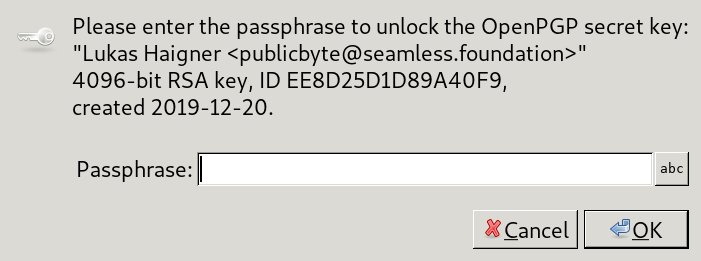
Hmm.. this doesn't seem to be working on my end.

ghost
on 21 Dec 2019
5700 is the process identifier, which, of course, is random.
ghost
on 21 Dec 2019
I could rename all of my private key entries to archlinux, but this isn't a perfect solution as this will only work for a machine running linux with the hostname archlinux. Furthermore, there could be more factors than running linux and having the correct hostname (e.g. which desktop are you running on, etc).
ghost
on 21 Dec 2019
You can use Ctrl+Shift+V to Auto-Type into the last selected window. It's unfortunate that the GPG window doesn't have a proper title.
droidmonkey
on 21 Dec 2019
OK. This is working and sadly still annoying as I'm using i3. I'd have to do the following actions to autotype manually..
- MOD + 9 to switch to the appropriate workspace
- MOD + SHIFT + 2 to move the KeePassXC window to my terminal workspace
- MOD + 2 to switch to my terminal workspace
- Focus the KeePassXC window
- Select the entry again as this sometimes doesn't work properly
- CTRL + SHIFT + V
- Focus the passphrase prompt asap or it'll enter the passphrase wrong
UPDATE: I just found out this workaround doesn't work for me either as certain ASCII characters unfocused the window and thus prevented autotype to type the complete passphrase into the prompt.
ghost
on 21 Dec 2019
GnuPG supports libsecret for storing the passphrase for pinentry. It should be possible to use the Secret Service implementation in KeePassXC to provide the passphrase automatically.
 hifi
on 21 Dec 2019
hifi
on 21 Dec 2019
You can create the entry using pinentry-gtk-2, which has the option to store secrets (I couldn't find how pinentry sets the key for the GPG key). I made a small tutorial here.
 alevalv
on 29 Jan 2020
alevalv
on 29 Jan 2020
Related issues
 n1trux
·
3Comments
n1trux
·
3Comments
 nfnty
·
3Comments
nfnty
·
3Comments
 amvasilyev
·
3Comments
amvasilyev
·
3Comments
 TheZ3ro
·
3Comments
TheZ3ro
·
3Comments
 lostfictions
·
3Comments
lostfictions
·
3Comments
Most helpful comment
You can create the entry using
pinentry-gtk-2, which has the option to store secrets (I couldn't find how pinentry sets the key for the GPG key). I made a small tutorial here.