Keepassxc: KeepassXC-Browser not connecting
Expected Behavior
Browser extesnion should be able to connect to KeepassXC (Browser integration is enabled)
Current Behavior
After installing KeepassXC form apt and then removed it (becaused BrowerExtesnion said it is not up to date), then I swapped to the snap package of Keepassxc. I downloaded and ran "keepassxc-snap-helper.sh".
After that, etiher on Firefox or Chrome, the extension is not able to connect to keepassxc. When I click on the reload button ("Recharger" in french) it return "key exchange has failed" ("L'échange de clé a échoué." in french).
I removed the snap package then reinstalled it but with no success.
However didn't tried to reinstall Browser extension.
Possible Solution
For Chrome :
~.config/google-chrome/NativeMessagingHosts/org.keepassxc.keepassxc_browser.json
"path" was pointing to "/usr/bin/keepassxc-proxy" but it is not existing on the system. I changed the value to "/snap/bin/keepassxc.proxy" and it's now working.
Firefox :
I did the same as above on the file :
~.mozilla/native-messaging-hosts/org.keepassxc.keepassxc_browser.json
And it worked
I don't know if the trick I USED is a good idea or not but obvisously the root cause is that I don't have keepassxc-proxy in /usr/bin, no ? Or if me trick is good, the helper is not generating the good proxy path in the jsons
Steps to Reproduce
Not sure if previous apt installation is not responsible
- Install keepassxc snap -> sudo snap install keepassxc
- Download and then install helper -> sudo ./keepassxc-snap-helper.sh
- Try to use the extension
Context
Debug Info
KeePassXC - snap package
Revision: 2.5.0
Libraries:
- LIBS
Operating system: Ubuntu 19.10
CPU architecture: x86_64
Kernel: KERNEL : 5.3.0-19-generic
Enabled extensions:
- KeepassXC-Browser Chrome : 1.5.3
-KeePassXC-Browser Firefox : 1.5.3
 mlafois
All 9 comments
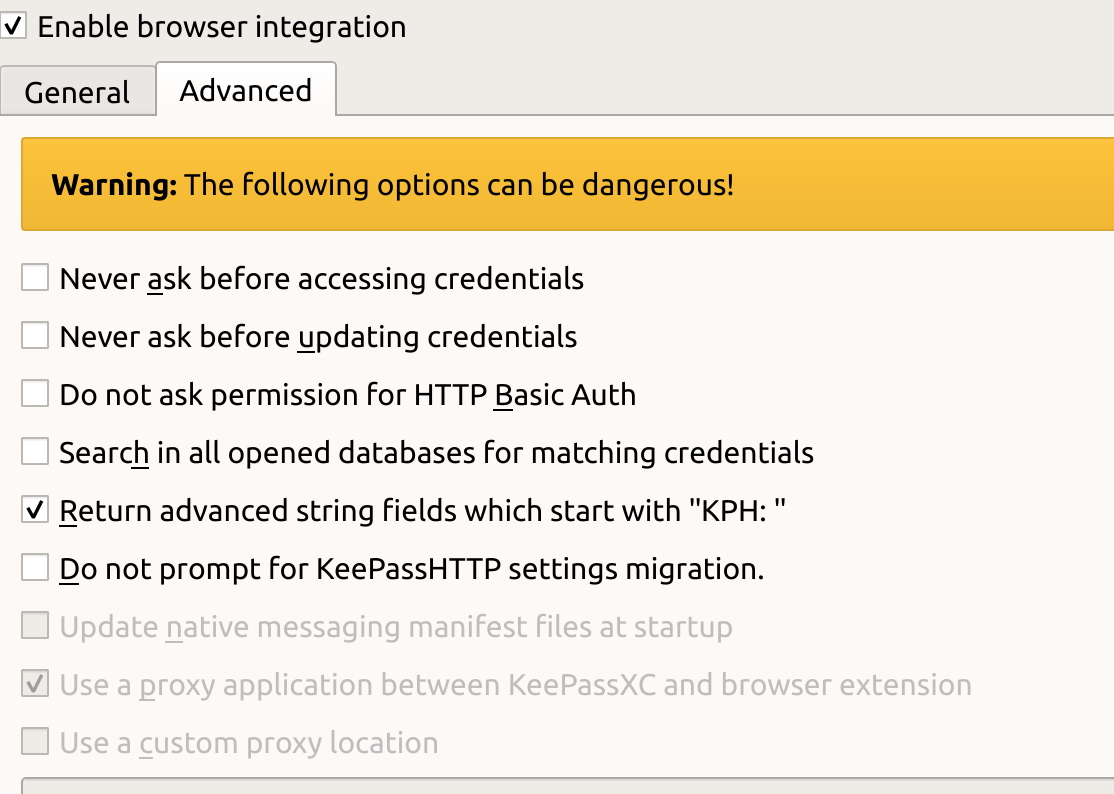
Does KeePassXC has the following setting enabled: Browser Integration -> Advanced -> Update native messaging manifest files at startup?
 varjolintu
on 31 Oct 2019
varjolintu
on 31 Oct 2019
In KeepassXC this option is grayed out and not checked
mlafois
on 31 Oct 2019
Strange. That option should be enabled by default, especially with snaps.
varjolintu
on 31 Oct 2019
Looks like I have the same issue.
I am on Ubuntu 19.04 and had keepassxc 2.4.3 installed from PPA and Chrome browser extension.
Then I removed PPA version and installed 2.5.0 via snap install keepassxc, after that I started getting the "Key exchange was not successful" error in browser extension.
Now I edited the ~/.config/google-chrome/NativeMessagingHosts/org.keepassxc.keepassxc_browser.json and changed path from /usr/bin/keepassxc.proxy to /snap/bin/keepassxc.proxy (@kaalk thanks for the tip) and it started working again.
Update: and I also have the Update native messaging manifest files at startup option unchecked and grayed out:
 serebrov
on 31 Oct 2019
serebrov
on 31 Oct 2019
Using the option said above should update those scripts manually to point to the correct location. Not sure why those are disabled for you.
varjolintu
on 31 Oct 2019
He is using a snap.
 droidmonkey
on 31 Oct 2019
droidmonkey
on 31 Oct 2019
He is using a snap.
droidmonkey
on 31 Oct 2019
Hello.
I downloaded the latest KeepassXC version from snap and I had to download the "keepassxc-snap-helper.sh" aloneside from GitHub. I think this can be useful to include this script into the package, either into the snap or DEB or RPM.
Thanks for this great work.
 thunderdome2
on 30 Dec 2019
thunderdome2
on 30 Dec 2019
We cannot include it in the snap because it must be run outside of the sandbox
droidmonkey
on 30 Dec 2019
Related issues
 nfnty
·
3Comments
nfnty
·
3Comments
 Throne3d
·
3Comments
Throne3d
·
3Comments
 MisterY
·
3Comments
MisterY
·
3Comments
 JosephHatfield
·
3Comments
JosephHatfield
·
3Comments
 lostfictions
·
3Comments
lostfictions
·
3Comments
Most helpful comment
Looks like I have the same issue.
I am on Ubuntu 19.04 and had keepassxc 2.4.3 installed from PPA and Chrome browser extension.
Then I removed PPA version and installed 2.5.0 via
snap install keepassxc, after that I started getting the "Key exchange was not successful" error in browser extension.Now I edited the
~/.config/google-chrome/NativeMessagingHosts/org.keepassxc.keepassxc_browser.jsonand changedpathfrom/usr/bin/keepassxc.proxyto/snap/bin/keepassxc.proxy(@kaalk thanks for the tip) and it started working again.Update: and I also have the
Update native messaging manifest files at startupoption unchecked and grayed out: