Keepassxc: Browser password addon always lists a wrong account on access request
Expected Behavior
I want nothing if no account is found or the correct entry.
Current Behavior
I want to login on ebay and it wants to put in my O² account data.
If it finds the correct account on another side it still wants access to my O² account.
It seems that it always picks my O² account regardless if it founds a matching account or not.
Possible Solution
Steps to Reproduce
- I go to ebay
- I want to login
It wants access to my O² account credentials
I go to paypal
- I want to login
- It wants access to my O² and paypal account credentials
Context
I updated from 2.3.1 to 2.5.0 via ubuntu repository
Now this is happening.
Debug Info
KeePassXC - 2.5.0
Revision: 1ab8a9f
Libraries:
- libgcrypt 1.8.1
Operating system: Ubuntu 18.04 / Linux Mint 19.2
CPU architecture: x86_64
Kernel: 5.0.0-32-generic
Enabled extensions:
- Auto-Type
- Browser-Integration
- SSH-Agent
- KeeShare (bestätigtes und unbestätigtes Teilen)
- YubiKey
 MartinX3
All 10 comments
Does your O2 account have an * in the url?
 droidmonkey
on 28 Oct 2019
droidmonkey
on 28 Oct 2019
oh
I added
https://login.o2online.de, https://www.o2online.de/ecareng/billing/
as url in the thinking I could add multiple urls for the browser addon.
I removed the other url and the , and now it works again.
But it is weird that it didn't happen with 2.3.1.
MartinX3
on 28 Oct 2019
Processing of url changed. Use the new multi url setting in the browser integration page.
droidmonkey
on 28 Oct 2019
I'm actually seeing this myself
KeePassXC - 2.5.0
KeePassXC-Browser - 1.5.3
Operating system: MacIntel
Browser: Mozilla Firefox 70.0
Every auto-type entry is the same regardless of the site, and I don't have additional urls for any of my passwords.
 flanger001
on 29 Oct 2019
flanger001
on 29 Oct 2019
Auto-Type is totally different. Go to the Auto-Type settings and disable matching url in entry title. Or you need to add an extension to your browser to put the url in the window title.
droidmonkey
on 29 Oct 2019
@droidmonkey I'm sorry - am I confusing the feature names? When I visit a website and I click into a username field, I expect to see an entry for that field if one exists in the db. I'm currently seeing that every website returns the same list (sorry for blanked out usernames but I can assure you they are the same):
Paypal:

Credit Karma:
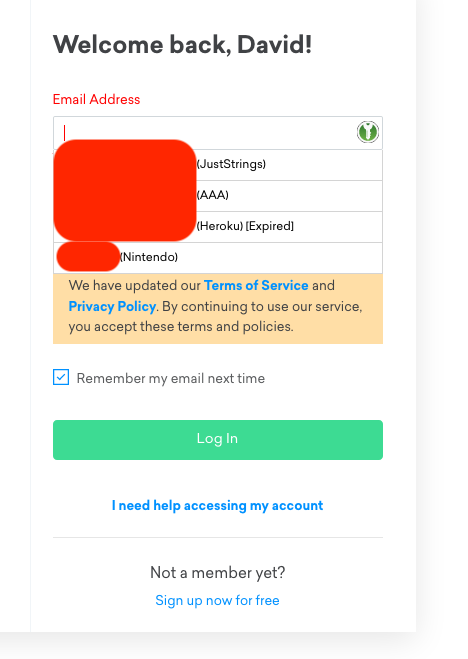
I'm using the regular KeepassXC-Browser extension on Firefox and nothing else of note.
flanger001
on 29 Oct 2019
Yes you confused the feature names, hehe. Can you screenshot the entry edit page for those three accounts. Please obscure your username and password fields.
Alternatively, create a demo database that replicates this behavior so we can debug it.
droidmonkey
on 29 Oct 2019
I can, but having looked at those I know what you're going to tell me. Here's the Nintendo one.
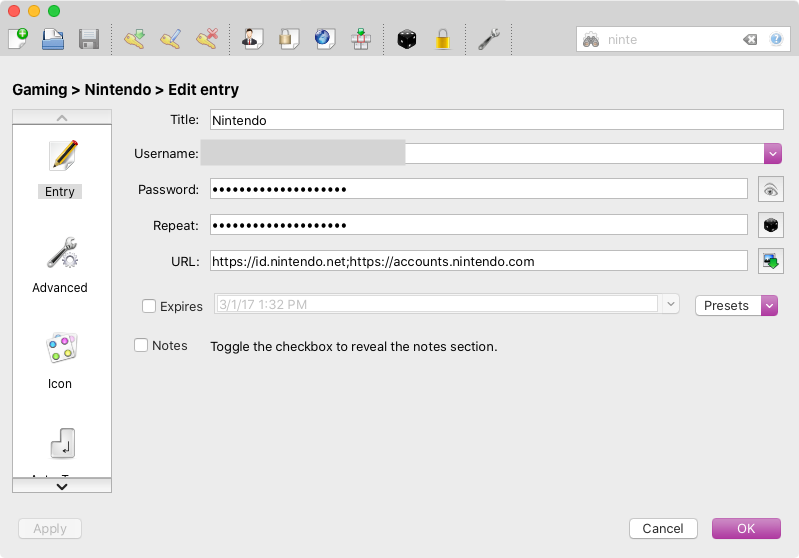
The others have multiple urls too. My bad! I'll fix.
flanger001
on 29 Oct 2019
One of them did have an asterisk in the url. Any suggested fix there?
flanger001
on 29 Oct 2019
please remove the second url and it's ; and put it in the "browser integration" symbol (left side, scroll down)
I did exactly the same wrong entry, except that I did use the ,
MartinX3
on 29 Oct 2019
Related issues
 guihkx
·
3Comments
guihkx
·
3Comments
 shyim
·
3Comments
shyim
·
3Comments
 MisterY
·
3Comments
MisterY
·
3Comments
 n1trux
·
3Comments
n1trux
·
3Comments
 2tbwXj46BDbdNBRV79DS
·
3Comments
2tbwXj46BDbdNBRV79DS
·
3Comments
Most helpful comment
please remove the second url and it's
;and put it in the "browser integration" symbol (left side, scroll down)I did exactly the same wrong entry, except that I did use the
,