Keepassxc: HMAC Mismatch after updating from 2.4.3 to 2.5.0
Expected Behavior
My database should unlock.
Current Behavior
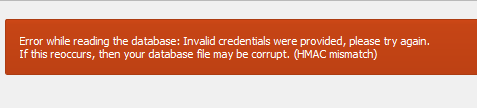
HMAC Mismatch.
Steps to Reproduce
- Update KeepassXC from 2.4.3 to 2.5.0
- Attempt to open your database.
Context
Updated immediately after starting my computer when the chrome extension told me to update.
Upon doing so I can no longer log into my database.
Debug Info
KeePassXC - Version 2.5.0
Revision: 1ab8a9f
Qt 5.13.1
Debugging mode is disabled.
Operating system: Windows 10 (10.0)
CPU architecture: x86_64
Kernel: winnt 10.0.19008
Enabled extensions:
- Auto-Type
- Browser Integration
- SSH Agent
- KeeShare (signed and unsigned sharing)
- YubiKey
Cryptographic libraries:
libgcrypt 1.8.5
 Elycin
All 23 comments
I can confirm that the database is not corrupt. It is synchronized between my desktop and laptop. My laptop runs 2.4.3 and can still unlock the database successfully.

Elycin
on 27 Oct 2019
Updated the title as I was misreading the 3 for an 8.
My apologies.
Elycin
on 27 Oct 2019
Same here. Almost had a heart attack.
KeePass opens the database without any issue.
 JonAnder83
on 27 Oct 2019
JonAnder83
on 27 Oct 2019
After removing the ~/.config/keepassxc directory and then starting keepassxc I could open my password database as normal, including only using Yubikey HMAC without a password set.
 ged42
on 27 Oct 2019
ged42
on 27 Oct 2019
Yeah! That did the trick!
Thanks!
JonAnder83
on 27 Oct 2019
We changed the way we use different key components. Before, yiu had to check a box explicitly for each component, which caused a lot of confusion with users. Now whenever a field has a value, we use it. No more checkboxes. If you are using weird configurations like no password, key file only or YubiKey only, then you may run into trouble initially. Make sure only the required fields are filled (e.g. no key file selected if you don't have one). Resetting the config file is one way to ensure that, although it shouldn't be necessary (it would be enough to delete the entries about recently used key files and YubiKeys).
 phoerious
on 27 Oct 2019
phoerious
on 27 Oct 2019
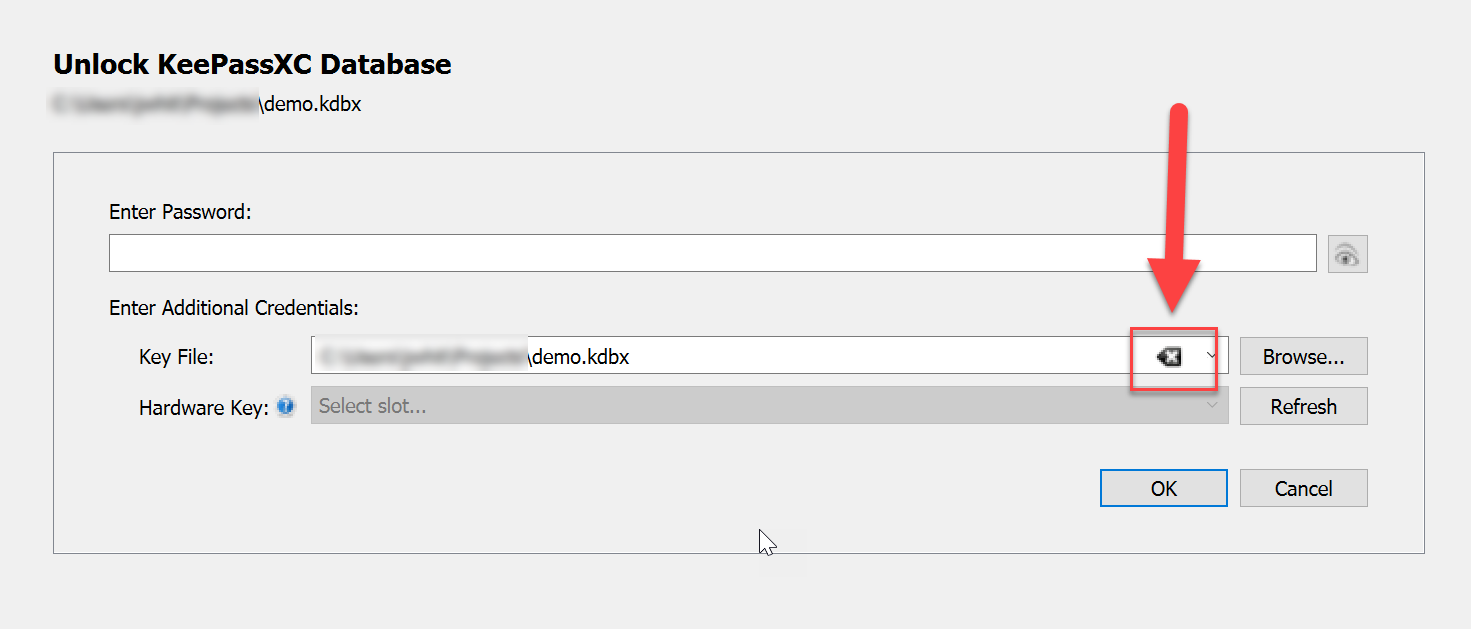
The fix is utterly simple, click the CLEAR button:
 droidmonkey
on 29 Oct 2019
droidmonkey
on 29 Oct 2019
For those who don't see/have a clear button and use the Ubuntu Snap installation:
Removing the keepassxc directoy under ~/snap/keepassxc/current/.config worked for me (corresponding to the comment by @ged42).
 tmhpfnr
on 29 Oct 2019
tmhpfnr
on 29 Oct 2019
I have the same symptom, and am running the Ubuntu snap installation - but neither the clear button in the key file nor deleting the ~/snap/keepassxc/current/.config directory was effective. I do not find a ~/.config/keepassxc directory, so I haven't deleted that.
I see three copies of my passwords.kdbx file in sub-directories of ~/snap/keepassxc/
current
590
550
I don't know the reasons for these directories, but I do know that prior to the deletion of ~/snap/keepassxc/current/.config, KeepassXC was looking (and failing to find) a file in "350" - which didn't and doesn't exist.
If there any hope of recovery? A prospect of downgrading Keepass XC?
Thanks for your time.
 psantucc
on 10 Nov 2019
psantucc
on 10 Nov 2019
We didn't change anything regarding the parsing of kdbx files. Of course, you can try an AppImage of an older version, but I doubt it'll change anything if you entered the credentials correctly and (like it was the case in this report) didn't try to add a key file when you didn't have one.
phoerious
on 10 Nov 2019
Looks hopeless - I installed 2.4.3 on another machine, and tried to open the "current" copy of the .kdbx file; same results.
Is it normal to have three copies of this file? Any documentation that might help me figure out why KeepassXC wanted to see the file in a directory called "350"?
psantucc
on 10 Nov 2019
350 is just the version number that snap gives to the package. Every update increments the version number. You should always use the "current" directory which points to the folder of the currently installed version.
droidmonkey
on 10 Nov 2019
Thanks, droidmonkey.
Looks like all thee copies are corrupted - or I got the password wrong. Either way, all my secure access is gone forever. That's a disaster, but I can't necessarily blame KeePassXC for it; could be snap, could be Ubuntu, could be hardware or random perversity.
psantucc
on 10 Nov 2019
You should definitely take a moment and think about what may have caused the issue. Did you change your master password recently? Did you try to remove the ~/snap/keepassxc/current/.config/keepassxc.ini file? Are you using a different keyboard layout or language?
droidmonkey
on 10 Nov 2019
What happens if you transfer the corrupt file to a different computer and try to open it there?
phoerious
on 10 Nov 2019
I did not remove ~/snap/keepassxc/current/.config/keepassxc.ini until I removed all of ~/snap/keepassxc/current/.config as part of troubleshooting. I didn't change the master password, keyboard layout, or language.
I have tried the file on a windows box running 2.4.3 and gotten the same result.
In trying to trace events, I have a weak hypothesis -
I know that KeepPassXC was running and open when snap updated me to 2.5.0. It wasn't until some weeks later - the day of my first post to this thread - that I closed and re-opened KeePassXC to find the new version and that it couldn't find my database file - looking in the "350" directory, not "current".
I suspect that Snap couldn't do what it thought it should with an open file, and deleted the only good copy. I know that the Snap version directories are loop mounts, but I've no idea if there's anything I can do to investigate further, or if this is a totally harebrained notion,
psantucc
on 11 Nov 2019
It is my understanding that the new version number directory and loopback are not created until you launch the new version of the app. Merely installing the new version, or a new snap, does not introduce this structure in your home directory. Further, we do not leave the database file "open" when you are using KeePassXC. We only open the file upon reading or writing to the file (open and save).
droidmonkey
on 11 Nov 2019
Thanks phoerious. #3840 is much more apt for my symptoms - I'll start following it.
psantucc
on 12 Nov 2019
I checked at the solution but the ~/.config/ folder does not contain any keepass folder inside is there another location where I can find the folder in mac
 Complugg3d
on 24 Dec 2019
Complugg3d
on 24 Dec 2019
at the end I had to remove de keepassxc.ini from ~/Library/Application Support/keepassxc opened the app again and it worked for me
Complugg3d
on 24 Dec 2019
How can i enable the YubiKey extension? it seems that keepassxc does not recognize it on my mbp
 TheRojam
on 7 Jan 2020
TheRojam
on 7 Jan 2020
Please see #3329.
phoerious
on 8 Jan 2020
I have been getting the HMAC Mismatch error trying to open databases created by importing from a CSV file - using 2.5.2 (downgraded from 2.5.3-2 to avoid the loss of TouchID) under macOS 10.13.6. Interestingly the databases would also not open with Macpass. I have not (ever) used key files or Yubikey, just passwords, for the databases.
Removing keepassxc.ini from ~/Library/Application Support/keepassxc seems to have fixed the problem for creating new files, but the old imported files still give the error.
Hopefully, the fix will hold ...
 Winter84
on 6 Apr 2020
Winter84
on 6 Apr 2020
Related issues
 JosephHatfield
·
3Comments
JosephHatfield
·
3Comments
 shaneknysh
·
3Comments
shaneknysh
·
3Comments
 Throne3d
·
3Comments
Throne3d
·
3Comments
 guihkx
·
3Comments
guihkx
·
3Comments
 813gan
·
3Comments
813gan
·
3Comments
Most helpful comment
The fix is utterly simple, click the CLEAR button:
