Keepassxc: macOS 10.15 Catalina: Yubikey slots not populating
Since upgrading to 10.15 catalina beta I cannot unlock my database which is secured with yubikey challenge response: the yubikey is not detected.
Expected Behavior
Unlock database with yubikey
Current Behavior
Yubikey is not detected:

I tried restarting everything, no change :-(
Otherwise yubikey works as expected (eg. with gpg), so currently only keepassxc cannot access it.
Debug Info
KeePassXC - Version 2.4.3
Revision: 5d6ef0c
Qt 5.12.3
Debugging mode is disabled.
Operating system: macOS 10.15
CPU architecture: x86_64
Kernel: darwin 19.0.0
Enabled extensions:
- Auto-Type
- Browser-Integration
- SSH-Agent
- KeeShare (signed and unsigned sharing)
- YubiKey
- TouchID
Cryptographic libraries:
libgcrypt 1.8.4
 doits
doits
All 45 comments
Does it work with the Yubikey Personalization tool?
 droidmonkey
on 27 Jun 2019
droidmonkey
on 27 Jun 2019
good catch, no, it doesn't. It says "unkown error occured" when I attach the yubikey.

doits
on 27 Jun 2019
Then this would be an error at the OS level or an incompatibility with yubikey itself. Recommend reporting the bug over on their repository: https://github.com/Yubico/yubikey-personalization-gui
droidmonkey
on 27 Jun 2019
:+1: reported at https://github.com/Yubico/yubikey-personalization-gui/issues/87
doits
on 27 Jun 2019
One more hint though: Using it in browsers for 2fa authentication or as a gpg smartcard for signing/encrypting e-mails still works though, so it is not completely broken. But looks like the functionality used in keepassxc and personalization tool is.
doits
on 27 Jun 2019
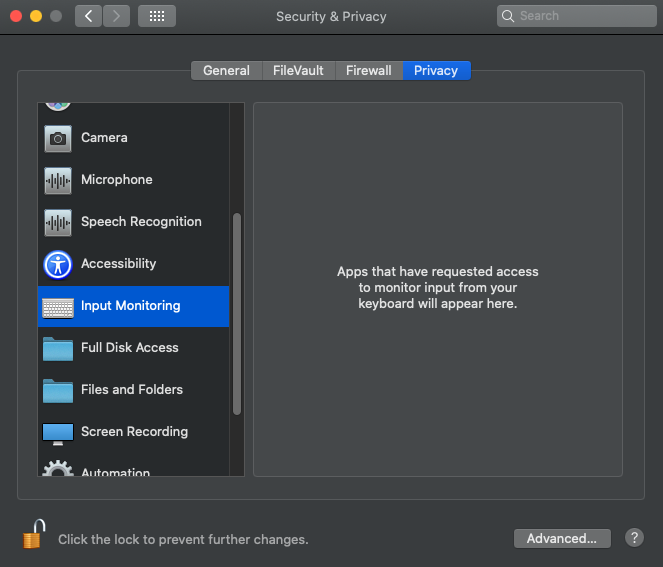
I made it working again by going to system settings --> security --> privacy --> input monitoring and manually adding keepassxc.app there. Looks like this permission should be requested by keepassxc when launching and/or trying to access yubikeys.
doits
on 1 Jul 2019
... although there is one minor flaw: The only yubikey is displayed three times now:

It is three times exactly the same entry and selecting any of them works.
doits
on 1 Jul 2019
Yes looks like Catalina is introducing new privacy features that require additional approvals. Unfortunately they don't seem to be documented yet or it is non-intuitive when I read the apple developer documentation.
droidmonkey
on 1 Jul 2019
I can confirm this issue, it persists with the current Dev Beta 10.15 (19A546d) - I have reported Apple this issue already. As workaround you can start KeePassXC (v2.4.3) from the comand line, then it works as exspected and the YubiKey is recognized correctly.
@doits That works for me too, thanks.
 Vertux
on 30 Aug 2019
Vertux
on 30 Aug 2019
That's quite annoying issue from mac. I am facing this intermittent issue everyday, when I restart my computer everything works but after few minutes (sometimes hours) it stop to work, if I try to type any command in terminal (like: ykinfo -s) I receive this message: "USB error: kIOReturnSuccess". This look likes a permission issue to read the USB port, since if I am with a root user it works pretty fine (ykinfo and also keepassxc).
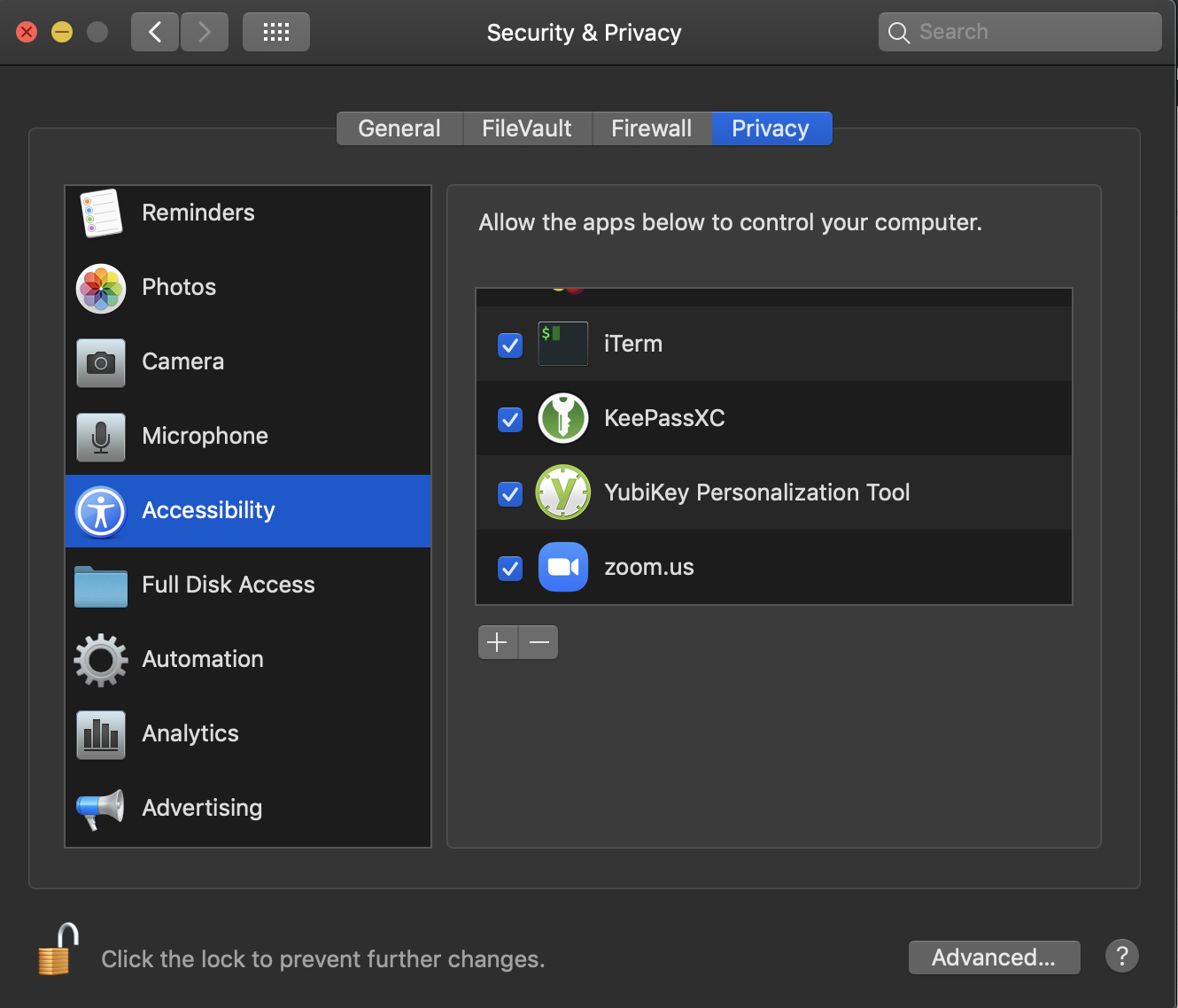
@doits , what version of MacOS are you using? I didn't find "input monitoring" option inside privacy. I tried to add the keepassxc inside "Accessibility" but it didn't solve.
 thobryan
on 10 Sep 2019
thobryan
on 10 Sep 2019
@thobryan using Beta 10.15 (19A546d) and it works like this for me:

doits
on 10 Sep 2019
Weird, I dont have this option :-( I am on 10.14.6.
thobryan
on 10 Sep 2019
afaik this is new on 10.15, so it makes sense you don't have it on 10.14.6 :-) Looks like your issue is a different one then.
doits
on 10 Sep 2019
On the latest 10.15 (19A558d) and I don't have the option to add an application....
 james56b
on 20 Sep 2019
james56b
on 20 Sep 2019
Weird, I dont have this option :-( I am on 10.14.6.
@thobryan You should not have any issues with MacOS 10.14.6 because it is the regular MacOS version (I run it on my second Mac too and there I have no problems with KeePassXC), we are talking about the 10.15 Beta, this version has intoduced many new security features, which lead into problems with some old applications.
Vertux
on 20 Sep 2019
Hi @Vertux , but unfortunately it's happening with me... I tried 3 different keys ( 2 different Yubikey 5 NFC with adaptor and Yubikey 5C) all failed after few minutes/hours. As a root it works. The same keys works in an old macbook that I have also in 10.14.6 (18G95).
thobryan
on 20 Sep 2019
@thobryan Weird, I got two ideas.
Sometimes it happens, that an application is not correctly recognized by macos when you install it, which means no window pops up where you have to give the app the required rights to opperate correctly. It can help if you reinstall the app and then start it for the first time from the comandline/terminal, then you should get the mentioned window - afterwards you can start it normally. It can always help to investigate issues by starting an app from the commandline, because you can see possible errors.
Maybe you are running additional security software or a software/driver which exclusivly blocks the USB/Lightning port on your (new) macbook.
Vertux
on 21 Sep 2019
Hi @Vertux . Thanks a lot for the information, in fact I am using Norton Security antivirus. But I am going to do what you suggested and see If can I catch some new information to share.
thobryan
on 23 Sep 2019
Just got the error (after 5 or 6 hours):
[12:53:53][thomas][~]: /Applications/KeePassXC.app/Contents/MacOS/KeePassXC
QObject::startTimer: Timers cannot have negative intervals
Failed to issue challenge
Have some verbose parameter that I can run to have more information?
PS: The QObject issue showed soon as keepassxc was opened. I dont think that it have any influence in this issue.
thobryan
on 23 Sep 2019
The last message is what matters. That means KeePassXC cannot communicate with the Yubikey to perform the Challenge-Response.
droidmonkey
on 23 Sep 2019
Yesterday my mac was updated to 10.14.6 (18G103), maybe it's too early to celebrate, but seems that the issue was fixed.
thobryan
on 1 Oct 2019
Bad news I just have updated to MacOS 10.15 Beta (19A578c) and KeePassXC again does not work anymore - till now I cannot get it working again. If I start it from the command line I get the following error:
QObject::startTimer: Timers cannot have negative intervals

Vertux
on 1 Oct 2019
The original issue (read the first post) clearly states that was a problem.
droidmonkey
on 1 Oct 2019
The original issue (read the first post) clearly states that was a problem.
@droidmonkey you did not understand what I mean. For the last MacOS 10.15 Beta there was an easy workaround see @doits post, but with the current Beta (19A578c) this does not work anymore
Vertux
on 2 Oct 2019
Still using it with 19A578c and it works. Did you add it to input monitoring?
doits
on 2 Oct 2019
Still using it with 19A578c and it works. Did you add it to input monitoring?
@doits It is very weird, I had already added it to input monitoring and I have tried it a couple of times yesterday and it did not work. Today I have removed it and then I have added it to input monitoring again and I have restarted the MBA - the miracle happens - now it works again.
Vertux
on 2 Oct 2019
macOS likes to "forget" permissions you gave an app but still show that you gave them. I've run into this with AutoType as well.
For this issue, is there a new entitlement we should be asking for?
droidmonkey
on 2 Oct 2019
This issue is preventing me from using my KeePass. Is there any news since 12 days ago? (yes, I already gave input monitoring permission, but this seems to work possibly once per reboot (or per re-install of keepassx), which is a real pain. Is KeePass now incompatible with YubiKey for OS 10.15 users?
 DanJohnsonCERN
on 14 Oct 2019
DanJohnsonCERN
on 14 Oct 2019
@DanJohnsonCERN This is an issue that may be outside our ability to correct. You probably have to follow the instructions above and ensure input monitoring setting is granted.
droidmonkey
on 14 Oct 2019
Thanks @droidmonkey . I have already followed the instructions above, and keepassxc only detects the yubikey slots at most once (per reboot or re-install). To re-iterate, the yubikey works fine (enters text etc) but is not consistently detected by keepassxc.
DanJohnsonCERN
on 14 Oct 2019
Please try our 2.5.0 snapshot: https://snapshot.keepassxc.org/latest
I improved Yubikey handling recently.
droidmonkey
on 14 Oct 2019
Aha, nice, that works perfectly first time (after input monitoring permission, obv). I'll get back to you here if it stops later. Thank you for your time/work @droidmonkey !
DanJohnsonCERN
on 14 Oct 2019
Upgraded from 10.14.6 today to 10.15.1 - had KeePassXC upgraded to 2.5.0 - created manually 'input monitoring' entries for both KeePassXC and YubiKey Personalization Tool - it works smoothly. Thanks @droidmonkey
 kanutope
on 31 Oct 2019
kanutope
on 31 Oct 2019
I need to figure out how to trigger the permission request for input monitoring
droidmonkey
on 31 Oct 2019
I'm on a machine stuck on High Sierra and I've had this issue ever since I got my YubiKey, so around version 2.3.4, and I was unable to fix the issue with the privacy settings mentioned above, as High Sierra lacks all of it.
However, I did some Googling around, and it seems that this issue is somehow triggered if "Secure Keyboard Entry" is enabled in Terminal's settings – I disabled it, and my key started to immediately work in KeepassXC, alongside with ykinfo -a producing actual output instead of USB error: kIOReturnSuccess, even when not run as sudo.
This thread is relevant: https://github.com/Yubico/yubikey-personalization/issues/34
 499602D2
on 20 Nov 2019
499602D2
on 20 Nov 2019
I'am on a machine stuck with High Sierra (10.13.6) and have same problem as well. Disabling the "Secure Keyboard Entry" in the Terminal settings works for me fine (KeePassXC 2.5.1).
Citation from Apple support page says:
Before you turn on secure keyboard entry, make sure other apps don’t require keystrokes from Terminal.
Thanks for the hint @499602D2 ! This does not solve the real problem, but for now a good workaround.

 FaMux
on 23 Nov 2019
FaMux
on 23 Nov 2019
I can verify that adding to security -> privacy -> input monitoring also works for OnlyKey. Is it possible for future release to automatically request adding KeePassXC to input monitoring? I think it already requests to automatically be added to accessibility.
 onlykey
on 7 Jan 2020
onlykey
on 7 Jan 2020
I'll need a link to the documentation to do that. I find Apple's documentation to be the absolute worst.
droidmonkey
on 7 Jan 2020
@droidmonkey Did a little digging into it and I am thinking that Mac released 10.15 without a way yet for apps to request this, or at least its not documented yet:
https://forums.developer.apple.com/thread/124368
https://developer.apple.com/documentation/bundleresources/information_property_list/protected_resources
EDIT - Did a little more digging, still no luck. Looks like others have this issue too - https://discussions.apple.com/thread/250754222
When you look at the privacy options in Xcode there is no option for input monitoring:

onlykey
on 8 Jan 2020
Workaround Generally: Add ("+" or drag and drop) KeePassXC.app into "System Settings --> Security --> Privacy --> Input Monitoring".
Workaround when the above won't work as no list appears: Populate _Input Monitoring_ with another app first.
- Start an app that requests _Input Monitoring_ permissions, e.g. CheatSheet. The _Input Monitoring_ window will be opened and populated with this one app plus a "+" and a drag-drop functionality.
- Add or drag-drop KeePassXC into the _Input Monitoring_ list.
- (optionally) remove the other app again.
 MarSalfer
on 8 Aug 2020
MarSalfer
on 8 Aug 2020
I've tried all the possible workarounds to get my OnlyKey working. KeePassXC is added to input monitoring and version 2.6.1, re-added is a couple of times as well, but still slots aren't populated.
Just a minute ago I found errors some errors caused by KeePassXC in my Console:
error   09:10:05.384303+0200    KeePassXC   IOConnectCallMethod(kIOHIDLibUserClientOpen):e00002c5
error   09:10:06.407640+0200    KeePassXC   IOConnectCallMethod(kIOHIDLibUserClientOpen):e00002c5
error   09:10:07.318337+0200    KeePassXC   IOConnectCallMethod(kIOHIDLibUserClientOpen):e00002c5
error   09:10:07.983491+0200    KeePassXC   IOConnectCallMethod(kIOHIDLibUserClientOpen):e00002c5
These errors occur when hitting 'Refresh' next to the slots. Anybody got an idea what might be happening here?
cc @onlykey
 tswestendorp
on 20 Aug 2020
tswestendorp
on 20 Aug 2020
@phoerious what version of ykpers are you deploying with the macos build?
droidmonkey
on 20 Aug 2020
Can't check right now, but it should be the latest one from homebrew.
 phoerious
on 20 Aug 2020
phoerious
on 20 Aug 2020
@tswestendorp Mac OS requires restart of app to have the privacy change take effect. I think in some cases it may require a reboot though, any luck after reboot?
onlykey
on 20 Aug 2020
@tswestendorp Mac OS requires restart of app to have the privacy change take effect. I think in some cases it may require a reboot though, any luck after reboot?
Unfortunately not 😕
tswestendorp
on 21 Aug 2020
Related issues
 JosephHatfield
·
3Comments
JosephHatfield
·
3Comments
 MountainX
·
3Comments
MountainX
·
3Comments
 haroldm
·
3Comments
haroldm
·
3Comments
 guihkx
·
3Comments
guihkx
·
3Comments
 nfnty
·
3Comments
nfnty
·
3Comments
Most helpful comment
I made it working again by going to system settings --> security --> privacy --> input monitoring and manually adding keepassxc.app there. Looks like this permission should be requested by keepassxc when launching and/or trying to access yubikeys.