Keepassxc: KeePassXC-cli.exe incorrect output (localization problem? string uncoding problem? utf-8 windows console problem?)
Expected Behavior
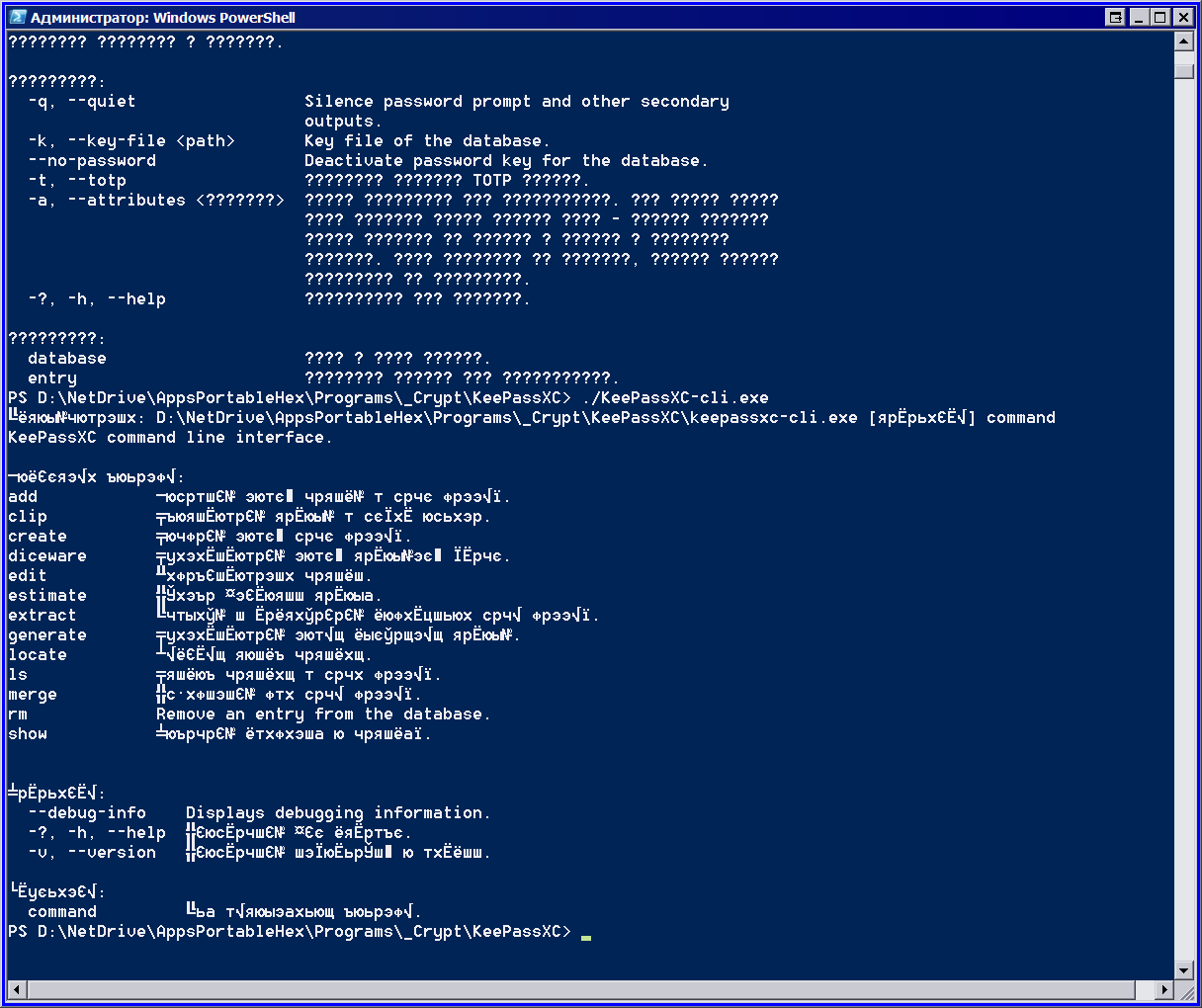
Readable text.
Current Behavior
Unreadable text.
Possible Solution
Disable localization for KeePassXC-cli.exe. (the one who use console will be able to use the online translator)
Steps to Reproduce
- just run "KeePassXC-cli.exe" in windows console. Windows 7 x64, Russian localization.

Context
Debug Info
KeePassXC - Version 2.4.1
Revision: 7bafe65
Qt 5.12.2
Debugging mode is disabled.
Operating system: Windows 7 SP 1 (6.1)
CPU architecture: x86_64
Kernel: winnt 6.1.7601
Enabled extensions:
- Auto-Type
- Интеграция с браузером
- SSH-агент
- KeeShare (signed and unsigned sharing)
- YubiKey
Cryptographic libraries:
libgcrypt 1.8.4
Operating system: Windows 7 x64 Russian
CPU architecture: x64
 heX16
heX16
All 8 comments
The Windows console uses its own single-byte encoding (cp850) for Western scripts, which does not include any Cyrillic characters. I would guess that a Russian Windows uses a different single-byte encoding, which is why you see some Cyrillic characters mixed with all sorts of garbage. The correct fix would be to use a localised encoding in KeePassXC, but I suppose that would need to be hard-coded for each non-latin script individually (?).
 phoerious
on 21 Apr 2019
phoerious
on 21 Apr 2019
Prior to Windows 7, the number of code pages was very small and manageable, but has multiplied by a lot since then. https://docs.microsoft.com/en-us/windows/desktop/intl/code-page-identifiers
The Cyrillic code page is 855. Considering the number of different code pages and possible non-standard system configurations, I don't think hard-coding code pages is the way to go. We are doing that for 850 at the moment, because Qt would try to write UTF-8 to the console otherwise. I will play around with it a bit and see if we can query the correct console code page using QLocale after all. Unfortunately, the console code page is different from the default system locale, which is why we resorted to hard coding in the first place.
phoerious
on 21 Apr 2019
Recommend using powershell
 droidmonkey
on 21 Apr 2019
droidmonkey
on 21 Apr 2019
@droidmonkey
heX16
on 21 Apr 2019
Powershell is using the same stupid 8-bit encoding. The main problem is that SetConsoleCP(CP_UTF8) is fairly new and the default console font only supports a subset of characters. So at least previously, whatever we did, we either printed gibberish due to a wrong encoding or squares due to missing glyphs in the console font.
Fortunately, this seems to have improved with Windows 10 recently(-ish). I managed to get it working by explicitly setting the console CP to CP_UTF8 (65001). The characters come out in the correct encoding and the font is able to display them (both in cmd.exe and Powershell). Last time I was working on this problem, windows.h only offered CP_UTF7 (65000) and nothing worked, no matter what I tried (thus I settled for cp850).
I am submitting a PR with the fix. In the meantime, you can work around the issue by setting the environment variable ENCODING_OVERRIDE to Windows-855. That's an undocumented feature I built into KeePassXC last time. You can also use a non-native shell (e.g. the Msys or Cygwin Bash shell) as those do UTF-8 by default.
phoerious
on 21 Apr 2019
Sorry missed the windows 7 part
droidmonkey
on 21 Apr 2019
Powershell uses 8-bit encoding by default on Windows 10 as well (unless perhaps you enable the UTF-8 beta in the locale settings, but I heard that it breaks a lot of drivers etc.).
I submitted the PR, which should fix the issue on Windows 10 at least. I am not so sure about Windows 7, but with the most recent updates it may.
phoerious
on 21 Apr 2019
May be just remove translation for console application?
heX16
on 22 Apr 2019
Related issues
 guihkx
·
3Comments
guihkx
·
3Comments
 shaneknysh
·
3Comments
shaneknysh
·
3Comments
 813gan
·
3Comments
813gan
·
3Comments
 lostfictions
·
3Comments
lostfictions
·
3Comments
 clementlesne
·
3Comments
clementlesne
·
3Comments