Keepassxc: Auto-Type doesn't work when app is shown as a workspace
Expected Behavior
Auto-Type should put the Username and password into the browser window.
Current Behavior
It puts the password in the keepass searchbar.
Possible Solution
It was working correctly in 2.3.
Steps to Reproduce
- Open your Firefox browser to a login page.
- Highlight the corresponding entry in your keepass database.
- Press Auto-Type button or keyboard short-cut.
Context
I now have to go back and forth from keepass to the webpage copying both the username and the password.
Debug Info
KeePassXC - 2.4.1
Revision: REVISION
Libraries:
- LIBS
Operating system: OSX
CPU architecture: ARCH
Kernel: KERNEL
Enabled extensions:
- EXTENSIONS
 sparstormo
All 18 comments
I should add that it appears to work correctly when the browser is in the desktop but not when it is in a workspace.
sparstormo
on 13 Apr 2019
What is the difference between a desktop and a workspace? The behavior was updated in 2.4.1 to always minimize the KeePassXC window before performing the auto-type action. It should be impossible to type into the search box.
 droidmonkey
on 13 Apr 2019
droidmonkey
on 13 Apr 2019
Jonathan,
In OSX the desktop is when you don't have the window full screen. You can
have windows of various sizes that all sit on the desktop. When you open up
to full screen (click the green button in the upper left corner) it moves
the window off the desktop to a workspace. If you do a three finger swipe
on the touch pad it (or press the Mission Control button, f3) will show you
the dashboard, desktop, and your open work spaces at the top of the screen.
I've done some more testing and here are the configurations and outcomes:
1) If the browser and keepassxc are both on the desktop then Auto-Type
appears to work as intended.
2) If the browser is in a workspace and keepassxc is on the desktop then it
prints the information to another app (like in my case Apple notes)
3) If both the browser is on the desktop and keepassxc is in a workspace
then sometimes it prints to another application (like the terminal if its
open) or to the keepassxc searchbar.
4) If both are in different workspaces then it seems to behave like #3
above.
I'm using Firefox Developer Edition 67.0b10 and OSX Mojava 10.14.4
If you can't duplicate this behavior, please let me know because it
perhaps means my computer has a problem.
I hope this helps.
Spar
On Sat, Apr 13, 2019 at 4:59 PM Jonathan White notifications@github.com
wrote:
What is the difference between a desktop and a workspace? The behavior was
updated in 2.4.1 to always minimize the KeePassXC window before performing
the auto-type action. It should be impossible to type into the search
box.—
You are receiving this because you authored the thread.
Reply to this email directly, view it on GitHub
https://github.com/keepassxreboot/keepassxc/issues/3003#issuecomment-482893376,
or mute the thread
https://github.com/notifications/unsubscribe-auth/AgdVSi7M9pAv5_Dr6rXyzgqcbNKNXRfZks5vglNegaJpZM4cuNlQ
.
sparstormo
on 14 Apr 2019
Oh great that is fantastic information. So a workspace is similar to maximizing the application? Either way, it seems we need to call different functions depending on the state of the applications.
droidmonkey
on 14 Apr 2019
I might have the term wrong. It might really just be another desktop.
Regardless, Auto-Type does weird stuff if there is not a browser with the
right fields available in the same desktop. It seems like it finds a cursor
somewhere and pastes to it.
On Sat, Apr 13, 2019 at 7:54 PM Jonathan White notifications@github.com
wrote:
Oh great that is fantastic information. So a workspace is similar to
maximizing the application? Either way, it seems we need to call different
functions depending on the state of the applications.—
You are receiving this because you authored the thread.
Reply to this email directly, view it on GitHub
https://github.com/keepassxreboot/keepassxc/issues/3003#issuecomment-482908394,
or mute the thread
https://github.com/notifications/unsubscribe-auth/AgdVSpFUp_11HlgK3AebcBeKtUyHWGpxks5vgnxQgaJpZM4cuNlQ
.
sparstormo
on 14 Apr 2019
Same here. KeePassXC 2.4.0 (2.4.1 not available as cask) opened in a "normal" window on the desktop. When I press autotype (why did you change the shortcut from cmd-v to cmd-shift-v?) it will insert my password in the search bar.
I've not found any combination of desktops/windows that works.
 seguri
on 16 Apr 2019
seguri
on 16 Apr 2019
When I press autotype (why did you change the shortcut from cmd-v to cmd-shift-v?) it will insert my password in the search bar.
Ah so I am not the only one that got confused by that!
 kitingChris
on 16 Apr 2019
kitingChris
on 16 Apr 2019
From my side, KeePassXC 2.5.3 Autotype under Linux Debian 10 is totally inconsistent indeed.
It rarelly does what I expect it to do. Either it does nothing at all, or only gives focus to KeePassXC window, or autotypes with missing characters...
NB: I have no issue under Windows.
 l0f4r0
on 13 Feb 2020
l0f4r0
on 13 Feb 2020
Are you running Wayland? If so, that's why it's inconsistent.
droidmonkey
on 14 Feb 2020
Are you running Wayland? If so, that's why it's inconsistent.
No, x11
l0f4r0
on 14 Feb 2020
Well we'll need way more information about your use cases on Debian to understand why its not working.
droidmonkey
on 14 Feb 2020
Well we'll need way more information about your use cases on Debian to understand why its not working.
Vivaldi 2.10.1745.27 (Stable channel) (64 bits)
KeePassXC 2.5.3 (AppImage)
Debian 10 with kernel 5.4.0-0.bpo.2-amd64
Example: I have a simple Autotype entry {USERNAME}{TAB}{PASSWORD}{ENTER} for https://mon.allocine.fr/connexion called "Allociné".
When I click Ctrl+Alt+Y, Autotype is triggered, a popup with my "Allociné" entry appears but after clicking on it, either 1) nothing happens or 2)fields are filled in but some login letters are missing so it doesn't work. Sometimes, popup never appears (I don't know if Autotype is not triggered at all or if it's just a popup issue)...
l0f4r0
on 14 Feb 2020
Weird enough, only letter "aA" is missing when Autotype is filling in fields (at least in {USERNAME}, I can't verify in {PASSWORD})!
l0f4r0
on 15 Feb 2020
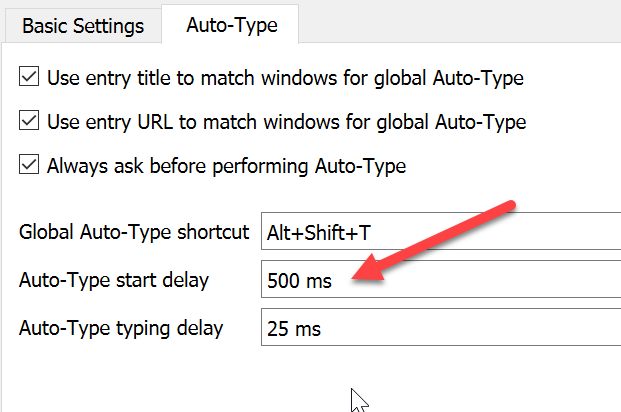
This could be that you are still holding down the modifier keys when typing starts. Try adding a longer delay in the auto-type settings.
droidmonkey
on 15 Feb 2020
How could it be connected to the issue? I don't understand the logic (letters "aA" could be anywhere in {USERNAME}...).
Anyway, I've tested that with no improvement ;)
l0f4r0
on 15 Feb 2020
Ah I thought you meant just from the beginning of the autotype. If you are using an alternate keyboard layout then this is a known issue on linux.
droidmonkey
on 15 Feb 2020
hought you meant just from the beginning of the autotype. If you are using an alternate keyboard layout then this is a known issue on linux.
I'm using Generic 105-key PC (intl.) - french layout.
So it's known issue?
l0f4r0
on 15 Feb 2020
See #2475 and #324
droidmonkey
on 15 Feb 2020
Related issues
 n1trux
·
3Comments
n1trux
·
3Comments
 Throne3d
·
3Comments
Throne3d
·
3Comments
 shaneknysh
·
3Comments
shaneknysh
·
3Comments
 bleepnetworks
·
3Comments
bleepnetworks
·
3Comments
 rugk
·
3Comments
rugk
·
3Comments
Most helpful comment
Ah so I am not the only one that got confused by that!