Keepassxc: Ctrl+C does not work as expected
The new version KeePassXC 2.4.0 behaves differently than the previous version.
Expected Behavior
Ctrl + C should copy the password into the clipboard of the selected item.
Current Behavior
Ctrl + C does nothing or copies the wrong text but not the password.
Steps to Reproduce
For illustration purposes I created a new database according to the pattern:
|-> Root --> My first password
Case 1:
If I now open the database the folder Root is automatically selected and the first and only item with the title "My first password". If I now press Ctrl + C the password should be copied to the clipboard from this item, this was the case in the previous version, instead either nothing happens or the title of the item is used (no joke the text "My first password" is copied to the clipboard instead of the password).
To make it work I have to click with the mouse on the item "My first password", only then Ctrl + C works as it should.
Case 2:
Click on the folder "Root" with the mouse, the item "My first password" is automatically selected. Now press Ctrl + C again and the folder name "Root" will be copied into the clipboard instead of the password of the selected item "My first password". Just like above the item has to be clicked again to copy the password with Strg + C.
Debug Info
KeePassXC - Version 2.4.0
Revision: c51752d
Libraries:
- Qt 5.12.2
- libgcrypt 1.8.4
Operating system: Antergos Linux
CPU architecture: x86_64
Kernel: linux 5.0.3-arch1-1-ARCH
Enabled extensions:
- Auto-Type
- Browser Integration
- SSH Agent
- KeeShare (only unsigned sharing)
- YubiKey
 kpcee
kpcee
All 19 comments
You need to explicitly select the entry before shortcuts work for it.
 droidmonkey
on 24 Mar 2019
droidmonkey
on 24 Mar 2019
Okay, thanks for the quick response, but it worked in the previous versions and now no longer. If you have to click on the items manually, it doesn't make sense for KeePassXC to automatically select the first item in the current folder. Either there is a current item if one is selected or imho nothing should be selected automatically.
kpcee
on 24 Mar 2019
The difference is what element has _focus_. This was a change made in 2.4.0 to prevent unwanted copying of passwords to the clipboard when interacting with other elements of the GUI. You can also simply press TAB which will change focus from the search field, group pane, then to the entries pane. The search field receives focus right after unlocking the database. Note the difference in shading in these two screenshots (and the contents of the preview pane) as well as the enabling of the toolbar icons:
Search field has focus:

First entry has focus:
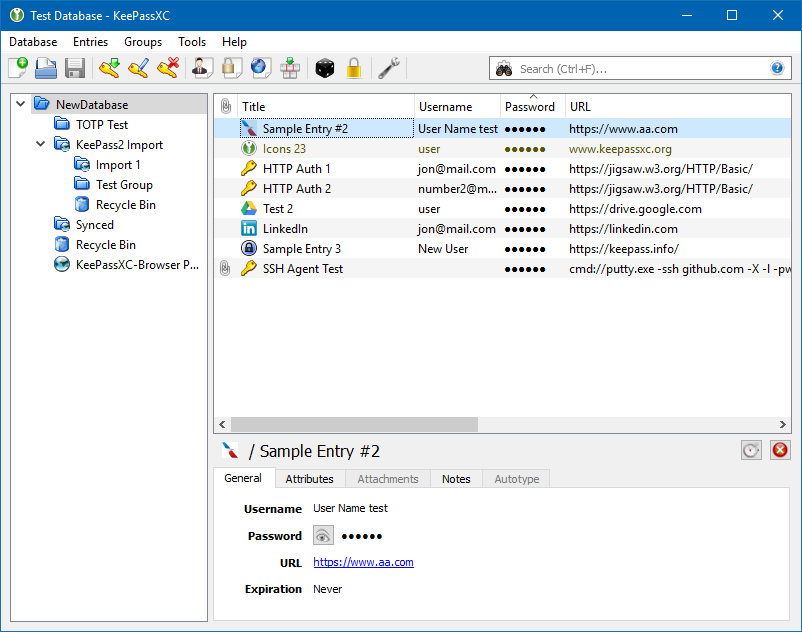
droidmonkey
on 24 Mar 2019
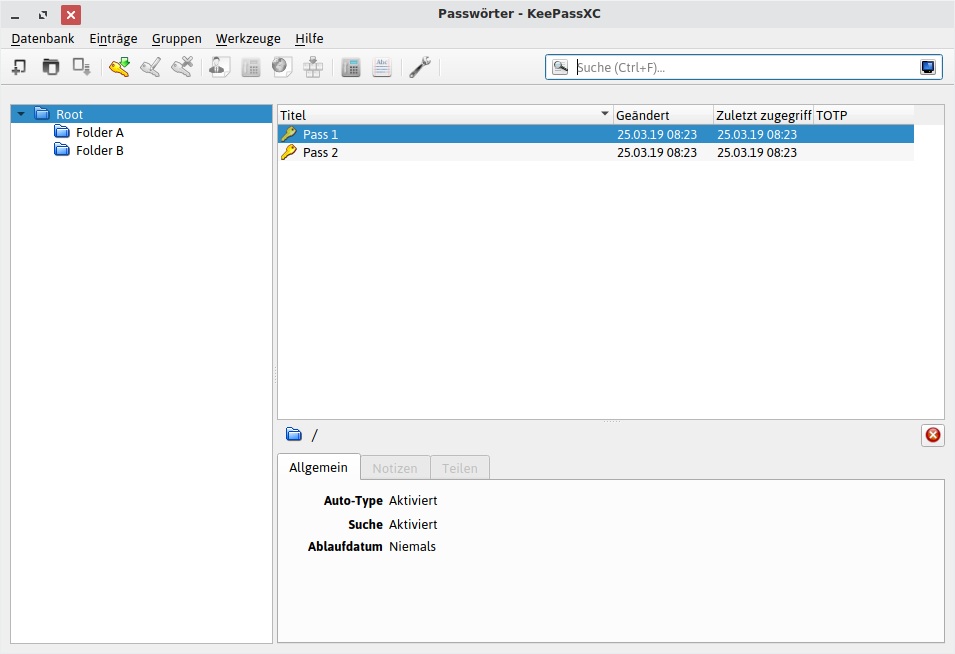
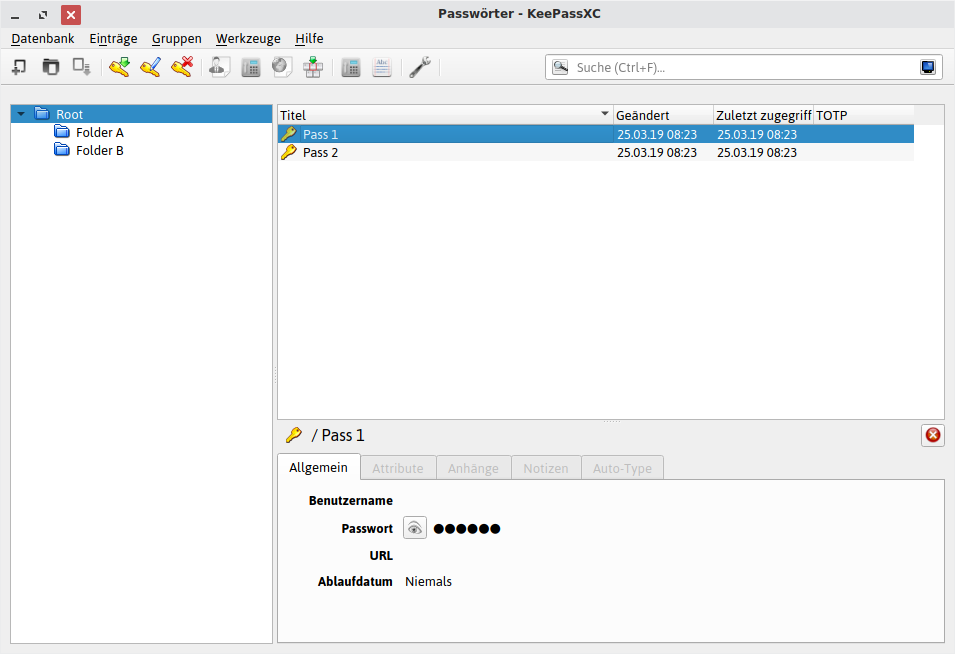
For me this is a step backwards and it has never happened to me by mistake to have copied the password. If you now press Ctrl + C different things can be copied depending on where the focus is and this makes the behaviour erratic. Under Linux (Xfce) I don't see any real graphical differences and you have to pay attention to the icons or preview instead.
Search field has focus:
First entry has focus:
kpcee
on 25 Mar 2019
If the search field is selected, Ctrl+C/V/X are supposed to work on that, not anything else. Xfce not making a visual distinction between selected and in focus vs. not in focus is a bug in their theme.
 phoerious
on 25 Mar 2019
phoerious
on 25 Mar 2019
Okay, then I have to do a downgrade and use the last properly working version 2.34 as long as possible.
kpcee
on 25 Mar 2019
You have to press down arrow after the search to focus on the first item, TAB key doesn't change focus for some reason
 anotherbugmaster
on 25 Mar 2019
anotherbugmaster
on 25 Mar 2019
Every other program on your computer only copies information you have selected in the gui. How is this any different? If anything the previous implementation was utterly flawed because it did actions the user wasn't expecting. You're welcome to downgrade if you want, but for this trivial thing is not advised.
droidmonkey
on 25 Mar 2019
@droidmonkey I used to press Enter after the search and Ctrl-C to copy the password of the first entry, but now Enter key opens the first entry of the search, was it intended?
anotherbugmaster
on 25 Mar 2019
Yes absolutely. You need to press down arrow to select the entry before interacting with it. I left the enter to open exception in place because it is harmless
droidmonkey
on 25 Mar 2019
I now use the old version again and have tested it. In fact, the first item is not shown as selected in the preview pane after unlock the database. But you can't see that, as you can see on the screenshots, no matter what theme is selected.
Nevertheless, this behavior has been so since KeePassX 0.xx and is much more user-friendly than what has been done now. Perhaps you can add a setting if the first item of a folder should be selected automatically and everybody could decide for himself how he likes it.
kpcee
on 25 Mar 2019
I could entertain a setting such as "Allow password copy in search"
droidmonkey
on 25 Mar 2019
Yes, that would be great if it would make the previous behavior available again. Maybe it would also be useful to select the item instead of just copying the password so that it is displayed in the preview pane as the current item.
kpcee
on 27 Mar 2019
FWIW I agree this is a step backwards, and would appreciate a setting to get the old behavior back. Before finding this discussion, I thought copying via keyboard shortcuts was broken entirely.
 The-Compiler
on 28 Mar 2019
The-Compiler
on 28 Mar 2019
Every change we make 50% consider a step forward and 50% consider a step backwards. I'll think about this, as it relates to searching only, and see what makes the most sense when interacting with the gui.
droidmonkey
on 28 Mar 2019
Every change we make 50% consider a step forward and 50% consider a step backwards. I'll think about this, as it relates to searching only, and see what makes the most sense when interacting with the gui.
Fair point - I can't speak for others, but I was quite happy when switching from KeePassX to XC because of the much increased keyboard-only usability (less dialogs, etc.), so I guess I got quite used to enter a search term and then press ctrl-c immediately.
Have you considered making ctrl-c (and related keys) in the search field copy the current entry, but only when there's no text selected in the search? I feel like that might make both groups happy - if there's no text selected, I assume you wouldn't accidentally copy a password instead of the text?
You can also simply press TAB which will change focus from the search field, group pane, then to the entries pane.
The down key seems to work, but I currently have to press the tab key four times to get there. First the focus goes somewhere random (haven't figured out where), then to the eye-button for the password, then to the group selection, then to the search results.
The-Compiler
on 2 Apr 2019
@The-Compiler That is how it worked before, I am going to generate a PR for 2.4.1 to bring that back in.
droidmonkey
on 2 Apr 2019
Hi, I actually expect it to work as describe here for 2.4.0. But when I do that ctrl-c/v/b are not working for me. I have to open up the entry and select the text there to copy.
This seem to have to do with the clear clipboard after setting. If I activate that it will not work. If I turn it of it works.
 jpyllman
on 4 Apr 2019
jpyllman
on 4 Apr 2019
Hi, I actually expect it to work as describe here for 2.4.0. But when I do that ctrl-c/v/b are not working for me. I have to open up the entry and select the text there to copy.
This seem to have to do with the clear clipboard after setting. If I activate that it will not work. If I turn it of it works.
OK, this is probably related to #2358. Even if I have not activated that feature.
jpyllman
on 5 Apr 2019
Related issues
 amvasilyev
·
3Comments
amvasilyev
·
3Comments
 Throne3d
·
3Comments
Throne3d
·
3Comments
 bleepnetworks
·
3Comments
bleepnetworks
·
3Comments
 MisterY
·
3Comments
MisterY
·
3Comments
 guihkx
·
3Comments
guihkx
·
3Comments
Most helpful comment
I could entertain a setting such as "Allow password copy in search"