Keepassxc: Multiple issues when opening databases in 2.4.0
Expected Behavior
When opening my databases
- (kdbx3.1, AES)
- (kdbx4, ChaCha20, Argon2)
protected by password and key-file from version 2.3.4 , I want to be able to open the database in release 2.4.0
Current Behavior
- When opening my database 1 with key I get a 'database corrupted' error when trying to open.
- When opening my database 2 with key I get a HMAC error when trying to open.
- When opening my database 2 without key, the database can be opened. When changing database settings to use a the key again, I get a segmentation fault.
I am sorry for not providing any more details on the segfault.
Debug Info
KeePassXC - Version 2.4.0
Revision: c51752d
Libraries: Qt 5.12.2, libgcrypt 1.8.4
Operating system: Arch Linux
CPU architecture: x86_64
Kernel: linux 5.0.2-arch1-1-ARCH
Comment
Since this is such a critical application, I am a little concerned. Upgrading to a stable version should not break the application to that extend.
Still I don't want to criticize you, but rather thank you for making this project possible! I am a happy patron through liberapay, btw. Please consider taking yourself more time before a release.
 alexg-k
All 30 comments
Same issue here, my database with keyfile does not open. Databases without key files seem to work fine.
KeePassXC - Version 2.4.0
Revision: c51752d
Libraries:
- Qt 5.12.2
- libgcrypt 1.8.4
Operating system: Arch Linux
CPU architecture: x86_64
Kernel: linux 5.0.3-arch1-1-ARCH
Enabled extensions:
- Auto-Type
- Browser Integration
- SSH Agent
- KeeShare (only unsigned sharing)
- YubiKey
 foosinn
on 22 Mar 2019
foosinn
on 22 Mar 2019
Are you both using legacy key files made by KeePass2?
 droidmonkey
on 22 Mar 2019
droidmonkey
on 22 Mar 2019
Hi have the same issue.
I'm using keyfiles that were previously warned about being legacy format. Problem is trying to regenerate new keyfiles in KeePassXC 2.4 results in the following crash:
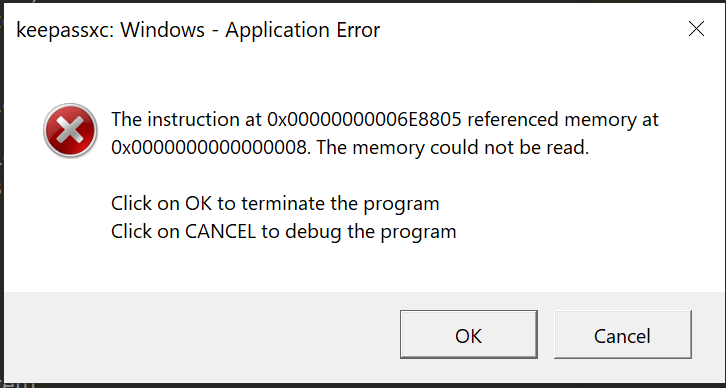
In once case I could recover one database by generating new keys on KeepassXC v2.2.0 on MacOS which then restored the warning about legacy key format.
On another database, following exactly the same steps to generate new keyfiles still results in 'corrupted database' warnings.
Another database is unaffected and opens in KeepassXC 3.4.0
All databases are AES256 and use password + keyfile.
I echo OPs concerns about jumping into future upgrades.
KeePassXC - Version 2.4.0
Revision: c51752d
Libraries:
- Qt 5.12.1
- libgcrypt 1.8.4
Operating system: Windows 10 (10.0)
CPU architecture: x86_64
Kernel: winnt 10.0.17763
Enabled extensions:
- Auto-Type
- Browser Integration
- SSH Agent
- KeeShare (signed and unsigned sharing)
- YubiKey
 mcx808
on 22 Mar 2019
mcx808
on 22 Mar 2019
I have replicated the crash. I will investigate.
droidmonkey
on 22 Mar 2019
Are you both using legacy key files made by KeePass2?
Yes, I use Keepass 2 files to be compatible with my coworkers.
foosinn
on 22 Mar 2019
Are you both using legacy key files made by KeePass2?
No, the seg fault happens when I try to generate a new key file for my existing database in the settings.
alexg-k
on 22 Mar 2019
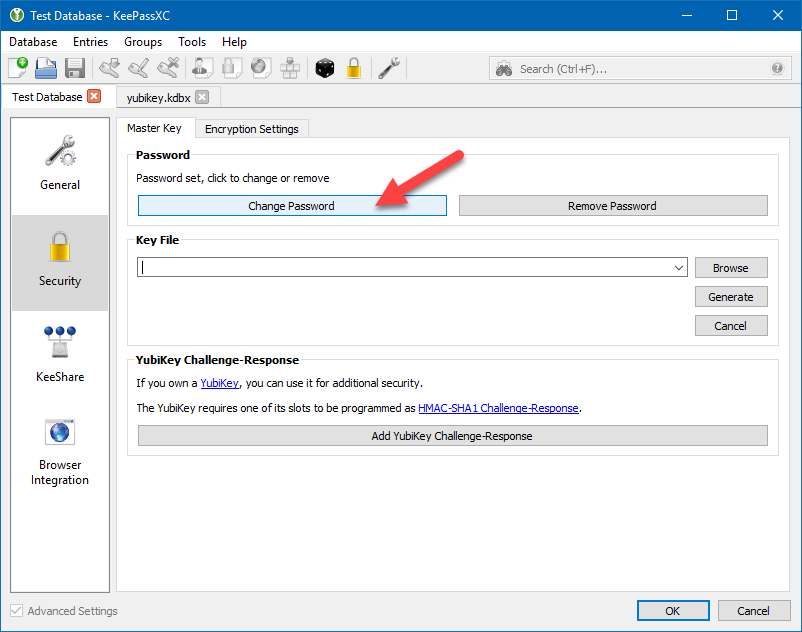
The crash occurs if you have the password edit field hidden when changing the keyfile. As a workaround, show the password edit, re-enter your password, then press OK. Apparently the whole GUI is not initialized when that settings dialog is shown which causes the crash.
droidmonkey
on 22 Mar 2019
BTW this is my fault, somehow while testing the feature to allow blank passwords this crash never occurred.
droidmonkey
on 22 Mar 2019
No worries, stuff happens.
Could you reproduce the error on my database 1? Was support for key-files from older versions or kdbx3.1 databases dropped with 2.4.0?
alexg-k
on 22 Mar 2019
We actually did not touch the actual keyfile functionality in 2.4.0. The issue with legacy key files came up during beta testing, but the user resolved it by creating a new legacy key file.
droidmonkey
on 22 Mar 2019
Would you be willing to share your keyfile that does not work in 2.4.0? You can replace the actual hash code with 0's.
Example:
<?xml version="1.0" encoding="utf-8"?>
<KeyFile>
    <Meta>
        <Version>1.00</Version>
    </Meta>
    <Key>
        <Data>000000000000000000000000000</Data>
    </Key>
</KeyFile>
It looks just like yours:
<?xml version="1.0" encoding="UTF-8"?><KeyFile><Meta><Version>1.00</Version></Meta><Key><Data>00000000000000000000000000000000000000000000</Data></Key></KeyFile>
alexg-k
on 22 Mar 2019
The crash occurs if you have the password edit field hidden when changing the keyfile. As a workaround, show the password edit, re-enter your password, then press OK. Apparently the whole GUI is not initialized when that settings dialog is shown which causes the crash.
The crash occurs if you have the password edit field hidden when changing the keyfile. As a workaround, show the password edit, re-enter your password, then press OK. Apparently the whole GUI is not initialized when that settings dialog is shown which causes the crash.
This workaround works for me so far, I will update my keyfiles.
FYI my database format is kdbx v3.1. I need to keep this to maintain compatibility with minikeepass on iOS for the time being.
Cheers
mcx808
on 22 Mar 2019
FYI my database format is kdbx v3.1. I need to keep this to maintain compatibility with minikeepass on iOS for the time being.
Cheers
Thank you. I am happy to hear that.
So this workaround shows how to get a key file included into my database (without key file!), but it does not explain why I can't unlock my original database (with keyfile) in the first place.
alexg-k
on 22 Mar 2019
That I cannot answer at this time.
droidmonkey
on 22 Mar 2019
The keyfile error is caused by a '/' being present in the data section of the key. This will be fixed in 2.4.1. Also see #2863.
droidmonkey
on 24 Mar 2019
Same issue here when opening my database with 2.4.0 it says : corrupted...
With 2.3.4 no problem at all
 fabien4455
on 26 Mar 2019
fabien4455
on 26 Mar 2019
Same issue when opening a database with a legacy key file.
But I have to use such key file because I really need a compatibility with the regular KeePass app.
So I had to roll back my KeePassXC version to 2.3.4.
 satorg
on 26 Mar 2019
satorg
on 26 Mar 2019
"Regular" KeePass is totally able to read non-legacy keyfiles. They only refuse to generate them.
 phoerious
on 26 Mar 2019
phoerious
on 26 Mar 2019
@phoerious It becomes too tricky to deal with it: I have to generate new key file using KeePassXC, but I cannot open my database file with it to change this database. I wouldn't like to experiment with such sensitive files like password databases until all applications I use have got full support for new key file format.
After all, what is wrong with legacy key files?
satorg
on 26 Mar 2019
Legacy key files add unnecessary complexity (as you can clearly see, this would not have happened with non-legacy keyfiles), do not scale well to other KDFs and generally don't make any sense.
You can use KeePassXC 2.3 to generate and set a new key file and then upgrade. You can also generate a new keyfile with any other tool you want (e.g., dd if=/dev/urandom of=keyfile), since they have no specific format.
phoerious
on 26 Mar 2019
Hmm.. You mean that new keyfiles are just random binary sequences? But if it is so, why does the new KeePassXC version refuse to read such files? As I know, KeePass treats keyfiles exactly in this way – just as some binary. Why could not KeePassXC take them in the same way?
satorg
on 26 Mar 2019
This has been discussed elsewhere on this issue board, I recommend spending some time to learn about it.
droidmonkey
on 26 Mar 2019
Actually, it was a rhetorical question )
Honestly, I've spent plenty of time already trying to figure out, what happened to my database. I got your point and I'm going to follow your advice and to regenerate my key files in a new manner, but since I see lot of other issues with this release here, I think I'll wait for the next one first. Anyway, KeePassXC is a great app and you guys do really great job, thank you for it.
satorg
on 26 Mar 2019
This is so peculiar. Everybody's raving about how KeePass can use just any file as a key file, when in fact that's exactly what KeePass is NOT doing that and everybody's still using these damn legacy files (which are not just random bytes, but a structured format), because it's the only thing KeePass generates.
phoerious
on 26 Mar 2019
Don't know why everyone is talking about legacy key files. I can actually reproduce it with freshly generated ones…
STR
- Have a DB with only password.
- Go to settings, add a new security info -> keyfile.
- Generate a keyfile
Result
$ keepassxc
Warning: disregarding XDG_SESSION_TYPE=wayland
To use wayland anyway, please set QT_QPA_PLATFORM=wayland
QObject::startTimer: Timers cannot have negative intervals
[1]    3869 segmentation fault  keepassxc
And no, my keyfile has no literal /, just binary data.
Workaround
As it has been said, I can work around the issue, if I also click "change password" and enter my new existing password. does not matter whether you enable viewing the password or not.
 rugk
on 10 Apr 2019
rugk
on 10 Apr 2019
That's an entirely different issue and already fixed in 2.4.1.
phoerious
on 10 Apr 2019
Okay, thx, thought it's the same as the workaround was (nearly) the same…
rugk
on 10 Apr 2019
Wait… but there is no 2.4.1. At least on GitHub nothing is tagged: https://github.com/keepassxreboot/keepassxc/releases Also downloads still mention 2.4.0. So nothing is released yet, as it seems.
rugk
on 10 Apr 2019
No, but will be in the next days.
phoerious
on 10 Apr 2019
Related issues
 amvasilyev
·
3Comments
amvasilyev
·
3Comments
 haroldm
·
3Comments
haroldm
·
3Comments
 clementlesne
·
3Comments
clementlesne
·
3Comments
 JosephHatfield
·
3Comments
JosephHatfield
·
3Comments
 nfnty
·
3Comments
nfnty
·
3Comments
Most helpful comment
The crash occurs if you have the password edit field hidden when changing the keyfile. As a workaround, show the password edit, re-enter your password, then press OK. Apparently the whole GUI is not initialized when that settings dialog is shown which causes the crash.