Keepassxc: Using google as fallback for getting an icon causes memory leak in gnome 3 wayland
When using the Download Favicon button for assigning an icon to an entry, if using the use google as a fallback option is selected, sometimes even if the icon is found, the software gets in some kind of loop stuck trying to download the icon (even though it already has). If I press Apply and then okay in short succession sometimes gnome-shell blooms from around 800mb of ram to 6.1 GB of ram and the system needs to be restarted entirely.
Expected Behavior
Current Behavior
Possible Solution
Perhaps check to see if an icon has been downloaded since the time the Download button has been pressed asynchronously every half a second and if one has kill all the different requests trying to grab it that keep calling?
Steps to Reproduce
1.
2.
3.
Context
Debug Info
Revision: 6fe821c
Libraries:
- Qt 5.11.3
- libgcrypt 1.8.4
Operating system: Fedora 29 (Workstation Edition)
CPU architecture: x86_64
Kernel: linux 4.20.13-200.fc29.x86_64
Enabled extensions:
- Auto-Type
- Browser Integration
- Legacy Browser Integration (KeePassHTTP)
- SSH Agent
- YubiKey
 Parkbro
All 14 comments
I tested this a bit with the DDG fallback in 2.4.0-beta2 on Windows. Related to this issue, I noticed that the download process seems to continue for some time (until a negative/positive response is received or a timeout is reached?) even after closing the entry. In the UI, this becomes apparent when then opening another entry and trying to download the favicon there as well - but finding the "Download favicon"-button disabled.
My expectation would be that the download processes are stopped when the entry is closed.
 whisdol
on 10 Mar 2019
whisdol
on 10 Mar 2019
sometimes gnome-shell blooms from around 800mb of ram to 6.1 GB of ram
Please explain this further. Does the KeePassXC application itself "bloom" to 6.1GB of ram? I have never seen it use more than 50 MB on Windows 10 and certainly not 500 MB.
 droidmonkey
on 12 Mar 2019
droidmonkey
on 12 Mar 2019
No not keepass itself, gnome-shell does but it's triggered by repeating the above steps in Keepass
Parkbro
on 12 Mar 2019
@Parkbro the favicon fetch changed pretty significantly since 2.3.4, Would you be able to install the 2.4.0 beta and see if the same behavior is happening on your gnome environment?
@whisdol I want to try to replicate the behavior you're seeing. I'm currently on Linux but can test on Win/OSX as well. Could you please post detailed steps to replicate it? Is there a certain URL that it happens to that you'd be willing to share?
In response to:
but finding the "Download favicon"-button disabled.
can you verify for me that the 2nd entry you clicked on has a URL set? In debugging this, I just want to make sure that button isn't supposed to be disabled in that moment (its only clickable when URL is set).
Thanks!
 kneitinger
on 13 Mar 2019
kneitinger
on 13 Mar 2019
@kneitinger Just testing on the latest appimage and there doesn't appear to be an issue any longer! Nice using ddg as a backup as well.
Parkbro
on 13 Mar 2019
@kneitinger
Yes, the second entry I open does contain a valid URL, in which the "Download favicon" button is usually active as well. A random URL to replicate this is http://51.15.34.100/ (not my server, the site might change):
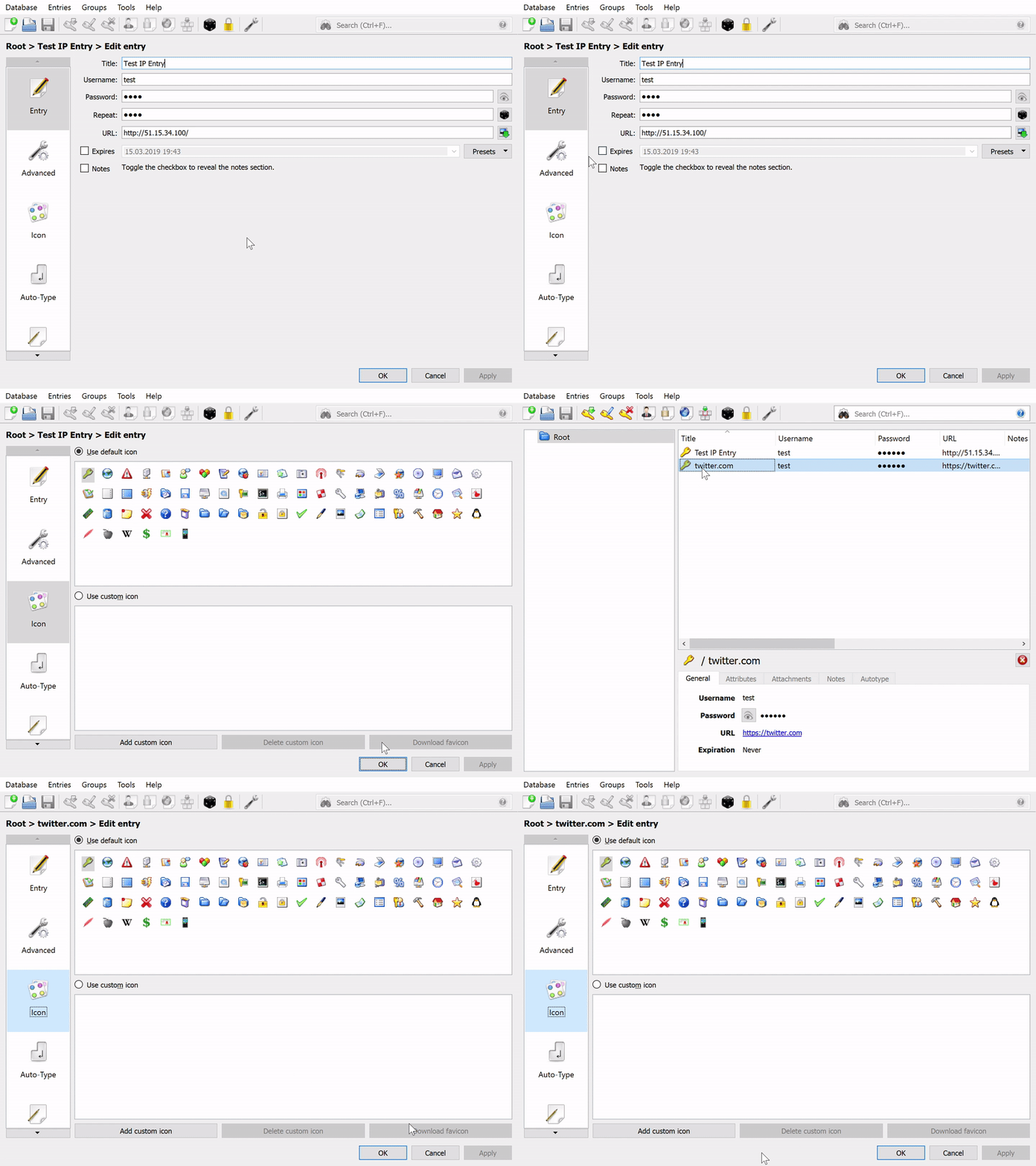
(Tested with 2.4.0-beta2 and DDG fallback activated.)
whisdol
on 15 Mar 2019
Awesome, thanks for the gif, it was very clear. I'll see if I can replicate it on various platforms today.
kneitinger
on 15 Mar 2019
@whisdol I was able to reproduce on Linux and MacOS.
It sometimes behaved slightly differently: occasionally, instead of hanging like your gif on the first try, I would get the red "Unable to fetch favicon" banner at the top of the window and have the
QNetworkReplyHttpImplPrivate::_q_startOperation was called more than once QUrl("http://51.15.34.100/favicon.ico")
warning logged to the console. The button would be clickable again, and upon clicking it, it would then exhibit the behavior you're seeing.
~Happy to look into fixing this problem, but I think it should not be a part of this GitHub issue, since it's a bit different than what this ticket was opened for. I recommend we consider this part of #2734 (due to the same console error message and other conditions, although not crashing in this case) or create a new issue.~ @droidmonkey thoughts?
Edit: after debugging, this is certainly not related to that issue.
kneitinger
on 16 Mar 2019
I agree with canceling the pending network operation when pressing OK or Cancel to close the edit entry view.
droidmonkey
on 16 Mar 2019
I seemed to have found and fixed the issue:
We first add the FQDN to the list of urls to try (with a /favicon.ico appended).
We also add the 2nd level domain, so for instance, if the entry's URL field is https://foo.bar.com, we'll attempt to try https://bar.com (also with the icon path added) in the first does not yield a result.
The issue happens when we try to find the 2nd level domain of an IP address:
QString getSecondLevelDomain(const QUrl& url)
    {
        QString fqdn = url.host();
        fqdn.truncate(fqdn.length() - url.topLevelDomain().length());
        QStringList parts = fqdn.split('.');
        QString newdom = parts.takeLast() + url.topLevelDomain();
        return newdom;
    }
Since an IP has no valid TLD, this function returns "100" if we feed it the example URL http://51.15.34.100/
When this line
m_urlsToTry.append(QUrl(m_url.scheme() + "://" + secondLevelDomain + "/favicon.ico"));
makes its best guess to make a URL out of that, it comes up with http://0.0.0.100/favicon.ico. Requests to that URL are the ones that are hanging. I added some code to check if the provided URL is an IP addr before trying the second level domain, and I believe it remediated the issue.
Before opening a PR, I'll do a sweep of where the network operations should be cancelled.
_Relevant snippets:_
_EditWidgetIcons.cpp: populating the m_urlsToTry list_
_EditWidgetIcons.cpp: second level domain method_
kneitinger
on 16 Mar 2019
@kneitinger Thanks for the investigation, that makes sense so far!
As you are investigating the second level logic, I found that this logic fails for entries with the URL https://www.secretescapes.de (red "Unable to fetch favicon" bar), while the favicon is retrieved correctly (via the DDG fallback) for an entry with https://secretescapes.de as the URL.
I believe this happens because the second level URL is not added to the list of URLs to try with the DDG fallback here: EditWidgetIcons.cpp#L210
(Sorry to further derail this thread...)
whisdol
on 16 Mar 2019
Oh great hypothesis! That makes a lot of sense, I'll test it out later today :+1:
kneitinger
on 16 Mar 2019
@whisdol your idea worked out very well, thanks!
kneitinger
on 17 Mar 2019
This issue can be closed.
kneitinger
on 24 Mar 2019
Related issues
 813gan
·
3Comments
813gan
·
3Comments
 haroldm
·
3Comments
haroldm
·
3Comments
 MountainX
·
3Comments
MountainX
·
3Comments
 amvasilyev
·
3Comments
amvasilyev
·
3Comments
 JosephHatfield
·
3Comments
JosephHatfield
·
3Comments
Most helpful comment
I seemed to have found and fixed the issue:
We first add the FQDN to the list of urls to try (with a
/favicon.icoappended).We also add the 2nd level domain, so for instance, if the entry's URL field is
https://foo.bar.com, we'll attempt to tryhttps://bar.com(also with the icon path added) in the first does not yield a result.The issue happens when we try to find the 2nd level domain of an IP address:
Since an IP has no valid TLD, this function returns
"100"if we feed it the example URLhttp://51.15.34.100/When this line
makes its best guess to make a URL out of that, it comes up with
http://0.0.0.100/favicon.ico. Requests to that URL are the ones that are hanging. I added some code to check if the provided URL is an IP addr before trying the second level domain, and I believe it remediated the issue.Before opening a PR, I'll do a sweep of where the network operations should be cancelled.
_Relevant snippets:_
_EditWidgetIcons.cpp: populating the m_urlsToTry list_
_EditWidgetIcons.cpp: second level domain method_