Keepassxc: [pre-release] KeeShare options don't show certificate panel
I'm using the pre-release 2.4.0-beta2. In the settings for KeeShare, there is no panel for the "Own certificate", as it is mentioned and shown in the documentation of the feature branch: https://github.com/hicknhack-software/keepassxc/blob/feature/sharing_groups/docs/QUICKSTART.md#enable-sharing
This is how the settings look for me:
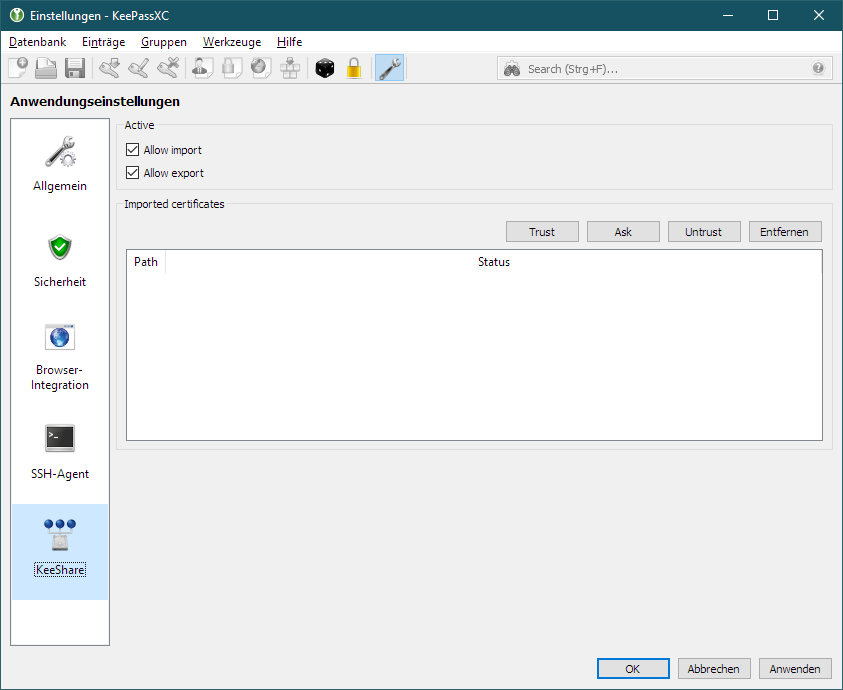
I'm not sure, whether this was dropped somewhere in the development. However, when I want to synchronize a group, I get the follwing warning: "We cannot verify the source of the shared container because it is not signed. [...]". So I expect there is the pssibility to sign the container.
Debug Info
KeePassXC - Version 2.4.0-beta2
Build Typ: PreRelease
Revision: 9bc20f0
Bibliotheken:
- Qt 5.12.1
- libgcrypt 1.8.4
Betriebssystem: Windows 10 (10.0)
CPU-Architektur: x86_64
Kernel: winnt 10.0.17763
Aktivierte Erweiterungen:
- Auto-Type
- Browser-Integration
- SSH-Agent
- KeeShare (only unsigned sharing)
- YubiKey
 franzlst
All 7 comments
I forgot to build in the protected share for beta 2. It'll be in the final
 droidmonkey
on 2 Mar 2019
droidmonkey
on 2 Mar 2019
Own certificate panel is still missing for me in Arch and AppImage version. Also when selecting an certified keeshare-file (kdbx.share) I get an error stating it isn't supported.
 ghost
on 22 Mar 2019
ghost
on 22 Mar 2019
KeeShare secure is not supported in AppImage at this time. You can use the snap build or build from source.
droidmonkey
on 22 Mar 2019
I have the same issue under OSX using the official 2.4.0 release: the panel to generate a certificate is missing. Should I open another issue for that?
 benjaminfrank
on 26 Mar 2019
benjaminfrank
on 26 Mar 2019
No, that's because homebrew does not provide quazip5. I guess we may have to submit that ourselves.
 phoerious
on 26 Mar 2019
phoerious
on 26 Mar 2019
In arch I also don't have certificate panel. Is this Arch problem or I do just have to install some library?
 jkolo
on 31 Mar 2019
jkolo
on 31 Mar 2019
You need to compile with -DWITH_XC_KEESHARE_SECURE=ON. It's not included in -DWITH_XC_ALL as of yet.
phoerious
on 31 Mar 2019
Related issues
 shaneknysh
·
3Comments
shaneknysh
·
3Comments
 rugk
·
3Comments
rugk
·
3Comments
 amvasilyev
·
3Comments
amvasilyev
·
3Comments
 TheZ3ro
·
3Comments
TheZ3ro
·
3Comments
 bleepnetworks
·
3Comments
bleepnetworks
·
3Comments