Keepassxc: All passwords corrupted
Hi,
I just noticed that most of my passwords show up as binary garbage on all of my devices (EL7, Fedora Linux, Android, Chrome browser). Trying to 'Repair Database' says there's no error.
This has all of the symptoms from https://github.com/keepassxreboot/keepassxc/issues/1784 except I've only been using KeePassXC 2.3.3 and 2.3.4. (I started only a few months ago).
I've also been using:
- CKP in Chrome (CKP - KeePass integration for Chrome™) because KeePassXC Browser could never detect fields properly on Unifi Controller/UNMS
- InSync on Linux and Windows (to sync with my Gdrive where my DB is stored)
- Keepass2Android on Android
- KeepassXC 2.3.3 and 2.3.4 AppImage on RHEL7. Native keepassxc on Fedora 28.
$ rpm -q keepassxc
keepassxc-2.3.4-1.fc28.x86_64
I'm starting to think that the corruption happened several days/weeks ago as some of the most recent passwords do appear fine (alas, it's only about 2-4 passwords out of over 500)
Is there anything to do to fix this?
 ElCoyote27
All 32 comments
Interesting, I decided to export my passwords to a CSV file and here's what I can tell:
- Total of 533 entries.
- The first few 150+ entries are file but the subsequent entries after line 172 are corrupted.. As if -something- had stumbled on an issue and corrupted the rest of the passwords in the file.
Perhaps the fact that it exports fine as csv and shows before and after behavior around a specific could the developers some hints.
ElCoyote27
on 2 Mar 2019
Can you try exporting your database as xml use the cli? keepassxc-cli export ...
 droidmonkey
on 2 Mar 2019
droidmonkey
on 2 Mar 2019
Hi @droidmonkey, Sorry for the late reply, I was busy dealing with the emergency of corrupted passwords.
At the end of the day, I:
1) switched back from CKP to KeepPassXC-Browser.
2) re-exported my passwords from Google Chrome and re-imported in KeepassXC.
With that, I was able to get back to a working state.
Back to your question.. What would be the purpose of exporting as XML? Both the KeepassXC GUI (2.3.4) and the CSV export showed mid-flight corruption. Do you only wish to check if it worked on the corrupted database?
ElCoyote27
on 5 Mar 2019
The xml export is a direct extraction of the encrypted xml database. The other methods are reading data, interpreting it, and spitting it out in a different format. There are a lot of things that can go wrong in that sequence. If the XML itself is corrupted, then I can be comfortable knowing it's not something in between.
droidmonkey
on 5 Mar 2019
Hi,
The issue just re-surfaced and I wonder if there isn't something else at play here.. I just attempted to export as CSV from the KeePassXC AppImage and here's what I got:
[raistlin@daltigoth ~/World/Vincent/Google_Drive_Krynn/KPXC]$ ls -la
total 3132
drwxr-xr-x. 2 raistlin cdrom  4096 Mar  5 13:51 .
drwx------. 3 raistlin cdrom  4096 Mar  4 10:41 ..
-rw-r--r--. 1 raistlin cdrom 68292 Mar  5 13:50 krynn (2) (2) (2) (2) (2) (2) (2) (2) (2) (2) (2) (2) (2).csv
-rw-r--r--. 1 raistlin cdrom 68292 Mar  5 13:50 krynn (2) (2) (2) (2) (2) (2) (2) (2) (2) (2) (2) (2).csv
-rw-r--r--. 1 raistlin cdrom 68292 Mar  5 13:50 krynn (2) (2) (2) (2) (2) (2) (2) (2) (2) (2) (2).csv
-rw-r--r--. 1 raistlin cdrom 68292 Mar  5 13:50 krynn (2) (2) (2) (2) (2) (2) (2) (2) (2) (2).csv
-rw-r--r--. 1 raistlin cdrom 68292 Mar  5 13:50 krynn (2) (2) (2) (2) (2) (2) (2) (2) (2).csv
-rw-r--r--. 1 raistlin cdrom 68292 Mar  5 13:50 krynn (2) (2) (2) (2) (2) (2) (2) (2).csv
-rw-r--r--. 1 raistlin cdrom 68292 Mar  5 13:50 krynn (2) (2) (2) (2) (2) (2) (2).csv
-rw-r--r--. 1 raistlin cdrom 68292 Mar  5 13:50 krynn (2) (2) (2) (2) (2) (2).csv
-rw-r--r--. 1 raistlin cdrom 68292 Mar  5 13:50 krynn (2) (2) (2) (2) (2).csv
-rw-r--r--. 1 raistlin cdrom 68292 Mar  5 13:50 krynn (2) (2) (2) (2).csv
-rw-r--r--. 1 raistlin cdrom 68292 Mar  5 13:50 krynn (2) (2) (2).csv
-rw-r--r--. 1 raistlin cdrom 68292 Mar  5 13:50 krynn (2) (2).csv
-rw-r--r--. 1 raistlin cdrom 68292 Mar  5 13:50 krynn (2).csv
-rw-r--r--. 1 raistlin cdrom 68292 Mar  5 13:50 krynn (3) (2) (2) (2) (2) (2) (2) (2) (2) (2) (2) (2) (2) (2).csv
-rw-r--r--. 1 raistlin cdrom 68292 Mar  5 13:50 krynn (3) (2) (2) (2) (2) (2) (2) (2) (2) (2) (2) (2) (2).csv
-rw-r--r--. 1 raistlin cdrom 68292 Mar  5 13:50 krynn (3) (2) (2) (2) (2) (2) (2) (2) (2) (2) (2) (2).csv
-rw-r--r--. 1 raistlin cdrom 68292 Mar  5 13:50 krynn (3) (2) (2) (2) (2) (2) (2) (2) (2) (2) (2).csv
-rw-r--r--. 1 raistlin cdrom 68292 Mar  5 13:50 krynn (3) (2) (2) (2) (2) (2) (2) (2) (2) (2).csv
-rw-r--r--. 1 raistlin cdrom 68292 Mar  5 13:50 krynn (3) (2) (2) (2) (2) (2) (2) (2) (2).csv
-rw-r--r--. 1 raistlin cdrom 68292 Mar  5 13:50 krynn (3) (2) (2) (2) (2) (2) (2) (2).csv
-rw-r--r--. 1 raistlin cdrom 68292 Mar  5 13:50 krynn (3) (2) (2) (2) (2) (2) (2).csv
-rw-r--r--. 1 raistlin cdrom 68292 Mar  5 13:50 krynn (3) (2) (2) (2) (2) (2).csv
-rw-r--r--. 1 raistlin cdrom 68292 Mar  5 13:50 krynn (3) (2) (2) (2) (2).csv
-rw-r--r--. 1 raistlin cdrom 68292 Mar  5 13:50 krynn (3) (2) (2) (2).csv
-rw-r--r--. 1 raistlin cdrom 68292 Mar  5 13:50 krynn (3) (2) (2).csv
-rw-r--r--. 1 raistlin cdrom 68292 Mar  5 13:50 krynn (3) (2).csv
-rw-r--r--. 1 raistlin cdrom 68292 Mar  5 13:50 krynn (3).csv
-rw-r--r--. 1 raistlin cdrom 64079 Mar  5 13:51 krynn_bad (2) (2) (2) (2) (2) (2) (2) (2).csv
-rw-r--r--. 1 raistlin cdrom 64079 Mar  5 13:51 krynn_bad (2) (2) (2) (2) (2) (2) (2).csv
-rw-r--r--. 1 raistlin cdrom 64079 Mar  5 13:51 krynn_bad (2) (2) (2) (2) (2) (2).csv
-rw-r--r--. 1 raistlin cdrom 64079 Mar  5 13:51 krynn_bad (2) (2) (2) (2) (2).csv
-rw-r--r--. 1 raistlin cdrom 64079 Mar  5 13:51 krynn_bad (2) (2) (2) (2).csv
-rw-r--r--. 1 raistlin cdrom 64079 Mar  5 13:51 krynn_bad (2) (2) (2).csv
-rw-r--r--. 1 raistlin cdrom 64079 Mar  5 13:51 krynn_bad (2) (2).csv
-rw-r--r--. 1 raistlin cdrom 64079 Mar  5 13:51 krynn_bad (2).csv
-rw-r--r--. 1 raistlin cdrom 64079 Mar  5 13:51 krynn_bad (3) (2) (2) (2) (2) (2) (2) (2).csv
-rw-r--r--. 1 raistlin cdrom 64079 Mar  5 13:51 krynn_bad (3) (2) (2) (2) (2) (2) (2).csv
-rw-r--r--. 1 raistlin cdrom 64079 Mar  5 13:51 krynn_bad (3) (2) (2) (2) (2) (2).csv
-rw-r--r--. 1 raistlin cdrom 64079 Mar  5 13:51 krynn_bad (3) (2) (2) (2) (2).csv
-rw-r--r--. 1 raistlin cdrom 64079 Mar  5 13:51 krynn_bad (3) (2) (2) (2).csv
-rw-r--r--. 1 raistlin cdrom 64079 Mar  5 13:51 krynn_bad (3) (2) (2).csv
-rw-r--r--. 1 raistlin cdrom 64079 Mar  5 13:51 krynn_bad (3) (2).csv
-rw-r--r--. 1 raistlin cdrom 64079 Mar  5 13:51 krynn_bad (3).csv
-rw-r--r--. 1 raistlin cdrom 64079 Mar  5 13:51 krynn_bad.csv
-rw-r--r--. 1 raistlin cdrom 68292 Mar  5 13:50 krynn.csv
-rw-------. 1 raistlin cdrom 39438 Mar  1 18:27 Krynn.good.kdbx
-rw-r--r--. 1 raistlin cdrom 42394 Mar  5 12:30 Krynn.kdbx
-rw-r--r--. 1 raistlin cdrom 40926 Mar  5 12:02 Krynn.old.kdbx
ElCoyote27
on 5 Mar 2019
Side information:
I was using 'insync' to sync my Gdrive (where my kdbx is located). Due to the unavailability of a GPU on my most recent system I had recently switched to 'insync-headless' (a lower version than 'insync'):
insync-headless-1.3.22.36179-el7.x86_64.rpm
vs:
insync-1.5.5.37367-fc26.x86_64.rpm
I've reverted to plain insync to try to isolate the issue.
ElCoyote27
on 5 Mar 2019
I can with 99.9% certainly say this is not something internal to KeePassXC. If it were, than we would be having a whole lot of people very upset.
droidmonkey
on 5 Mar 2019
I agree, this doesn't look like it. Are there recommendations/nest practices for using KeePassXC with GDrive? I'll reach out to insynchq to see what they have to say..
ElCoyote27
on 5 Mar 2019
GDrive is Google Drive, correct? I just use their sync app directly. Works without issue across multiple platforms.
droidmonkey
on 5 Mar 2019
I agree. I wonder if I was the cause of the issue by editing (adding entries) to my kdbx in GDrive from several different endpoints over a short amount of time (less than 15 minutes).
ElCoyote27
on 5 Mar 2019
The thing that baffles me is if the encrypted data was corrupted by the sync operations than it wouldn't decrypt at all. Also, the checksums would fail. This leads me to the point of there must have been some corruption PRIOR TO encryption. Which would technically be within the KeePassXC application. By why only the passwords? Were any other fields "corrupted"? Usernames or URL's?
If you can replicate the corruption on a test database without sensitive information and provide that to us for inspection, that would be very useful.
droidmonkey
on 5 Mar 2019
Yes, it is very surprising. All of the fields were there. No mangled username or URL.. only the passwords, halfway through the exported .csv file (and as seen from within the KeePassXC 2.3.4 AppImage) were corrupted (looked like some binary blob).
I found a copy of the old & corrupted kdbx, perhaps I'll see if I can provide it to you in an obfuscated manner. Would that work for you?
ElCoyote27
on 5 Mar 2019
Yes that would be perfect. You can email to [email protected], our PGP is
Team email PGP key: 105D 8D57 BB97 46BD
droidmonkey
on 5 Mar 2019
My guess is that some $#%&-up happened prior to or after the inner stream encryption, which is applied only to passwords and other explicitly protected fields.
 phoerious
on 6 Mar 2019
phoerious
on 6 Mar 2019
Hi,
Issue just re-surfaced:
[vcojot@skullcap KPXC]$ ls -la Krynn.*
-rw-rw-r--. 1 vcojot vcojot 40926 Mar  5 12:02 Krynn.20190305.kdbx <=== GOOD
-rw-rw-r--. 1 vcojot vcojot 54510 Mar 11 19:32 Krynn.kdbx <==== CORRUPTED
-rw-------. 1 vcojot vcojot 41198 Mar  7 09:31 Krynn.old.kdbx <=== GOOD
ElCoyote27
on 12 Mar 2019
The last time something like this cropped up it turned out the person had bad RAM. Have you had any kernel crashes recently?
droidmonkey
on 12 Mar 2019
Nope. I haven't had any of that (I'm using a Dell PowerEdge T440 as a workstation). The machine has ECC DDR4 server RAM and is using RHEL 7.6 so that's quite a stable combo.
-BUT- I'm pretty sure that the edits which triggered the corruption happened using the .AppImage version of KeePassXC. I'll do more testing tonight but I'd like to keep the issue open for now.
ElCoyote27
on 12 Mar 2019
Sure, if there is some sort of incompatibility it needs fixing because a corrupt database means a bad day for everyone.
droidmonkey
on 12 Mar 2019
Hi,
I may have found the source of the corruption: PyCharms 2018.3.5 (possibly as early as 2018.3.3).
I had configured PyCharms on my Desktop to save credentials into KeePassXC this way:
Appearance & Behaviour -> System Settings -> Passwords -> In KeePass, Database: <....>/Krynn.kdbx
I'm still trying to confirm the culprit but that looks like a good start.
I'll keep this ticket updated.
ElCoyote27
on 13 Mar 2019
You should have led with this information!
droidmonkey
on 13 Mar 2019
Yes. i'm still not 100% sure. Please accept my apologies. Is this a known problem with PyCharms? Or is it because it thinks it is talking to KeePass(not XC)
ElCoyote27
on 13 Mar 2019
Who knows, I didnt even know this interface existed.
droidmonkey
on 14 Mar 2019
It is weird, since about yesterday I noticed that at least 3 of my passwords (with over 50 passwords) are corrupted. But because my 3 backups (on 2 external HDDs) are also corrupted, I doubt that I have any filesystem corruption. (I used the passwords in the past few months, but my backup of last year also shows corrupted passwords.)
I backup my files manually, so the files are not "broken" and all of them open nicely either.
I tried the last three KeePassXC releases (2.3.4 _distribution package_, 2.3.3, 2.3.2 _both AppImage from github_) and all of them show the same.
I think some lib might be broken or has been changed since the last update of my system, this would explain it.
My OS: ParrotOS (based on debian rolling release distribution) - updated yesterday with over 500 updated packets.
Browser-Plugin: Firefox KeePassXC-Browser (doesn't access the mentioned passwords)
An idea to workaround would be a VM with not-updated packets. But this is of course only for critical passwords, not daily use.
 Loader009
on 14 Mar 2019
Loader009
on 14 Mar 2019
@Loader009 what do you mean by corrupted, exactly?
Using an appimage guarantees you won't be using your systems libraries.
droidmonkey
on 14 Mar 2019
@droidmonkey
Look here:
deleted image
This is obviously not my password. The length might be right.
The same for my other 2 passwords. Length seems to be correct but the password itself is just gibberish.
Loader009
on 14 Mar 2019
And you never accidentally activated the password generator with all the options enabled? This would overwrite your password if you pressed OK at the bottom of the edit screen. This was fixed in a recent version by asking you if you wanted to accept the password in the generator.
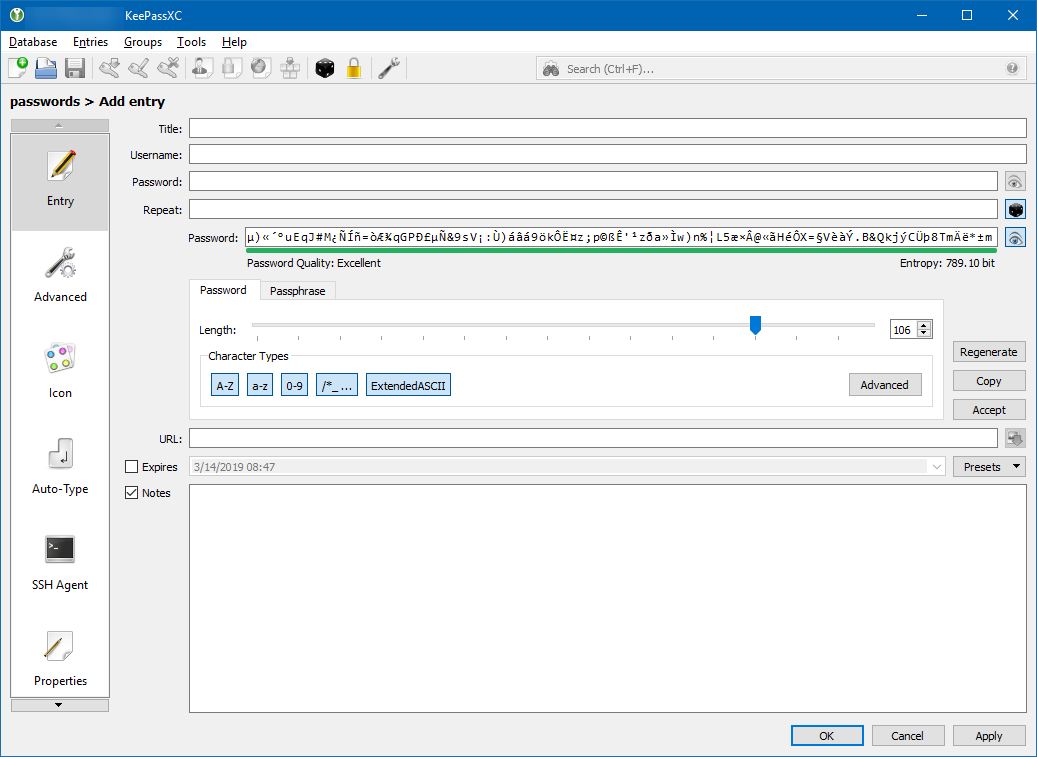
That password does not look corrupted at all, it is extended ascii.
droidmonkey
on 14 Mar 2019
@droidmonkey
You are right.
It's my mistake, sorry. (Luckily the password is more than double of the length of the image.)
I couldn't copy the passwords via doubleclick or via rightlick+copy. I assumed that "gibberish" cannot be copied, so I also assumed that the password ist corrupt.
So, sorry to bother this issue ticket, it was my mistake.
The problem is/was firejail, which blocked the copy feature for specific passwords (which is also weird).
I also get the following line (with working copy function) in the commandline:
Maximum depth of replacement has been reached. Entry uuid: e2fb04f751dda5a0557e06a2cb763ef0
The UUID belongs to the password of the screenshot (which I deleted now).
But everything works now.
Loader009
on 14 Mar 2019
You might have a recursive reference going on. That message indicates you are referencing a reference of a reference of a reference ..... etc. Firejail might be blocking extended ascii or the length of the clipboard (maybe it is interpreting it as a document or such).
droidmonkey
on 14 Mar 2019
Firejail isn't the issue, running KeePassXC (2.3.4 distribution package) directly gives the same line, whenever I go into the "folder" with the password (within KeePassXC, within the database) or whenever I copy the password via doubleclick. (Line doesn't appear with rightclick+copy.)
But the password looks to be correct, I copied it with doubleclick and with rightclick+copy, I get the same password as with firejail.
Loader009
on 14 Mar 2019
Are you using a clipboard manager?
droidmonkey
on 14 Mar 2019
No, not knowingly.
The distribution is security oriented, so I think that such apps aren't included.
Loader009
on 14 Mar 2019
I am closing this since it cannot be replicated.
droidmonkey
on 6 Apr 2019
Related issues
 MisterY
·
3Comments
MisterY
·
3Comments
 guihkx
·
3Comments
guihkx
·
3Comments
 mstarke
·
3Comments
mstarke
·
3Comments
 MountainX
·
3Comments
MountainX
·
3Comments
 nfnty
·
3Comments
nfnty
·
3Comments