Keepassxc: "Agent refused this identity" on Windows 10 Pro with v2.3.4 installed using chocolatey
I've like a dozen SSH Keys in my Database all of those could be imported to the putty pageant (v0.70) using old KeePass.
But using KeepassXC I can't get it to work, while opening the database all I see is this little error Message:
Screenshot
Agent refused this identity, Possible reasons include:
The Key has already been added.
But it certainly is not added...
Expected Behavior
Expect my Keys to be loaded to the agent
Current Behavior
only 4 of my about 12 are loaded
Debug Info
[KeePassXC - Version 2.3.4
Revision: 6fe821c
Bibliotheken:
- Qt 5.11.1
- libgcrypt 1.8.3
Betriebssystem: Windows 10 (10.0)
CPU-Architektur: x86_64
Kernel: winnt 10.0.17763
Aktivierte Erweiterungen:
- Auto-Type
- Browser Integration
- Legacy Browser Integration (KeePassHTTP)
- SSH Agent
- YubiKey
Operating system: Win10 Pro 1809 Build: 17763.316
CPU architecture: Intel (Core i-8250U)
 mircsicz
All 19 comments
Are all the keys the same type? Anything special about the ones that fail to load? This error pops up if Pageant does not return a response OR the response does not equal "success". Unfortunately there is not much fidelity in the response.
 droidmonkey
on 28 Feb 2019
droidmonkey
on 28 Feb 2019
Hi hi, the keys load fine to my ssh-agent on my MacBook using KeepasXC too, they are all ssh-rsa...
Isn't there a way to get pageant to output debug info's?
mircsicz
on 28 Feb 2019
Sorry, but "pageant --debug" and "pageant --help" only give me an error: Couldn't load this kex (unable to open file)
Seems it try's to open a file named like my parameter...
mircsicz
on 1 Mar 2019
You need to download the source and compile using MinGW using the command mingw32-make.exe -f Makefile.mgw COMPAT="-DDEBUG_IPC" then run pageant. When KeePassXC sends it a message a console window will pop up with debug output, also a debug.log will be generated in the same directory as pageant.exe. Please copy/paste the output to here. There is no sensitive data in the output besides your computer's SID.
I already did this and you are welcome to use my precompiled binary if you prefer: https://drive.google.com/open?id=1wnnf3WqlVbb0tCaycNRjmgykvQMb-K40
droidmonkey
on 1 Mar 2019
Thanks for the precompiled binary!
But when I run it and click the "add to agent" button in KeepassXC all I get is: "Agent protocol error" and no debug.log is generated...
mircsicz
on 1 Mar 2019
Interesting, when I tested it with my running instance of KPXC it worked flawlessly.
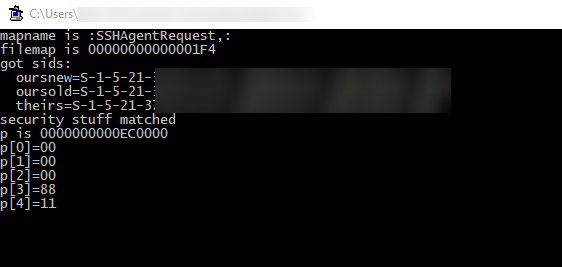
Actually, in reviewing the debug information it doesn't seem very useful at all. I'll see if I can add some more outputs to indicate where the issue is occuring.
droidmonkey
on 1 Mar 2019
Argghh, just tried different orders of starting keepassXC and pageant but the issue remains. Using "
pageant --debug" still got the same errors...
Then I realized I had it running in an Admin-Session :-(
So here's a log from adding a key that usually fails:
mapname is :SSHAgentRequestD:
filemap is 00000000000002F4
got sids:
  oursnew=S-1-5-21-1953974832-3190315616-3578785543-1001
  oursold=S-1-5-21-1953974832-3190315616-3578785543-1001
  theirs=S-1-5-21-1953974832-3190315616-3578785543-1001
security stuff matched
p is 0000000000680000
p[0]=00
p[1]=00
p[2]=06
p[3]=39
p[4]=11
And here's a log from the moment when all my key's. But as you said for me the log is nonsense...
Sharing your hope, hate to type my password's after so many years using an agent on MacOS...
mircsicz
on 1 Mar 2019
OK, so I am going to go on record here and state that Putty/Pageant is some of the worst code I have ever worked with.
Here is a build of pageant that will output the log messages to the same terminal type setup as before and the debug.log.
https://drive.google.com/open?id=1VEvRIqmmgcZLzLsufSum8eqDrl0vsOa8
droidmonkey
on 1 Mar 2019
THX a ton, here's the output from the same key as yesterday:
request: SSH2_AGENTC_ADD_IDENTITY
reply: SSH_AGENT_FAILURE (key setup failed)
On a successful add it looks like that:
request: SSH2_AGENTC_ADD_IDENTITY
submitted key: ssh-rsa 4096 f3:a5:49:20:1e:3d:db:d5:da:9e:10:c1:23:2f:1f:5e one_key
reply: SSH_AGENT_SUCCESS
mircsicz
on 2 Mar 2019
Ok now we are getting somewhere
droidmonkey
on 2 Mar 2019
So what's next?
mircsicz
on 4 Mar 2019
The key setup failed message appears when the openssh_createkey function return null:
bloblen = msgend - p;
key->data = key->alg->openssh_createkey(key->alg, &p, &bloblen);
if (!key->data) {
    sfree(key);
    fail_reason = "key setup failed";
    goto failure;
}
The only thing I can think of is the keys stored in your database are corrupt, truncated, or invalid in some way. Loading them externally probably works because they are still OK outside of your KPXC database. Try re-attaching your key files.
droidmonkey
on 4 Mar 2019
I've changed my keys from attachments to use of the external files, which are used and can all be added to the SSH-Agent on my Mac nad Linux machine, but sadly even that way they throw the same error...
mircsicz
on 5 Mar 2019
Without the actual key I cannot debug any further. Can you try creating a dummy key (with the same exact parameters as the ones that fail) that can replicate this issue and send to [email protected]?
droidmonkey
on 5 Mar 2019
Does converting the keys to the "new" OpenSSH format fix that issue? Old/normal RSA keys need processing before they are sent to the agent and that code is the likely culprit.
PuTTYgen can do that on Windows when you load a private key and select the new format when saving it back out.
Sorry it took me so long to notice this thread.
 hifi
on 7 Mar 2019
hifi
on 7 Mar 2019
@droidmonkey yesterday I spent quite some time generating keys for testing. What I learned is that through a script I've running in my WSL's Debian I can add keys inside Debian's ssh-agent and they'll be added to pageant. This way I can use those keys KeepassXC won't add with KiTTy... But I couldn't generate a key that did refuse to load from KeepassXC!
@hifi Awesome hint!!! Just regenerated one of the important keys with puttygen, didn't work with normal OpenSSH Format (KeepassXC refused the key), had to use (force new file format). I'll now regenerate all my other keys...
mircsicz
on 7 Mar 2019
So we are again in the situation where some people have some keys that some agent refuse to load but we don't have a test key that would exhibit the same problem that could be imported into the test suite.
Glad re-exporting to new file format worked for you, though. Too bad we can't fix the actual issue yet.
hifi
on 7 Mar 2019
Yeap, totally understood! Would have loved to provide a test-key...
One key that was refused is from a system that is to be shutdown at the end of the year, so I could provide that key in like 10 month :-( ;-)
mircsicz
on 7 Mar 2019
Certainly wouldn't refuse it. Since you have resolved your specific issue, I am going to close this ticket. We still have a mystery problem with certain key formats that needs addressing, but that is covered elsewhere.
droidmonkey
on 7 Mar 2019
Related issues
 Throne3d
·
3Comments
Throne3d
·
3Comments
 guihkx
·
3Comments
guihkx
·
3Comments
 clementlesne
·
3Comments
clementlesne
·
3Comments
 JosephHatfield
·
3Comments
JosephHatfield
·
3Comments
 n1trux
·
3Comments
n1trux
·
3Comments