Keepassxc: Open terminal for ssh:// urls
ssh:// url - not working when double click on url field and when use shortcut or chose from contents menu
on 2.3.1 working but URL field on list was empty.
Expected Behavior
double click on url with ssh://{username}@ip:22 should open terminal automatically
Current Behavior
ssh:// url - not working when double click on url field and when use shortcut or chose from contents menu
Possible Solution
Steps to Reproduce (for bugs)
- add to url eg. ssh://127.0.0.1:22
- Save
- try to Url open, double clic on URL or do CMD+U
Context
Debug Info
KeePassXC - 2.3.4
Revision: master
Libraries:
- LIBS
Operating system: OSX 10.14
CPU architecture: intel
Kernel: KERNEL
Enabled extensions:
- EXTENSIONS
 intonet
All 13 comments
You can work around this by making the URL the following command:
cmd://open ssh://127.0.0.1:22
Then you could execute auto-type to fill in the password and log in. Or if you are using a certificate to unlock the certificate.
 droidmonkey
on 29 Oct 2018
droidmonkey
on 29 Oct 2018
I think that it would be nice to add an option in settings to add custom schema handler applications like in KeePass 'Tools' → 'Options' → tab 'Integration' → 'URL Overrides'.
It can be used as a generic solution for other schemas too not only for ssh.
 PhoneixS
on 21 Feb 2019
PhoneixS
on 21 Feb 2019
Also, I think this isn't only for MacOs but for all systems.
PhoneixS
on 28 Feb 2019
I switch from Windows to Mac and i realy realy miss this feature.
The Workaround is... not that bad... but not as elegant as the doubleclick behavior on Windows with KeePass2.
I even would pay Money for that kind of feature ;-)
I am not that good at C++ ... mayby if someone could show me the right place in code, i will see if i can get ist to Work.
 ehrlich-media
on 6 Mar 2019
ehrlich-media
on 6 Mar 2019
I back to 2.2.4 version because of that.
intonet
on 6 Mar 2019
In 2.2.4 its working? ... Hmm but we dont wont to go back ;) We want to go forward.
As far as I see it shouldn't be that difficult zu implement it.
Somthing like:
If URL contains "ssh://" at the begining of the String replace it with mayby "cmd://open ssh://{USERNAME}@
Am I worng?
ehrlich-media
on 6 Mar 2019
The problem occurred because the fix introduced in 2.3.0 corrects bad behavior in other instances with URL's. Unfortunately that fix broke this use case. I absolutely do not recommend downgrading just for this issue, there are so many positive benefits to the 2.3.x baseline, not to mention support for KDBX 4.0 which you may be using and will not be able to use in 2.2.x.
This will be slated for fixing in 2.4.1
droidmonkey
on 6 Mar 2019
I had this working in v2.3.1 in Ubuntu 18.04. I just upgraded to 18.10 and it broke with v2.3.4. I have an ssh:// URL handler (via .desktop file) and it's not being launched (though it does with xdg-open). That said, it the ssh:// URL handling can be handled in-program, that would be great too.
Downgrading to 2.3.1 from Ubuntu 18.04 makes my URL handler work. I'm not sure the issue was introduced in 2.3.0.
 suwalski
on 13 Mar 2019
suwalski
on 13 Mar 2019
Hi, I confirm linux url handling not working on 2.4.0 too..
Downgrading to 2.3.3 Open URL works
Tested inside XFCE Desktop
Kind regards
 ugoviti
on 25 Mar 2019
ugoviti
on 25 Mar 2019
Hello KeepassXC contributors and developers!
I would extend this request to all URLs (not only "ssh://").
IMHO handover of URL processing to OS level is the best solution, because in this case each user may design URL fields in the way he likes by the defined apps.
So, f.e.:
1) http://, https:// - chosen browser will be opened
2) ssh:// - chosen SSH client will be opened
- custom URLs will be available for usage in KeepassXC, which I like really much for my daily work automation.
In 2.4.0 everything is interpreted as web-link (Mac OS Mojave). I would change logic to consider web-link only when no URL RegEX (^[a-zA-Z1-9]{1,}\://) exists in the field.
Regards,
Nikolay
 Niko-CZ
on 29 Mar 2019
Niko-CZ
on 29 Mar 2019
Opened https://github.com/keepassxreboot/keepassxc/pull/3153 to fix this. I tested with ssh:// and https:// on Linux and worked as expected.
 SohamG
on 17 May 2019
SohamG
on 17 May 2019
Hi. (I leave comment in task linked above too. )
I made test, and works for:
ssh://[email protected]:22
but not works when I use "{username}" variable
ssh://{username}@10.0.0.1:22
( in preview at Botton pane {username} in URL is replaced ok.)
Can you look at this again please?
intonet
on 10 Sep 2019
I can confirm this bug.
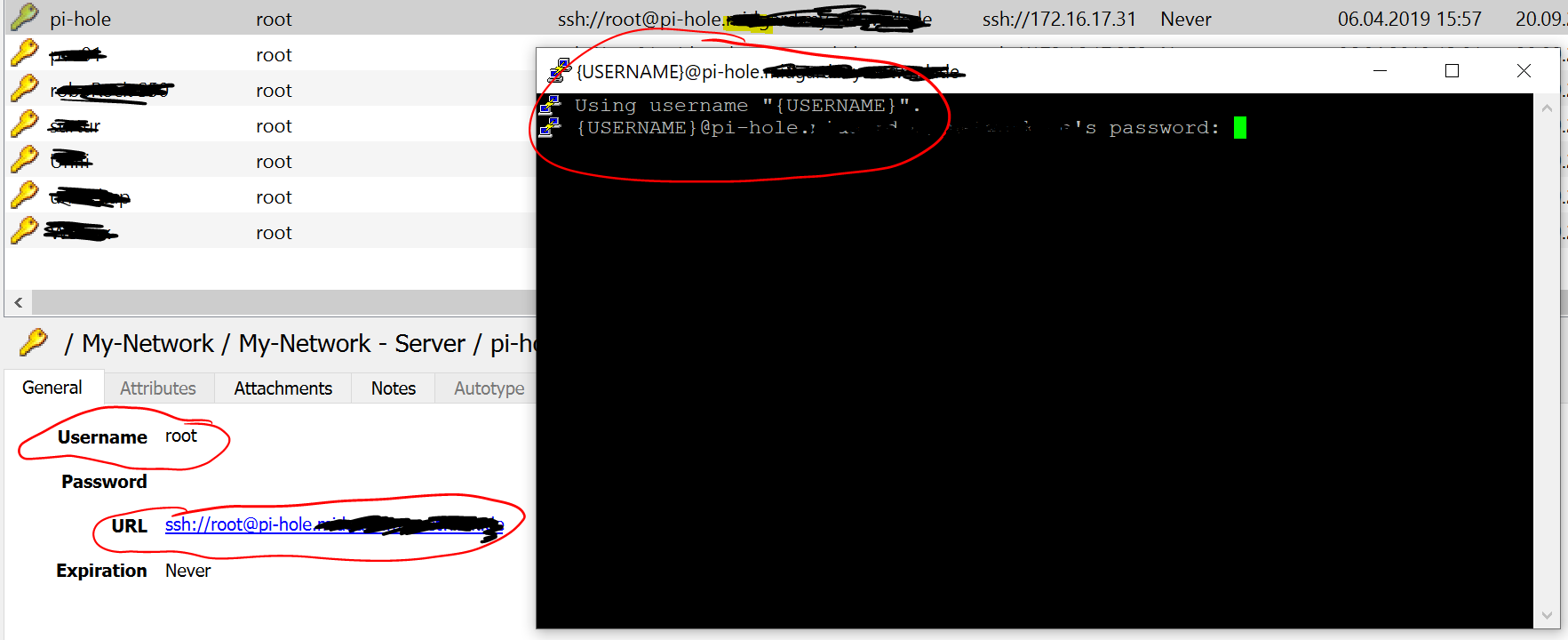
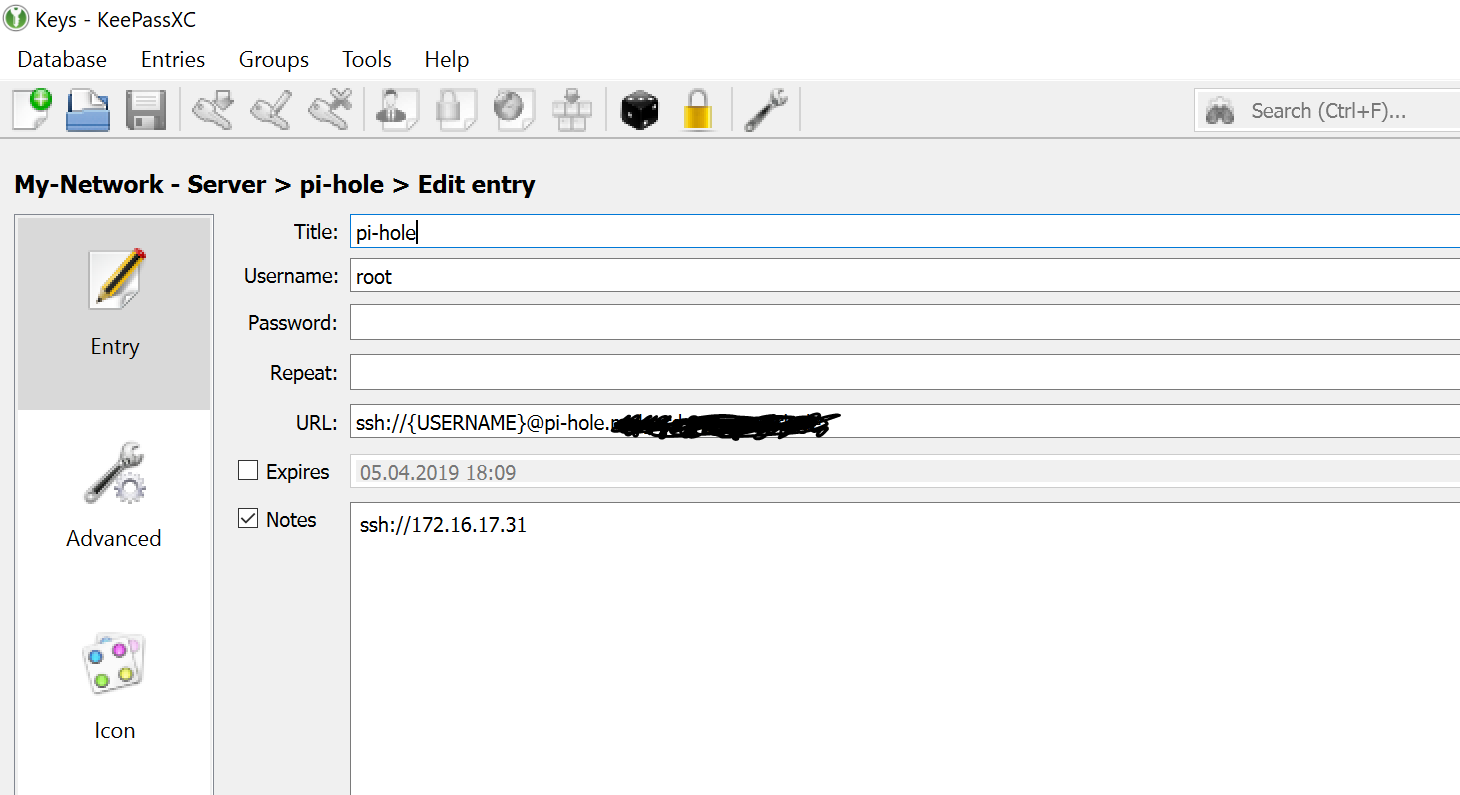
KeepassXC send out the variable "{username}" instead of the real username from the field.
--
KeePassXC - Version 2.4.3
Revision: 5d6ef0c
Qt 5.12.3
Debugging mode is disabled.
Operating system: Windows 10 (10.0)
CPU architecture: x86_64
Kernel: winnt 10.0.18362
Enabled extensions:
- Auto-Type
- Browser Integration
- SSH Agent
- KeeShare (signed and unsigned sharing)
- YubiKey
Cryptographic libraries:
libgcrypt 1.8.4
 BeNeDeLuX
on 20 Sep 2019
BeNeDeLuX
on 20 Sep 2019
Related issues
 amvasilyev
·
3Comments
amvasilyev
·
3Comments
 shyim
·
3Comments
shyim
·
3Comments
 shaneknysh
·
3Comments
shaneknysh
·
3Comments
 2tbwXj46BDbdNBRV79DS
·
3Comments
2tbwXj46BDbdNBRV79DS
·
3Comments
 mstarke
·
3Comments
mstarke
·
3Comments
Most helpful comment
You can work around this by making the URL the following command:
cmd://open ssh://127.0.0.1:22Then you could execute auto-type to fill in the password and log in. Or if you are using a certificate to unlock the certificate.