Keepassxc: Issues with advanced password generator
Current Behavior
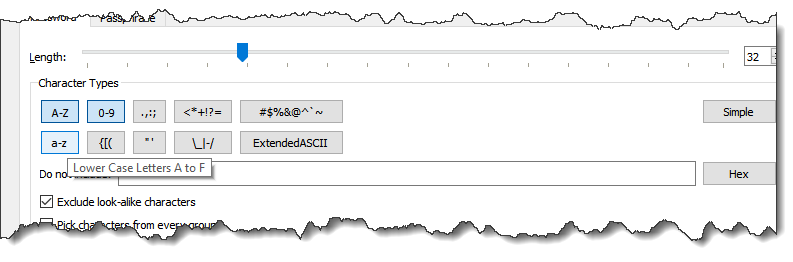
- [x] The hover text label for A-Z and a-z both say a-f.
- [x] There should be more spacing in the symbol buttons
- [x] When selecting passphrase tab, the widget remains huge
- [x] Change Advanced/Simple button to "Show Advanced" / "Hide Advanced"
- [ ] Move "Hex" below the exclusion box and add other buttons for common exclusion patterns
Debug Info
KeePassXC - Version 2.4.0-snapshot
Build Type: Snapshot
Libraries:
- Qt 5.11.1
- libgcrypt 1.8.3
Operating system: Windows 10 (10.0)
CPU architecture: x86_64
Kernel: winnt 10.0.17134
Enabled extensions:
- Auto-Type
- Browser Integration
- SSH Agent
- YubiKey
 droidmonkey
All 13 comments
Under MAC OS (KeePassXC-2.3.4.dmg) there IS NO advanced generator, can that be? If so, I cannot find how to enable or use it. The mayority of German banks do not accept { and } as special caharcters, so I would like to be able to exclude these signs but still use some other..
 UkeFan
on 11 Nov 2018
UkeFan
on 11 Nov 2018
This is a 2.4.0 feature.
droidmonkey
on 11 Nov 2018
If we could specify exactly what do we mean by 'common exclusion patterns', I can take this up. I don't recall ever coming across a website that wouldn't allow a specific character group (or to put simply: I don't use the Advanced options at all), so I may not be the best person to come up with the exclusion groups.
We should also decide whether or not #3271 should be implemented, and if so, I think it should be merged into this issue.
 ba32107
on 23 Jun 2019
ba32107
on 23 Jun 2019
I would ignore that one for now.
droidmonkey
on 24 Jun 2019
Also, at least here (Elementary OS Juno), I find it difficult to decide which option is selected and which is not.
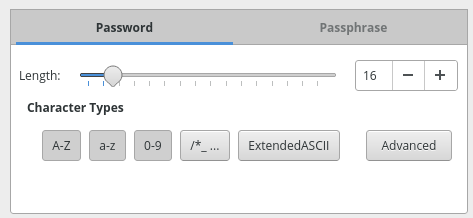
How about making the selected ones stand out better, e. g. with a thick border or a check mark?
 wolframroesler
on 30 Jun 2019
wolframroesler
on 30 Jun 2019
I commented about this on a macOS dark mode issue of the same concern. The highlighting and color of these buttons is 100% the fault of either the Qt platform plugin or the theme being applied by the system to Qt apps. We don't and shouldn't impose artificial behavior. The only real solution to this is to not use toggleable buttons, but some other gui element.
droidmonkey
on 30 Jun 2019
@ba32107
Sorry for late answer. A common bank e.g. does allow concerning special characters only "- ! % & / = ? * + , . ; : _ @ "
T-Online does allow for the personal passwort only "§ # & ( ) * + , _ - . / : < = >" and for the Email-Account only "! # $ % & ' ( ) * + , _ - . / < = > ? @ [ ] { } | ~"
If you could give us users a possibility to (de-)select sessions-wise special characters we could better deal with our providers stupidieties!
UkeFan
on 5 Jul 2019
@UkeFan Thanks, this is helpful. I'll see what I can do, not sure when I'm gonna have time to work on this though.
ba32107
on 6 Jul 2019
I like this design for password generation rules: https://addons.mozilla.org/en-US/firefox/addon/secure-password-generator/
There is an "Other Characters" field for selecting specific symbols to be included, and "Exclude Characters" for symbols that are disallowed (e.g. they look similar to each other [oO0Il1|].
 rcpao
on 23 Aug 2019
rcpao
on 23 Aug 2019
Even though the further development was/is already remarkablel @rcpao contribution i.E. the "firefox"' way would even be better. The option "two/left/right" hand usage is also very intelligent, concerning the mobile use problem "my thumb is not long enough" (-:
UkeFan
on 23 Aug 2019
@rcpao, there is already an "Exclude look-alike characters" option in the current password generator, as well as a field for excluding characters. The only thing we are missing right now is the ability to include specific characters, which is tracked in https://github.com/keepassxreboot/keepassxc/issues/3271. I think as part of this issue, we only need to come up with common exclusion groups.
@UkeFan the "hand feature" looks like a cool idea, but I'm not sure if it brings any value to KeePassXC. You would never really type any generated passwords by hand, so this feature does not seem to offer a good effort/benefit ratio.
I haven't had much time lately to work on this project, but I'm planning to pick this one (and others) up soon.
ba32107
on 23 Aug 2019
@ba32107 Wow, you do only copy-paste keys? I use in at least 15% of the keys the pass phrase feature. I manipulated the word list to feature four languages I am more/less familiar with and use it also a bit like a vocabular trainer.
PS: Maybe that could become a USP? Buttons to (un-)include other wordlists than English. I already wondered whether e.g. "German" isn't more secure than English because there are only 1/10 or less people speking it and - probably - respectively using pass phrases. Possible??!
UkeFan
on 23 Aug 2019
I use form autofill 80% of the time, and copy-paste 20%. The only password I type in is the master password of my database. I don't use passphrases at all.
The only benefit of using non-English passphrases would be if the attacker uses a dictionary attack. I recommend reading this page:
https://security.stackexchange.com/questions/33960/is-there-additional-security-value-in-using-passwords-with-words-or-phrases-in-n
ba32107
on 23 Aug 2019
Related issues
 nfnty
·
3Comments
nfnty
·
3Comments
 813gan
·
3Comments
813gan
·
3Comments
 bleepnetworks
·
3Comments
bleepnetworks
·
3Comments
 clementlesne
·
3Comments
clementlesne
·
3Comments
 n1trux
·
3Comments
n1trux
·
3Comments