Keepassxc: Suggestion: easier 2FA setting workflow
Not sure this has been already been discussed earlier: currently setting up 2FA is quite a manual and error prone procedure. Personally my workflow is:
1) Go to to a password entry with a 2FA already setup
2) Manually copy all keys
3) Go to the password entry that needs 2FA I want to setup
4) Manually paste the keys and data
Expected Behavior
The user experience to setup 2FA for an entry should be easier
Current Behavior
Currently adding TOTP settings to enable is a quite manual and error prone procedure
Possible Solution
Could the free form fields replaced by a couple of static forms where at least you don't have to input the keys' names (KPH: {TOTP}, TOTP Seed, TOTP Settings).
Debug Info
KeePassXC - Version 2.3.3
Revision: 0a155d8
Libraries:
- Qt 5.9.5
- libgcrypt 1.8.1
Operating system: Ubuntu 18.04.1 LTS
CPU architecture: x86_64
Kernel: linux 4.15.0-29-generic
Enabled extensions:
- Auto-Type
- Browser Integration
- Legacy Browser Integration (KeePassHTTP)
- SSH Agent
- YubiKey
 apiraino
All 4 comments
FYI, KPH: {TOTP} is no longer needed with 2.3.3 unless you are using it with String Fields.
 varjolintu
on 7 Aug 2018
varjolintu
on 7 Aug 2018
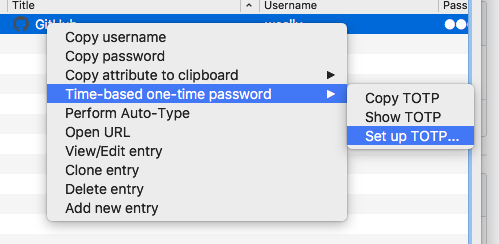
You don't need all these steps to setup 2FA. Right-click the entry and select this item:
 weslly
on 8 Aug 2018
weslly
on 8 Aug 2018
@weslly thanks for the suggestion.
I think the documentation on how to setup TOTP integration (currently here) should be moved to a more prominent place, for example updating both the Wikis of keepassxc-browser and keepassxc.
@varjolintu Would you consider a PR updating these? Also adding this suggestion.
apiraino
on 8 Aug 2018
@apiraino This is already under work: https://github.com/keepassxreboot/keepassxreboot.github.io/pull/43. But I totally missed the wiki, still, it's the old wiki from my old repo. Thanks.
varjolintu
on 8 Aug 2018
Related issues
 amvasilyev
·
3Comments
amvasilyev
·
3Comments
 guihkx
·
3Comments
guihkx
·
3Comments
 bleepnetworks
·
3Comments
bleepnetworks
·
3Comments
 Throne3d
·
3Comments
Throne3d
·
3Comments
 shaneknysh
·
3Comments
shaneknysh
·
3Comments