Keepassxc: Support Username-Only and Password-Only Auto-Type keyboard shortcuts
Hi Team,
I've made several attempts to migrate from KeePass 2 to Keepassxc, but the absence of many various Auto-Type options stops me every time. It is the Keepass 2 killer feature for me.
I need auto-type a lot of long passwords in console emulators via RDP session, and the default auto-type option {USERNAME}tab{PASSWORD} just doesn't work.
 SkyWheel
All 43 comments
You can change the autotype sequence as you wish https://github.com/keepassxreboot/keepassxc/wiki/Autotype-Custom-Sequence
 TheZ3ro
on 5 Jul 2018
TheZ3ro
on 5 Jul 2018
I know this feature. But Keepass2 has it from the box.
I have close to 100 (one hundred) passwords stored in my Keepass2 database. To migrate to Keepassxc I need manually change each and every record for these 100 records?
Besides, I need multiple choice of auto-type options, exactly like in Keepass2. Every time change the behaviour of auto-type?
SkyWheel
on 6 Jul 2018
OK, let's assume I will find time for changing auto-type option for all 100 passwords. What about multiple choices of auto-type at the same moment?
SkyWheel
on 6 Jul 2018
I can't understand what's the issue here. Do you want autotype to only type the password?
TheZ3ro
on 6 Jul 2018
@TheZ3ro, it is not an issue in common sense. It is feature request. It would be nice if Keepassxc could do everything that Keepass2 can.
Use case: I'm logged via RDP to a remote Windows desktop, and now I need SSH using PuTTY from this Windows to another Linux machine. In this case there is need auto-type in separate auto-type for username and password for one entry.
Or another example: using terminal emulator in Linux machine, and after that using the same record for GUI.
SkyWheel
on 6 Jul 2018
So, Keepass2 does easily allow to do that. Where Keepassxc requires in one case {USERNAME}TAB{PASSWORD}ENTER, and in another case separately {USERNAME}ENTER and {PASSWORD}ENTER. Sometimes there is need in just {PASSWORD} without ENTER.
Keepass2 allows configure usual auto-type on Ctrl-V, but separately has different auto-type options you don't need to configure explicitly.
SkyWheel
on 6 Jul 2018
Ahhh, he's saying a "quick" autotype that is preconfigured to just perform a username or password typing. Like pressing CTRL+ALT+V types only the password.
 droidmonkey
on 6 Jul 2018
droidmonkey
on 6 Jul 2018
I was asking for that :stuck_out_tongue_closed_eyes:
Do you want autotype to only type the password?
Anyway I think it's a nice feature to have
TheZ3ro
on 13 Jul 2018
Sorry guys for long response. I'll try to make it clearer.
- After Keepass2 default installation, you can find 8 options of different auto-types. You don't need to configure anything, they are already there. I'll make a screenshot
SkyWheel
on 17 Jul 2018

As you can see there are many auto-type options available. You don't need to reconfigure a record every time you need another auto-type option.. Hope it's more clearer now.
SkyWheel
on 17 Jul 2018
Would be a nice feature instead of adding several entries with different autotype actions for the same target.
 Russe
on 23 Jul 2018
Russe
on 23 Jul 2018
Looks like what I requested - or expansion of https://github.com/keepassxreboot/keepassxc/issues/2052
 pbulteel
on 24 Jul 2018
pbulteel
on 24 Jul 2018
Yes, looks similar.
In Keepass2 it's in the Options, Interface, "show additional auto-type menu commands".
I'm still deferring migration from Keepass2 to Keepassxc due to absence of this important feature.
SkyWheel
on 24 Sep 2018
Please provide this feature in this year. I've transitioned from KeePass2 and as mentioned it'd be too hectic to carry out changes for individual entries manually for a large database.
 gmish27
on 1 Jan 2019
gmish27
on 1 Jan 2019
Please can the title of this issue be changed to something like "Support Username-Only and Password-Only Auto-Type quick functions" or similar, as it's not just about keyboard shortcuts - the menu image as shown above:
would also be very desirable. There are many websites which have username and password on separate pages, and there are occasions, like when changing a password, when you sometimes want to type the old password only, even though most of the time you want to type both.
I wasn't aware of this feature in KeePass2, so this thread is very helpful for telling me about that, if nothing else!
 JohnVeness
on 6 Feb 2019
JohnVeness
on 6 Feb 2019
Hmmm... I see more and more requests similar to this one in regards to Auto-Type. Still nothing?
SkyWheel
on 13 Mar 2019
Until this gets implemented, in case it helps others: on Linux, I'm using a global shortcut running the code referenced in https://gist.github.com/ethack/110f7f46272447828352768e6cd1c4cb
 cr1st1p
on 29 Mar 2019
cr1st1p
on 29 Mar 2019
KeePass 2.42 added a password-only auto-type with [Ctrl]+[Alt]+[Shift]+[A], which I would like to see adopted in KeePassXC for consistency (and because it's a useful thing I need occasionally.
 ccoenen
on 2 May 2019
ccoenen
on 2 May 2019
Another place, where this is useful: when changing passwords or while setting up accounts: you're usually asked to type your password twice. With this shortcut, this becomes as easy as
[Ctrl]+[Alt]+[Shift]+[A]
[Tab]
[Ctrl]+[Alt]+[Shift]+[A]
ccoenen
on 4 May 2019
Just installed fresh KeePassXC version (AppImage). Played around and deleted. The killer-feature is still not implemented 😢 Still staying with KeePass 2...
SkyWheel
on 11 Jul 2019
I am missing the feature, too. There are several webpages, where you have to fill on the first page the username and on the next page the password. Keypass2 has the ability to fill via global auto-type only the password. This Hotkey is changeable.
References:
https://keepass.info/help/kb/keyb_shortcuts.html
 SimonWpt
on 16 Aug 2019
SimonWpt
on 16 Aug 2019
I am missing that too
 davidcava
on 17 Oct 2019
davidcava
on 17 Oct 2019
Yet another thing that I (albeit less frequently) run into: services that b0rked their sign-in forms. Where the tab order is broken or where it varies for different ways of logging in.
I just logged into my phone company's internal site. And they broke Tab-Order, and with regular KeePass, I just needed to tab once more, hit Ctrl+Alt+Shift+A and then enter - done.
Also, this is what sometimes happens when you fail to log in correctly for whatever reason: usually a login form comes back with blank password and prefilled username. Sweet! Ctrl+Alt+Shift+A. Done.
ccoenen
on 21 Nov 2019
Github asks you to verify your password when you do security critical things (for example: delete a repository). Hit Ctrl+Alt+Shift+A. Done.
Kickstarter asks you tu verify your password if you fill in a backer survey (basically your address after a successful funding). Hit Ctrl+Alt+Shift+A. Done.
Xing (german centric contacts platform, somewhat like LinkedIn) only asks for your password for every link you follow from an email. Hit Ctrl+Alt+Shift+A. Done.
Nextcloud asks admin users to re-enter just their password for security critical actions (updating plugins, changing another user's details, ...). Hit Ctrl+Alt+Shift+A. Done.
Spotify asks users to re-enter just their password when they download their personal data. Hit Ctrl+Alt+Shift+A. Done.
Disney+ has a weird default login screen. There is one screen that asks you to just enter the mail address, and another one that then asks for the password. The delay between the two is not predictable, so any kind of delay will either fail periodically or unnerve you. Hit Ctrl+Alt+A for the username and then Ctrl+Alt+Shift+A for the password. Done.
ccoenen
on 9 Dec 2019
I run into this quite a bit. Without getting into too many details, sometimes I need to get into a virtual machine that doesn't have it's network working yet. The only console I have access to, _does not allow for copy-paste_, an so I need to rely on auto-type to get the password in (but just the password).
Another instance where this comes in handy is when I RDP into a windows server and need to change my account password. Windows _doesn't allow copy-paste here_, and so I have to rely on auto-type. But again, they aren't asking for username+password, they are asking for old password + new password + new password.
I really miss the ability to do this in KeePassXC.
 randoogle
on 31 Jan 2020
randoogle
on 31 Jan 2020
Technically you can do this right now. Simply go to the Auto-Type tab when editing an entry. There you can define a custom default sequence for that entry. You can also add additional sequences for specific window titles. Therefore, for your example, you can define a password only sequence for the virtual machine window and when you use the Auto-Type button it will ask you which sequence you want to use.
droidmonkey
on 31 Jan 2020
Technically you can do this right now. Simply go to the Auto-Type tab when editing an entry. There you can define a custom default sequence for that entry. You can also add additional sequences for specific window titles. Therefore, for your example, you can define a password only sequence for the virtual machine window and when you use the Auto-Type button it will ask you which sequence you want to use.
I tried this, but the window-title thing didn't work for either case. Maybe I'm not doing it right. I added a window association with a different sequence (password only) and click OK. After clicking on the "perform auto-type" button, it just types the default sequence instead, I don't see any other options popping up.
randoogle
on 31 Jan 2020
Only the global Auto-Type shortcut key pops up the selection dialog
droidmonkey
on 31 Jan 2020
Only the global Auto-Type shortcut key pops up the selection dialog
Ah, yes, it's not super straight-forward, but it works. Just have to go through a few global shortcuts till I found one that worked.
Thanks for the info.
randoogle
on 31 Jan 2020
This feature is a must in keepasxc for many users like me who have been using keepass2 just because of this freedom the keepassxc is still not as good as keepass2.
 adityaduggal
on 19 May 2020
adityaduggal
on 19 May 2020
I'm just trying keepassXC.
I need this functionnality too and i see that has been asked since 2 years now.
 gilles007-
on 21 May 2020
gilles007-
on 21 May 2020
I'd agree. I use Keepass 2.0 on my PC, but I recently got a new Mac also, so I've been using KeepassXC with that machine.
There are so many situations where you go to a site and it auto-populates your e-mail address.
At that point, it would be great to be able to just hit a different keyboard short-cut and have KeepassXC auto-type in just the password.
It's kind of unpredictable when this feature will be needed, and it's enough of an edge situation that it's not efficient to program that password only into the auto-type rules for each user account you have, especially if you have a lot of them, as many people do.
Hope this gets sorted out before too long. Seems like it's been hanging around for a while.
 kingsinger
on 15 Jul 2020
kingsinger
on 15 Jul 2020
droidmonkey already added this feature to the next milestone 2.6.1. I think we can stop spamming this issue with comments.
 Perry3D
on 15 Jul 2020
Perry3D
on 15 Jul 2020
I can't find that in the changelog, though?
https://github.com/keepassxreboot/keepassxc/blob/develop/CHANGELOG.md#261-2020-08-19
and the settings screen also doesn't hint at this? (windows, portable 2.6.1)
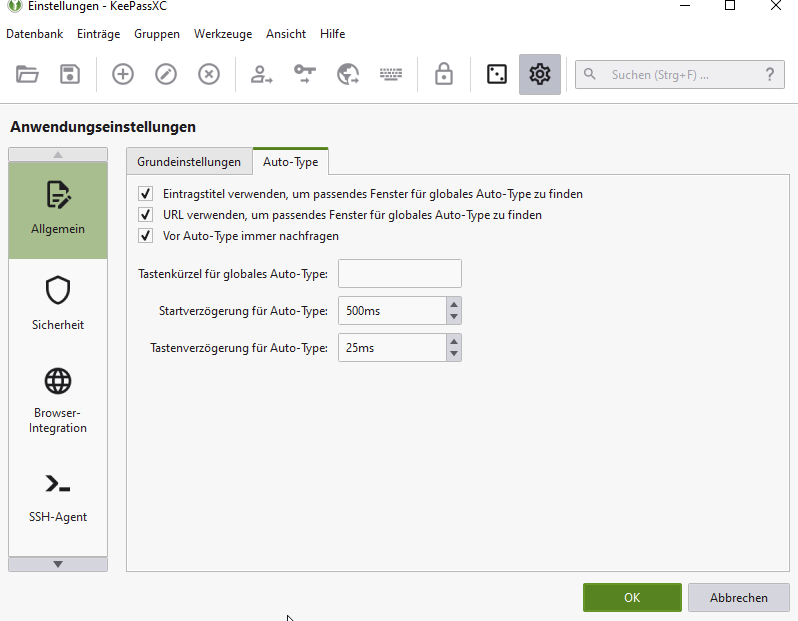
ccoenen
on 21 Aug 2020
Reading through #4891, there has only been added a context menu, but this issue is about a global hotkey. I think this is 1000x more useful. For the "why", I listed a number of real-life examples here:
ccoenen
on 21 Aug 2020
Would agree with that. Windows Keepass has a separate global hotkey for
just the password. Having the menu item is a great start. But adding the
hotkey (ideally user configurable), would be even better.
JL
On Fri, Aug 21, 2020 at 11:51 AM Claudius Coenen notifications@github.com
wrote:
Reading through #4891
https://github.com/keepassxreboot/keepassxc/pull/4891, there has only
been added a context menu, but this issue is about a global hotkey. I think
this is 1000x more useful. For the "why", I listed a number of real-life
examples here:
- #2093 (comment)
https://github.com/keepassxreboot/keepassxc/issues/2093#issuecomment-489327769- #2093 (comment)
https://github.com/keepassxreboot/keepassxc/issues/2093#issuecomment-556557430- #2093 (comment)
https://github.com/keepassxreboot/keepassxc/issues/2093#issuecomment-563014623—
You are receiving this because you commented.
Reply to this email directly, view it on GitHub
https://github.com/keepassxreboot/keepassxc/issues/2093#issuecomment-678438702,
or unsubscribe
https://github.com/notifications/unsubscribe-auth/AAZRPBE3CV2LF3JU6DBRNMDSB263TANCNFSM4FIOKHOQ
.
kingsinger
on 21 Aug 2020
I was also looking forward to 2.6.1 because I thought that Auto-Type would then be expanded to include the function of only password or only username via a key combination. In my opinion, the new menu is not suitable for this. I can use the existing buttons directly.
The best would really be additional keyboard shortcuts with which you can fill out your password, username or TOTP individually.
For example, when I log out of Amazon or eBay, only the password is required. I would then like to press "CMD + P" (MacOS), choose Amazon or eBay and then only the password of the selected entry is entered.
Apart from that, I am very satisfied with KeePassXC and also support the developer.
 xx5198
on 22 Aug 2020
xx5198
on 22 Aug 2020
We have no desire to add more global hotkeys. There is another issue to show the auto-type password/username choice from the auto-type selection dialog (https://github.com/keepassxreboot/keepassxc/issues/3630). And another issue to allow searching for any entry from that dialog (https://github.com/keepassxreboot/keepassxc/issues/429). Those are our focus.
droidmonkey
on 22 Aug 2020
I guess I can see how doing it via the auto-type dialog could work, but the
upside of doing it via a dedicated hotkey is that in many situations it
would obviate the need for popping the dialog box at all. You'd just
execute the key command, it would type in your password, and you'd be good
to go. If inserting the password only was an edge case, I could see the
logic in not wanting to create a hotkey for it. But as the comment above
underscores, there are some very common and highly used sites, like Amazon
and eBay, which frequently auto-populate the email address. I believe
Microsoft Outlook often does this too if you've already been signed in
recently. So the need for inserting password only is something that many
average users will encounter almost every day.
With that said, for anybody on Mac who has Keyboard Maestro installed, the
new menu entries do make it possible to create a user defined hotkey and
then fire a macro that selects the new menu item for inserting just the
password. For those who don't have KM installed, it's like $35 or something
like that and useful for a lot of other stuff beyond this situation,
particularly if you like using keyboard shortcuts. It's not as elegant as
having the keyboard shortcut built in. But in my limited testing, it does
work.
JL
On Sat, Aug 22, 2020 at 5:13 AM Jonathan White notifications@github.com
wrote:
We have no desire to add more global hotkeys. There is another issue to
show the auto-type password/username choice from the auto-type selection
dialog. And another issue to allow searching for any entry from that
dialog. Those are our focus.—
You are receiving this because you commented.
Reply to this email directly, view it on GitHub
https://github.com/keepassxreboot/keepassxc/issues/2093#issuecomment-678633165,
or unsubscribe
https://github.com/notifications/unsubscribe-auth/AAZRPBCBSCDEHF2JYKRVQMDSB6Y7JANCNFSM4FIOKHOQ
.
kingsinger
on 22 Aug 2020
If you do it all the time just define it as a sequence...
https://keepassxc.org/docs/KeePassXC_UserGuide.html#_configure_auto_type_sequences
droidmonkey
on 22 Aug 2020
I'm still a user of KeePass on Windows, mostly, because they just nailed this. I just wish I had the same functionality on Linux in KeePassXC as well.
You most often need full auto type. That's Ctrl+Alt+A
You regularly need passwort auto type. That's Ctrl+Alt+Shift+A
It really works extremely well in practice. Together this covers damn near 100% of my password needs.
Reconfiguring the auto-type sequence is _not_ the solution here, because both cases are common (again, I've listed a _ton_ of real world examples that come up quite frequently).
ccoenen
on 22 Aug 2020
Claude is totally right here. My use case is more or less the same as his.
I use KeePass on Windows also. They have it right there. Why make the user
define a second password-only auto-type definition for numerous sites, when
you can give the user a second keyboard short-cut that will cover the vast
majority of those scenarios (which are numerous) without additional
configuration? Nothing about doing that precludes a user from defining
password only auto-types if they prefer that workflow. It just allows the
user the option of doing it by default via the second keyboard shortcut.
JL
On Sat, Aug 22, 2020 at 10:19 AM Jonathan White notifications@github.com
wrote:
If you do it all the time just define it as a sequence...
—
You are receiving this because you commented.
Reply to this email directly, view it on GitHub
https://github.com/keepassxreboot/keepassxc/issues/2093#issuecomment-678667544,
or unsubscribe
https://github.com/notifications/unsubscribe-auth/AAZRPBD4B6K4SGVKWVJ3RITSB74ZHANCNFSM4FIOKHOQ
.
kingsinger
on 22 Aug 2020
If you do it all the time just define it as a sequence...
https://keepassxc.org/docs/KeePassXC_UserGuide.html#_configure_auto_type_sequences
I do not want to define for all my passwords one by one just to paste password, TOTP or Username so this is not a solution for me. If this definition would be global this would be okay. One key combination and then the choice for every entry for example between Password, Username and so on.
xx5198
on 23 Aug 2020
Related issues
TheZ3ro
·
3Comments
 guihkx
·
3Comments
guihkx
·
3Comments
 JosephHatfield
·
3Comments
JosephHatfield
·
3Comments
 clementlesne
·
3Comments
clementlesne
·
3Comments
 MisterY
·
3Comments
MisterY
·
3Comments
Most helpful comment
droidmonkey already added this feature to the next milestone 2.6.1. I think we can stop spamming this issue with comments.