Keepassxc: Database information / statistics panel [$50 awarded]
It would be nice to have an info panel/window with some infos about the opened database
like full database path, number of entries, last write access time, outdated passwords, number of non unique passwords, ...
KeePassXC - 2.3.3
Revision: 0a155d8
Libraries:
- Qt 5.9.5
- libgcrypt 1.8.1
Operating system: Ubuntu 17.10 (shown by KeePassXC but it is 18.04)
CPU architecture: x86_64
Kernel: linux 4.15.0-22-generic
Enabled extensions:
- Auto-Type
- Browser Integration
- Legacy Browser Integration (KeePassHTTP)
- SSH Agent
- YubiKey
 denk-mal
All 48 comments
The last two are covered under #551. I'm not sure the value of the first three though.
 droidmonkey
on 7 Jun 2018
droidmonkey
on 7 Jun 2018
I saw the issue #551 but my intend was not those special information. My intend is for a more general place to get Infos about the actual loaded database(s) so if I had two versions of a database (at diff. places, of course) I can seen some general infos about them (especially but not only the file path, the number of entries and the last write access/change date)
denk-mal
on 7 Jun 2018
The program is open source. Then someone make a separate branch. It is necessary (just necessary) function the number of records in the database.
Make the function "counter the number of records in the database."
The problem is that I'm working and synchronizing different databases, because of this I am making new entries to the old database.
The android counter implemented in the keepassdroid in keepass2 also has a counter, why is not there? Because of such little things, huge problems
 torerobo
on 18 Sep 2018
torerobo
on 18 Sep 2018
Show full path of database file in this view (#2114)
droidmonkey
on 24 Sep 2018
Ah okay, here it is. Searched for "statistics" and could not find it here. So some other ideas:
My initial question was:
- How many passwords do I even have in the database?
Unfortunately, I could not find an easy way to see this.
So maybe you can show this for all selected items? Or for all of the group.
Maybe in a status bar? But well… this is oldish, I know, so maybe in a extra "Statistics" menu entry?
There, (combined with https://github.com/keepassxreboot/keepassxc/issues/2477), you may also show some more stats like:
- as said, database entry count
- oldest/newest used/created/… password
- maximal/minimal use count (https://github.com/keepassxreboot/keepassxc/issues/2477)
- whatever else may be useful
 rugk
on 14 Nov 2018
rugk
on 14 Nov 2018
Greetings! I didn't want to duplicate a feature request, and this appeared to be in the ballpark. @rugk made a suggestion regarding stats, which seems pretty great. I was hoping for something similar, but maybe less sweeping in scope. Specifically, I was hoping for an extra column in the normal database view which would show the number of the entry.
Currently, the open database has columns for "Title", "Username", "Password", etc. I was hoping to add a column which would assign a numerical value for each entry, so that I could see, at a glance, which number entry I was looking at, in, say, a specific group. The quote below might cover it, but I wasn't sure.
as said, database entry count
If this is out of scope, I would be happy to open a separate issue.
Thank you for your work.
 AboveMyPaygrade
on 29 Jun 2019
AboveMyPaygrade
on 29 Jun 2019
@AboveMyPaygrade I am not sure I understand your request. What number are you wanting to display? The sequential number of the entry as added to the database? The UUID of the entry?
droidmonkey
on 29 Jun 2019
In the image below (shamelessly taken from one of the PRs), there are multiple columns (Title, Username, etc.). I was hoping one could be added that would show a number. For example, in the image, Amazon would be (1), Apple would be (2), Dropbox would be (3), and so on.

AboveMyPaygrade
on 29 Jun 2019
But why? What does that number correspond to? You can sort the entries by clicking the column headers.
droidmonkey
on 29 Jun 2019
Preference, I guess? The number itself would correspond to the entry inside the folder group. It makes it easier for me to see at a glance how many entries are in a specific group. Essentially, I've been manually moving from Lastpass to keepassxc (it's easier to export from LP and import to XC, but it was probably time for me to manually review my LP entries and edit/prune as needed), and while LP has a count for the number of entries in each folder, XC doesn't. I felt it would be easier to see if I was missing something at a glance using numbers versus having to read and compare the entries in the folders within LP and XC, and maybe count them manually to make sure I didn't miss one.
It's certainly a minor thing; it may not really be worth the trouble to implement if others haven't been clamoring for it. Either way, I very much appreciate the consideration/quick responses.
AboveMyPaygrade
on 29 Jun 2019
It would be better (and easier) to just report the number of entries in the group. This could be shown in the entry/group preview panel and when editing a group.
droidmonkey
on 29 Jun 2019
I'm not entirely sure if that request is covered by this issue number, or would require a separate one, but your suggestion sounds great!
AboveMyPaygrade
on 29 Jun 2019
Received (and receive) requests for "adding statistics function". Why are developers ignoring? Why???
Why none of the users can make a separate branch of an open source project with the function of statistics?
torerobo
on 29 Jun 2019
@torerobo If you are so keen for this feature, why don't _you_ do? :thinking:
rugk
on 29 Jun 2019
@torerobo If you are so keen for this feature, why don't _you_ do?
Why don't you do my work in the Arctic Circle?
And yes, dozens of people are interested ...
torerobo
on 29 Jun 2019
I am going to add a bounty to this PR so maybe it'll motivate someone to work on it.
https://www.bountysource.com/issues/59353244-database-information-statistics-panel
droidmonkey
on 29 Jun 2019
Okay, that's also a good idea, so @torerobo you can obviously also add (to that) bounty.
rugk
on 29 Jun 2019
After all this discussion, a little summary seems adequate, to specify what exactly the requirements are (and what the bounty is for). My understanding is:
Add a "statistics panel" to KeePassXC which displays information about all open databases. Per database, the following information is shown:
- Database name
- Database description
- Full database file name
- Number of groups
- Number of entries
- Number of unique passwords (used in only one entry)
- Number of non-unique passwords (used in more than one entry)
- Maximum number of entries that share a password
- Number of passwords not changed within the last 12 months
- Last time the database was changed (if we have that information somewhere already)
- Last time the database was saved to disk
The statistics panel will be a modal dialog similar to the "Help -> About" dialog. I suggest to put a new item "Statistics" into the "Tools" menu to open the statistics panel. (It could also go into the "Database" menu, however that one seems more about one single database, and there is so much in the "Database" menu already and so little in the "Tools" menu. Opinions?)
Any additions? Suggestions? Thumbs ups/downs? Additional $$$ added by @torerobo? :)
Anyway, if that's the general idea, I'll give it a try.
PS: @AboveMyPaygrade Nice to see that the "demo database" I introduced (#3294) is already being put to good use.
 wolframroesler
on 8 Sep 2019
wolframroesler
on 8 Sep 2019
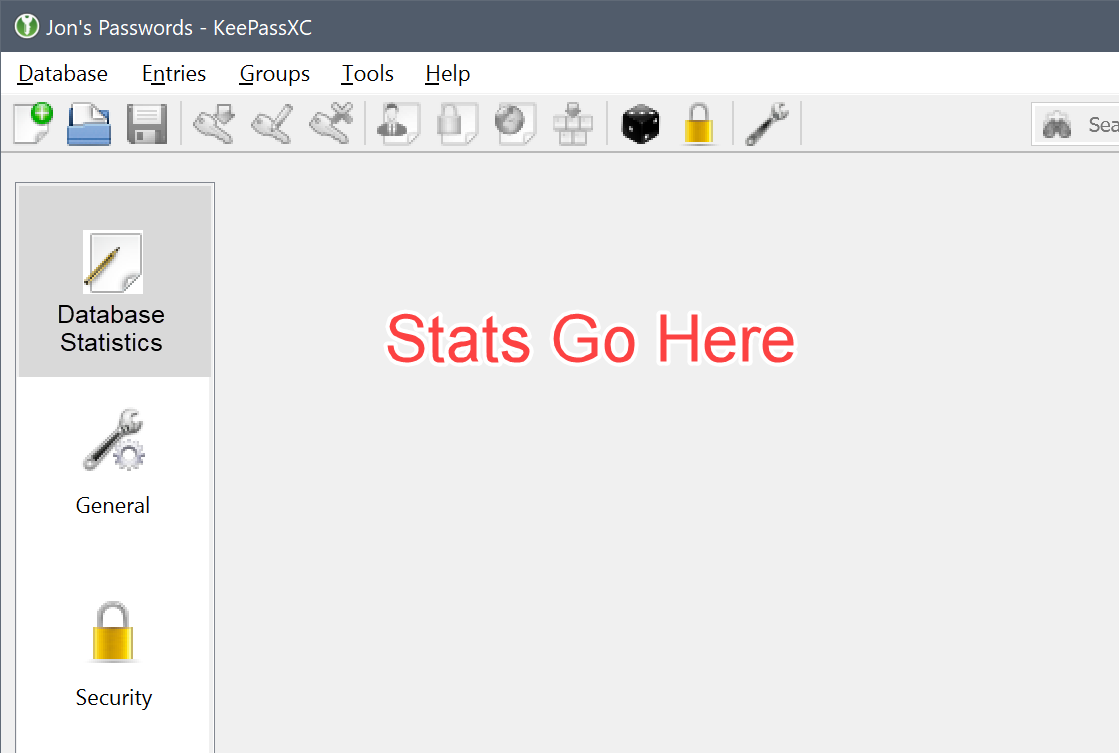
This should not be a modal dialog. It should be a page in the "Database Settings" widget. The purpose of this request is a per-database statistics panel, not an overarching panel for "ALL" databases.
droidmonkey
on 8 Sep 2019
It would be better (and easier) to just report the number of entries in the group. This could be shown in the entry/group preview panel and when editing a group.
I'd like to see this one, too.
 xatage
on 10 Sep 2019
xatage
on 10 Sep 2019
Page in Database Settings sounds good. Will do that, hoping to find time soon.
@droidmonkey: Have you set a release date for the next version yet?
wolframroesler
on 14 Sep 2019
Not yet, we are trying to get through the CLI improvements
droidmonkey
on 14 Sep 2019
@droidmonkey Good, so there's no time pressure for me. Any particular CLI issue you need help with?
wolframroesler
on 15 Sep 2019
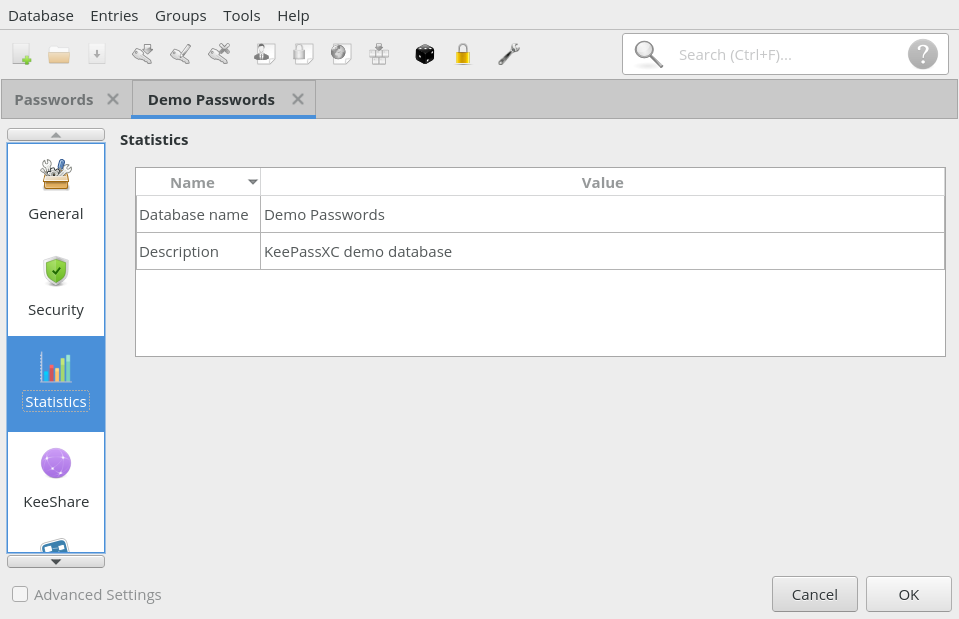
Working on it. Here's a screenshot of the first prototype, showing two data fields already. Is that what you had in mind?
wolframroesler
on 15 Sep 2019
Yes that looks very nice, simple and to the point
droidmonkey
on 15 Sep 2019
Glad you like it. Here's what I've got so far:
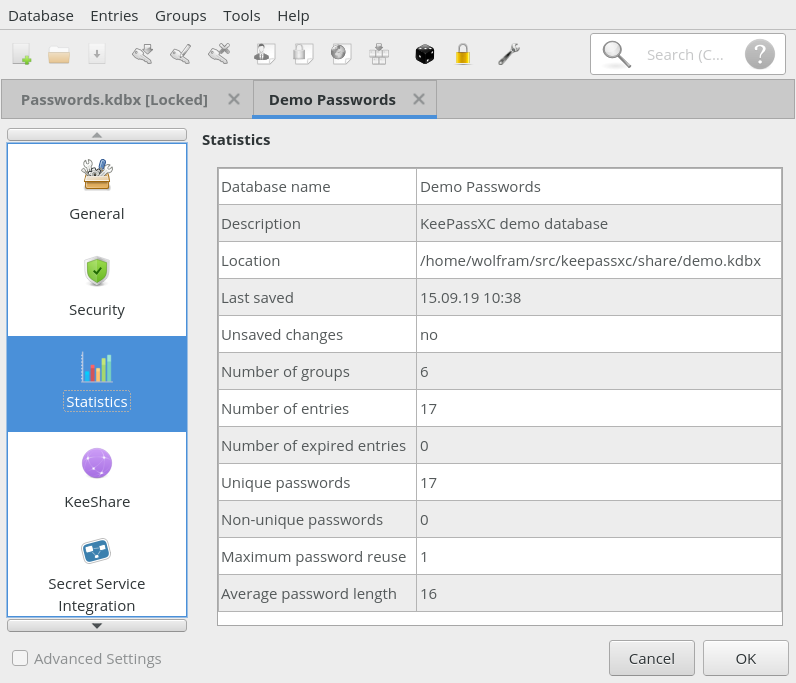
Instead of "number of passwords not changed within the last 12 months" I'm showing the number of expired passwords, which seems more logical and less arbitrary to me. The "last database change time stamp" doesn't seem to exist anywhere, instead I'm showing a notification for unsaved changes along with the file modification time stamp.
Anything else? It's easy enough to add additional statistics, but we shouldn't overdo it just because we can. For instance, I see no point in repeating all the settings from the "General" page.
wolframroesler
on 15 Sep 2019
The only addition to this would be a link/button you could click to actually show the entries that the numbers are counting. For example, number of expired entries would show the entries that were expired. We can hold that for future if necessary.
droidmonkey
on 15 Sep 2019
@droidmonkey That sounds awesome but should go into a separate issue, especially since I'm not sure how to do it. :)
Will submit a PR shortly.
wolframroesler
on 16 Sep 2019
Maybe also add indicators of what is good and what is bad? (e.g. "non-unique passwords" -> lower is better) Because at the first glance, that is quite hard to notice. (especially with negations like "non-unique" - ehm, could we cann this "duplicate" BTW? That is easier to understand??)
Maybe with colors?
rugk
on 16 Sep 2019
That's a great idea. Especially if there are any expired passwords that should be highlighted the error color.
droidmonkey
on 16 Sep 2019
Sounds good, two questions:
- You say "the error color", is there one particular color to use? Is it guaranteed that it can be used as a foreground or background color?
- "Number of expired passwords" gets highlighted if >0, and "unsaved changes" gets highlighted if "yes", ok. "Average password length" could be highlighted if less than 10. But any idea when to highlight "non-unique passwords" or "maximum password reuse"? A small amount of reuse should be tolerated. Maybe set a percentage limit, like highlight if > 10 %? Any better ideas?
wolframroesler
on 17 Sep 2019
I like those thresholds you mentioned. Instead of an error color (which breaks easily with dark themes) we can use an error or warning icon similar to what I have setup in the edit entry widget when the passwords do not match. See this code:
droidmonkey
on 17 Sep 2019
Tried the color and it really didn't look good, don't even want to think about theming issues (or cultures where red isn't associated with "problem"). The icon is a much better idea, look:

wolframroesler
on 20 Sep 2019
Any opinions? Anything else to add?
wolframroesler
on 27 Sep 2019
The only additional idea I have is to add a tooltip to the warning/error icon that explains WHY it is being shown. These should be translatable as well.
droidmonkey
on 27 Sep 2019
If we are really using tables, then they should at least be aligned properly. Right now it has additional margins around the edges.
 phoerious
on 27 Sep 2019
phoerious
on 27 Sep 2019
From my comment here as far as I can see one information is still missing: How many passwords do I have in my DB?
rugk
on 28 Sep 2019
@rugk as in "number of entries that have a non-empty password"?
wolframroesler
on 28 Sep 2019
@phoerious could you elaborate? Could you mark in the screenshot where exactly the table is not aligned properly?
wolframroesler
on 28 Sep 2019
@rugk there is a line for "number of unique passwords" and one for "number of entries"
droidmonkey
on 28 Sep 2019
Ahh, yeah, "number of entries" was what I've missed, sry.
rugk
on 28 Sep 2019
Tooltips added and pushed to #3546.
wolframroesler
on 3 Oct 2019
@droidmonkey Sorry if this question is stupid:
I have KeePassXC 2.5.2 Portable in Windows but I have no idea how to get the database-settings dialog.
I don't see this in the "Database" menu and also not when I right-click the root entry in the tree...
 OLLI-S
on 6 Jan 2020
OLLI-S
on 6 Jan 2020
@OLLI-S Please open a new issue and submit a screen shot with the contents of the Database menu.
This is the development issue, and it's closed, so the people who can help you won't see what you've written here. (I only see it because I contributed to the issue, but I can't help you because I'm not on Windows.)
wolframroesler
on 6 Jan 2020
Sorry, @wolframroesler I simply have overseen the entry in the Database menu.
Embarrassing for me, really very embarrassing
OLLI-S
on 6 Jan 2020
I like the statistics feature a lot.
What I would like even more would be the possibility to actually do something about the issues of which I am alerted.
"Number of short passwords: 6"
To change those six, I'll have to go though all 324 entries and check the password length?
Or is there an easier way ("Show me all entries with a short/weak/duplicate password") that I am missing?
 perdittmann
on 25 Apr 2020
perdittmann
on 25 Apr 2020
@perdittmann the next release will have the "Health Check" report that shows you in detail which entries have issues. You can double-click lines in the report to jump directly into the entry editor. Here's a preview:

wolframroesler
on 25 Apr 2020
Wow, that's great news! Exactly what I was looking for – now I am looking forward to the next release.
Thank you very much!
perdittmann
on 25 Apr 2020
Related issues
 mstarke
·
3Comments
mstarke
·
3Comments
 lostfictions
·
3Comments
lostfictions
·
3Comments
 amvasilyev
·
3Comments
amvasilyev
·
3Comments
 Throne3d
·
3Comments
Throne3d
·
3Comments
 shyim
·
3Comments
shyim
·
3Comments
Most helpful comment
@perdittmann the next release will have the "Health Check" report that shows you in detail which entries have issues. You can double-click lines in the report to jump directly into the entry editor. Here's a preview: