Keepassxc: Every Chrome launch creates new additional keepassxc-proxy
Every time I launch Chrome, an additional keepassxc-proxy appears in Task Manager. So far I have 8 of them running. Each one also has its own conhost.exe and cmd.exe.
Expected Behavior
Either the old keepassxc-proxy should quit when I quit Chrome, or it should be reused next time I run Chrome.
Current Behavior
Each launch of Chrome creates a new keepassxc-proxy process. This is in Windows 7 32 bit with Chrome 65.0.3325.181 (Official Build) (32-bit), KeePassXC 2.3.1 and KeePassXC-Browser 1.0.1
Possible Solution
Probably best to reuse the old keepassxc-proxy process.
Steps to Reproduce (for bugs)
- Run Task Manager
- Run KeepassXC
- Run Chrome with KeePassXC-Browser installed and enabled
- Quit Chrome
- Run Chrome again
- Observe in Task Manager how there are multiple keepassxc-proxy processes
- Repeat steps 5 and 6 if you want to see more processes
Context
Debug Info
KeePassXC - Version 2.3.1
Revision: 2fcaeea
Libraries:
- Qt 5.10.1
- libgcrypt 1.8.2
Operating system: Windows 7 SP 1 (6.1)
CPU architecture: i386
Kernel: winnt 6.1.7601
Enabled extensions:
- Auto-Type
- Browser Integration
- Legacy Browser Integration (KeePassHTTP)
- SSH Agent
- YubiKey
 dreamlayers
All 16 comments
Launching a new proxy for each chrome instance is by design, its what keeps native messaging secure. However, they should be killed when the browser closes. I suspect they may be left alive due to the chrome tasktray feature.
 droidmonkey
on 21 Mar 2018
droidmonkey
on 21 Mar 2018
They should be killed yes. Multiple open processes does no harm though.
 varjolintu
on 31 Mar 2018
varjolintu
on 31 Mar 2018
One more thing: using the old process is not possible. Native messaging always launches a new process on browser startup.
varjolintu
on 1 Apr 2018
Multiple open processes does no harm though.
It does though:
- their number keeps growing until consume the entire memory
- they do not appear in the process tree as child of the browser process that "started" them, but in the root (but not as a service), so it's not obvious why a new one would be needed.
- many audit/security/monitoring software already marks it automatically as problematic after a few of these "zombie" processes.
- KeepassXC was already put on blacklists because of this behavior in some companies :( .
 aadrian
on 24 Apr 2018
aadrian
on 24 Apr 2018
I have seen this kind of behaviour before. For some reason Chrome doesn't kill the native messaging processes like Firefox does and they keep running in the background. Haven't solved this one yet. One thing that could be done is that every proxy process will be terminated when KeePassXC launches.
varjolintu
on 24 Apr 2018
This sounds more like a chrome bug than a KeePassXC bug. We don't spawn or control the process...
What is your evidence for the claim of "KeepassXC was already put on blacklists because of this behavior in some companies"
droidmonkey
on 24 Apr 2018
Not sure if this is an instance of the same problem, but Chrome started behaving very strangely for me today, in particular being extremely slow and crashing, and menus for some of my extensions wouldn't come up. Meanwhile, had created 2000+ instances of keepassxc-proxy, which causes the rest of my system to bog down. I definitely did not launch it 2000 times.
 seanlynch
on 10 May 2018
seanlynch
on 10 May 2018
I had hundreds of keepassxc-proxy processes running just now. I have Chromium and I've opened around 15 tabs. I had to kill the proxies as my 16GB Windows 7 PC already shut itself down because it ran out of memory today and prompted my investigation. Only had Chromium and my DAW (Reason 10) running.
This is an issue and will prevent me from using the browser integration unless fixed.
 rask
on 10 May 2018
rask
on 10 May 2018
I have a few, but hundreds or thousands sounds very excessive.
As a workaround you may turn off proxy support in the settings and let Chrome manage your KeePassXC instance directly.
 phoerious
on 10 May 2018
phoerious
on 10 May 2018
For the moment I've just removed the extension from Chrome. I use Chrome
just for work-related stuff, and we have Bitium, so I can just use that to
manage most of my work passwords and keep my personal passwords in
KeePassXC.
The problem is reliably reproducible, incidentally; approximately two
processes are getting created per second.
On Thu, May 10, 2018 at 12:55 PM, Janek Bevendorff <[email protected]
wrote:
I have a few, but hundreds sounds very excessive.
As a workaround you may turn off proxy support in the settings and let
Chrome manage your KeePassXC instance directly.—
You are receiving this because you commented.
Reply to this email directly, view it on GitHub
https://github.com/keepassxreboot/keepassxc/issues/1765#issuecomment-388166689,
or mute the thread
https://github.com/notifications/unsubscribe-auth/AAKO-g0ZbM6d_c9LDBurPwXyvyPNoIT4ks5txJstgaJpZM4S1zJd
.
seanlynch
on 10 May 2018
I tested it and the problem is caused by auto reload and the fact that Chrome on Windows doesn't properly shut down the proxy. You can avoid it by making sure that KeePassXC is always running in the background. As soon as you stop KeePassXC, the browser will start trying to reconnect and spawn processes which are not cleaned up properly.
phoerious
on 10 May 2018
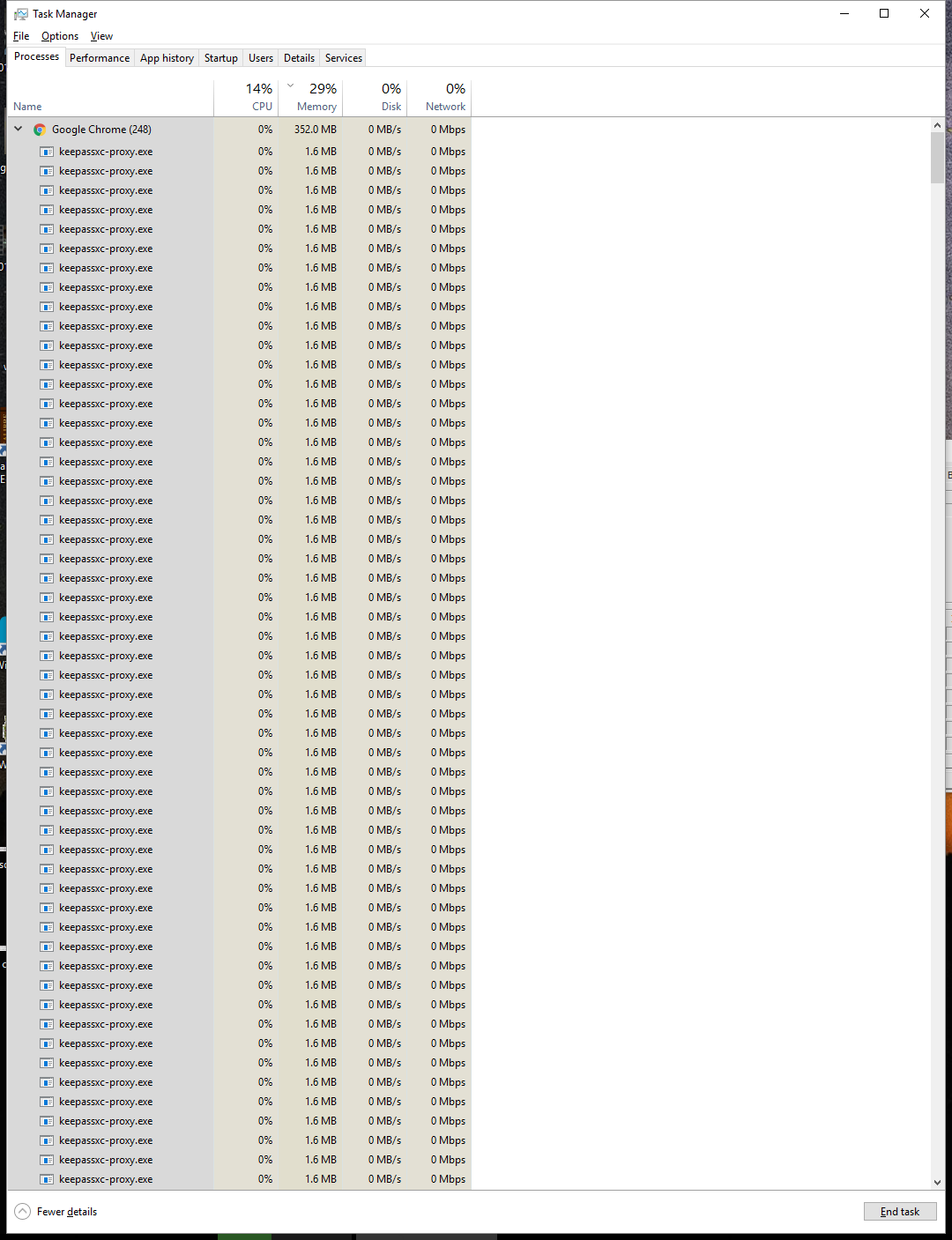
Freshly booted PC, I had maybe 2 or 3 Chrome tabs open, my PC gets super sluggish all of a sudden. I open task manager and see this:
Keepassxc 2.3.3
 DuncanFairley
on 11 May 2018
DuncanFairley
on 11 May 2018
We are working to fix this. As a workaround, leave KeePassXC running or disable the browser extension in Chrome.
droidmonkey
on 11 May 2018
@droidmonkey
Is there a work around or manual edit possible aside from disabling it? I found I had 326 of them running and 327 conhost.exe tasks. I only had 4 or so tabs open and maybe only for 10 minutes. My machine has been crashing a lot lately, I believe all these running keepassxc-proxy instances are consuming too many resources.
I unchecked the "use proxy application between KPXC and browser extension" and now i see it trying to spawn multiple KPXC instances. Though mostly it stops after one, but I had 5 at one point when I viewed the task bar.
KeePassXC-Browser Version: 1.1.2
KeePassXC Version: 2.3.1
 sheavner
on 11 May 2018
sheavner
on 11 May 2018
@sheavner Until we have a new release available the only thing you can do is to keep KeePassXC open in the background when proxy is enabled.
varjolintu
on 11 May 2018
We reverted the autoreconnect feature and uploaded a fixed version to the store.
phoerious
on 11 May 2018
Related issues
 guihkx
·
3Comments
guihkx
·
3Comments
 2tbwXj46BDbdNBRV79DS
·
3Comments
2tbwXj46BDbdNBRV79DS
·
3Comments
 nfnty
·
3Comments
nfnty
·
3Comments
 JosephHatfield
·
3Comments
JosephHatfield
·
3Comments
 813gan
·
3Comments
813gan
·
3Comments
Most helpful comment
Freshly booted PC, I had maybe 2 or 3 Chrome tabs open, my PC gets super sluggish all of a sudden. I open task manager and see this:

Keepassxc 2.3.3