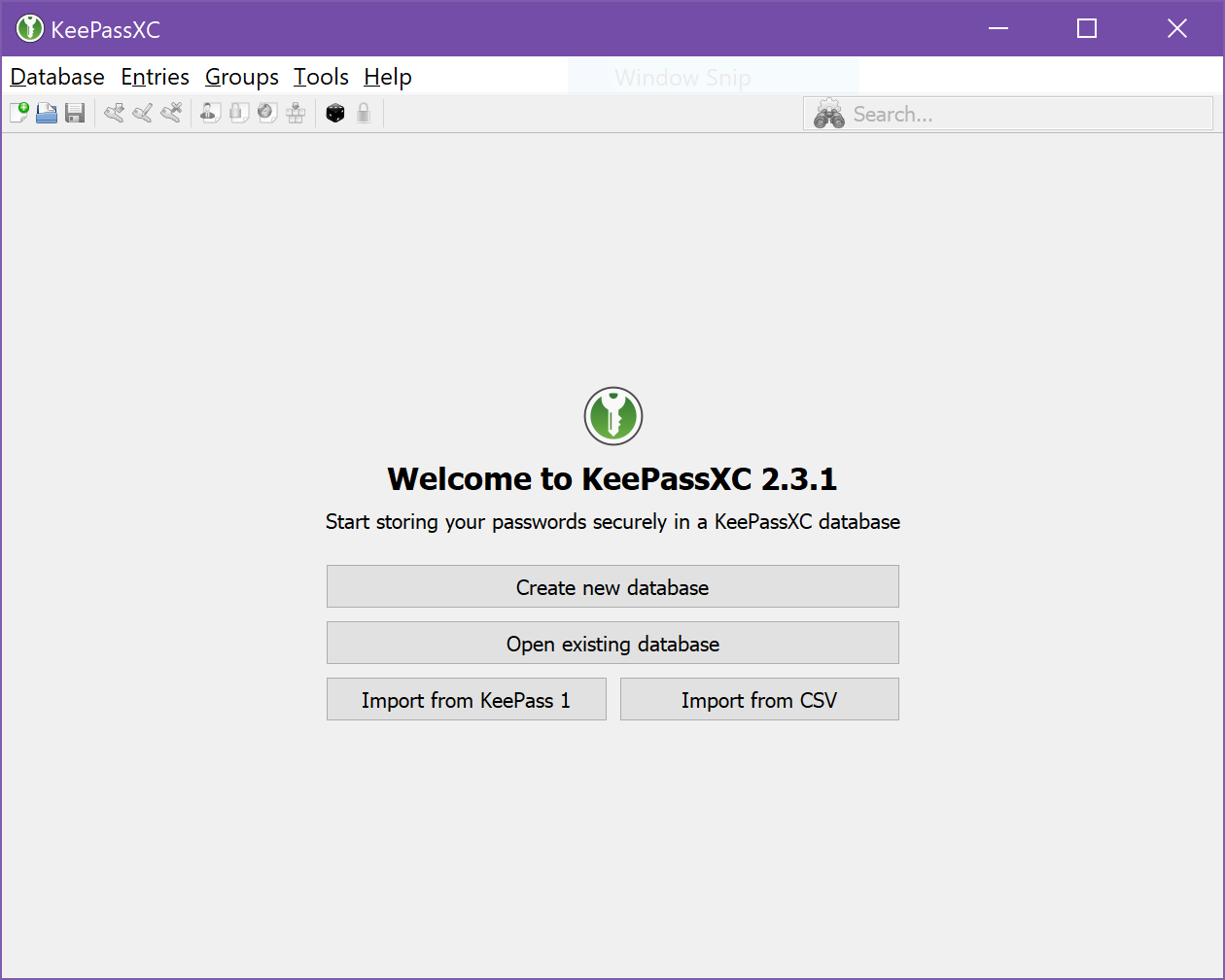
Keepassxc: Windows build: toolbar icons microscopic on 12" 4K display
Expected Behavior
I would expect the toolbar icons to be recognizable and scaled properly.
Current Behavior
Well, just take a look:
Possible Solution
Probably need higher resolution icons so that it can use those.
Steps to Reproduce (for bugs)
- Run KeePassXC on Windows at 4K.
- Observe the tiny icons.
Context
It only affects me on one device, a laptop with a 12" 4K display.
Debug Info
KeePassXC - Version 2.3.1
Revision: 2fcaeea
Libraries:
- Qt 5.10.1
- libgcrypt 1.8.2
Operating system: Windows 10 (10.0)
CPU architecture: x86_64
Kernel: winnt 10.0.16299
Enabled extensions:
- Auto-Type
- Browser Integration
- Legacy Browser Integration (KeePassHTTP)
- SSH Agent
- YubiKey
 tycho
tycho
All 4 comments
Same problem with the Attachments icon in the entry list header, the favicons, and the tree view icons on the left.
tycho
on 12 Mar 2018
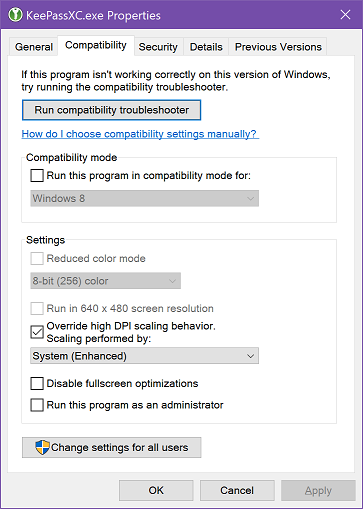
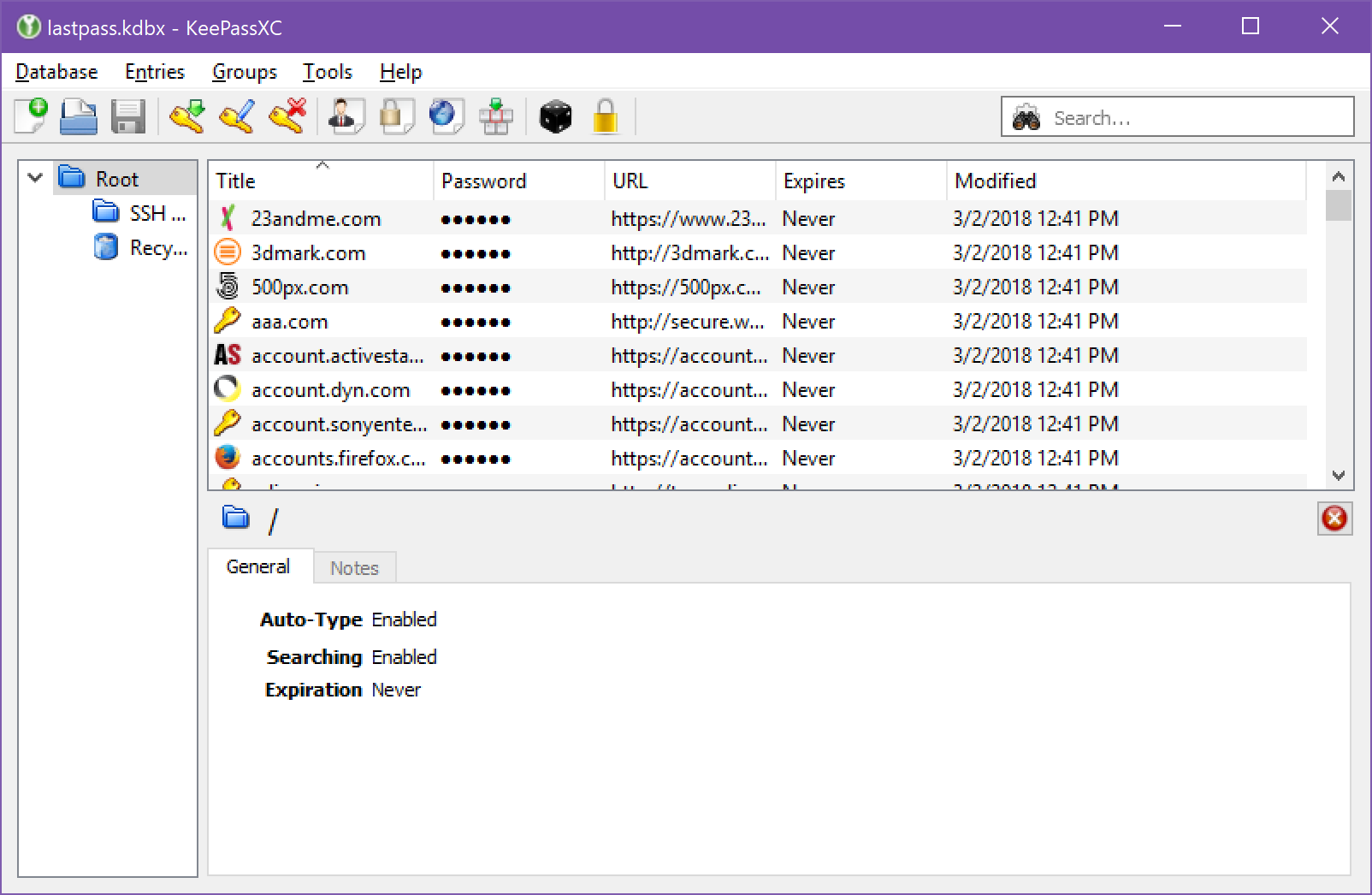
This setting has a dramatic positive impact on the readability of the whole thing:
As you can see:
tycho
on 12 Mar 2018
This looks like #548 and https://github.com/keepassxreboot/keepassxc/issues/1291#issuecomment-352079847
 ArchangeGabriel
on 12 Mar 2018
ArchangeGabriel
on 12 Mar 2018
I wonder if we can tell Windows to use the "system (enhanced)" scaling via the embedded .manifest? If we could, that'd be a stopgap for Windows until high DPI icons exist.
EDIT: Apparently we could!
The example manifest they provide is for MMC, but we could take the asmv3:application section and use it for our manifest:
<?xml version="1.0" encoding="UTF-8" standalone="yes"?>
<!-- Copyright (c) Microsoft Corporation -->
<assembly xmlns="urn:schemas-microsoft-com:asm.v1"  xmlns:asmv3="urn:schemas-microsoft-com:asm.v3" manifestVersion="1.0">
  <assemblyIdentity
    processorArchitecture="x86"
    version="5.1.0.0"
    name="Microsoft.Windows.MMC"
    type="win32"
/>
  <description>Microsoft Management Console</description>
  <trustInfo xmlns="urn:schemas-microsoft-com:asm.v3">
    <security>
      <requestedPrivileges>
        <requestedExecutionLevel
          level="highestAvailable"
          uiAccess="false"
            />
      </requestedPrivileges>
    </security>
  </trustInfo>
  <asmv3:application>
    <asmv3:windowsSettings xmlns="http://schemas.microsoft.com/SMI/2017/WindowsSettings">
      <gdiScaling>true</gdiScaling>
    </asmv3:windowsSettings>
  </asmv3:application>
</assembly>
Related issues
 mstarke
·
3Comments
mstarke
·
3Comments
 shaneknysh
·
3Comments
shaneknysh
·
3Comments
 nfnty
·
3Comments
nfnty
·
3Comments
 bleepnetworks
·
3Comments
bleepnetworks
·
3Comments
 clementlesne
·
3Comments
clementlesne
·
3Comments