Keepassxc: 2.3.0 crashes on macOS yosemite
Expected Behavior
Application should open on macOS. I have not tried with 2.3.1.
Current Behavior
The application crashes immediately.
Possible Solution
Fix the code signature for libsodium?
Steps to Reproduce (for bugs)
- download https://github.com/keepassxreboot/keepassxc/releases/download/2.3.0/KeePassXC-2.3.0.dmg
- install application
- open the application
Debug Info
Process:               KeePassXC [4336]
Path:                  /Applications/KeePassXC.app/Contents/MacOS/KeePassXC
Identifier:            org.keepassx.keepassxc
Version:               ???
Code Type:             X86-64 (Native)
Parent Process:        ??? [1]
Responsible:           KeePassXC [4336]
User ID:               502

Date/Time:             2018-03-04 20:16:18.612 -0500
OS Version:            Mac OS X 10.10.5 (14F2511)
Report Version:        11
Anonymous UUID:        C7E1D712-4C65-46C5-68B1-17D3EDDA7754

Sleep/Wake UUID:       14ABA23D-7031-436E-814E-FC6B82806CE9

Time Awake Since Boot: 17000 seconds
Time Since Wake:       560 seconds

Crashed Thread:        0

Exception Type:        EXC_BREAKPOINT (SIGTRAP)
Exception Codes:       0x0000000000000002, 0x0000000000000000

Application Specific Information:
dyld: launch, loading dependent libraries

Dyld Error Message:
  Library not loaded: @executable_path/../Frameworks/libsodium.23.dylib
  Referenced from: /Applications/KeePassXC.app/Contents/MacOS/KeePassXC
  Reason: no suitable image found.  Did find:
    /Applications/KeePassXC.app/Contents/MacOS/../Frameworks/libsodium.23.dylib: code signature invalid for '/Applications/KeePassXC.app/Contents/MacOS/../Frameworks/libsodium.23.dylib'

    /Applications/KeePassXC.app/Contents/MacOS/../Frameworks/libsodium.23.dylib: code signature invalid for '/Applications/KeePassXC.app/Contents/MacOS/../Frameworks/libsodium.23.dylib'

Binary Images:
    0x7fff6efbc000 -     0x7fff6eff292f  dyld (353.2.4) <3C068A0D-69D5-3AD6-86D9-6261D3B1564E> /usr/lib/dyld
KeePassXC - 2.3.0
Operating system: macOS
 efx
efx
All 29 comments
Please try 2.3.1.
 phoerious
on 7 Mar 2018
phoerious
on 7 Mar 2018
This still happens on 2.3.1. Seemingly identical error.
efx
on 7 Mar 2018
I am experiencing similar issues, even after trying 2.3.1. The issue is most common when viewing entries or editing entries within the application. Would it be a good bet to revert back to a previous version until this is resolved?
 rohitksharma
on 7 Mar 2018
rohitksharma
on 7 Mar 2018
Looks like we need to set mmacosx-version-min=10.10 on release-tool, though Qt 5.10 still requires at least 10.11.
 weslly
on 7 Mar 2018
weslly
on 7 Mar 2018
I don't know about Qt 5.10, but KeePassXC 2.3.0 from macports runs fine on Yosemite 10.10. So to my view it's a pure packaging (signing) problem.
So this bug is not against KeePassXC itself, but against the provided .dmg file.
 7usr7local
on 7 Mar 2018
7usr7local
on 7 Mar 2018
Interesting @peterjw. FWIW I tried installing 2.3.0 using brew and saw the same error.
efx
on 7 Mar 2018
release-tool already sets the target variable to 10.10.
phoerious
on 8 Mar 2018
@efx can you check the output of this command?
codesign -vv /Applications/KeePassXC.app/Contents/Frameworks/libsodium.23.dylib
It looks like the libsodium lib is not being signed correctly preventing it from loading
 droidmonkey
on 8 Mar 2018
droidmonkey
on 8 Mar 2018
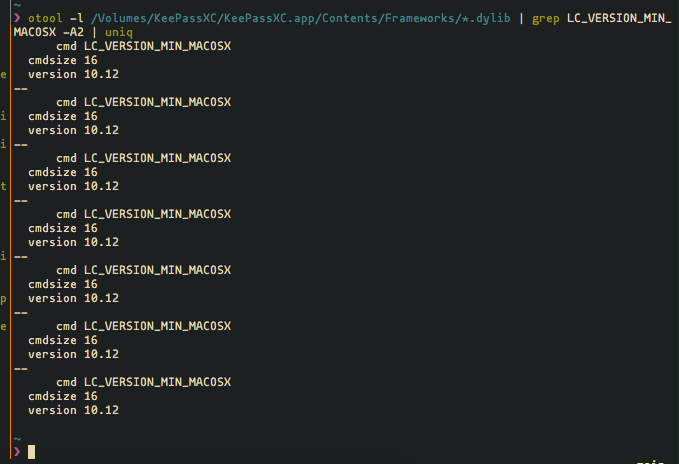
@phoerious I get this if I run otool -l /Volumes/KeePassXC/KeePassXC.app/Contents/Frameworks/libsodium.23.dylib | grep LC_VERSION_MIN_MACOSX -A2 | uniq:
      cmd LC_VERSION_MIN_MACOSX
  cmdsize 16
  version 10.12
But running the same command on the app binary I get version 10.10 instead, so cmake/clang is only setting the version on the binary and ignoring the libs. We should probably add -mmacosx-version-min=10.10 to CFLAGS, CXXFLAGS, and LDFLAGS to force the minimum version on the *.dylib files too.
weslly
on 8 Mar 2018
@weslly sure thing:
$ codesign -vv /Applications/KeePassXC.app/Contents/Frameworks/libsodium.23.dylib
/Applications/KeePassXC.app/Contents/Frameworks/libsodium.23.dylib: valid on disk
/Applications/KeePassXC.app/Contents/Frameworks/libsodium.23.dylib: satisfies its Designated Requirement
If it's just libsodium that's built with the new linker version, then the only thing we can do is build it ourselves. The libsodium.32.dylib is the one from home brew. KeePassXC itself is built with 10.10 compatibility.
phoerious
on 8 Mar 2018
@phoerious Pretty much all of them are 10.12:
weslly
on 8 Mar 2018
Dang! Why do people make backwards compatibility on macOS so damn hard?
phoerious
on 8 Mar 2018
I'm trying to get KeePass X installed on a friend's machine and I just ran into this issue. What's the recommended workaround for now? Build from source? If so, could someone post the exact list of steps to follow? I don't work on a Mac myself so I'm quite the novice when it comes to debugging and fixing a build from source issue on that OS.
 banerjs
on 1 Apr 2018
banerjs
on 1 Apr 2018
@banerjs https://github.com/keepassxreboot/keepassxc/wiki/Set-up-Build-Environment-on-OS-X and https://github.com/keepassxreboot/keepassxc/wiki/Building-KeePassXC
weslly
on 5 Apr 2018
@banerjs : The .dmg file of one of the old versions - I believe it was 2.2.2- from the Releases page just works on Yosemite or if you happen to have macports installed, just take the macports version.
7usr7local
on 18 Apr 2018
Same problem/error here with fresh install version 2.3.1:
Process:               KeePassXC [23448]
Path:                  /Applications/A/KeePassXC.app/Contents/MacOS/KeePassXC
Identifier:            org.keepassx.keepassxc
Version:               ???
Code Type:             X86-64 (Native)
Parent Process:        ??? [1]
Responsible:           KeePassXC [23448]
User ID:               502

Date/Time:             2018-05-08 12:19:31.248 +0200
OS Version:            Mac OS X 10.10.5 (14F2411)
Report Version:        11
Anonymous UUID:        FD463EED-CFC6-8E01-83CD-C88C63CC9306


Time Awake Since Boot: 4700 seconds

Crashed Thread:        0

Exception Type:        EXC_BREAKPOINT (SIGTRAP)
Exception Codes:       0x0000000000000002, 0x0000000000000000

Application Specific Information:
dyld: launch, loading dependent libraries

Dyld Error Message:
  Library not loaded: @executable_path/../Frameworks/libsodium.23.dylib
  Referenced from: /Applications/A/KeePassXC.app/Contents/MacOS/KeePassXC
  Reason: no suitable image found.  Did find:
    /Applications/A/KeePassXC.app/Contents/MacOS/../Frameworks/libsodium.23.dylib: code signature invalid for '/Applications/A/KeePassXC.app/Contents/MacOS/../Frameworks/libsodium.23.dylib'

    /Applications/A/KeePassXC.app/Contents/MacOS/../Frameworks/libsodium.23.dylib: code signature invalid for '/Applications/A/KeePassXC.app/Contents/MacOS/../Frameworks/libsodium.23.dylib'
Will try the "work arounds" from above.
Where to find older version or MacPorts?
Searched the web but nothing.
 bartatgithub
on 8 May 2018
bartatgithub
on 8 May 2018
@bartatgithub Sorry, missed your question. Edited my previous post to contain links to the the sources I mentioned.
7usr7local
on 12 Jun 2018
It’s a time ago, so, could you send a link where to find?
Thanks!
On 12 Jun 2018, at 15:26, Peter J. W. notifications@github.com wrote:
@bartatgithub https://github.com/bartatgithub Sorry, missed your question. Edited my previous post to contain links to the the sources I mentioned.
—
You are receiving this because you were mentioned.
Reply to this email directly, view it on GitHub https://github.com/keepassxreboot/keepassxc/issues/1671#issuecomment-396588168, or mute the thread https://github.com/notifications/unsubscribe-auth/AGOycbEQJCqfDWOi1-3yyzz4pcv7cBs6ks5t78FzgaJpZM4SgfMG.
bartatgithub
on 13 Jun 2018
This is still a problem with 2.3.4 released half a year after this ticket was opened.
If you can't fix the code signature problem for OS X 10.10, I'd recommend not to mark the download as "macOS 10.10 and later"
Just my two pence ...
7usr7local
on 10 Sep 2018
Same issue here. Not a great user experience...
 edswangren
on 3 Jan 2019
edswangren
on 3 Jan 2019
Just for grins, can you try the 2.4.0-snapshot build: https://snapshot.keepassxc.org/latest/KeePassXC-2.4.0-snapshot.dmg
We made several changes to the packaging for Mac.
droidmonkey
on 3 Jan 2019
Thanks to work on this problem!
Meanwhile I have switched to MacOS 10.13.4 and your current version 2.3.4 works smooth.
Sorry, no running Yosemite anymore to test.
Maybe someone else?
bartatgithub
on 4 Jan 2019
The 2.4.0 snapshot still shows the same behavior.
 alexblaessle
on 11 Jan 2019
alexblaessle
on 11 Jan 2019
@droidmonkey, thank you for the update.
Just for grins, can you try the 2.4.0-snapshot build: https://snapshot.keepassxc.org/latest/KeePassXC-2.4.0-snapshot.dmg
Starting it from the DMG image on _10.10.5 Yosemite_ shows the error
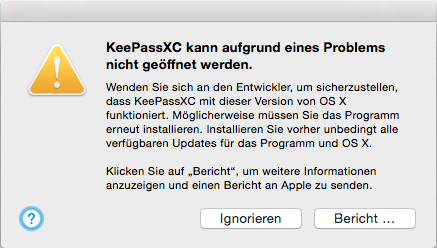
(sorry for the german) It basically says rather generic "Can not be opened, contact developer, maybe you need to reinstall the software. Update everything beforehand at all cost. Press _Bericht_ to get more information and send everything to Apple."
Pressing the button indeed gives a form to send information to Apple providinging the lines
Process:               KeePassXC [XXXXXX]
Path:                  /Volumes/VOLUME/KeePassXC.app/Contents/MacOS/KeePassXC
Identifier:            org.keepassx.keepassxc
Version:               ???
Code Type:             X86-64 (Native)
Parent Process:        ??? [1]
Responsible:           KeePassXC [XXXXX]
User ID:               XXX

Date/Time:             2019-MM-DD HH:MM:SS.068 +XXXX
OS Version:            Mac OS X 10.10.5 (XXXXXX)
Report Version:        11
Crashed Thread:        0
[...]
Exception** Type:        EXC_BREAKPOINT (SIGTRAP)
Exception Codes:       0x0000000000000002, 0x0000000000000000

Application Specific Information:
dyld: launch, loading dependent libraries

Dyld Error Message:
  Symbol not found: _kSecUseAuthenticationUI
  Referenced from: /Volumes/VOLUME/KeePassXC.app/Contents/MacOS/KeePassXC
  Expected in: /System/Library/Frameworks/Security.framework/Versions/A/Security
 in /Volumes/VOLUME/KeePassXC.app/Contents/MacOS/KeePassXC
Followed by some more information about libraries, binary adresses and stuff which I do omit here because I cannot tell wether it contatins sensitive information about my system or not.
Trying to start it from the shell yields basically the same error message.
Not wanting to copy it to /Applications for obvious reasons 😏
Version 2.4 is not (yet) available on MacPorts for Yosemite to crosscheck.
7usr7local
on 11 Jan 2019
Ok great that is very helpful and I know exactly what it wrong.
droidmonkey
on 11 Jan 2019
Does this fix also the problem with version 2.4.0 on MacOS 10.13.4?
MacOS 10.13.4 ---> version 2.3.4 works
MacOS 10.13.4 ---> version 2.4.0 doesn't start up
Thanks!
bartatgithub
on 6 May 2019
... sorry, version 2.4.1 just installed and tested and works on MacOS 10.13.4!
Thanks!
bartatgithub
on 6 May 2019
Related issues
 bleepnetworks
·
3Comments
bleepnetworks
·
3Comments
 n1trux
·
3Comments
n1trux
·
3Comments
 2tbwXj46BDbdNBRV79DS
·
3Comments
2tbwXj46BDbdNBRV79DS
·
3Comments
 MisterY
·
3Comments
MisterY
·
3Comments
 guihkx
·
3Comments
guihkx
·
3Comments
Most helpful comment
This is still a problem with 2.3.4 released half a year after this ticket was opened.
If you can't fix the code signature problem for OS X 10.10, I'd recommend not to mark the download as "macOS 10.10 and later"
Just my two pence ...