Keepassxc: "Require user confirmation when this key is used" causes SSH Agent signing failed
Expected Behavior
When using SSH Agent and "Require user confirmation when this key is used" checkbox is checked, SSH Agent login should work and I'm assuming there should be some sort of confirmation
Current Behavior
When using SSH Agent, and "Require user confirmation when this key is used" checkbox is checked, the following error is seen on the terminal sign_and_send_pubkey: signing failed: agent refused operation
Possible Solution
Un-check "Require user confirmation when this key is used"
Steps to Reproduce (for bugs)
- Add a new entry with SSH Agent
- Check "Require user confirmation when this key is used"
- Login to a server that utilises the key
Context
Trying to use the new SSH Agent feature
Debug Info
KeePassXC - Version 2.3.0
Revision: 4c0ed74
Libraries:
- Qt 5.9.3
- libgcrypt 1.8.2
Operating system: macOS High Sierra (10.13)
CPU architecture: x86_64
Kernel: darwin 17.4.0
Enabled extensions:
- Auto-Type
- Browser Integration
- Legacy Browser Integration (KeePassHTTP)
- SSH Agent
- YubiKey
 64b2b6d12b
All 14 comments
Does user confirmation work when you add the key manually with ssh-add -c outside KeePassXC? Is they key actually on the agent when you list the loaded keys with ssh-add -l?
It's likely the issue is with OpenSSH and confirmation on macOS meaning OpenSSH doesn't have any "askpass" binary that can be launched.
 hifi
on 5 Mar 2018
hifi
on 5 Mar 2018
I get the same error on my macos install and the key is loaded for me, but I will need to check your other questions when I boot back into macos.
 mannp
on 5 Mar 2018
mannp
on 5 Mar 2018
It's likely the issue is with OpenSSH and confirmation on macOS meaning OpenSSH doesn't have any "askpass" binary that can be launched.
Yes that's the cause. I use https://github.com/theseal/ssh-askpass to provide the ASKPASS program on macOS. It works for almost everything (git, ssh, filezilla, and possibly more). Only sshfs does not work with that.
 yan12125
on 5 Mar 2018
yan12125
on 5 Mar 2018
The same problem was happening for me even by manully adding the key with ssh-add -c so it was not a KeePassXC issue. The issue was resolved for me after installing https://github.com/theseal/ssh-askpass as per @yan12125, however, I had to follow the manual install process of;
$ sudo cp ssh-askpass /usr/local/bin/
$ cp ssh-askpass.plist ~/Library/LaunchAgents/
The homebrew method did not resolve the issue.
64b2b6d12b
on 6 Mar 2018
Hi,
I encountered the same issue and it took me quite some time to find the cause.
Maybe we should add a check for the askpass installation or at least show some kind of information pop-up that askpass is required for this feature in order to work properly.
This may prevent people in the future from taking hours to troubleshoot this issue.
Thanks and regards
 sven-weber
on 13 Aug 2018
sven-weber
on 13 Aug 2018
The same happens on my Linux (Arch+KDE) setup.
The key is correctly registered, and I can use it when the checkbox is empty. When enabling the Require user confirmation when this key is used looks like the key can not be used anymore
 thePanz
on 10 Jan 2019
thePanz
on 10 Jan 2019
Confirm the issue on Arch Linux with KDE with SSH_ASKPASS set to /usr/bin/ksshaskpass, but it works with x11-ssh-askpass or when ksshaskpass executable is symlinked to /usr/lib/ssh/ssh-askpass.
Also after checking/unchecking the checkbox we have to lock-unlock database (or restart keepassxc)
 cl0ne
on 25 Jan 2019
cl0ne
on 25 Jan 2019
I Confirm the issue on Fedora 29 on Gnome with SSH_ASKPASS set to /usr/lib/ssh/ssh-askpass.
KeepassXC Version: 2.3.4
 pablomenino
on 8 Feb 2019
pablomenino
on 8 Feb 2019
@cl0ne so the solution is to define SSH_ASKPASS=/usr/bin/ksshaskpass ?
thePanz
on 14 Feb 2019
@cl0ne so the solution is to define
SSH_ASKPASS=/usr/bin/ksshaskpass?
Confirmation with ksshaskpass works only when I symlink ksshaskpass executable to /usr/lib/ssh/ssh-askpass.
cl0ne
on 14 Feb 2019
Also after checking/unchecking the checkbox we have to lock-unlock database (or restart keepassxc)
Actually, I overlooked buttons "Add to agent" and "Remove from agent" as a faster way to apply changes in key settings.
cl0ne
on 14 Feb 2019
This is still an issue on ubuntu. The solution on Ubuntu 18.04 was to disable the keyring and use the default ssh-agent.
Follow this instructions: https://bugs.launchpad.net/ubuntu/+source/openssh/+bug/1812247/comments/12
To get the linked solution to work, I needed to change one line in ~/.config/autostart/ssh-agent.desktop:
Exec=/usr/bin/ssh-agent -a /run/user/1000/keyring/ssh
Now it's asking every time (when keepassxc is unlocked):
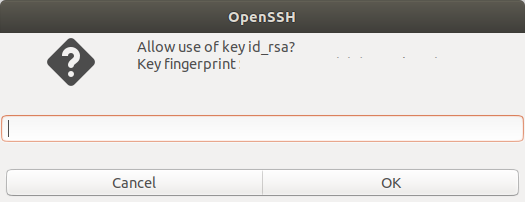
 TechupBusiness
on 8 Nov 2019
TechupBusiness
on 8 Nov 2019
This issue still happens to me on Arch Linux, when I use sway.
When using i3, it works.
Edit: But it doesn't work with ssh-add -c, too, so I guess it's no keepassxc problem.
 nycex
on 16 Nov 2019
nycex
on 16 Nov 2019
Ok, I'm going to close this as an upstream issue. If you keep having this on a stock distribution with their stock desktop environment, file a bug in their system to fix their implementation of SSH_ASKPASS.
Thanks everyone.
hifi
on 16 Nov 2019
Related issues
 JosephHatfield
·
3Comments
JosephHatfield
·
3Comments
 shyim
·
3Comments
shyim
·
3Comments
 MisterY
·
3Comments
MisterY
·
3Comments
 MountainX
·
3Comments
MountainX
·
3Comments
 bleepnetworks
·
3Comments
bleepnetworks
·
3Comments
Most helpful comment
The same happens on my Linux (Arch+KDE) setup.
The key is correctly registered, and I can use it when the checkbox is empty. When enabling the
Require user confirmation when this key is usedlooks like the key can not be used anymore