Keepassxc: Hide Toolbar functionality is crippled.
Expected Behavior
Ability to the hide toolbar, via the Show Toolbar toggle under the View menu or the menu bar's right-click menu. Function is persistent between each application session.

Current Behavior
Caption is missing from the menu bar's right-click menu, and the view menu. Persistence of functionality between each application session is no longer retained.

Possible Solution
Revert changes made to mainWindow.cpp in commit https://github.com/keepassxreboot/keepassxc/pull/1116/commits/ca59ae4f4f503ff0044919ebce94d544484aa126
Context
For some users — including myself — this feature is critical to keeping the user interface clean and distraction free, thus being critical to my workflow within the application. Due to this functionality now being crippled, I have to utilize the right-click menu option every single new application session.
View menu being perceived as 'useless', is no reason to regress the aforementioned functionality; hiding the menu would've been more than sufficient.
Debug Info
KeePassXC - Version 2.3.0
Revision: 4c0ed74
Libraries:
- Qt 5.10.1
- libgcrypt 1.8.2
Operating system: Arch Linux
CPU architecture: x86_64
Kernel: linux 4.15.7-1-ARCH
Enabled extensions:
- Auto-Type
- Browser Integration
- Legacy Browser Integration (KeePassHTTP)
- SSH Agent
- YubiKey
 SapphirusBeryl
All 6 comments
The reason this feature was removed is due to the search box being part of the toolbar. I don't understand how our simple toolbar causes distractions, but to each's own. I do agree that the right click menu should have a proper headline to it.
 droidmonkey
on 3 Mar 2018
droidmonkey
on 3 Mar 2018
Seems that I forgot to remove the right-click sub menu.
Anyway we discussed against the View menu/Toolbar/Tabbar in #207
 TheZ3ro
on 3 Mar 2018
TheZ3ro
on 3 Mar 2018
What's wrong with giving people the option to disable the toolbar? There's no reason for removing functionality people utilize. I can concede with the removal of the view menu, but not this toggle option in its entirety.
SapphirusBeryl
on 4 Mar 2018
Yeah, it was for context about the commit you linked :wink:
TheZ3ro
on 4 Mar 2018
As a follow-up to the present issue and #505 (starting here), here are a few more thoughts regarding toolbar functionality.
About @TheZ3ro proposition:
Bring back the hide toolbar option (maybe by right-clicking on the toolbar itself if we don't want an empty View menu and fixing #1618)
IMHO, menu bar is definitely not the right place for this. I don't want to bring back View menu either. Instead, adding a persistent option in Tools -> Settings -> General -> Basic Settings would be much more appropriate. Both _Entry Management_ and _General_ sections already serve the purpose of showing/hiding stuff. Here's the new option I propose:
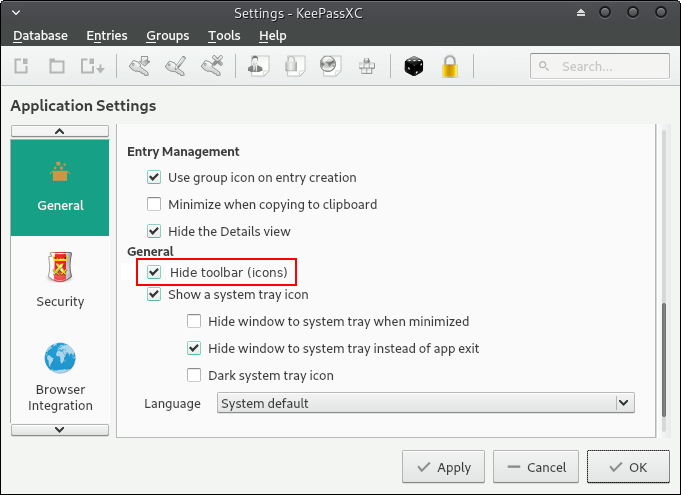
From what I understand, @TheZ3ro first removed the View menu in #1116 (which is good), then @weslly removed the toolbar toggle from the toolbar itself in #1232 (also a good thing). But as @SapphirusBeryl noticed, a 2nd toggle is still available when right-clicking menu bar.
So, I believe the best way to keep it clean and functional at the same time would be to remove the toggle button from menu bar and add a persistent option to hide toolbar in settings.
 A1RO
on 4 Mar 2018
A1RO
on 4 Mar 2018
Fixed in #1819. This will be available in version 2.4
TheZ3ro
on 3 Jul 2018
Related issues
 n1trux
·
3Comments
TheZ3ro
·
3Comments
n1trux
·
3Comments
TheZ3ro
·
3Comments
 bleepnetworks
·
3Comments
bleepnetworks
·
3Comments
 mstarke
·
3Comments
mstarke
·
3Comments
 813gan
·
3Comments
813gan
·
3Comments
Most helpful comment
As a follow-up to the present issue and #505 (starting here), here are a few more thoughts regarding toolbar functionality.
About @TheZ3ro proposition:
IMHO, menu bar is definitely not the right place for this. I don't want to bring back View menu either. Instead, adding a persistent option in
Tools -> Settings -> General -> Basic Settingswould be much more appropriate. Both _Entry Management_ and _General_ sections already serve the purpose of showing/hiding stuff. Here's the new option I propose:From what I understand, @TheZ3ro first removed the View menu in #1116 (which is good), then @weslly removed the toolbar toggle from the toolbar itself in #1232 (also a good thing). But as @SapphirusBeryl noticed, a 2nd toggle is still available when
right-clickingmenu bar.So, I believe the best way to keep it clean and functional at the same time would be to remove the toggle button from menu bar and add a persistent option to hide toolbar in settings.