Keepassxc: Intermittent crash
Current Behavior
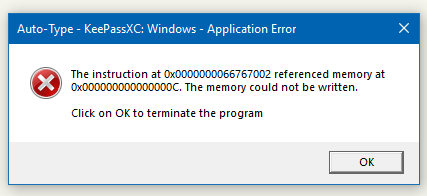
KeePassXC on Windows suddenly crashed in the background due to a faulty memory read. The following message popped out of nowhere.
Steps to Reproduce (for bugs)
No idea. KeePassXC was minimized in the tray. This needs investigating.
Debug Info
KeePassXC - Version 2.3.0
Revision: 4c0ed74
Libraries:
- Qt 5.10.1
- libgcrypt 1.8.2
Operating system: Windows 10 (10.0)
CPU architecture: x86_64
Kernel: winnt 10.0.16299
Enabled extensions:
- Auto-Type
- Browser Integration
- Legacy Browser Integration (KeePassHTTP)
- SSH Agent
- YubiKey
 phoerious
All 27 comments
I got this too after I had KeePassXC running for some time. I do not minimize, only keeping it in the background. Windows 10 64bit.
 jpyllman
on 28 Feb 2018
jpyllman
on 28 Feb 2018
I have not seen this, but I do not use autotype
 droidmonkey
on 28 Feb 2018
droidmonkey
on 28 Feb 2018
The window title may be misleading. I did not use Auto-Type. In fact, I had no interaction with KeePassXC. It just popped up randomly.
I've never had that before and I haven't had it since, but there must be a problem, still.
phoerious
on 1 Mar 2018
Today it happened a lot sooner then yesterday. It might be connected to auto-type, cause it happened quite soon after I used auto-type. And I seem to be able to recreate it by just use auto-type. And way I can help track the problem??
jpyllman
on 1 Mar 2018
You'd have to trigger it in a debugger, but if you can trigger it reliably post your exact conditions when it crashes
droidmonkey
on 1 Mar 2018
I just start KeePassXC. It opens with my last open database and shows the login. I then switch to my browser and put the cursor in the login I need KeePassXC for. After that I press the hotkey set for auto-type. I get the login dialog. After that it shows the matched keys. I select the correct one and make it send the user/password. It works fine and I get logged in. Then maybe 10 seconds later I get the dialog popup that KeePassXC has crashed. It might be 8 seconds since that is my autolock setting. But I have not managed to time it that close. I will see if I can get the debug version up and running and see if I get the same behavior.
jpyllman
on 1 Mar 2018
I had it this afternoon when lock session (windows seven 64bits)
 OlivierMary
on 1 Mar 2018
OlivierMary
on 1 Mar 2018
I have the same problem on a Windows 10 (x64) machine. I am not sure but I think this problem come when KeePassXC is unlocked and my screen is locked.
Most times I recognized, that KeePassXC was crashed, were after I returned back to my PC.
There are no entried in the Windows event log.
 TB1234
on 2 Mar 2018
TB1234
on 2 Mar 2018
It happens each time I lock my session (Windows 7 64bits). I thought I could use the 2.2.4 again to avoid this, but now my database is not compatible with 2.2...
 6wheels
on 5 Mar 2018
6wheels
on 5 Mar 2018
@6wheels you can downgrade your database if you select the old KDF again.
droidmonkey
on 6 Mar 2018
Not without the implicit upgrade fix in 2.3.1, which we haven't released yet.
phoerious
on 6 Mar 2018
Downgrading my database to KDBX 3.1 (with 2.3.1) allows me to use the 2.2.4 again.
I tried both 32 and 64bits versions, still failing (2.3.1).
6wheels
on 7 Mar 2018
I haven't been able to reproduce the crash since my first report.
phoerious
on 7 Mar 2018
I can reproduce with this sequence:
- Open KeepassXC
- Unlock anydatabase
- Put KeepassXC in tray
- Lock session (keepass lock databases)
- Login (don't open keepass from tray)
- AutoType on FF or Chrome or .... (Will ask for password and stay in tray)(don't open keepass from tray)
- Validate Autotype (don't open keepass from tray)
- Lock session
- Error prompt directly (for me).
I tried it 5 times I got error 5 times
OlivierMary
on 7 Mar 2018
Thanks, I can reproduce the crash with that information. However, I think it's much simpler than that. For me it crashes every time it auto-locks after Auto-Type when I lock my session.
phoerious
on 7 Mar 2018
This bug actually exists in 2.2 as well. 2.1.4 is the last version not to have the bug. I guess it got introduced with auto lock. I'll se if I can fix it.
phoerious
on 7 Mar 2018
I never had this bug in 2.2.4, If i'm right @6wheels too (5 post before)
OlivierMary
on 7 Mar 2018
I have this bug in the 2.3.1 too. Now, I am using the 2.2.0 again in lack of having the old install file of the 2.2.4 saved.
 jo-shi
on 9 Mar 2018
jo-shi
on 9 Mar 2018
@jo-shi 2.2.4 is available in the release tab ;)
@OlivierMary you're right, I never had this issue with 2.2.x or any previous KeepassXC version.
Hope the devs will find a solution ;)
Actually, the linux version works ok (but I did'nt tried the lock/unlock/tray method as my i3-lock does not lock the KeepassXC's databases automatically).
Is this reproducible on Linux, with Gnome or KDE?
6wheels
on 9 Mar 2018
@jo-shi did you see the crash in 2.3.1 performing the exact sequence that OlivierMary described?
droidmonkey
on 9 Mar 2018
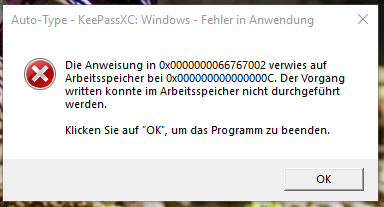
@droidmonkey yes, I can verify the exact sequence that @OlivierMary descibed:
jo-shi
on 9 Mar 2018
I couldn't reproduce it on Linux. I can reproduce it on Windows by
- auto-typing credentials
- locking and unlocking my session
That's all I need to do to reproduce the crash. I can, however, repro it with a 2.2 build as well. Only 2.1 which doesn't have auto lock on session lock doesn't have the problem. I may have to try it with our downloadable 2.2.4 release, but from what I've seen so far, 2.2 seems to be affected as well.
phoerious
on 9 Mar 2018
Update: I tested it with our 2.2 ZIP and it seems that the problem is not present there, which is weird, because I can reproduce it with a 2.2 development build.
phoerious
on 9 Mar 2018
If you can, please test my patch in #1691.
phoerious
on 9 Mar 2018
@phoerious I will try tomorow at work, no windows at home :laughing:
OlivierMary
on 11 Mar 2018
@phoerious Test ok for me :+1:
KeePassXC - Version 2.3.1-snapshot
Genre de la version : Snapshot
Révision : f620ad9
Bibliothèques :
- Qt 5.10.1
- libgcrypt 1.8.2
Système d’exploitation : Windows 7 SP 1 (6.1)
Architecture processeur : x86_64
Noyau : winnt 6.1.7601
Extensions activées :
- Auto-Type
- SSH Agent
OlivierMary
on 12 Mar 2018
I also confirm that the given patch fixes the issue.
Thanks for the quick fix. Waiting for the 2.3.2 release ;)
6wheels
on 12 Mar 2018
Related issues
 shaneknysh
·
3Comments
shaneknysh
·
3Comments
 2tbwXj46BDbdNBRV79DS
·
3Comments
2tbwXj46BDbdNBRV79DS
·
3Comments
 bleepnetworks
·
3Comments
bleepnetworks
·
3Comments
 haroldm
·
3Comments
haroldm
·
3Comments
 Throne3d
·
3Comments
Throne3d
·
3Comments