Keepassxc: Unable to connect to KeePassXC-Browser
I installed official KeePassXC-Browser from https://chrome.google.com/webstore/detail/keepassxc-browser/oboonakemofpalcgghocfoadofidjkkk
Current Behavior
KeePassXC 2.3.0 with KeePassXC browser integration checked. When trying to connect to KeePassXC-Browser, it triggers the KeePassXC window and that's all. The extension shows "Timeout or not connected to KeePassXC".
KeePassHTTP is working correctly like previously.
Debug Info
KeePassXC - Version 2.3.0
Revision: 4c0ed74
Libraries:
- Qt 5.9.3
- libgcrypt 1.8.2
Operating system: macOS High Sierra (10.13)
CPU architecture: x86_64
Kernel: darwin 17.4.0
Enabled extensions:
- Auto-Type
- Browser Integration
- Legacy Browser Integration (KeePassHTTP)
- SSH Agent
- YubiKey
 gyli
gyli
All 89 comments
Did you check the migration guide?
 varjolintu
on 28 Feb 2018
varjolintu
on 28 Feb 2018
Same happening with Arch Linux and same versions, except I'm using Firefox 58.0.2.
My previous source build worked fine before 2.3.0 release and 1.0 Firefox addon release.
 Z1ni
on 28 Feb 2018
Z1ni
on 28 Feb 2018
@varjolintu Yes, the related browser in Browser Integration page is also checked.
The problem is KeePassXC window is jumping out when connecting but the "KeePassXC: New key association request" window never show up.
gyli
on 28 Feb 2018
Firefox & KeePassXC restart got me to the point where the addon detects the KeePassXC version, but I can't connect.
For me the KeePassXC window isn't jumping out.
Z1ni
on 28 Feb 2018
I think the Association Request window is missing some flag on mac to pup-up in first screen with focus.
Can you guys checkout if maybe the window is below other windows?
 TheZ3ro
on 28 Feb 2018
TheZ3ro
on 28 Feb 2018
Now after the KeePassXC database had locked, the addon detected that and showed up the application window. After I opened the locked database the addon failed with "Cannot decrypt message".
Then after restarting the browser I got the addon to display the Association Request window and successfully added it.
Now it works.
Z1ni
on 28 Feb 2018
@TheZ3ro Negative. I don't find that window by minimizing all others.
I don't think I am having the same issue as @Z1ni's, restarting browser and keepassxc doesn't work for me.
gyli
on 28 Feb 2018
I get an error: Cannot save the native messaging script file. when trying to enable this for Chrome.
 gapipro
on 28 Feb 2018
gapipro
on 28 Feb 2018
I am encountering nearly the exact same problem on Ubuntu 16.04.4. Migration instructions followed; keepassxc-browser plugin installed, keepassxc version 2.3.0 (recent release, not beta) otherwise working fine, database unlocked when attempting to connect and appropriate checkbox under browser integration checked (_not_ http, browser integration).
The error condition I have is just "Timeout or not connected to KeePassXC". Restarting browser or keepassxc don't help.
 AzureRaptor
on 1 Mar 2018
AzureRaptor
on 1 Mar 2018
I hope no one should face this kind of issues. These are hard to solve and are frustrating for the users. Here's a general checklist for connection issues that could help finding the real issue:
1) After enabling Browser Integration and support for your browser
Depending on the operating system the org.keepassxc.keepassxc_browser.json native messaging script file shoud be installed to these locations:
Windows
AppData\Local\keepassxc or to the KeePassXC directory if using portable version.
Also there should be a registry entry found in the following location(s):
- Chrome:
HKEY_CURRENT_USER\\Software\\Google\\Chrome\\NativeMessagingHosts\\ - Chromium:
HKEY_CURRENT_USER\\Software\\Chromium\\NativeMessagingHosts\\ - Firefox:
HKEY_CURRENT_USER\\Software\\Mozilla\\NativeMessagingHosts\\ - Vivaldi:
HKEY_CURRENT_USER\\Software\\Vivaldi\\NativeMessagingHosts\\
Linux
- Chrome:
~/.config/google-chrome/NativeMessagingHosts - Chromium
~/.config/chromium/NativeMessagingHosts - Firefox:
~/.mozilla/native-messaging-hosts - Vivaldi:
~/.config/vivaldi/NativeMessagingHosts
macOS
- Chrome:
~/Library/Application Support/Google/Chrome/NativeMessagingHosts - Chromium:
~/Library/Application Support/Chromium/NativeMessagingHosts - Firefox:
~/Library/Application Support/Mozilla/NativeMessagingHosts - Vivaldi:
~/Library/Application Support/Vivaldi/NativeMessagingHosts
If you use any other browser the configuration location can vary. In these cases the script file must be copied manually.
Other browsers
Some example Linux paths:
- Google Chrome Beta:
~/.config/google-chrome-beta/NativeMessagingHosts - Google Canary (Unstable):
~/.config/google-chrome-unstable/NativeMessagingHosts - Waterfox:
~/.waterfox/native-messaging-hosts - Iridium:
~/.config/iridium/NativeMessagingHosts
2) Check the native messaging script file path and extension ID's
After finding the org.keepassxc.keepassxc_browser.json check the path variable inside it. It should point to the exact location to the KeePassXC binary. In Windows this variable can also exists without a path.
The extension ID under allowed_origins should be chrome-extension://oboonakemofpalcgghocfoadofidjkkk/ for Chromium-based browsers and
[email protected] under allowed_extensions for Firefox. There can be another ID seen with Chromium. This is the older version of the extension and it will be removed in the future from the script file.
With Chromium-based browsers you can check that the extension ID is the same with what is shown at the extensions page.
3) Check if keepassxc-proxy is launched and running
Connection between KeePassXC and the browser extension is managed by keepassxc-proxy binary. Make sure this is up and running. If not try to start it manually. Under macOS the binary can be found inside the KeePassXC.app at Contents/MacOS/.
If the binary doesn't start on macOS, please check the binary linking with the following command:
otool -L /Applications/KeePassXC.app/Contents/MacOS/keepassxc-proxy
It should show the following for QtNetwork and QtCore frameworks:
@executable_path/../Frameworks/QtNetwork.framework/Versions/5/QtNetwork
@executable_path/../Frameworks/QtCore.framework/Versions/5/QtCore
It's possible to use KeePassXC without the proxy feature. This means the connection between the extension and KeePassXC is direct and KeePassXC must not be launched before the browser does it (at the startup or from the popup). This mean the extension cannot be connected to KeePassXC on-the-fly. Proxy can be disabled from the Advanced tab of Browser Integration settings. This is not the recommended setting.
4) Debug the extension itself
If everything else seems to be OK but you still have issues please try to debug the extension.
Chromium-based:
- Go to the extension page, check
Developer mode - Click
backgroung pagelink after theInspect views:text
Firefox: - Go to
about:debuggingand checkEnable add-on debugging - Find KeePassXC-Browser and click
Debug
Console tab should now show any error messages the extension writes. If you are a developer and know these things you can use the Sources tab and debug the extension and find the exact point where it fails.
varjolintu
on 1 Mar 2018
@varjolintu Maybe we should put this on the website? O link this from the FAQ?
TheZ3ro
on 1 Mar 2018
@TheZ3ro Yes we should. I was just thinking more additions to it. I could make a PR to the web page repo.
varjolintu
on 1 Mar 2018
I'm facing the same error message with Google Chrome Beta on Arch Linux. After adding the file to ~/.config/google-chrome-beta/NativeMessagingHosts the connection works.
The documentation about where to put those JSON files (the whole troubleshooting guide) should really be part of the official documentation, not just part of an issue on Github. Even better, the settings page should contain a link to the technical details what "enable integration in these browser XYZ" entails.
 mbunkus
on 1 Mar 2018
mbunkus
on 1 Mar 2018
@mbunkus I totally agree. This will be fixed in the next version.
I didn't know Google Chrome Beta uses a different configuration location. But that explains it didn't work earlier.
varjolintu
on 1 Mar 2018
I' ve encountered exact the same issue on Ubuntu 16.04 with Iridium Browser.
https://github.com/keepassxreboot/keepassxc-browser/issues/35
After creating the directory ~/.config/iridium/NativeMessagingHosts and copying org.keepassxc.keepassxc_browser.json from Chromium, it seems to work.
 diffusae
on 1 Mar 2018
diffusae
on 1 Mar 2018
What would also be useful to mention, is that on Windows Chrome (and likely Chromium) will have to be restarted if it's running while KeePassXC is configured for it (it probably only looks for and picks up the registry keys on startup). On Linux this isn't required; it seems to look for the JSON files each time the extension's preferences are opened.
mbunkus
on 1 Mar 2018
Issue is not solved for me.
I have double checked the checklist of @varjolintu and the New key association request window is not showing on my machine. I have also tried restarting system and browser. Is it OS related?
In extension debugging, it shows Failed to connect: Native host has exited.
Here's my org.keepassxc.keepassxc_browser.json file
{
    "allowed_origins": [
        "chrome-extension://oboonakemofpalcgghocfoadofidjkkk/"
    ],
    "description": "KeePassXC integration with native messaging support",
    "name": "org.keepassxc.keepassxc_browser",
    "path": "/Applications/KeePassXC.app/Contents/MacOS/KeePassXC",
    "type": "stdio"
}
@ligyxy Have you tried using the proxy feature? Is there a reason you are not using it? If you are using a direct connection with KeePassXC this means you must close KeePassXC and then let the browser extension start it. This can happen on the browser startup or from the popup's Reload button.
varjolintu
on 2 Mar 2018
@varjolintu That solves it. Thanks!
I thought I have proxy running but actually it's not. So I followed what you said and let the extension start KeePassXC, then the request window show up.
Thank you so much!
gyli
on 2 Mar 2018
@ligyxy Please notice that this means that KeePassXC will be closed if you close your browser. Basically the extension handles the KeePassXC process. Make sure to save often. If you want everything to work like with KeePassHTTP-based extensions, make sure you enable the proxy from the Browser Integration settings.
varjolintu
on 2 Mar 2018
Followed the instructions @varjolintu but i'm still not able to connect my Chromium with my Database.
Debug Info on KeePassXC
KeePassXC - Version 2.2.4
Revision: 4723f66
Libraries:
- Qt 5.9.1
- libgcrypt 1.8.1
Operating system: macOS Sierra (10.12)
CPU architecture: x86_64
Kernel: darwin 16.7.0
Enabled extensions:
- KeePassHTTP
- Auto-Type
- YubiKey
What i've done
Created the file org.keepassxc.keepassxc_browser.json and copied it to ~/Library/Application Support/Chromium/NativeMessagingHosts but no luck
Chromium Extension Debugger Output
On Icon Click
Error 5: Timeout or not connected to KeePassXC
Click on "Reload"
Switches to KeePassXC App
Connecting to native messaging host org.keepassxc.keepassxc_browser
keepass.js:846 Failed to connect: Native host has exited.
keepass.js:954 Error 5: Timeout or not connected to KeePassXC
keepass.js:92 Uncaught (in promise) TypeError: Cannot read property 'onMessage' of null
    at Promise (keepass.js:92)
    at new Promise (<anonymous>)
    at Object.keepass.sendNativeMessage (keepass.js:89)
    at Promise (keepass.js:609)
    at new Promise (<anonymous>)
    at Object.keepass.changePublicKeys (keepass.js:590)
    at setTimeout (event.js:157)
_generated_background_page.html:1 Uncaught (in promise) false
Update
After clicking multiple times on the "reload" button, i sometimes get this error:
KeePassXC-Browser has encountered an error:

Cannot encrypt message or public key not found. Is native messaging or support for your browser enabled in KeePassXC?
Where can i enable native messaging or where can i select my browser?

 mortensassi
on 2 Mar 2018
mortensassi
on 2 Mar 2018
@moesphemie Looking at your extension list this is because you haven't enabled the Browser Integration extension. And also you are using an old version 2.2.4. This feature is supported only with 2.3.0 and later.
varjolintu
on 2 Mar 2018
oh my fault! now it's working, thanks
mortensassi
on 2 Mar 2018
@varjolintu @TheZ3ro and others
Thank you very much for your guidance here. I have now been able to resolve this in my particular situation.
I believe it may be that the relevant json file was just not automatically installed, or copied, for a Waterfox installation. That's the browser I'm using; its profile is stored under ~/.waterfox as opposed to ~/.firefox or ~/.mozilla .
What I did was simply to check under my .mozilla profile (I keep FF around for reference purposes but don't use it often), and indeed found the relevant json file there. I'm not sure if it was accidentally deposited there during the extension installation on Waterfox; I think it was because I haven't used FF in quite some time. I then had to manually make a native-messaging-hosts subdir of ~/.waterfox, and copied the json file there. Once I'd done that, when I next clicked the KPXC toolbar button, Eureka! The binding process to the KPXC application & database could take place, and the proxy process was run automatically somewhere along the way. I don't believe I even had to restart either KPXC or Waterfox.
Once again, thank you all very much!
AzureRaptor
on 3 Mar 2018
I just added both Keepassxc and the Keepassxc-browser extension. Windows 10 Chrome Version 64.0.3282.186 (Official Build) (64-bit). I have added the browser in Keepassxc. I have connected to the database. However, if I close the database and then open Chrome Keepassxc-browser does not connect to the database and I get the messaging error. However, I can connect if I open the database.
I am not a programmer but I did try following the instructions about enabling the browser within the database and cannot seem to remedy the problem.
 joduvain
on 3 Mar 2018
joduvain
on 3 Mar 2018
@joduvain You cannot connect to a closed database or get entries from it.
varjolintu
on 3 Mar 2018
I can not connect to a closed database.
joduvain
on 3 Mar 2018
@joduvain And you shouldn't. Read my previous message.
varjolintu
on 4 Mar 2018
Sorry. I read that as a question. Could I connect or could I get entries? I did think that when I was going through the material on accessing the database that the browser part would open the database.
Thanks for clearing that up.
joduvain
on 4 Mar 2018
It would be nice if one could select a path, but at least get a link to some documentation and the required JSON. For me it's ~/.config/google-chrome-unstable. Maybe one could maintain a list of the most commonly used paths and show those where the directory or registry key exists in addition to some documentation and JSON link?
 luzat
on 11 Mar 2018
luzat
on 11 Mar 2018
@luzat Good idea.
varjolintu
on 11 Mar 2018
Thanks, @varjolintu ! Your post on March 1 gave me the solution. For some reason, keepassxc-proxy is not being launched automatically; running it from the command line gets things moving.
 ghost
on 11 Mar 2018
ghost
on 11 Mar 2018
@serussell Running it from the command line doesn't work. The process needs to be launched by the browser extension.
varjolintu
on 11 Mar 2018
@varjolintu I must have gotten lucky; I started it from the command line and it worked fine.
ghost
on 11 Mar 2018
I would offer to at least implement a more dynamic list of browsers within the next ~2 weeks if nobody else decides to take it. My idea is to probably use a multi-select QListWidget and check for the respective parent paths/keys and add missing browsers that were encountered (Iridium, Chrome beta, unstable, ...). It may make sense to not hide browsers for which no profile was detected, but instead grey them out with a tooltip like "No profile found." Adding a link to JSON and more documentation can be done separately.
I don't know how to best integrate documentation for manually adding NativeMessagingHosts as this might get quite elaborate. Maybe a page similar to the migration guide should be created and linked to.
luzat
on 11 Mar 2018
ArchLinux, Chromium 65.0.3325.146, keepassxc 2.3.1
After the first successful login keepassxc-proxy exits and never restarts.
As the result "Timeout or not connected to KeePassXC" error appears until browser restart.
PS. works fine however with attached gdb, lol. the workaround looks like
gdb -p keepassxc-proxy pid
continue
 dront78
on 13 Mar 2018
dront78
on 13 Mar 2018
@dront78 The proxy can be restarted from the popup Reload button also. No need to restart browser. There's currently an issue open where this kind of exit happens. keepassxc-proxy gets EOF for some reason and shuts down. If you like you can also try https://github.com/varjolintu/keepassxc-proxy-rust/ instead.
varjolintu
on 13 Mar 2018
@varjolintu probably it is a bug in a keepassxc-proxy, but reload button does not work for me.
In general it could be better to restart it automatically.
dront78
on 13 Mar 2018
@dront78 Does the keepassxc-proxy start manually from the shell?
varjolintu
on 13 Mar 2018
Hello,
I'm facing similar issue with Vivaldi 1.14.1077.55 (32-bit) and KeepassXC-Browser 1.0.1 on Windows 10 1709 x64. The debug logs says:
Error 5: Timeout or not connected to KeepassXC
Connecting to native messaging host org.keepassxc.keepassxc_browser
Failed to connect: Specified native messaging host not found.
Of course I followed the checklist and verified that all config files and paths are correct. Any ideas how to debug further?
 skibbipl
on 13 Mar 2018
skibbipl
on 13 Mar 2018
Some users have reported that Vivaldi actually uses Chrome paths, so try to enable Chrome support from the settings and give it a second try.
varjolintu
on 14 Mar 2018
@joduvain You cannot connect to a closed database or get entries from it.
I was tripped by this too. The documentation and error messages don't make it very clear that you need to open KeePassKC (the main application) first, and unlock the database with your passphrase before the browser's plugin can use it. I got the impression from the documentation that plugin would prompt for a passphrase to unlock the database. i.e. The plugin would be self-sufficient in handling everything.
 pgera
on 14 Mar 2018
pgera
on 14 Mar 2018
@varjolintu yes, I can run keepassxc proxy from the command line.
going forward I did strace sniff by attaching to the proxy process started by browser
https://pastebin.com/vJJwxmWM
there are two parts in this sniff
- successful get-logins call
- get-logins call failed with "{\"action\":\"get-logins\",\"error\":\""..., 88) = 88
after the second call keepassxc proxy exits.
It is better to switch between different sites with different passwords to reproduce this issue.
dront78
on 17 Mar 2018
I was able to get it working on macOS with Chrome and bypass the Cannot save the native messaging script file. by creating the following file :
~/Library/Application\ Support/Google/Chrome/NativeMessagingHosts/org.keepassxc.keepassxc_browser.json
{
    "allowed_origins": [
        "chrome-extension://oboonakemofpalcgghocfoadofidjkkk/"
    ],
    "description": "KeePassXC integration with native messaging support",
    "name": "org.keepassxc.keepassxc_browser",
    "path": "/Applications/KeePassXC.app/Contents/MacOS/keepassxc-proxy",
    "type": "stdio"
}
I needed to use sudo to do it, maybe it's why KeePassXC is unable to create the file ?
 valouille
on 27 Mar 2018
valouille
on 27 Mar 2018
Yes, there’s something wrong with the permissions. Use the Disk Manager to check them?
varjolintu
on 27 Mar 2018
hi on Ubuntu 16.04, Firefox 59.0.2.
The script looks fine and is at the right path.
But I can't connect, I always get timeout error.
So I enabled debugging and the logs say ;
Failed to connect: Unknown error  keepass.js:846:5
Connecting to native messaging host org.keepassxc.keepassxc_browser  keepass.js:870:5
[Exception... "Component returned failure code: 0xc1f30001 (NS_ERROR_NOT_INITIALIZED) [nsIMessageSender.sendAsyncMessage]"  nsresult: "0xc1f30001 (NS_ERROR_NOT_INITIALIZED)"  location: "JS frame :: resource://gre/modules/ExtensionUtils.jsm :: sendAsyncMessage :: line 524"  data: no] (unknown)
Server public key: Ae2PtSq5Jxh3jgQTZ+YJzCQ4c1/QgDBMNJ6oNd/CCy0=  keepass.js:620:17
JSON.parse: unterminated string at line 1 column 103 of the JSON data subprocess_common.jsm:480
Failed to connect: Unknown error  keepass.js:846:5
Error 5: Timeout or not connected to KeePassXC  keepass.js:954:5
Connecting to native messaging host org.keepassxc.keepassxc_browser  keepass.js:870:5
Server public key: K9oUDnt6DMDZbkLVgu5lgvzYfUTwWNnvyORlNeqGnCQ=  keepass.js:620:17
JSON.parse: unterminated string at line 1 column 103 of the JSON data subprocess_common.jsm:480
Failed to connect: Unknown error  keepass.js:846:5
[Exception... "Component returned failure code: 0xc1f30001 (NS_ERROR_NOT_INITIALIZED) [nsIMessageSender.sendAsyncMessage]"  nsresult: "0xc1f30001 (NS_ERROR_NOT_INITIALIZED)"  location: "JS frame :: resource://gre/modules/ExtensionUtils.jsm :: sendAsyncMessage :: line 524"  data: no]  (unknown)
Error 5: Timeout or not connected to KeePassXC  keepass.js:954:5
Connecting to native messaging host org.keepassxc.keepassxc_browser  keepass.js:870:5
[Exception... "Component returned failure code: 0xc1f30001 (NS_ERROR_NOT_INITIALIZED) [nsIMessageSender.sendAsyncMessage]"  nsresult: "0xc1f30001 (NS_ERROR_NOT_INITIALIZED)"  location: "JS frame :: resource://gre/modules/ExtensionUtils.jsm :: sendAsyncMessage :: line 524"  data: no]  (unknown)
Server public key: UvPF+QNBoZdOtQcwgB/UPQvk9iz1jxq0mDmmIv8JDiM=  keepass.js:620:17
JSON.parse: unterminated string at line 1 column 103 of the JSON data subprocess_common.jsm:480
Failed to connect: Unknown error  keepass.js:846:5
 bayang
on 29 Mar 2018
bayang
on 29 Mar 2018
update / solution
in retrospect feel a bit silly I didn't see this earlier - solution is:
sudo chown bencreasy:staff ~/Library/Application\ Support/Google/Chrome/NativeMessagingHosts/org.keepassxc.keepassxc_browser.json
Somehow - probably from the sudo -s I did earlier - this got created with permissions root:staff. Not sure why it wasn't working originally. I have rights to the folder.

debugging
I feel sort of close to getting 2.3.1 (from brew cask) working on Sierra 10.12.6 with Chrome 65 - getting the generic error Timeout or not connected to KeePassXC. Steps I took:
- Tried running the proxy manually, didn't do anything (can't remember if it was running anyway)
- Created the file at the same place with the same content as @valouille above
- Restarted browser / keepass, same error, so tried "Update native messaging manifest files..."
- This got me the error "could not create", so I ran:
sudo -s /Applications/KeePassXC.app/Contents/MacOS/KeePassXC
This got me somewhere - I saw instead Cannot encrypt message or public key not found. Is native messaging or support for your browser enabled in KeePassXC?
Seems that somehow sudo had disabled turning on browser integration (?), so I turned it back on and did some restarting.
Saw a message saying my app was out of date and a spinner! Went to debug the Chrome extension and found:
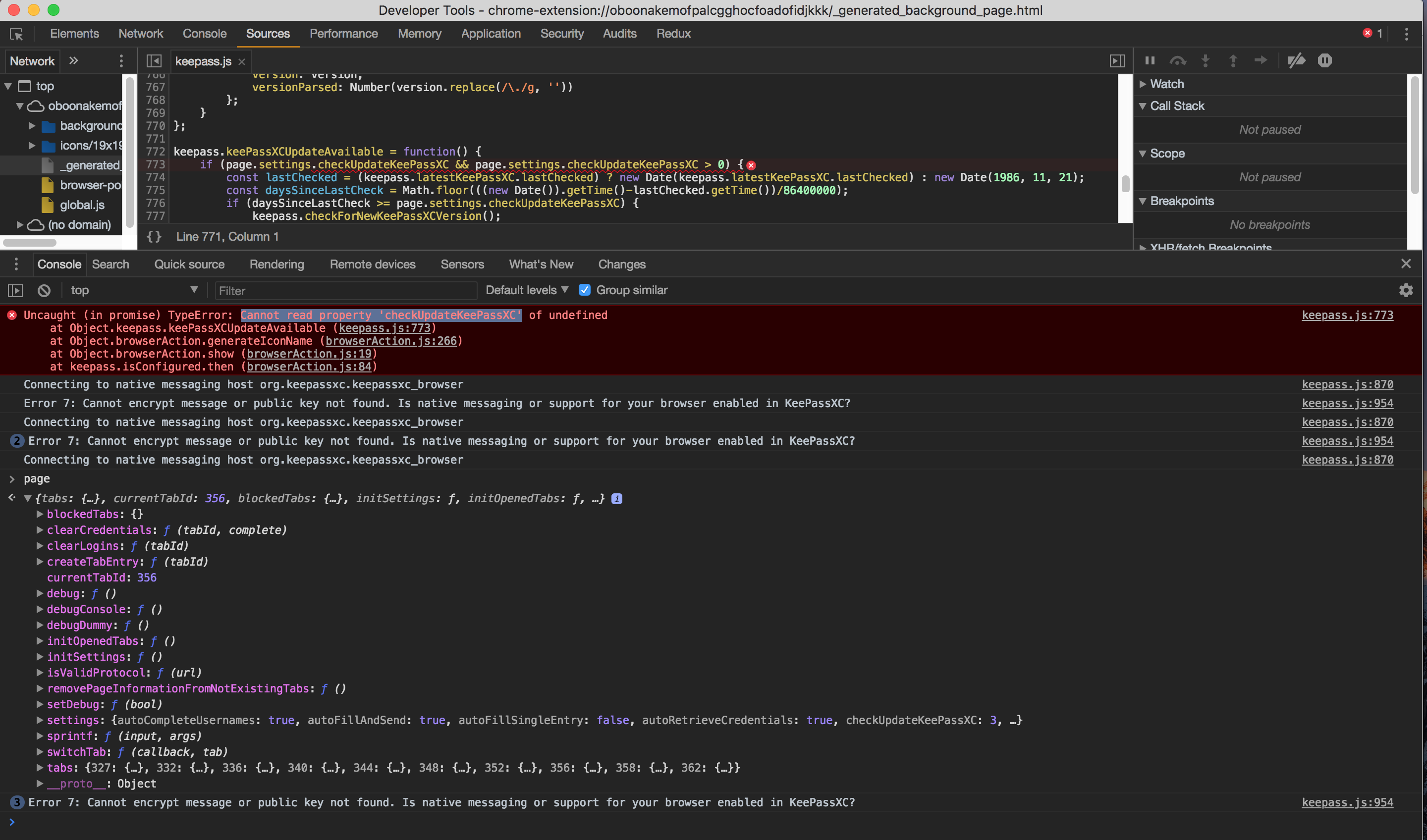
☝️ I think this might be due to how I'm viewing the thing - maybe the way I'm loading it (just viewing the extension's background page) doesn't load a typical page object... that settings object should have been all initialized properly at https://github.com/keepassxreboot/keepassxc-browser/blob/618b5ca6cd10b0028a99336b56510c8998ef0938/keepassxc-browser/background/page.js#L21
I will do some more debugging and possibly file an issue at https://github.com/keepassxreboot/keepassxc-browser
 jcrben
on 1 Apr 2018
jcrben
on 1 Apr 2018
On windows 10 pro 64-bit and chrome v66 64-bit.
I am running into the same issue where keepassxc refuses to connect to the browser extension. The proxy is running. Registry and file in localappdata appear to be fine.
console errors:
keepass.js:880 Connecting to native messaging host org.keepassxc.keepassxc_browser
_generated_background_page.html:1 Error in event handler for (unknown): TypeError: Cannot read property 'stack' of undefined
at Object.keepass.updatePopup (chrome-extension://oboonakemofpalcgghocfoadofidjkkk/background/keepass.js:1044:47)
at onDisconnected (chrome-extension://oboonakemofpalcgghocfoadofidjkkk/background/keepass.js:855:13)
2keepass.js:964 Error 5: Timeout or not connected to KeePassXC
keepass.js:964 Error 5: Timeout or not connected to KeePassXC
 ramenchef
on 14 May 2018
ramenchef
on 14 May 2018
Hi,
I just ran into something similar.
For my work-network it's neccessary for me to run a custom chromium profile(and custom config folder) and I just couldn't get KeepassXC Browser to connect.
Thanks to @varjolintu's awsome post I was able to quickly figure out that the problem was a missing org.keepassxc.keepassxc_browser.json in ~/.config/custom_chromium/NativeMessagingHosts.
Since it's a non standard directory keepassxc of course didn't know about it, copying by hand fixed it.
Since there's already an option "Browser Intergration/Advanced/Update native messaging manifest files at startup" could we maybe somehow pass a custom directory as well? Add a custom broswer option or something similar?
 chron-isch
on 25 Jun 2018
chron-isch
on 25 Jun 2018
@chron-isch Make a symbolic link that points your ~/.config/custom_chromium/NativeMessagingHosts to ~/.config/chromium/NativeMessagingHosts?
Custom browser option has been discussed previously here: https://github.com/keepassxreboot/keepassxc/issues/1594.
varjolintu
on 25 Jun 2018
I think this ticket should be closed. There are still a few people submitting connection issue under this ticket, but they are actually not the same issue. Personally I don't have this issue any more with proxy on.
gyli
on 25 Jun 2018
Mac OS Version: 10.13.6
Chrome Version: 68.0.3440.106 x64
KeePassXC-Browser Version: 1.2.0
KeePassXC Version: 2.3.3
Problem Description:
After clicking KeePassXC-Browser Connect in Chrome,
The KeePassXC main window pops up and activates but fails to display "new key association request".
Solution:
"New Key Association Request" has popped up, since chrome is already full screen, causing the confirmation box to be on the desktop.
Switch to the desktop to see the "New Key Association Request".
original text
问题描述:
Chrome中点击KeePassXC-Browser的Connect后,
KeePassXC主窗口弹窗并激活但未能显示"新的密钥关联请求".
解决办法:
"新的密钥关联请求"已弹出,由于chrome已经全屏,导致确认框在桌面上.
切换到桌面即可看到"新的密钥关联请求".
 imdong
on 22 Aug 2018
imdong
on 22 Aug 2018
This happened to me after I switched to the AppImage version of KeepPassXC. Also, keepassxc-proxy was not in my path. I had to re-install the native Linux keepassxc to get keepasscx-proxy installed in my path. I still use the AppImage version for KPXC, but the Chrome extension can now find keepassxc-proxy. Problem solved.
 lsiden
on 2 Sep 2018
lsiden
on 2 Sep 2018
Hi.
I'm encountered this problem on Windows10.
First, I'm installed KeePassXC Portable version, uninstall, and install Installer version, of course json file was different location.
I checked the registry data, 'NativeMessagingHosts' json path was Portable version's path.
It seems don't write when registry key found even if the registry value is invalid.
It doesn't solve keepassxc/src/brwoser/HostInstaller.cpp check more restrict.
I want the fix .reg file give for Windows KeePassXC Installer user, is it difficult?
 moriyaki
on 3 Oct 2018
moriyaki
on 3 Oct 2018
@moriyaki Portable version (I assume you are using it from PortableApps) doesn't write to Windows' registry. You have to modify the path yourself.
varjolintu
on 3 Oct 2018
@varjolintu Really?
It seems to write Windows' registry by HostInstaller.cpp when KeepassXC installed.
When KeePassXC portable version wrote registry, and it seems to checks only the value is null.
https://github.com/keepassxreboot/keepassxc/blob/develop/src/browser/HostInstaller.cpp#L226
moriyaki
on 4 Oct 2018
@moriyaki Sorry, I guess you meant just the Portable Windows package.
You can enable the checkbox Update native messaging manifest files at startup from Browser integration Advanced settings tab. This should update the location.
varjolintu
on 4 Oct 2018
Debug info:
KeePassXC - Version 2.3.4
Revision: 6fe821c
Libraries:
- Qt 5.9.5
- libgcrypt 1.8.1
Operating system: Ubuntu 18.04.1 LTS
CPU architecture: x86_64
Kernel: linux 4.15.0-36-generic
Enabled extensions:
- Auto-Type
- Browser Integration
- Legacy Browser Integration (KeePassHTTP)
- SSH Agent
- YubiKey
My setup:
- Ubuntu 18.04
- Firefox 62
- Vivaldi 2.0.1309
- Chromium 69.0.3497.100
I had this problem - and I still have it with Chromium, but Firefox and Vivaldi work.
One of the main indicators I found was that the proxy wasn't running as suggested above
This is what you should see when you've got things connected:
$ ps -ef | grep keepass
channi16 15529 15228  0 11:26 tty2     00:00:00 /usr/bin/keepassxc-proxy chrome-extension://oboonakemofpalcgghocfoadofidjkkk/
channi16 23423  8073  0 11:56 pts/4    00:00:00 grep --color=auto keepass
channi16 27622 27046  0 11:19 tty2     00:00:00 /usr/bin/keepassxc-proxy /home/channi16/.mozilla/native-messaging-hosts/org.keepassxc.keepassxc_browser.json [email protected]
channi16 32657 25943  0 11:20 tty2     00:00:03 keepassxc
When it wasn't working I just saw
$ ps -ef | grep keepass
channi16 23423  8073  0 11:56 pts/4    00:00:00 grep --color=auto keepass
channi16 32657 25943  0 11:20 tty2     00:00:03 keepassxc
I had an issue that keepassxc somehow got deleted from my system - so had to re-install via sudo apt install keepassxc but then all the browsers had a broken connection to the old instance. At least that was my guess.
I went into the Tools > Settings > Browser Integration > Disconnect all browsers
Then with a restart of both KeepassXC and Firefox the 'Connect' button appeared as expected
 ianchanning
on 10 Oct 2018
ianchanning
on 10 Oct 2018
I'm tempted to add some improvements to KeePassXC 2.4.0. Maybe an indicator that tells if the script doesn't point to a valid location.
varjolintu
on 10 Oct 2018
Debug info:
KeePassXC - Version 2.3.4-1
Libraries:
- Qt 5.12.1-2
- libgcrypt 1.8.4-1
Operating system: Arch Linux
CPU architecture: x86_64
Kernel: linux-surface-4.19.23-2
Enabled extensions:
- Auto-Type
- Browser Integration
My setup:
- Arch
- Firefox 65.0.2
Sorry to bump this, but I think I have the same problem as described here but adding this file didn't fix it:
I was able to get it working on macOS with Chrome and bypass the
Cannot save the native messaging script file.by creating the following file :
~/Library/Application\ Support/Google/Chrome/NativeMessagingHosts/org.keepassxc.keepassxc_browser.json{ "allowed_origins": [ "chrome-extension://oboonakemofpalcgghocfoadofidjkkk/" ], "description": "KeePassXC integration with native messaging support", "name": "org.keepassxc.keepassxc_browser", "path": "/Applications/KeePassXC.app/Contents/MacOS/keepassxc-proxy", "type": "stdio" }I needed to use sudo to do it, maybe it's why KeePassXC is unable to create the file ?
In ~/.mozilla/ there was no native-messaging hosts folder and then of course no JSON file, so I created the file at ~/.mozilla/native-messaging-hosts/org.keepassxc.keepassxc_browser.json. I then copied the above text and modified it for my setup accordingly (I think):
{
    "allowed_extensions": [
        "[email protected]"
    ],
    "description": "KeePassXC integration with native messaging support",
    "name": "org.keepassxc.keepassxc_browser",
    "path": "/bin/keepassxc",
    "type": "stdio"
}
I also needed to use sudo to do it, like OP. However, even after adding this file, I got the same error. I tried uninstalling with config files, rebooting, and reinstalling KeePassXC, but it still didn't work. Interestingly, after the uninstall and reinstall, it still presented a login page for the database I was using before uninstall. I would have thought it wouldn't remember this? Not sure if that might have anything to do with it.
@varjolintu You seem to be the guru on this, sorry if I shouldn't be pinging you.
 lhindir
on 4 Mar 2019
lhindir
on 4 Mar 2019
@lhindir Are you using a plain install via pacman or AUR, or use an official AppImage? If you need to use sudo for the directories, please check the permissions. KeePassXC's config file is stored under .config/keepassxc, which explains the reason why your database name was remembered.
varjolintu
on 4 Mar 2019
@varjolintu
Are you using a plain install via pacman or AUR, or use an official AppImage?
I installed via pacman with pacman -S keepassxc.
If you need to use sudo for the directories, please check the permissions.
Permissions on the directories? Is it fine to change the permissions on .mozilla if it required sudo by default?
KeePassXC's config file is stored under .config/keepassxc, which explains the reason why your database name was remembered.
I removed via pacman -Rns keepassxc, and the -n flag should have taken care of that :thinking:
I also noticed KeePassXC was opening with Firefox and came across this keepassxc-browser issue, but unlike that guy, I have the proxy setting on by default, and yet KeePassXC was still opening.
I then came across #1845 and realized I had my path wrong (/bin/keepassxc instead of /usr/bin/keepassxc-proxy), so I fixed that. Now KeePassXC doesn't open with Firefox, but enabling Firefox support still results in Cannot save the native messaging script file..
lhindir
on 4 Mar 2019
@lhindir I find it very strange if directories under your home will need sudo. That shouldn't happen by default. Change the permissions.
varjolintu
on 4 Mar 2019
@varjolintu I would tend to agree. .mozilla was the only directory like that; I'm not sure why. I ran:
mv .mozilla/native-messaging-hosts ~ # move the JSON file I created out to see if installation creates it
chown -R [USER]:wheel .mozilla/
sudo pacman -Rns keepassxc
sudo pacman -S keepassxc
But the installation didn't create the native hosts directory or the JSON file :(
lhindir
on 4 Mar 2019
@lhindir Installation doesn't create the directory. It's created when enabling the Firefox support in the Browser Integration settings.
varjolintu
on 4 Mar 2019
@varjolintu Thank you so much! I should have tried that; it makes sense that it wouldn't create the directory unless you enable it. I wonder why manually creating the file worked for the other case but not for me. It works now though, after enabling support. Thanks again.
lhindir
on 4 Mar 2019
Vivaldi-snapshot and KeePassXC never work out of the box on Linux and it brought me here. However, the troubleshooting guide in wiki is not complete, since it does not mention what should be in the .json file, anyway here is the gist how to get it working https://gist.github.com/LeBaux/ad4e301e9c69d17294a8d73739af2d78
 LeBaux
on 20 Apr 2019
LeBaux
on 20 Apr 2019
@LeBaux It's mentioned here: https://github.com/keepassxreboot/keepassxc-browser/wiki/Native-messaging-script-files
varjolintu
on 21 Apr 2019
Connecting to native messaging host org.keepassxc.keepassxc_browser
_generated_background_page.html:1 Error in event handler: TypeError: Cannot read property 'stack' of undefined
    at Object.keepass.updatePopup (chrome-extension://oboonakemofpalcgghocfoadofidjkkk/background/keepass.js:1168:51)
    at onDisconnected (chrome-extension://oboonakemofpalcgghocfoadofidjkkk/background/keepass.js:967:13)
_generated_background_page.html:1 Unchecked runtime.lastError: Specified native messaging host not found.
browser-polyfill.min.js:1 Returning a Promise is the preferred way to send a reply from an onMessage/onMessageExternal listener, as the sendResponse will be removed from the specs (See https://developer.mozilla.org/docs/Mozilla/Add-ons/WebExtensions/API/runtime/onMessage) Error
    at B (chrome-extension://oboonakemofpalcgghocfoadofidjkkk/browser-polyfill.min.js:1:8152)
    at Object.kpxcEvent.onUpdateAvailableKeePassXC (chrome-extension://oboonakemofpalcgghocfoadofidjkkk/background/event.js:206:5)
    at chrome-extension://oboonakemofpalcgghocfoadofidjkkk/background/event.js:72:21
B @ browser-polyfill.min.js:1
kpxcEvent.onUpdateAvailableKeePassXC @ event.js:206
(anonymous) @ event.js:72
Promise.then (async)
kpxcEvent.invoke @ event.js:46
kpxcEvent.onMessage @ event.js:13
(anonymous) @ browser-polyfill.min.js:1
keepass.js:1078 Error 5: Cannot connect to KeePassXC. Check that browser integration is enabled in KeePassXC settings.
keepass.js:993 Connecting to native messaging host org.keepassxc.keepassxc_browser
keepass.js:969 Failed to connect: Specified native messaging host not found.
keepass.js:1192 {}message: (...)get message: ƒ ()__proto__: Object
keepass.js:1078 Error 9: Key exchange was not successful.
I get this in Chrome's console. It works fine in firefox for me.
KeepassXC 2.4.3
 txtsd
on 27 Jun 2019
txtsd
on 27 Jun 2019
@txtsd keepass.js:969 Failed to connect: Specified native messaging host not found. please check the script file content and see where the path points.
varjolintu
on 27 Jun 2019
@varjolintu I just tied it to simple, one-page guide. GitHub wikis are not great to navigate, that is all. It is also pretty niche combination. KeePassXC, Vivaldi-snapshot and i3wm on top. Feel free to integrate the gist into wiki. Or ignore it. :)
LeBaux
on 1 Jul 2019
@LeBaux Your gist suggests auto-loading keepassxc-proxywith crontab. The proxy doesn't work that way. Browser starts that binary using Native Messaging (a kind of child process). Launching it separately won't do anything because browsers cannot connect to an existing process via Native Messaging.
varjolintu
on 2 Jul 2019
After I updated my KeepassXC on Windows to 2.4.3, my KeePassXC-Browser extension (1.5.1) in chrome fails to connect to it:
KeePassXC-Browser has encountered an error:
Message encryption failed. Is KeePassXC running?
Any idea why?
Btw, I'm using the portable KeePassXC-2.4.3-Win64.
 Boscop
on 3 Oct 2019
Boscop
on 3 Oct 2019
Ah, sorry, I just noticed Browser integration was disabled in settings -.-
I now enabled it for chrome and firefox, it's working in chrome now, but not in firefox.
I get this error:
KeePassXC-Browser has encountered an error:
Cannot decrypt message
How can I make it work in FF, too? :)
Boscop
on 3 Oct 2019
@Boscop Try to reopen KeePassXC and then reload the connection from extension popup.
varjolintu
on 3 Oct 2019
Hit this on Ubuntu 19.10 with version 2.5.0 of KeePassXC on FireFox version 70.0. I'm using the latest version of the KeePassXC-Browser Extension.
Cannot connect to KeePassXC. Check that browser integration is enabled in KeePassXC settings.
When I press the blue Reload button, I get the following gem of an error message:
Key exchange was not successful.
When I navigate to the Connected Databases part of the Extension settings and press the Connect button, nothing happens. This looks a lot like a UI bug.
Further details:
KeePassXC - Version 2.5.0
Revision: 1ab8a9f

Qt 5.12.4
Debugging mode is disabled.

Operating system: Ubuntu 19.10
CPU architecture: x86_64
Kernel: linux 5.3.0-19-generic

Enabled extensions:
- Auto-Type
- Browser Integration
- SSH Agent
- KeeShare (signed and unsigned sharing)
- YubiKey

Cryptographic libraries:
 libgcrypt 1.8.4
To resolve this, I had to lock the database and leave it locked while I restarted Firefox.
I was then prompted to unlock the database, and could connect it.
Seems like there may be a hole in the current set of test cases?
Normally this wouldn't worry me too much, but I've begun to suggest this as an option for corporate customers, who tend to rely on solid UX for all but the most technical users.
 v6
on 1 Nov 2019
v6
on 1 Nov 2019
@v6 Can you reproduce it every time?
varjolintu
on 1 Nov 2019
I was able to reproduce it with Chromium, and every time, I have been unable to get the integration to work.
I can try it again if you'd like on FireFox... I'm just scared the integration'll break again.
v6
on 1 Nov 2019
@v6 Please do so. If you can debug the extension, that would be helpful too.
varjolintu
on 1 Nov 2019
Just posted some useful infos here https://github.com/keepassxreboot/keepassxc-browser/issues/559#issuecomment-563490202
 intika
on 10 Dec 2019
intika
on 10 Dec 2019
Errs out in Chrome Beta:
Error 5: Cannot connect to KeePassXC. Check that browser integration is enabled in KeePassXC settings.
keepass.js:979 Connecting to native messaging host org.keepassxc.keepassxc_browser
keepass.js:949 Failed to connect: Specified native messaging host not found.
keepass.js:1180 Error: No content script available for this tab.
keepass.js:1062 Error 9: Key exchange was not successful.
keepass.js:1062 Error 5: Cannot connect to KeePassXC. Check that browser integration is enabled in KeePassXC settings.
Works fine in Firefox. Works fine in Chrome (not-beta).
Debug details:
KeePassXC - Version 2.5.1
Revision: 0fd8836

Qt 5.13.2
Debugging mode is disabled.

Operating system: Arch Linux
CPU architecture: x86_64
Kernel: linux 5.4.2-1-ck-zen

Enabled extensions:
- Auto-Type
- Browser Integration
- SSH Agent
- KeeShare (signed and unsigned sharing)
- YubiKey
- Secret Service Integration

Cryptographic libraries:
 libgcrypt 1.8.5
More info:
keepass.nativeHostName
"org.keepassxc.keepassxc_browser"
browser.runtime.connectNative(keepass.nativeHostName);
{disconnect: ƒ, …}sender: (...)onMessage: (...)onDisconnect: (...)name: (...)disconnect: ƒ disconnect()arguments: (...)caller: (...)length: 0name: "disconnect"__proto__: ƒ ()[[Scopes]]: Scopes[0]postMessage: ƒ postMessage()arguments: (...)caller: (...)length: 0name: "postMessage"__proto__: ƒ ()arguments: (...)caller: (...)length: 0name: ""constructor: ƒ Function()apply: ƒ apply()bind: ƒ bind()call: ƒ call()toString: ƒ toString()Symbol(Symbol.hasInstance): ƒ [Symbol.hasInstance]()get arguments: ƒ ()set arguments: ƒ ()get caller: ƒ ()set caller: ƒ ()__proto__: Object[[FunctionLocation]]: <unknown>[[Scopes]]: Scopes[0][[Scopes]]: Scopes[0]No propertiesget sender: ƒ ()arguments: (...)caller: (...)length: 0name: ""__proto__: ƒ ()[[Scopes]]: Scopes[0]set sender: ƒ ()get onMessage: ƒ ()set onMessage: ƒ ()get onDisconnect: ƒ ()set onDisconnect: ƒ ()get name: ƒ ()set name: ƒ ()__proto__: Object

_generated_background_page.html:1 Unchecked runtime.lastError: Specified native messaging host not found.
Fixed it thanks to https://github.com/keepassxreboot/keepassxc/issues/1559#issuecomment-563494059
Just had to
λ cp ~/.config/google-chrome/NativeMessagingHosts/org.keepassxc.keepassxc_browser.json ~/.config/google-chrome-beta/NativeMessagingHosts/org.keepassxc.keepassxc_browser.json
Future versions should install the json to this beta location too.
txtsd
on 12 Dec 2019
@txtsd We don't officially support any beta or nightly versions of browsers. Mostly because of the different configuration paths etc. But those can be tweaked manually just like you did.
varjolintu
on 12 Dec 2019
@varjolintu Gotcha. Maybe that could be mentioned on the wiki?
txtsd
on 14 Dec 2019
I have a similar problem. This is my first Github post so forgive any protocol issues please.
KeePassXC - Version 2.5.1
Revision: 0fd8836
Distribution: Snap
Qt 5.9.5
Debugging mode is disabled.
Operating system: Linux 5.3.0-7625-generic
CPU architecture: x86_64
Kernel: linux 5.3.0-7625-generic
KeePassXC-Browser Version: 1.5.4
Enabled extensions:
- Auto-Type
- Browser Integration
- SSH Agent
- KeeShare (signed and unsigned sharing)
- YubiKey
- Secret Service Integration
Cryptographic libraries:
libgcrypt 1.8.1
Firefox
71.0 (64-bit)
Mozilla for Ubuntu
canonical 1.0
I receive the following error when trying to connect the addin and then refresh:
Cannot connect to KeePassXC. Check that browser integration is enabled in KeePassXC settings.
Key exchange was not successful
Browser integration is enabled in Keepassxc but no browsers are showing in database settings --> Browser integration
In ./.mozilla/native-messaging-hosts/ there are two files:
org.gnome.shell.extensions.gsconnect.json
org.keepassxc.keepasssxc_browser.json
Contents of org.keepassxc.keepasssxc_browser.json file:
{
"name": "org.keepassxc.keepassxc_browser",
"description": "KeePassXC integration with native messaging support",
"path": "path": "/snap/bin/keepassxc.proxy",
"type": "stdio",
"allowed_extensions": [ "[email protected]" ]
In /snap/bin there is the file keepassxc.proxy:
lrwxrwxrwx 1 root root 13 Dec 11 21:14 keepassxc.proxy -> /usr/bin/snap
Also, and not sure it matters, the same file exists (or a link) in /snap/keepassxc/625/usr/bin:
I've tried closing and killing all Firefox instances, closing Keepassxc, starting them in different orders, but nothing changes either the error messages or lack of browsers in the settings tab of Keepassxc.
I've manually started the keepassxc.proxy binary and made sure it was running. Still no change. I've gone through the troubleshooting document except for the debug stuff as I wouldn't understand the errors.
I hope I've given you enough info to troubleshoot. Happy to take more steps are your direction.
 harryfine
on 18 Dec 2019
harryfine
on 18 Dec 2019
@harryfine Run this script to get the snap version of KeePassXC run properly with the browser extension: https://raw.githubusercontent.com/keepassxreboot/keepassxc/master/utils/keepassxc-snap-helper.sh
varjolintu
on 18 Dec 2019
I've already run the script, got an error, so I built the file myself as above.
$ sudo /bin/sh keepassxc-snap-helper.sh
keepassxc-snap-helper.sh: 55: [[: not found
keepassxc-snap-helper.sh: 60: Bad substitution
harryfine
on 18 Dec 2019
@harryfine Try: bash keepassxc-snap-helper.sh
varjolintu
on 18 Dec 2019
Why would you explicitly run with sh?
 droidmonkey
on 18 Dec 2019
droidmonkey
on 18 Dec 2019
[SOLVED] Worked like a charm. Thank you. The integration works better than Keepass and the Kee plugin on my wife's windows machine.
To answer your question, I'm not a Linux pro but not a complete newcomer, but haven't usedLinux in years. I remembered that I had to run a ,sh file through an interpreter, and I thought /bin/sh was a shell that would run it.
harryfine
on 18 Dec 2019
Related issues
 clementlesne
·
3Comments
clementlesne
·
3Comments
 guihkx
·
3Comments
guihkx
·
3Comments
 lostfictions
·
3Comments
lostfictions
·
3Comments
 MisterY
·
3Comments
MisterY
·
3Comments
 amvasilyev
·
3Comments
amvasilyev
·
3Comments
Most helpful comment
I hope no one should face this kind of issues. These are hard to solve and are frustrating for the users. Here's a general checklist for connection issues that could help finding the real issue:
1) After enabling Browser Integration and support for your browser
Depending on the operating system the
org.keepassxc.keepassxc_browser.jsonnative messaging script file shoud be installed to these locations:Windows
AppData\Local\keepassxcor to the KeePassXC directory if using portable version.Also there should be a registry entry found in the following location(s):
HKEY_CURRENT_USER\\Software\\Google\\Chrome\\NativeMessagingHosts\\HKEY_CURRENT_USER\\Software\\Chromium\\NativeMessagingHosts\\HKEY_CURRENT_USER\\Software\\Mozilla\\NativeMessagingHosts\\HKEY_CURRENT_USER\\Software\\Vivaldi\\NativeMessagingHosts\\Linux
~/.config/google-chrome/NativeMessagingHosts~/.config/chromium/NativeMessagingHosts~/.mozilla/native-messaging-hosts~/.config/vivaldi/NativeMessagingHostsmacOS
~/Library/Application Support/Google/Chrome/NativeMessagingHosts~/Library/Application Support/Chromium/NativeMessagingHosts~/Library/Application Support/Mozilla/NativeMessagingHosts~/Library/Application Support/Vivaldi/NativeMessagingHostsIf you use any other browser the configuration location can vary. In these cases the script file must be copied manually.
Other browsers
Some example Linux paths:
~/.config/google-chrome-beta/NativeMessagingHosts~/.config/google-chrome-unstable/NativeMessagingHosts~/.waterfox/native-messaging-hosts~/.config/iridium/NativeMessagingHosts2) Check the native messaging script file path and extension ID's
After finding the
org.keepassxc.keepassxc_browser.jsoncheck thepathvariable inside it. It should point to the exact location to the KeePassXC binary. In Windows this variable can also exists without a path.The extension ID under
allowed_originsshould bechrome-extension://oboonakemofpalcgghocfoadofidjkkk/for Chromium-based browsers and[email protected]underallowed_extensionsfor Firefox. There can be another ID seen with Chromium. This is the older version of the extension and it will be removed in the future from the script file.With Chromium-based browsers you can check that the extension ID is the same with what is shown at the extensions page.
3) Check if keepassxc-proxy is launched and running
Connection between KeePassXC and the browser extension is managed by
keepassxc-proxybinary. Make sure this is up and running. If not try to start it manually. Under macOS the binary can be found inside the KeePassXC.app atContents/MacOS/.If the binary doesn't start on macOS, please check the binary linking with the following command:
otool -L /Applications/KeePassXC.app/Contents/MacOS/keepassxc-proxyIt should show the following for QtNetwork and QtCore frameworks:
@executable_path/../Frameworks/QtNetwork.framework/Versions/5/QtNetwork@executable_path/../Frameworks/QtCore.framework/Versions/5/QtCoreIt's possible to use KeePassXC without the proxy feature. This means the connection between the extension and KeePassXC is direct and KeePassXC must not be launched before the browser does it (at the startup or from the popup). This mean the extension cannot be connected to KeePassXC on-the-fly. Proxy can be disabled from the Advanced tab of Browser Integration settings. This is not the recommended setting.
4) Debug the extension itself
If everything else seems to be OK but you still have issues please try to debug the extension.
Chromium-based:
Developer modebackgroung pagelink after theInspect views:textFirefox:
about:debuggingand checkEnable add-on debuggingDebugConsole tab should now show any error messages the extension writes. If you are a developer and know these things you can use the Sources tab and debug the extension and find the exact point where it fails.