Keepassxc: Open other database URL entry
Expected Behavior
On Windows Original "KeePass" Variant you could make a link to another Keepass database file with
kdbx://C:database.kbdx. If you double click that entry's URL it would open the database file. (Even is password protected, the password would come from the entry and would be passed in the openening process silently.
It also worked for password+keychain protection, but that didnt come right out of the box. (But I think I have the settings on my windows maschine still and could share it)
Current Behavior
This feature isnt implemented to my knowledge.
Context
With the implementation of this feature you could have seperated keepass database files for each customer in a company for instance. A "master" keepass file would be created with link entries to the customers keepass files. 1 entry = 1 customer = 1 keepass file.
If that keepass file is on an smb share for instance, it would be easy to revoke or give access to a keepass database file per user or per group. If you double click that entry and have ro/rw rights to that file, keepassxc will open that file (in a new window/tab of keepassxc).
Operating system: Mac OS High Sierra (other systems not checked)
 pquerner
All 11 comments
We already implemented autoopen (#477) and it is available in 2.3-beta1.
This feature will be available in 2.3.0 if you prefer a stable release
 TheZ3ro
on 27 Feb 2018
TheZ3ro
on 27 Feb 2018
I would like to reopen this issue, as I see its not working as intended in my opinion.
Double click the entry still opens a webbrowser, instead of trying to open that relative file first (if it exists of course).
@TheZ3ro
pquerner
on 22 May 2018
I also cannot get this to work on Windows, and this feature is entirely undiscoverable without studying the original PR.
 droidmonkey
on 25 May 2018
droidmonkey
on 25 May 2018
1541 better describes this I think. Wierd that I had this opened twice, I am sorry. If I read it correctly, both of the issues mean the same thing.
pquerner
on 30 May 2018
KeePassXC - Version 2.4.0-snapshot
Build Type: Snapshot
Revision: f06742c
Now allows the database to be opened by having this as the URL file:///Users/pq/projects/intern/keepassxc/1.kdbx, however it still doesnt pass the password to the database.
Because it just gets openend with openUrl(QString file), see here
https://github.com/keepassxreboot/keepassxc/blob/f06742cf41151417154b54f41d43d0db45c4812c/src/gui/DatabaseWidget.cpp#L662
pquerner
on 13 Nov 2018
The functionality you are talking about would be AutoOpen or the upcoming group sync.
droidmonkey
on 14 Nov 2018
No AutoOpen seems to do just fine-ish. This is a different problem here.
I do not want files to AutoOpen for me, instead I want to doubleclick (or CTRL+U) the entry and have it opened up with keepassxc - no password no nothing. Since the entry has the full path to the keepass file with the password I expect that its used for this.
This works fine when I call switchToOpenDatabase from void DatabaseWidget::openUrlForEntry.
However, this closes (with UI bugs) the current open database and switches to the new database instead.
pquerner
on 14 Nov 2018
Oh I see. When @phoerious completes his overhaul of the DatabaseTabWidget this will be a lot easier to achieve.
droidmonkey
on 14 Nov 2018
Hi just wondering if there's any movement on this? I searched for DatabaseTabWidget but didn't really understand what I was seeing so I couldn't understand if this is easier to achieve now?
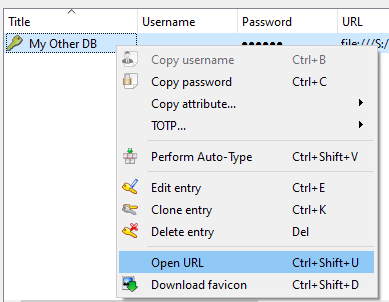
Is it possible to use the 'Open URL' or something similar to open another KDBX directly, rather than via the AutoOpen feature? Basically a way of opening other KDBXs occasionally (adhoc) rather than each time I open my own KDBX - as my teams work with multiple KDBXs, the AutoOpen feature is too unwieldy and opens databases that aren't needed.
example:
 mendhak
on 1 Jun 2020
mendhak
on 1 Jun 2020
I just implemented this for 2.6.0, was actually very easy and useful command. Thank you for the suggestion.
droidmonkey
on 2 Jun 2020
Hey thank _you_ @droidmonkey for implementing!
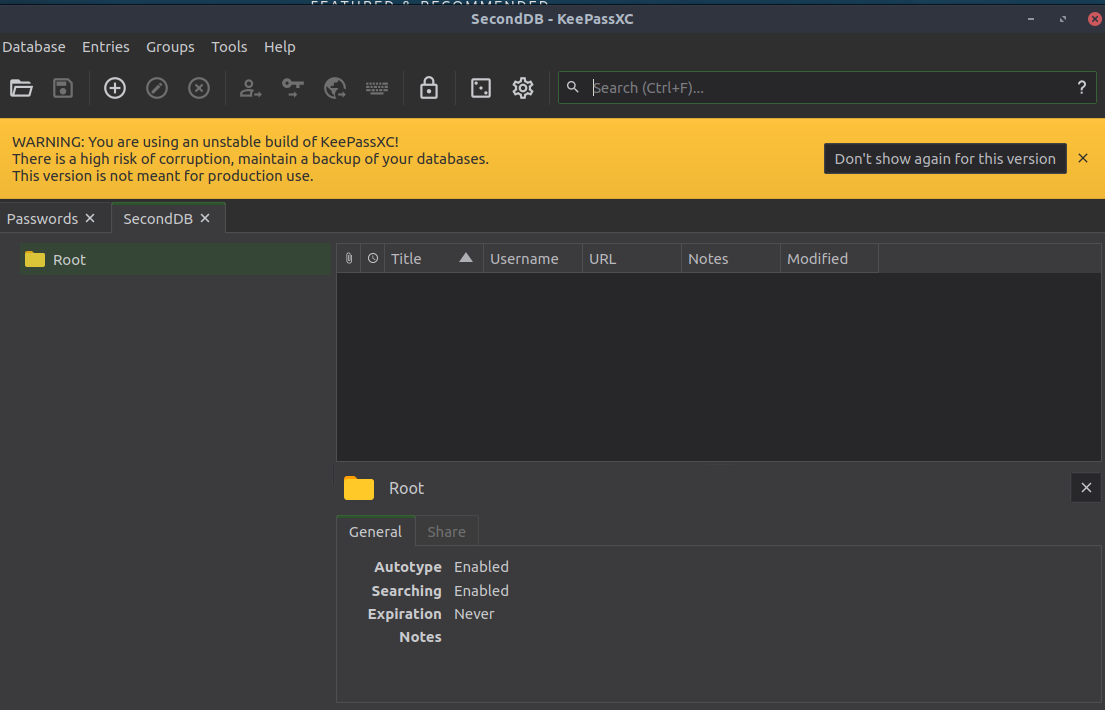
Out of curiosity/eagerness I built your branch and at least on Linux it was easy to follow the instructions. Then I created two test DBs, and in the first DB I created an entry as kdbx://seconddb.kdbx. Then I clicked that item, and pressed Ctrl Shift U and it opened a second DB! I didn't test Windows 10 but hopefully it will work there too.

mendhak
on 3 Jun 2020
Related issues
 Throne3d
·
3Comments
Throne3d
·
3Comments
 n1trux
·
3Comments
n1trux
·
3Comments
 amvasilyev
·
3Comments
amvasilyev
·
3Comments
 haroldm
·
3Comments
haroldm
·
3Comments
 shyim
·
3Comments
shyim
·
3Comments
Most helpful comment
I just implemented this for 2.6.0, was actually very easy and useful command. Thank you for the suggestion.