Keepassxc: Redesign database search
Issue to discuss search redesign as started in comment section of pull request #1305, with focus on:
- Use cases (i.e. what would one search for and what would one expect the results to look like)
- GUI integration (if possible create graphical mockups)
- Possible implementations (code drafts, proof-of-concepts).
Original motivation from pull request #1305:
@fonic wrote:
[Regarding the search] it all comes down to use cases.
Therefore, I'd like to suggest opening an issue for this where we try to collect/construct all imaginable use cases, i.e. what would one search for and what would one expect of the search to help you reach your objective. Once we got the use cases, we can come up with ideas for implementations that would cover those.
 fonic
fonic
All 15 comments
I'd like to suggest changing the search mode to work _without_ the _'Group'_ column. This would _greatly_ reduce code complexity regarding state syncing. One solution I can think of is implementing an _E-Mail-client-like search_, where the number of search results for each group is displayed in the group tree view.
Here's a quick mock-up:

fonic
on 24 Dec 2017
My original comment in the pr was to split the search results functionality into its own widget class. This would help encapsulate specific display and interaction behavior from the main entry view. Regardless of the display method, this class arguably should be generated. Right now search code is heavily intertwined with normal database display code making it difficult to follow the state transitions.
 droidmonkey
on 24 Dec 2017
droidmonkey
on 24 Dec 2017
I agree this should be a separate widget which inherits from QTableView and implements specific logic for showing rows in groups as depicted in my Photoshop mockup here: https://github.com/keepassxreboot/keepassxc/pull/1305#issuecomment-353779125
This would also make it easy to use that as a standard view and not only for search (if the user wants it). Right now, the search GUI logic is amazingly bad and unmaintainable.
 phoerious
on 24 Dec 2017
phoerious
on 24 Dec 2017
I agree, a separate widget with its own class for the search results would certainly be a much cleaner approach. This would eliminate the need for all that if (inSearchMode) [...] code that can currently be found everywhere.
However, I think this will be tough to achieve (not meaning I'm against it, just pointing out):
- Model: if we would go with @phoerious solution, the new widget would either have to use the existing EntryModel as well or have its own model which does basically the same, resulting in lots of duplicated code
- Syncing (1): if we would implement @phoerious solution without a new/separate class, there wouldn't be the need to sync when entering/leaving search, as the view stays the same, only the listing changes -> less code, less complexity; syncing when switching tabs would be easy as there is only one view state to consider
- Syncing (2): With a new/separate class, on the other hand, syncing would be really tough, with the same issues that we're currently facing, e.g. _enter search mode -> sync view state to new widget -> leave search mode -> sync back; currently in search mode -> switch to other tab -> check which widget was active in old tab, sync its view state_
fonic
on 26 Dec 2017
Search use cases from my own experience:
Locate one or few specific items, e.g. _'Wasn't there a Facebook/Pinterest/... account somewhere?'_. Expectations: either search result is used directly (copy-on-doubleclick) or user wants the search to reveal its location within the database to do something with it, e.g. move it, delete it, ...
Locate all items with a certain criteria, e.g. _'Which accounts use my old email address [email protected]?'_. Expectations: search lists all items, user can then e.g. change the email address for all items
fonic
on 26 Dec 2017
To add to @fonic's first point:
Currently searching for your email account is a pain.
E.g searching "gmail" will show all entries where a gmail address is the username and all entries where the email address is in the notes (because I put the email address I used in the notes field if it isn't the username already).
Therefore I'd limit searching to the title field by default.
Thunderbird's Quick Filter Bar has solved this part nicely in my opinion. When you start searching for something the (in my case) blue bar appears and I can select in which fields I want to search. In this case "Body" is the only one not selected.
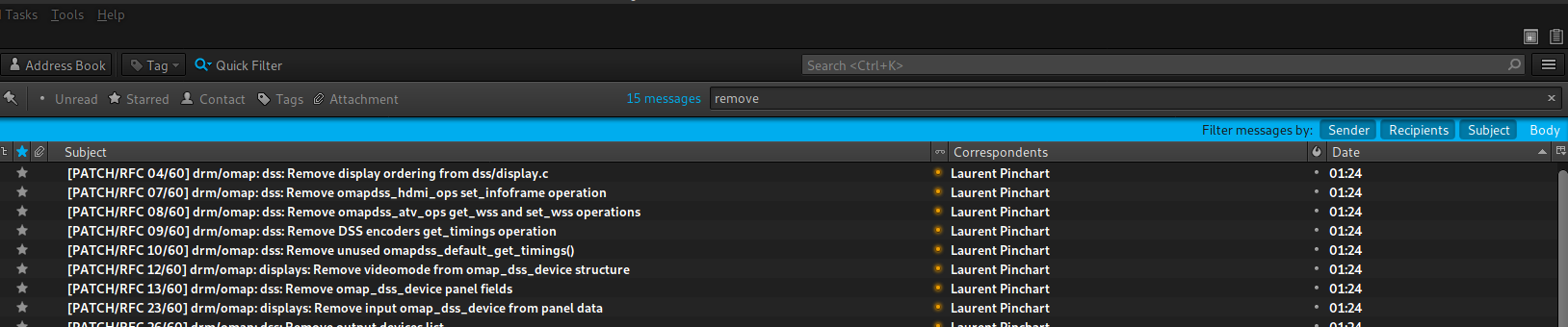
 LingMan
on 7 Mar 2018
LingMan
on 7 Mar 2018
Thunderbird search is fantastic; there are buttons for searching different things; we could have buttons for each of various fields in the KP database.
Also, with TB you can do a few letters, a space, then some more letters and it works like an AND operation (must have both, or more if you space and add more).
The only thing missing from the quick search in TB is a exclude entry, such as exclude all of "exclude", ala "!exclude" or some other method.
Searching could be greatly improved with Keepassxc -- KP2 has improvements here, including being able to choose whether or not to include searching the password.
 affinityv
on 7 Mar 2018
affinityv
on 7 Mar 2018
Regarding the query interface:
The QuickSearch idea looks great. I think a similar bar could be used, but I would propose these enhancements (which could be incrementally added):
- Excludes using the ! operator
- Support for concatenation instead of ANDing of words using "…" (for those searching for literal " to be escaped using ")
- Clickable fields for username etc. and dropdown which allows selecting custom attributes (if performance allows). Also: Search all fields
- A small dropdown menu with advanced options/checkboxes. Possibly:
- Has attachments
- Is SSH key
- Case-sensitive search
- Current subtree only
- Search all open databases
This would still be a very slick approach with a minimal number of additional UI elements. Some searches such as "has attribute x" are not supported, but such probably requires a more complicated interface or some additional syntax (which could still be integrated with simple predicates such as "has:mycustomattribute").
I would not consider a more advanced UI for more complex queries necessary. Users which need those are probably faster at constructing such a query in textual form.
 luzat
on 8 Mar 2018
luzat
on 8 Mar 2018
IMO the GUI and defaults are mostly separate concerns from the syntax and features of the queries. Therefore, I'll concentrate on the GUI and defaults and extending the grammar can be discussed over at https://github.com/keepassxreboot/keepassxc/issues/239.
The way I see it the GUI should have only the most needed features.
- Clickable selection of Title, Username, and Notes. To me, none of the others look like fields you'd usually want to search. Maybe URL but when in doubt, I'd leave it out (KISS). If there is demand, it can always be added later. Probably all three of them should be enabled by default but any changes need to be remembered.
- Clickable selection of "Case-sensitive" (called "Match Case" in the Firefox search, btw) search and "Current subtree only". These two are probably needed fairly often. Should be on the same bar as the field selection but need to be visually separated. Both should be off by default and remembered.
- No dropdowns. Again, less is more and if they are needed rarely enough to be hidden behind a dropdown, they can probably be handled by a well defined, intuitive query syntax.
LingMan
on 8 Mar 2018
Note: "Current subtree only" is currently called "Limit search to selected group"
 TheZ3ro
on 8 Mar 2018
TheZ3ro
on 8 Mar 2018
Slightly related: keepassxreboot/keepassxc-browser#218
 slovdahl
on 7 Jul 2018
slovdahl
on 7 Jul 2018
I was openeing a new ticket but I have found this one so I write here.
Once you made a search, I would be nice to get the searchbox cleared once you select with the mouse another item of the database tree. Actually after having made a search, if you select a group in the tree you don't see anything until you manually clean the searchbox
 Germano0
on 3 Aug 2018
Germano0
on 3 Aug 2018
I agree with @Germano0 that clearing the search box after clicking on another database tree would be helpful. I often search for something and then (later) click on a group and expect the search to get cleared in doing so.
 jhult
on 6 Aug 2018
jhult
on 6 Aug 2018
This is already fixed for 2.4 with the enhanced search PR
droidmonkey
on 7 Aug 2018
Closing this issue as search was significantly enhanced in 2.4.0.
droidmonkey
on 28 Apr 2019
Related issues
 MisterY
·
3Comments
MisterY
·
3Comments
 813gan
·
3Comments
813gan
·
3Comments
 Throne3d
·
3Comments
TheZ3ro
·
3Comments
Throne3d
·
3Comments
TheZ3ro
·
3Comments
 nfnty
·
3Comments
nfnty
·
3Comments
Most helpful comment
Search use cases from my own experience:
Locate one or few specific items, e.g. _'Wasn't there a Facebook/Pinterest/... account somewhere?'_. Expectations: either search result is used directly (copy-on-doubleclick) or user wants the search to reveal its location within the database to do something with it, e.g. move it, delete it, ...
Locate all items with a certain criteria, e.g. _'Which accounts use my old email address [email protected]?'_. Expectations: search lists all items, user can then e.g. change the email address for all items