Keepassxc: Add more color neutral icon set for KDE Plasma 5
KDE Plasma 5 prefers color neutral icons (almost monochrome style), with color added only for some specific attention emphasis. It would be nice for keepassxc to have an option to use such icons for better KDE integration.
For instance, when the DB is locked, it shouldn't use red color in the notification area (system tray) icon, since in KDE that usually indicates that user should pay special attention to the notification area, which isn't the case here.
 shmerl
All 19 comments
Looks like it can be related to #756 and #475.
shmerl
on 15 Dec 2017
Are you only referring to the tray icon? The in-app icons are original Breeze icons if the Breeze theme is installed.
 phoerious
on 15 Dec 2017
phoerious
on 15 Dec 2017
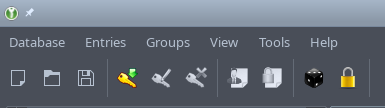
Yes, I refer to the notification area icon (system tray). However, the toolbar icons are a bit inconsistent color wise as well. Here how it looks to me:
shmerl
on 15 Dec 2017
In the notification area, it looks like this:
Unlocked:

Locked:

shmerl
on 15 Dec 2017
That’s because some are not part of Breeze. There is also issues with HiDPI support.

 ArchangeGabriel
on 15 Dec 2017
ArchangeGabriel
on 15 Dec 2017
I did not test, but I believe it's because this:
m_ui->actionEntryNew->setIcon(filePath()->icon("actions", "entry-new",false));
See some previous lines for some action that has its icon working icon theme: m_ui->actionDatabaseNew->setIcon(filePath()->icon("actions", "document-new"));
The false param is probably "disallowing" fetch the icon from icon theme.
 franksouza183
on 8 Mar 2018
franksouza183
on 8 Mar 2018
@franksouza183 Yes, this is what #756 is about (and it is also expected to solve #548).
ArchangeGabriel
on 8 Mar 2018
Oh, sorry, I didn't see that. Thanks
franksouza183
on 8 Mar 2018
I'm adding more KeepassXC compatible icons to the KDE Breeze icon theme. I'll let you guys know when I'm finished so you can close this issue.
 noahadvs
on 21 Feb 2019
noahadvs
on 21 Feb 2019
Cool. I have been working on a new icon theme as well, but haven't got very far. Perhaps we can just make Breeze our new default if we can fill in the missing icons. I especially dislike the die for the password generator. It's not clear what it means and the Breeze icon does not even look like a die at smaller resolutions.
phoerious
on 21 Feb 2019
Cool. I have been working on a new icon theme as well, but haven't got very far.
I'd like to see what you've got if you don't mind. If you want to make your own changes to breeze-icons, I'd love to help you out. Or I could include them in my own commit if that's alright with you.
Perhaps we can just make Breeze our new default if we can fill in the missing icons.
That could work fine. I could make additional icons you might want to achieve a consistent looking icon style. With the current version of Breeze, you get a mix of color and monochrome icons in the sidebar preference categories.
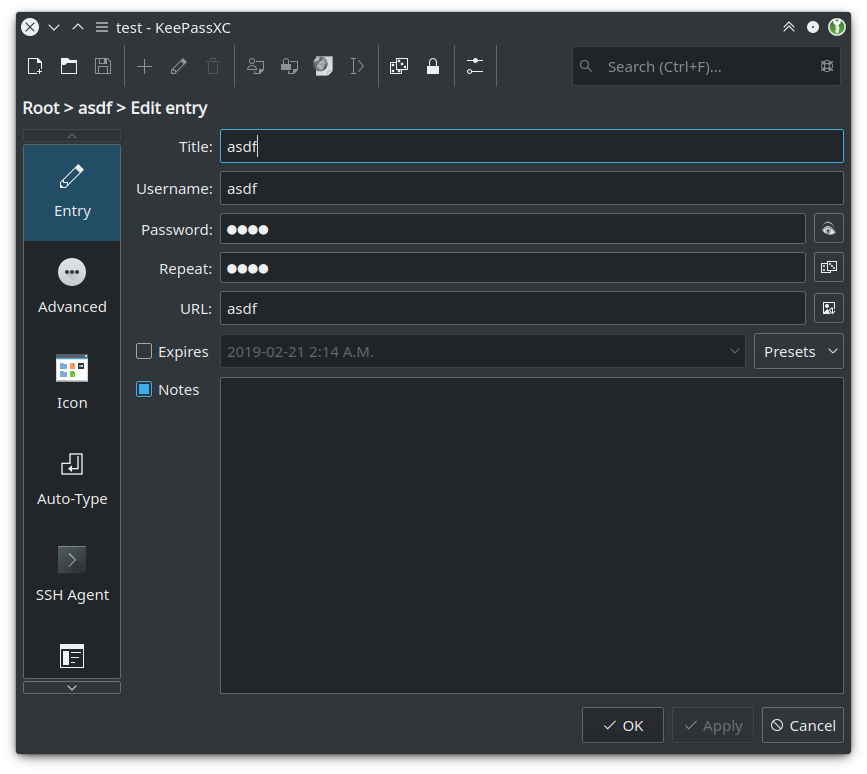
I especially dislike the die for the password generator. It's not clear what it means and the Breeze icon does not even look like a die at smaller resolutions.
Funny thing, I actually made a monochrome pair of dice for the password generator so that Breeze wouldn't be too different from the official icons for KeepassXC. I kind of agree, but I don't have better ideas right now.
noahadvs
on 21 Feb 2019
I played around with a completely different icon set and it wasn't monochrome, although I think that's the way to go, particularly with dark themes.
I think coloured icons for the sidebar are okay as long as they are consistently coloured. The toolbar icons should be monochrome, I think. We also "misuse" certain standard icon names, because a more or less suitable icon exists on some Linux distributions. If we have a proper icon for that, we can also give it a proper name and not be surprised what certain platforms make of it. For instance, the lock icon is document-encrypt which really should be something like lock to avoid someone making it an icon that has a document but no lock.
phoerious
on 21 Feb 2019
If you are going to use Breeze icons for KeepassXC, I should contribute the icons directly to KeepassXC, right? Of course, any that are appropriate for Breeze icons should also go upstream so that they can be reused in other applications.
noahadvs
on 23 Feb 2019
Yes.
phoerious
on 23 Feb 2019
If you use monochrome icons, is there a way for KeepassXC to change the color of the icons based on the user's theme? In KDE Plasma, Breeze icons are able to change their colors based on the user's color scheme in Qt applications by using KIconThemes. I do not know if other desktop environments are able to do something similar. If they can't, then users of other DEs who use dark themes could end up with difficult to read icons.
noahadvs
on 26 Feb 2019
I don't think there is a good way to do that, but we can try to make it work somehow.
phoerious
on 26 Feb 2019
I don't think there is a good way to do that, but we can try to make it work somehow.
I think there is, because KDE applications can do that as well, but it involves adding a bunch of KDE Frameworks dependencies and you might not want that.
noahadvs
on 26 Feb 2019
We do not depend on Kf5 and do not plan to. KColorScheme is not a plain Qt feature.
phoerious
on 26 Feb 2019
You're probably going to have to add some way to manually switch between light and dark themes within KeepassXC then. I can add a set of light and dark monochrome icons. This is still significantly more complicated than just using color icons for everything like you do now, except that Breeze icons are easier to make than Oxygen icons.
noahadvs
on 26 Feb 2019
Related issues
 bleepnetworks
·
3Comments
bleepnetworks
·
3Comments
 JosephHatfield
·
3Comments
JosephHatfield
·
3Comments
 Throne3d
·
3Comments
Throne3d
·
3Comments
 haroldm
·
3Comments
haroldm
·
3Comments
 2tbwXj46BDbdNBRV79DS
·
3Comments
2tbwXj46BDbdNBRV79DS
·
3Comments
Most helpful comment
I'm adding more KeepassXC compatible icons to the KDE Breeze icon theme. I'll let you guys know when I'm finished so you can close this issue.