Keepassxc: MacOS: Auto-Type when database locked causes main window to steal focus
I am using KeepassXC on MacOS. When I press the hotkey to autotype a password in Safari, two instances of KeepassXC are opening to enter the database password.
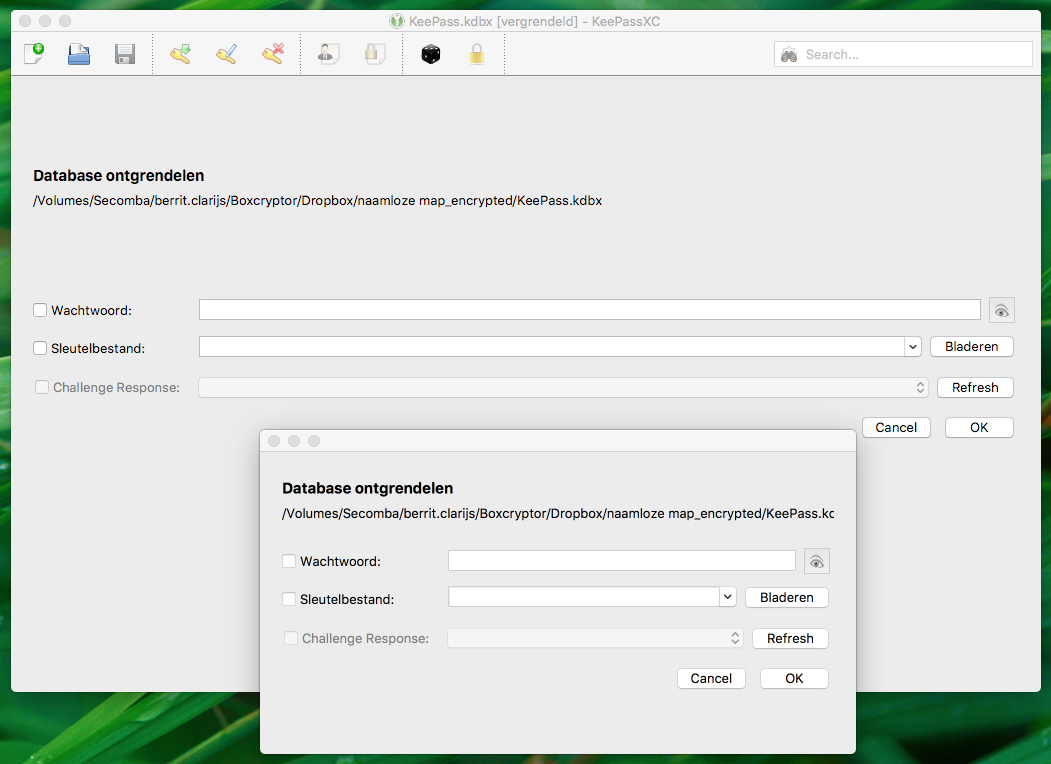
If I enter the password in one of the instances (in this case: the one on top), the following error is displayed:

(translated: could not find an element with window title: About KeepassXC)
Expected Behavior
Only one instance should open.
Current Behavior
Two instances open
Steps to Reproduce (for bugs)
Press hotkey combination to autotype username and password in Safari
Debug Info
KeePassXC - Version 2.2.2
Revision: 6d46717
Libraries:
- Qt 5.9.1
- libgcrypt 1.8.1
Operating system: macOS High Sierra (10.13)
CPU architecture: x86_64
Kernel: darwin 17.2.0
Enabled extensions:
- KeePassHTTP
- Auto-Type
- YubiKey
 klara31
All 12 comments
I can confirm this issue, but it occurs only if the database is locked.
 RicardoCapricciosa
on 6 Dec 2017
RicardoCapricciosa
on 6 Dec 2017
This is still an issue with v2.3.0
 hfr-hfr
on 1 Mar 2018
hfr-hfr
on 1 Mar 2018
Yes, this issue still exist
 anshulbajpai
on 2 Mar 2018
anshulbajpai
on 2 Mar 2018
I'd like to add more to this bug.
When we press the global hotkey to summon auto-type (with the browser in foreground) on a closed database and after entering the password, we see a modal dialog saying "Couldn't find the entry that matches the window title: ** - KeePassXC".
When we press the OK button, then the KeePassXC application is in the foreground, whereas the expected behaviour would be to bring the browser again in the foreground.
anshulbajpai
on 2 Mar 2018
The problem with focus seems solved for me in 2.3.1, but it still cannot find the correct password if the database was previously locked
 emilbayes
on 1 Apr 2018
emilbayes
on 1 Apr 2018
Yes, the issue still exists in 2.3.1-2.3.3:
Focus is now set correctly on password field. But the other issue (using wrong window title for autotype) remains. Here's my summary of this bug from October last year:
after unlocking the database (…) KeepassXC should use the prior window (where global Auto-Type keyboard shortcut was invoked) to check against auto-type rules. Instead it uses its own window ("database-name KeepassXC") and consequently presents an error dialog "no entry found with that window title".
hfr-hfr
on 3 Apr 2018
Problem still exists in 2.3.3
klara31
on 14 May 2018
Problem still exists in 2.3.4
Is there anything we can do to support development (as a non developer?) As this is one of the most annoying bugs I have to deal with a hundred time every day.
RicardoCapricciosa
on 12 Mar 2019
I just tried this with 2.4.0-beta2, problem still exists in this version
klara31
on 12 Mar 2019
I can confirm the observation of @klara31. The problem is still there with v2.4.0-beta2 (tested on MacOS X 10.14.3)
RicardoCapricciosa
on 14 Mar 2019
Hi,
I can confirm that problem still exists in KeePassXC 2.4.1 on macOS 10.14.3.
 veysiertekin
on 9 May 2019
veysiertekin
on 9 May 2019
I have made a fix for this, see PR link above.
 droidmonkey
on 11 May 2019
droidmonkey
on 11 May 2019
Related issues
 bleepnetworks
·
3Comments
bleepnetworks
·
3Comments
 mstarke
·
3Comments
mstarke
·
3Comments
 shaneknysh
·
3Comments
shaneknysh
·
3Comments
 guihkx
·
3Comments
guihkx
·
3Comments
 clementlesne
·
3Comments
clementlesne
·
3Comments
Most helpful comment
I can confirm this issue, but it occurs only if the database is locked.