Keepassxc: KeepassXc UI opens maximized and hides desktop task bar (Cinnamon desktop)
Hello,
I am experiencing the following issue with KeepassXc under Cinnamon 3.4.6, I am not sure it's relevant but I am running a dual monitor setup.
About 50% of the time, when launching KeepassXC, its UI opens maximized in such a way that it covers my entire desktop (like pressing F11 under firefox). Application panels are covered and inaccessible, the usual window decoration, title bar and icons are absent.
When keepassUi is displaying, there is no way to interact with my desktop, the only things I can do are either close KeepassXC using the menu or press the keyboard win key to open the App launcher, this seems to be the only thing that can appear on top:
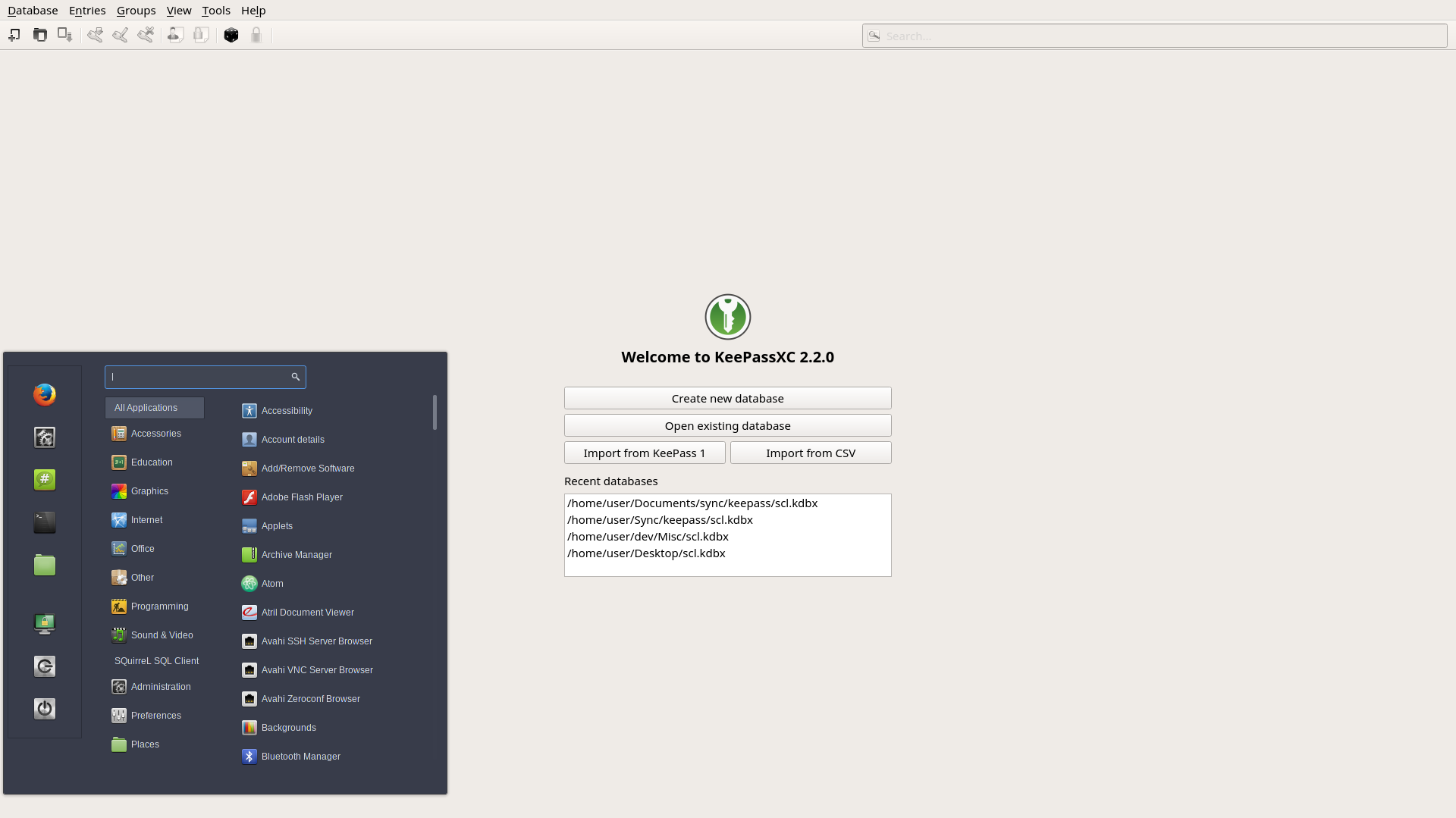
Switching between workspaces doesn't help, KeepassXC keeps eating the entire display on my primary monitor whatever I do. Also it does not obey keyboard shortcuts except alt-F4 (close).
Has anybody else experienced this problem?
Debug Info
KeePassXC - Version 2.2.0
Revision: caa49a8ef3ee28ed478192389b21d61107b3b8e0
Libraries:
- Qt 5.9.1
- libgcrypt 1.8.1
Operating system: Manjaro Linux
CPU architecture: x86_64
Kernel: linux 4.12.14-1-MANJARO
Enabled extensions:
- KeePassHTTP
- Auto-Type
- YubiKey
 stefcl
All 16 comments
As a workaround, the following command can recover the situation
wmctrl -r KeePassXC -b remove,fullscreen
I am now wondering whether there is any specific code in KeepassXC for requesting fullscreen state or if my environment is causing this to happen somehow.
stefcl
on 9 Oct 2017
no code in KeePassXC requests fullscreen from my reading.
 droidmonkey
on 9 Oct 2017
droidmonkey
on 9 Oct 2017
Thanks for checking,
I had a very quick look at the code, the Main windows constructor tries to restore the window state using QWidget::restoreGeometry().
I assume that it uses this serialized value from the keepassxc.ini file
[GUI]
MainWindowGeometry=@ByteArray(\x1\xd9\xd0\xcb\0\x2\0\0\0\0\a\xe8\0\0\0Q\0\0\f\xdb\0\0\x3\xd4\0\0\a\xe8\0\0\0m\0\0\f\xdb\0\0\x3\xd4\0\0\0\x1\0\0\0\0\a\x80)
I can suppose that broken state information might have been written in this file at some point. Perhaps when I try to shutdown my computer and that DE starts killing tasks and fall apart. Who knows?
Nevertheless, QT docs suggests that their geometry system and X11 are not the best friends ever
http://doc.qt.io/qt-5/application-windows.html#window-geometry
stefcl
on 9 Oct 2017
I'm using same version of Cinnamon, in Arch Linux. Single monitor setup.
Can't reproduce this bug.
 ranolfi
on 11 Oct 2017
ranolfi
on 11 Oct 2017
Thanks for trying but it's probably not something you can reproduce. At 99% it has to do with the settings that were saved in the .ini file which, in turn, depended on the state of my window manager at that exact instant.
Except _perhaps_ adding a restore default entry under the View menu, there is probably nothing to do.
stefcl
on 12 Oct 2017
It keeps happening to me on a regular basis, I can confirm that deleting the MainWindowGeometry entry from the INI file and then restarting the application solves the problem.
I guess that settles it.
stefcl
on 18 Oct 2017
@Serhii
Are you talking about adding a restore default entry to the menu?
2017-10-28 21:47 GMT+02:00 Serhii Moroz notifications@github.com:
how's it going? I can deal with this issue in my spare time.
—
You are receiving this because you authored the thread.
Reply to this email directly, view it on GitHub
https://github.com/keepassxreboot/keepassxc/issues/1049#issuecomment-340215341,
or mute the thread
https://github.com/notifications/unsubscribe-auth/ACHRExQJqlEELTBzIFuVd67FXxG65fojks5sw4TYgaJpZM4Pxnbi
.
stefcl
on 29 Oct 2017
@stefcl sorry, I mistakenly answered in this branch :(
 frostasm
on 29 Oct 2017
frostasm
on 29 Oct 2017
However I found one small bug. KeePassXC saves the geometry even when the main window is hidden. It creates a wrong behaviour on my DE (I use Mate). When the application starts, the main window always opens in the upper left corner of the monitor. Today I'll make some changes, maybe this will help
frostasm
on 29 Oct 2017
Yes, I'll be happy to test as I am facing the aforementioned fullscreen issue almost all the time.
However, since GUI state parameters are auto-saved, I think it would hurt to also offer a clean way to restore the default state. I am not a Qt expert but it doesn't seem that hard (except for multi-platform testing of course).
stefcl
on 29 Oct 2017
I'll push small PR #1146
frostasm
on 29 Oct 2017
@stefcl can you test the develop branch?
frostasm
on 11 Nov 2017
@frostasm
Issue has been closed, so there is no point...
stefcl
on 12 Nov 2017
@stefcl if you have the ability to check, please check the changes in the develop branch. The issue can be reopened if it will be necessary.
frostasm
on 12 Nov 2017
I've closed the issue since it should be fixed after #1146. If it's not we can reopen this or make a new one ;)
 TheZ3ro
on 12 Nov 2017
TheZ3ro
on 12 Nov 2017
This issue just happened with me and, as said by stefcl, removing the MainWindowGeometry line from keepassxc.ini solved it. This file can be found at ~/.config/keepassxc/
 Markkop
on 27 Oct 2019
Markkop
on 27 Oct 2019
Related issues
 813gan
·
3Comments
813gan
·
3Comments
 amvasilyev
·
3Comments
amvasilyev
·
3Comments
 mstarke
·
3Comments
mstarke
·
3Comments
 shyim
·
3Comments
shyim
·
3Comments
 lostfictions
·
3Comments
lostfictions
·
3Comments