Keepassxc: On 2.2.1 & macOS, Global Auto-Type dialogue comes to front, but database password field not actually in focus
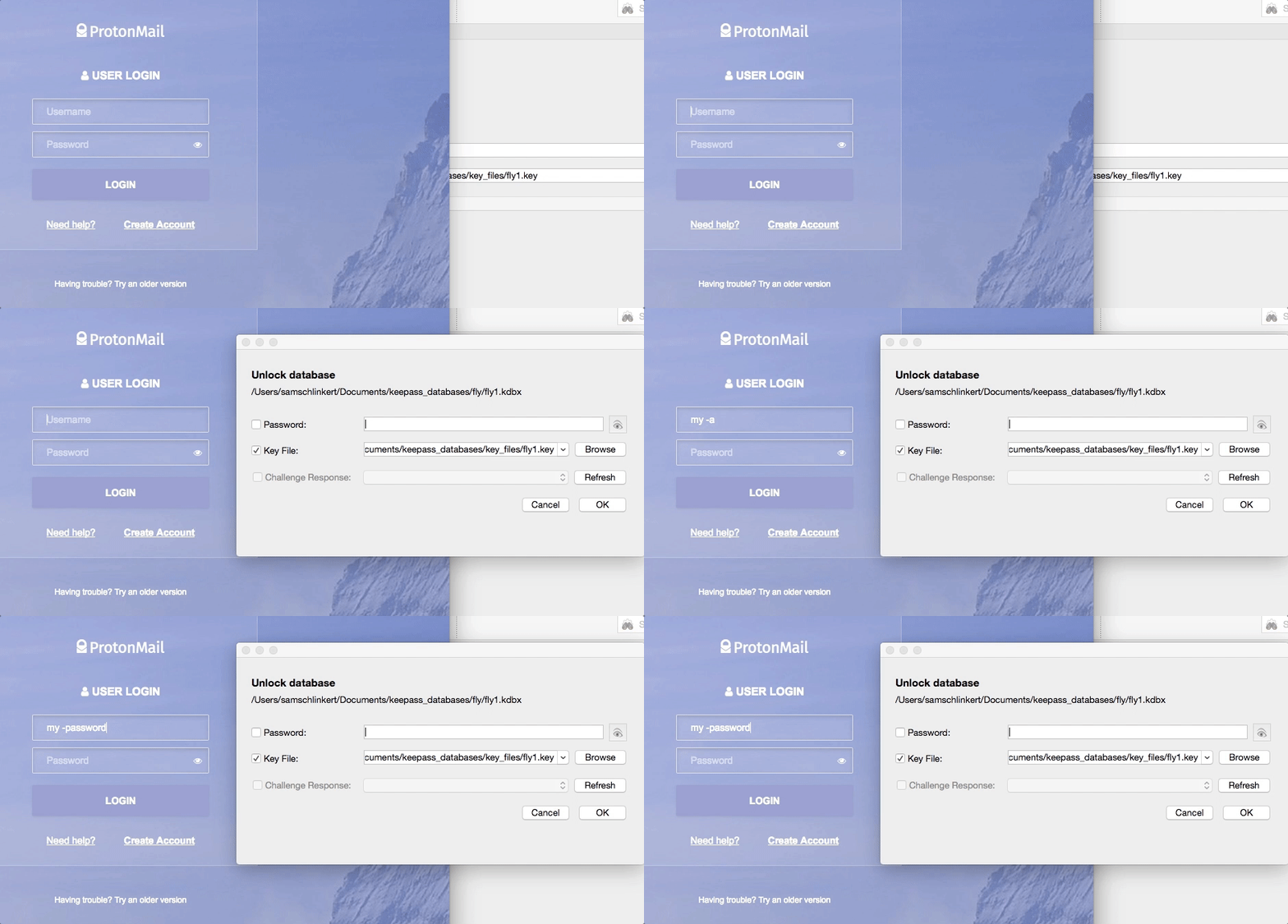
I recently upgraded to 2.2.1 on my Mac and wanted to investigate whether the PR #663 fix was working. While the pop-up dialogue does now come to the front, when you start typing you're still in the username field, not the KeePassXC database password field.
Expected Behavior
- While on a browser login page, with KeePassXC database locked, invoke Global Auto-Type keyboard shortcut
- Database unlock dialogue appears on top of browser window.
- User begins typing their database password into the dialogue box.
- Hit enter after entering database password and KeePassXC performs the Auto-Type.
Current Behavior
- While on a browser page, with KeePassXC database locked, invoke Global Auto-Type keyboard shortcut
- Database unlock dialogue appears on top of the browser window (awesome!).
- User begins typing, and while a cursor appears in the database password field, the entered text is actually typed into the username text field rather than the database password field (see GIF below). Even when I attempt to click into the database password field, I often still can't enter characters into it.
Possible Solution
I'm worried this is a macOS issue?
Steps to Reproduce (for bugs)
- While on a browser page, with KeePassXC database locked, invoke Global Auto-Type keyboard shortcut
- Database unlock dialogue appears on top of the browser window (awesome!).
- User begins typing, but the entered text is actually being typed into the username text field rather than the database password field (see GIF above)
- Attempt to click into the database password field-- I couldn't enter characters into it.
Context
Not a huge deal to me as I learned to use KeePassXC's Global Auto-Type feature. But I feel like new KeePassXC users will be frustrated and potentially disclose their master database password to internet services inadvertently.
Debug Info
KeePassXC - Version 2.2.1
Revision: 2bce9c8add07226e9a05e9e0fd0e5e66b236d5b6
Libraries:
- Qt 5.9.1
- libgcrypt 1.8.1
Operating system: OS X Yosemite (10.10)
CPU architecture: x86_64
Kernel: darwin 14.5.0
Enabled extensions:
- KeePassHTTP
- Auto-Type
- YubiKey
Browsers: I reproduced this with FireFox 57.0b4 (64-bit) and Google Chrome Version 61.0.3163.100 (Official Build) (64-bit) on the login pages of both ProtonMail and Reddit.
 sts10
sts10
All 28 comments
This is a nicely written issue. @sts10, how did you make your animated gif?
 quinncomendant
on 3 Oct 2017
quinncomendant
on 3 Oct 2017
Thanks!
I made the GIF using GIPHY Capture, though that application doesn't capture the mouse cursor. If I need to show the mouse, I use QuickTime screen record to make an MP4 file, and then GIF Brewery (10.11+) to turn that into a GIF. I had a lot of recent practice making my (self-promotion alert) KeePassXC user guide.
sts10
on 3 Oct 2017
Holy cow what a nice user guide! We should make that our official guide (minus the MacOS specific stuff).
 droidmonkey
on 3 Oct 2017
droidmonkey
on 3 Oct 2017
I agree. I was thinking about how the cool gifs could be done with perhaps scrot tool or other options with Linux (rather than macOS).
 affinityv
on 3 Oct 2017
affinityv
on 3 Oct 2017
Thanks y'all! I actually mentioned it in a comment on an issue about documentation back in June, offering it as a starting point for a how-to/wiki. Offer still stands! (Though I'm still a little unsure about the procedure I outline in the appendix, Verifying Your KeePassXC Download without Using the Command Line.)
As for making GIFs with Linux, I've been meaning to check out Peek (OMG Ubuntu article), but I've currently only got Linux running on a machine with 2 GB of RAM and doubt it will perform well enough to really use.
sts10
on 3 Oct 2017
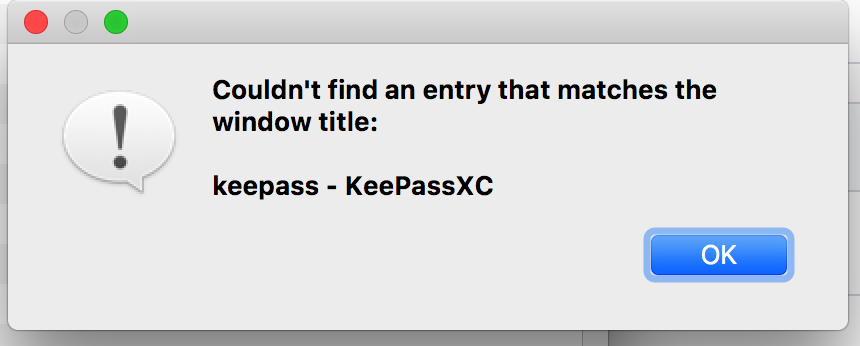
Probably related: after unlocking the database this way (by manually setting focus on popped up password field), KeepassXC should use the prior window (where global Auto-Type keyboard shortcut was invoked) to check against auto-type rules. Instead it uses its own window ("database-name KeepassXC") and consequently presents an error dialog "no entry found with that window title".
 hfr-hfr
on 8 Oct 2017
hfr-hfr
on 8 Oct 2017
Seems a bug in MacOS window flags
 TheZ3ro
on 8 Oct 2017
TheZ3ro
on 8 Oct 2017
…KeepassXC gets the window right when database is unlocked at time of hitting Auto-Type keyboard shortcut. It only fails when database has to be unlocked in the process of KeepassXC's Auto-Type routine.
hfr-hfr
on 8 Oct 2017
I also can confirm that the fix added to 2.2.1 has this window in front but no-focus problem on mac.
Also, why does the main window is also when the unlock window is presented (this was was in 2.2.0 already), could it be related to actual bug? (if main window is minimised or closed it appears together with the unlock window)
 mihaiile
on 17 Oct 2017
mihaiile
on 17 Oct 2017
@weslly were you going to fix this for 2.2.2?
droidmonkey
on 19 Oct 2017
@droidmonkey yes, I'll take a look at it today
 weslly
on 19 Oct 2017
weslly
on 19 Oct 2017
Looks like there's no way to actually steal the focus just with Qt window flags on macOS. I'll probably have to use ActivateIgnoringOtherApps from AppKit.
weslly
on 20 Oct 2017
I wonder what method the auto-type selector window uses now. That comes to the foreground correctly, whatever method it uses.
quinncomendant
on 20 Oct 2017
Postponing, since no immediate solution is in sight.
 phoerious
on 22 Oct 2017
phoerious
on 22 Oct 2017
MacPass works as expected in similar situation, maybe some ideas for the fix could be taken from there.
 rkiyanchuk
on 26 Oct 2017
rkiyanchuk
on 26 Oct 2017
Here's a link to a properly working KeepassX 0.4.3 autotype patch from kar (tested): https://web.archive.org/web/20150908084351/https://www.keepassx.org/forum/download/file.php?id=122
via KeepassX's now dead forum: https://web.archive.org/web/20150908084351/https://www.keepassx.org/forum/viewtopic.php?f=5&t=1920&start=120
Maybe this can help.
hfr-hfr
on 26 Oct 2017
…and another one, supposed to be working with KeepassX 2.0 on OSX (not tested): https://github.com/keithbennett/keepassx
hfr-hfr
on 26 Oct 2017
The specific commit is https://github.com/keithbennett/keepassx/commit/b87097a7abbc676c46ff0a84c341e381506a9fcc
It's doing his thing using the keepassx processId and the function SetFrontProcessWithOptions
If someone can work on that very appreciated, otherwise I will do it myself
TheZ3ro
on 26 Oct 2017
When I type the database password, because of this issue I can type it in clear text on some other webpage and I can end up revealing my password to someone sitting next to me.
Can we stick security label to this bug?
 anshulbajpai
on 9 Nov 2017
anshulbajpai
on 9 Nov 2017
I could still face the issue on latest macOS. I am running keepassxc 2.2.4
anshulbajpai
on 19 Dec 2017
This fix will be released in v2.3.0 in the future.
droidmonkey
on 19 Dec 2017
Sorry, my bad. I read the release 2.2.4 as 2.4.2.
anshulbajpai
on 19 Dec 2017
Hello
I've backported patch to 2.2.4 version with the fix and it looks like after focus it doesn't perform autotype as it is looking for an entry for "keepassxc window". is behaviour for 2.3.0 different?
 MaximKraev
on 23 Dec 2017
MaximKraev
on 23 Dec 2017
There is no way to tell, master and develop branches are wildly different at this point.
droidmonkey
on 23 Dec 2017
@MaximKraev there's an open issue for this already: https://github.com/keepassxreboot/keepassxc/issues/1216, this behavior is a side effect from having a second dialog when bringing the unlock window to front.
weslly
on 23 Dec 2017
Hi, I have upgraded KeepassXC to 2.3 im My MacOS High Sierra via Homebrew Cask, but this issue remains.
 darkgeek
on 1 Mar 2018
darkgeek
on 1 Mar 2018
I can confirm that with MacOS 10.11.6 via binary bundle. Focus is now set correctly on password field. But the other issue (using wrong window title for autotype) remains. Here's my summary of this bug from October last year:
after unlocking the database this (…) KeepassXC should use the prior window (where global Auto-Type keyboard shortcut was invoked) to check against auto-type rules. Instead it uses its own window ("database-name KeepassXC") and consequently presents an error dialog "no entry found with that window title".
hfr-hfr
on 1 Mar 2018
Yes, the focus is fixed but the undesirable alert is still coming up.
anshulbajpai
on 2 Mar 2018
Related issues
 rugk
·
3Comments
rugk
·
3Comments
 Throne3d
·
3Comments
Throne3d
·
3Comments
 mstarke
·
3Comments
mstarke
·
3Comments
 MisterY
·
3Comments
TheZ3ro
·
3Comments
MisterY
·
3Comments
TheZ3ro
·
3Comments
Most helpful comment
Holy cow what a nice user guide! We should make that our official guide (minus the MacOS specific stuff).