Keepassxc: Add character exclusion to the password generator widget
KeePass has a really nice passphrase generator with some excellent fine tuning options.
It would be nice to have a small box where the user could enter characters NOT to use in the generated password string.
For instance, having quotes " in the password often leads to cut off passwords at this character in some circumstances. Excluding such characters manually would be really handy to avoid that.
I'm considering trying my hand at writing a patch for this in the next few weeks if nobody is up for the challenge (but I've never programmed in C++ before).
 glubsy
All 24 comments
We deliberately did not add many of the features in the KeePass password generator because it is extremely overwhelming to use. Although a text box that you can enter exclusion characters seems like a good compromise to a hundred checkboxes.
 droidmonkey
on 27 Jul 2017
droidmonkey
on 27 Jul 2017
I would like to add my voice to the request for better selectivity in the password generation.
More web sites have problematic characters than don't, and many of those require passwords with some symbols so turning off symbols altogether isn't an option. Right now when I need to generate, I either fire up KeePass2 or generate a 40 character password in KeepassXC and delete the problematic symbols.
My first choice would be better selectivity in the password generator. An added amount of optional complexity to the password generation is not a bad thing. A fourth choice for "use these characters in the generated password" will not be the breaking factor that causes someone to go "oh my God this is just too complex".
As a second choice, if you are unwilling to adopt an option to customize the character list, I would highly suggest you pare down your symbol list to ones that are essentially safe anywhere. I propose the following as generally safe:
!@#$^*_-=+.,
Symbols that should never be in a password generator unless specifically asked for:
%&<>[]{}?/\'"
As I said, the number of places that have problems with one or more of the symbols in my problem list exceed the number of places that will accept them all. Some symbols are actually dangerous to use (particularly quotes and backslashes), in that poorly written web sites sometimes don't properly filter or escape them and those badly written sites will accept the password but won't process it correctly. I've run into cases that a password that was accepted then won't work when I try to use it to log in.
 VA1DER
on 10 Sep 2017
VA1DER
on 10 Sep 2017
poorly written web sites
The discussion could easily end here.
I would also like to have a profile-based password generator, but this will take lot of time and effort.
I think our password generator is much user-friendly compared to the KeePass one, and I think it's already too complex.
Reducing the symbol list seems a good workaround but notice that the current symbol list match the KeePass one
 TheZ3ro
on 10 Sep 2017
TheZ3ro
on 10 Sep 2017
I'm not sure if we should really leap into that rabbit hole of "fixing" broken websites. Yes, there are websites that use wrong encodings, disallow characters or accept long passwords, but only hash the first n characters (Microsoft does/did that, so I couldn't log in with my full password). It's not our job to fix broken websites. If a website disallows specific characters, it's easy to replace them by hand (seriously, how often do you need new passwords for these websites?) and I wouldn't worry too much about encodings. Our "special characters" have the same single-byte encoding in Latin1 and UTF-8.
 phoerious
on 10 Sep 2017
phoerious
on 10 Sep 2017
It's not for a password management/generation program to tell web sites what characters they have to allow in their passwords. That is the tail wagging the dog.
Now this is your project, and if you feel one more setting for "use these characters in the password" is the tipping point that will push your project into the "OMG this is just too complex" territory, that is your prerogative. All I can do is vote with my feet. I had much preferred the native code of KeepassXC, but if I have to manually edit every password it generates then it has little value added.
I hope you will reconsider. I really don't think this will push KeepassXC over the edge, and there are many many ways to mitigate that even if it would. A checkbox in the security settings for "expert password generation options", or even a text box with "default symbols to use when symbols are allowed" that has the current allowed list will keep the current functionality identical, and still allow people to tweak their settings to match the types of web sites they frequent.
VA1DER
on 10 Sep 2017
In my case, I had in mind some shell programs on Linux which cut the passphrase at some characters (for example if I recall correctly cryptsetup stops reading the passphrase at the first quote encountered, some archiving tools mess up when they read a pipe |, etc.
I also fail to see how "complexity" is not "user-friendly". I guess it's a subjective thing.
To me, the less complex a UI looks, the less user-friendly it is. That's partially why I really dislike Gnome for example. ;P
glubsy
on 11 Sep 2017
It's not for a password management/generation program to tell web sites what characters they have to allow in their passwords. That is the tail wagging the dog.
Modern hashing function can take input in any encoding and they will output a fixed length hexadecimal string that can easily be stored in any database you use.
NIST guideline on passwords explicitly states:
Allow at least 64 characters in length to support the use of passphrases. Encourage users to make memorized secrets as lengthy as they want, using any characters they like (including spaces), thus aiding memorization.
I also fail to see how "complexity" is not "user-friendly". I guess it's a subjective thing.
It's not a subjective thing, there are people studying UX for job.
For user-friendly I don't mean less customization.
I mean having lots of (useless) buttons will drive average Joe crazy (using a password manager for the first time)
Like I said before, I agree that we should implement a profile-based password generator for users that want more flexibility and customization, but this will take some time and effort
TheZ3ro
on 11 Sep 2017
I would just like to add a vote for the ability to remove certain characters from the special characters classes.
 trystant
on 22 Oct 2017
trystant
on 22 Oct 2017
I generally agree that it is more a problem with the software that does not follow the basic guidelines for secure passwords. But I also think KeePassXC UI gets more user friendly if the user does not have to make to many 'manual hacks' to choose a password. My first thought on this issue was to make the special characters button to extend to a list of maybe 3-4 options that are usable. As a first step until there is an advanced option to do whatever you want. I have started to run into this problem more and more.
 jpyllman
on 26 Oct 2017
jpyllman
on 26 Oct 2017
I think #725 has been referenced in error, these are two distinct suggestions/features.
 Grexeo
on 31 Oct 2017
Grexeo
on 31 Oct 2017
I would suggest that a new box in addition to the "A-Z", "a-z", "0-9", "_special_" and "Extended ASCII" boxes could be a box "Custom". (By special, I mean the box with those "other" characters, which I don't even know if they even specified except in source code?!). One could then deselect the "Special" box and choose "Custom" and add the supported "special" characters permitted by the rogue website.
Note: I can't use the password generator for my bank account. Clearly, this limitation of KeepassXC is a hurdle to wide-spread use.
I am going to look into a separate password generator for now.
 ghost
on 18 Dec 2017
ghost
on 18 Dec 2017
Mind if I put my 2cents in. Why not just simply add two text boxes. Whitelist and Blacklist. They are enabled when "/*_..." is selected, and the user can either take it all, or input a whitelist or input a blacklist.
{ {/*_...} ∩ {Whitelist} } \ {Blacklist}
This can be a global setting, or a per-entry setting. (per entry would generally make sense as each website will have their own requirements.)
 hisham-albeik
on 23 Apr 2018
hisham-albeik
on 23 Apr 2018
I also like the idea of just adding a whitelist/blacklist, as it'd be simpler than keepassx's approach and in the end more effective. A blacklist in particular would solve all of the random website issues I've come across.
I mean having lots of (useless) buttons will drive average Joe crazy (using a password manager for the first time)
If you're worried about exposing too much to the average Joe what about adding an advanced/expert toggle, so power users that need these features can have them and the average Joe doesn't have to touch them?
 pensive-fuzz
on 29 Apr 2018
pensive-fuzz
on 29 Apr 2018
Really missing this feature. To define which special characters to use. There are plenty of institutions and banks that allow the only subset of special characters. As well as tons of legacy sites where I cannot use any character I like.
 ivankatliarchuk
on 4 May 2018
ivankatliarchuk
on 4 May 2018
@tanzwud Check out this PR https://github.com/keepassxreboot/keepassxc/pull/1841.
 varjolintu
on 4 May 2018
varjolintu
on 4 May 2018
Honestly not the best approach.. here is an example why this won't be very helpful..
Below is an example from a site:
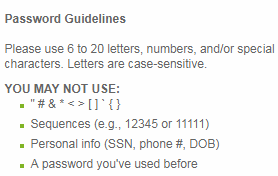
According to those requirements..
I can use:
- ' but not "
- () but not [{}]
- $ but not #
- but not *
Which makes 4 buttons unusable, and instead of eliminating just 11 characters from the set, it would be eliminating at least 18 characters.
This is why simply adding I would also add two text boxes labelled "whitelist" and "blacklist" is more appropriate. I can simply enable "/*_..." and then add " # & * < > [ ] ` { } to the blacklist. The best part I'll just copy that line from the site and paste it into the textbox and done (ok, I still have to remove the whitespaces).
However I would keep the upper case and lower case hex buttons as it would appear to fulfill a request #789.
hisham-albeik
on 4 May 2018
Ugh what really needs to be eliminated it's ridiculous restrictions on passwords.
droidmonkey
on 5 May 2018
Let's call them "preemptive password sanitizations". ;-)
glubsy
on 5 May 2018
Ugh what really needs to be eliminated it's ridiculous restrictions on passwords.
Agreed. I'd love to see an actual standard for password characters, but the reality is with overwhelming probability we are going to be stuck with incompatible password restrictions for as long as we use passwords. There are three choices that I see:
- Do nothing, and make users edit passwords for compatibility with each site.
- Adopt a restricted enough subset that it works with most web sites.
- Allow customization of the password generating process with user-selectable characters
I suspect option 1 will, over time, diminish the project's adoption rate.
VA1DER
on 5 May 2018
On the other hand, I don't want my keepassdb on my Smartphone.
For this i must type in the password from keepassxc to use my smartphone services e.g. google, mail and so on. So I would like to disable lookalike Chars, like iIlf1 or oO0 or '" sometime these chars are hard to differ and I leads to mistakes on password input.
So this is the only feature left, that makes me look envious of keepass users. :)
P.S. I know the button to exclude lookalike chars, but there are some lookalike chars I also want to disable...
 templis
on 10 May 2018
templis
on 10 May 2018
Please list out all the characters you want to disable so they can be added to the look alike checkbox feature...
droidmonkey
on 10 May 2018
Throwing in my two cents for an 'advanced' option for people to explicitly include/exclude special characters. The whitelist/blacklist suggestion above has real value to essentially anyone who has a bank account. I'll look into implementation and formalize the suggestion when I get a chance.
 anthonyjmartinez
on 21 Sep 2018
anthonyjmartinez
on 21 Sep 2018
@anthonyjmartinez This is already implemented in #1841. This issue should actually be closed at this point.
droidmonkey
on 21 Sep 2018
@anthonyjmartinez This is already implemented in #1841. This issue should actually be closed at this point.
@droidmonkey excellent news, and apologies for not finding it mixed in with the other issues. I look forward to the 2.4.0 release!
anthonyjmartinez
on 21 Sep 2018
Related issues
 shaneknysh
·
3Comments
shaneknysh
·
3Comments
 amvasilyev
·
3Comments
amvasilyev
·
3Comments
 haroldm
·
3Comments
haroldm
·
3Comments
 lostfictions
·
3Comments
lostfictions
·
3Comments
 MisterY
·
3Comments
MisterY
·
3Comments
Most helpful comment
I would suggest that a new box in addition to the "A-Z", "a-z", "0-9", "_special_" and "Extended ASCII" boxes could be a box "Custom". (By special, I mean the box with those "other" characters, which I don't even know if they even specified except in source code?!). One could then deselect the "Special" box and choose "Custom" and add the supported "special" characters permitted by the rogue website.
Note: I can't use the password generator for my bank account. Clearly, this limitation of KeepassXC is a hurdle to wide-spread use.
I am going to look into a separate password generator for now.