Keepassxc: --pw-stdin stopped working
I have used --pw-stdin in a script to open and unlock KeePassXC upon login, but it stopped working when I updated keepassxc to version 2.1.4.
Expected Behavior
This command should work fine to start and unlock KeePassXC:
keepassxc --keyfile ~/folder/keyfile.key --pw-stdin ~/anotherFolder/database.kdbx <<< password
Current Behavior
KeePassXC starts, but is still in a locked state. I have to open it up from the tray, and input the password to unlock it.
Steps to Reproduce (for bugs)
- Launch KeePassXC with the command above
Your Environment
- KeePassXC version/commit used: 2.1.4.r396.ga75746c7
- Qt version: 5.8.0
- Compiler: 4.0.0
- Operating System and version: Arch Linux with 4.11.2-1-zen kernel.
 guzzard
All 35 comments
Did you update from 2.1.3?
 droidmonkey
on 23 May 2017
droidmonkey
on 23 May 2017
@droidmonkey yes I updated from 2.1.3.r245.gc4d6fa8
guzzard
on 24 May 2017
@droidmonkey this has started working again at some point so I'm closing this issue.
guzzard
on 26 Jun 2017
I am having the exact issue. Did you reboot or something like that?
 peperunas
on 27 Jun 2017
peperunas
on 27 Jun 2017
@peperunas I think the issue disappeared with the latest update I did.
[2017-05-22 09:31] [ALPM] upgraded keepassxc-git (2.1.3.r245.gc4d6fa8-1 -> 2.1.4.r396.ga75746c7-1)
[2017-06-18 13:51] [ALPM] upgraded keepassxc-git (2.1.4.r396.ga75746c7-1 -> 2.1.4.r428.gf817eaa5-1)
I had the issue with 2.1.4.r396.ga75746c7, however 2.1.3.r245.gc4d6fa8 worked as expected, and 2.1.4.r428.gf817eaa5 also works fine. My best guess is that something in one of these commits fixed the issue: https://github.com/keepassxreboot/keepassxc/compare/a75746c...f817eaa
Try updating to the latest version (2.2.0) and see if you still have the issue. If that doesn't work try a build at f817eaa.
guzzard
on 27 Jun 2017
Tried build f817eaa and latest version 2.2.0. Still not working.
peperunas
on 28 Jun 2017
Hi @peperunas, I did some experimenting.. rebooted computer.. keepassxc started and unlocked automatically as expected.. exited keepassxc and tried to restart it manually from the terminal with "keepassxc --keyfile ~/path_to.key --pw-stdin ~/path_to.kdbx <<< password" but it did not work. The database was not unlocked. I then restarted the computer again and keepassxc did NOT unlock on autostart. Really strange. Basically it seems like the testing I did somehow broke keepassxc again?
Hi @droidmonkey, reopening this issue again since something strange is going on. Perhaps some temp/cache file is to blame?
guzzard
on 28 Jun 2017
I wonder if its a combo of a latent .lock file and single instance perhaps.
droidmonkey
on 28 Jun 2017
Yes, probably it's caused by the single instance, we need to dig more into this
 TheZ3ro
on 28 Jun 2017
TheZ3ro
on 28 Jun 2017
I'm experiencing the same issue. It somehow works only, if there's no database in the history. If you clear every database tab with ^w, exit the application and then issue the command with --pw-stdin, it works.
 janhicken
on 3 Jul 2017
janhicken
on 3 Jul 2017
I can confirm that closing (CTRL-W) the database solves this issue.
2017-07-03 19:32 GMT+02:00 Jan Hicken notifications@github.com:
I'm experiencing the same issue. It somehow works only, if there's no
database in the history. If you clear every database tab with ^w, exit
the application and then issue the command with --pw-stdin, it works.—
You are receiving this because you were mentioned.
Reply to this email directly, view it on GitHub
https://github.com/keepassxreboot/keepassxc/issues/590#issuecomment-312700247,
or mute the thread
https://github.com/notifications/unsubscribe-auth/AFwP622I0DJ7hMBVM-9Jk8aVbvjLntdwks5sKSWngaJpZM4Njasp
.
--
- Giulio
peperunas
on 4 Jul 2017
@janhicken @peperunas @droidmonkey @TheZ3ro I can also confirm. I made sure "remember last databases", "remember last key files and security dongles" and "load previous databases on startup" was unchecked in the settings, and then I cleared the "recent history" of databases. Now KeePassXC automatically unlocks on startup using --pw-stdin every time. Should be possible to figure out what is causing the issue now?
guzzard
on 4 Jul 2017
In Windows not work too. =(
Operating system: Windows 7 SP 1 (6.1)
CPU architecture: x86_64
Kernel: winnt 6.1.7601
KeePassXC - Version 2.2.0
Revision: caa49a8ef3ee28ed478192389b21d61107b3b8e0
P.S. Thanks to all the participants for creating the fork and developing the project! I've been waiting for this fork for two years.
 heX16
on 25 Jul 2017
heX16
on 25 Jul 2017
I'm also unable to get this to work, the password never gets send, the CTRL-W method doesn't seem to work for me either.
OS: Windows 10
KeePassXC 2.2.0 64-bit
 TheChiefMeat
on 9 Sep 2017
TheChiefMeat
on 9 Sep 2017
The fix is to ignore the previous opened databases if --pw-stdin is issued. Easy fix, i got this.
droidmonkey
on 9 Sep 2017
I guess I'm late to the party but here's a helpful screen recording: https://youtu.be/F5wEaE5QNBg.
 dAnjou
on 5 Oct 2017
dAnjou
on 5 Oct 2017
not work. =(
Operating system: Windows 7 SP 1 (6.1)
CPU architecture: x86_64
Kernel: winnt 6.1.7601
KeePassXC - Version 2.2.2 32 bit
Revision: 6d46717
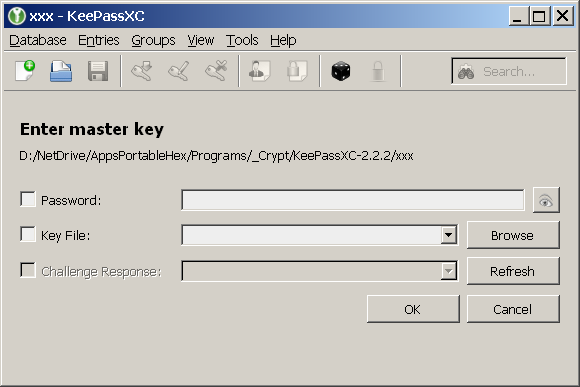
Run:
echo 123 | KeePassXC.exe /pw-stdin xxx
Result:
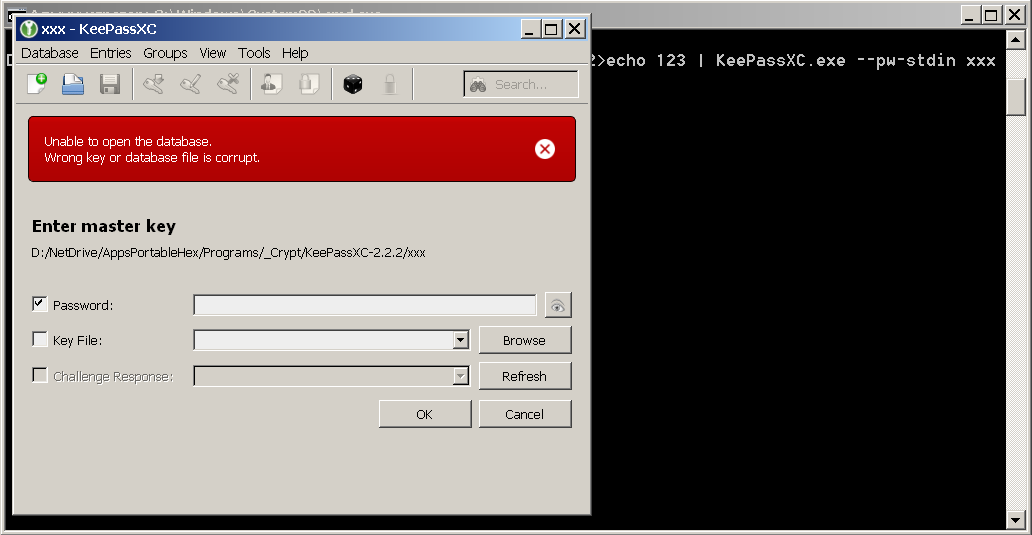
Run:
echo 123 | KeePassXC.exe --pw-stdin xxx
Result:
Run:
echo 123 | KeePassXC.exe xxx --pw-stdin
echo 123 | KeePassXC.exe xxx /pw-stdin
same result.
heX16
on 22 Oct 2017
It doesnt work in windows. Totally separate issue though.
droidmonkey
on 22 Oct 2017
Just got version 2.2.2 and it works now again.
dAnjou
on 23 Oct 2017
Greetings
Any ideas why the -stdin option works for me, when I use it over the terminal, but not, if I use the exactly same command in the startup applications to start keepassxc when logging in?
keepassxc --pw-stdin ~/Google\ Drive/Other/logins.kdbx <<< supersecretpassword
 g0r3
on 1 Nov 2017
g0r3
on 1 Nov 2017
@g0r3, try with sh -c "keepassxc --pw-stdin /home/g0r3/Google\ Drive/Other/logins.kdbx <<< supersecretpassword" instead, that should work.
guzzard
on 1 Nov 2017
Mmmh... thank you for your reply
Trying it in the startup application keepassxc doesn't start at all, using the shell it complains about
sh: 1: Syntax error: redirection unexpected
Moving the second quotation mark after "kdbx" it works on the terminal, but again not over startup applications
g0r3
on 1 Nov 2017
@g0r3, strange.. that works perfectly fine for me.. you could setup a bash script otherwise, and run that?
#!/bin/bash
keepassxc --pw-stdin ~/Google\ Drive/Other/logins.kdbx <<< supersecretpassword
Thanks, your suggestion with the script brought me on the right track! I am using ubuntu and this is a bash != dash thing.
If I use
bash -c "keepassxc --pw-stdin ~/Google\ Drive/Other/logins.kdbx <<< supersecretpassword"
(bash instead of sh) it works perfectly fine also in the startup applications
g0r3
on 1 Nov 2017
If I use
bash -c "keepassxc --pw-stdin ~/Google\ Drive/Other/logins.kdbx <<< supersecretpassword"
(bash instead of sh) it works perfectly fine also in the startup applications
But of course you shouldn't save your password in cleartext within the command. You can instead save the pass in the gnome keyring:
https://gist.github.com/dAnjou/b99f55de34b90246f381e71e3c8f9262
 jonazc
on 12 Feb 2018
jonazc
on 12 Feb 2018
Mehh...
The new release seems to have broke it again :(((
g0r3
on 3 Mar 2018
The regression has already been fixed in #1608 and will be released with 2.3.1.
 phoerious
on 3 Mar 2018
phoerious
on 3 Mar 2018
hi - maybe somebody is interressted: win10 -64 bit - this works for me with autostart and autologin (win batch file):
start "xxx" C:\KeePassXC-2.3.0-Win64\KeePassXC.exe --pw-stdin
timeout /t 3
sendkeys-x64 -s "password"
sendkey enter
taskkill /IM keepassxc.exe >nul
exit
sendkeys.exe and sendkey.exe are commandtools (look for it) which I copied to system32-folder.
in keepassxc you have to set under options: minimize to tray when close.
 liv-in-sky
on 3 Mar 2018
liv-in-sky
on 3 Mar 2018
The regression has already been fixed in #1608 and will be released with 2.3.1.
when is this going to be released? Just to know if I should wait for release or use the fixed version..
jonazc
on 6 Mar 2018
Soon.
phoerious
on 6 Mar 2018
hi - maybe somebody is interressted: win10 -64 bit - this works for me with autostart and autologin (win batch file):
start "xxx" C:\KeePassXC-2.3.0-Win64\KeePassXC.exe --pw-stdin
timeout /t 3
sendkeys-x64 -s "password"
sendkey enter
taskkill /IM keepassxc.exe >nul
exit
sendkeys.exe and sendkey.exe are commandtools (look for it) which I copied to system32-folder.
in keepassxc you have to set under options: minimize to tray when close.
Hi, where i can download sendkeys.exe and sendkey.exe are commandtools??? Thanks
 dacorsa
on 23 Mar 2019
dacorsa
on 23 Mar 2019
The regression has already been fixed in #1608 and will be released with 2.3.1. BUT
try this: https://drive.google.com/drive/folders/1od7aZXJBcW0msO3a-NZ7FHDcexKVjTLG?usp=sharing
I will delete this link in a couple of hours - give me a short reply after download
liv-in-sky
on 23 Mar 2019
Thanks very much , downloaded
dacorsa
on 23 Mar 2019
what is the correct command to start keepassxc with the password in Windows? in linux works well
dacorsa
on 23 Mar 2019
@dacorsa I'm sorry - I don't use it anymore - maybe you should look for their forum or homepage to get your question answered
liv-in-sky
on 24 Mar 2019
Related issues
 MountainX
·
3Comments
MountainX
·
3Comments
 shyim
·
3Comments
shyim
·
3Comments
 mstarke
·
3Comments
mstarke
·
3Comments
 MisterY
·
3Comments
MisterY
·
3Comments
 shaneknysh
·
3Comments
shaneknysh
·
3Comments
Most helpful comment
The fix is to ignore the previous opened databases if --pw-stdin is issued. Easy fix, i got this.