Keepassxc: Allow searching when toolbar is not shown
KeePassX 2.0.3 for macOS allowed using the search function (⌘F) while the toolbar was hidden. It would be great to have that functionality retained. The toolbar consumes about 40 pixels of vertical space, I never use it. Hotkeys FTW.
 quinncomendant
All 19 comments
Hm, that's the unfortunate consequence of moving the search bar outside of the database tab. In Qt, when widgets are hidden they do not respond to hotkeys. Would the desired behavior be to temporarily show the toolbar (and search bar with it) until searching is complete and then hide the bar again?
 droidmonkey
on 17 Apr 2017
droidmonkey
on 17 Apr 2017
Would the desired behavior be to temporarily show the toolbar (and search bar with it) until searching is complete and then hide the bar again?
No, I don't think so. You're not getting off that easy. ;) I never want to see the toolbar, and I want the search box (or search modality) always available.
For me, search is the most used function of a password manager. Unless I am in the process of editing an entry, I'm searching. Why not place the search box in the same location as the yellow Search Results (123) message area, and keep it always visible? Of course, this could be a customizable option if people don't use search they can disable it (this person exists?).
It's also worth considering other search modalities, such as:
- Notational Velocity (and its improved grandchild, nvAlt automatically place the cursor in the search box when it is invoked by a hotkey, assuming your immediate desire will be to do a search.
- FireFox has a Search for text when I start typing, which doesn't require typing
⌘Ffirst. In KeePassXC, unless an entry is being edited, any keystroke can be registered as a search query. This may not even require displaying a search box. - LaunchBar-style search which gives a few seconds to type a query before the focus moves to the results area.
quinncomendant
on 17 Apr 2017
Here's my proposal:
- The option will be created to show search bar in either the toolbar or the database tab.
- Searching from the search bar is always global to the currently selected database. (#296)
- Typing keys without modifiers will search / focus on the entries shown in the current folder. This would be similar behavior to file managers.
Whatcha think?
droidmonkey
on 17 Apr 2017
Thanks @droidmonkey, I think that’ll do nicely.
The only concern is the added work (by the developers) and complexity (by the developers and users) of having a config option to have the search bar in toolbar vs. database tab. It might be worth doing a poll to see how many people would prefer the search function in the toolbar. If not many, just do the simple option of allowing search only in the DB tab. Does github allow polls?
quinncomendant
on 9 May 2017
Could also just move it to the db tab if the toolbar is hidden automagically.
droidmonkey
on 9 May 2017
Whatever you do, please add shorcuts into tooltips for actionable UI elements.
Tooltips of toolbar buttons lack such valuable information now, let alone the search field.
I had to wade through open and closed issues to grasp Ctrl+F is the very shortcut here.
 sergeevabc
on 31 Oct 2017
sergeevabc
on 31 Oct 2017
Mmmh, after https://github.com/keepassxreboot/keepassxc/pull/1116 the toolbar will always be visible so I think this issue is not a problem anymore
@sergeevabc please open a new issue about hotkey sequences so we can track it easily
 TheZ3ro
on 31 Oct 2017
TheZ3ro
on 31 Oct 2017
Visibility of the toolbar is not the issue, absence of shortcuts in the tooltips is the issue.
That is, user should see “Add new entry _(Ctrl+N)_…” or “Search _(Ctrl+F)_…” when hovers an element.
sergeevabc
on 31 Oct 2017
Hi, Since this issue is still relevant to some people (myself included), I would like to propose a few ideas to fuel creativity in the design of a separate search bar (available as an option, while keeping it in the toolbar by default).
From my experience, a search field is typically available on-demand only, and otherwise hidden. With the ubiquity of Ctrl+F in most applications, there's no need to have a permanent search bar when navigating with the keyboard.
Two common examples are Chrome and Firefox search boxes.
They show up on Ctrl+F and get closed on Esc.

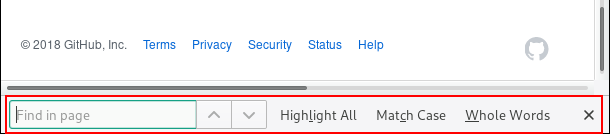
As @quinncomendant and @sjaakvandenberg (see #680) have already mentionned, the KeePassX 2 way of dealing with it is clean and useful. For KeePassXC, I would see it merged with the yellow results bar. This bar could be split in half, with an input field on the left and results on the right.

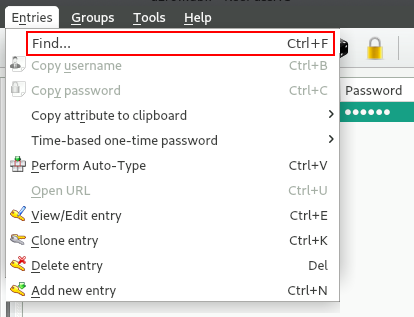
To go along with @sergeevabc comments, I would definitely add an Entries -> Find... menu item to easily focus/bring the search field and to document this Ctrl+F shortcut once and for all. It is part of KeePassX 2 but was removed in KPXC for some reason.
To explain the context of this post, I'd like to say I totally agree with @SapphirusBeryl (see #1618) that you should keep the ability to hide the toolbar somehow. I'm another one of those guys that always remove those icons from just about every software I use. Since the implementation of a search bar seems to be the only thing blocking this feature, I figured I could help over here.
@droidmonkey and @TheZ3ro, please bear with us on this one.
I'm sure there's more people like us. :stuck_out_tongue_winking_eye:
 A1RO
on 4 Mar 2018
A1RO
on 4 Mar 2018
Maybe we can do the following:
- Bring back the hide toolbar option (maybe by right-clicking on the toolbar itself if we don't want an empty
Viewmenu and fixing #1618) - Display a Chrome/Firefox-style search box when searching/typing in the main window instead (if the toolbar isn't visible)
TheZ3ro
on 4 Mar 2018
@TheZ3ro,
Bring back the hide toolbar option (maybe by right-clicking on the toolbar itself if we don't want an empty View menu and fixing #1618)
See my reply here.
Display a Chrome/Firefox-style search box when searching/typing in the main window instead (if the toolbar isn't visible)
Yep, that's the idea! :grin:
I don't mind the actual implementation of the search box, as long as it stays in line with current interface design. As for the placement, I believe 2 spots would be good: either at the top of the entry panel (along with the yellow results bar), or at the bottom of it.
A1RO
on 4 Mar 2018
I want to add my super strong support for being able to Ctrl+F to search when the Toolbar is hidden. I actually came here to post a bug about the inability to hide the Toolbar. From reading here, I see now there is a hidden option of right-click on the menu-bar to hide the Toolbar. But this cripples the ability to Ctrl+F, which is a capability that is critical for everyday use.
Hence this post to urge the developers to fix this bug ASAP. It is one of the most important bugs to address IMHO because it impacts the every-day usability, especially on small screens like I use of 12.5". I need every pixel to count and displaying Toolbars IMHO are a no go. But losing Ctrl+F search functionality cripples my work flow.
Thanks so much guys for accepting feedback. Your work on KeePassXC is amazing!
PS: I'm coming from KeePassX 2.0.3 and have found zero issues with how 2.0.3 handles hiding the Toolbar and making use of Ctrl+F to search. This is beyond my expertise, but why was this "code" of 2.0.3 messed with? Can you not just put that 2.0.3 code back and "solve" this issue?
 vdcbb
on 10 Sep 2018
vdcbb
on 10 Sep 2018
Some of these suggestions are great :-) I would prefer to see a separate search bar versus the toolbar. That way the toolbar can be hidden. Possibly also the search bar could be hidden but revealed on demand or left permanently visible.
 rnc
on 19 Sep 2019
rnc
on 19 Sep 2019
wow open for 2years and still ppl complain lolz
 iBilley
on 22 Oct 2019
iBilley
on 22 Oct 2019
@iBilley This is an open source project, everybody (including me) has an idea how this should work but somebody actually has to sit down and do the coding and contribute their time. This project is pretty open to community PRs, if you would like to contribute a solution to this I'm sure we'd all appreciate it.
 alerque
on 23 Oct 2019
alerque
on 23 Oct 2019
It'd be cool if the search were just moved onto the menu bar and out of the tool bar.
Instead of this:

Do this:

because everything that's on the toolbar is also in the menus, so i'd love to be able to hide it but not lose the search box.
 pigsflew
on 29 May 2020
pigsflew
on 29 May 2020
I don't think we can do that in Qt. Plus the menu bar is not visible on macOS.
droidmonkey
on 29 May 2020
oh well :/ I suppose the Chrome/Firefox popup search modal way is probably best anyway, I was hoping there'd be an easy way out, but I've never done any QT so I don't know what I'm talking about :D
pigsflew
on 29 May 2020
As the window is resized, what about moving the search bar to a second toolbar row of instead of hiding them in an overflow dropdown? That way the search bar would always be visible.
In my case, I run my Toolbar button style as "Icon only", that way there is pretty much always room for the search bar to fit.
 travelalpaca
on 20 Nov 2020
travelalpaca
on 20 Nov 2020
Related issues
 guihkx
·
3Comments
guihkx
·
3Comments
 MisterY
·
3Comments
MisterY
·
3Comments
 MountainX
·
3Comments
MountainX
·
3Comments
 813gan
·
3Comments
813gan
·
3Comments
 shaneknysh
·
3Comments
shaneknysh
·
3Comments
Most helpful comment
@iBilley This is an open source project, everybody (including me) has an idea how this should work but somebody actually has to sit down and do the coding and contribute their time. This project is pretty open to community PRs, if you would like to contribute a solution to this I'm sure we'd all appreciate it.