Keepassxc: Authenticode Code Signing (for Windows)
Installer binaries and executables should be signed w/Authenticode.
I see the code is already GPG signed, but validating a GPG signature requires significant effort to validate, and the OS does not know about it. So most users will either blindly accept or reject the various Authenticode warnings (e.g. "This publisher could not be verified. Are you sure you want to run this software.")
If the build is run on a Windows machine, running signtool is relatively straightforward.
Repro steps:
- Download either Installer or Portable version of KeepassXC
- Run installer or main program.
Result:
Scary warning from OS about unsigned binary.
Expected:
Not as scary warning from OS about binary signed by... Keepass XC Team, or some other entity.
 matthewblain
All 30 comments
Code signing incurs quite a significant financial cost for us and right now there are no viable free certification authorities for open source projects (Certum made their previously free service a paid service recently). For that reason we cannot provide a signed Windows binary right now.
 phoerious
on 4 Mar 2017
phoerious
on 4 Mar 2017
Yeah, that's a valid issue.
It looks like StartSSL is about $60/2 years but they're controversial.
Comodo reseller http://codesigning.ksoftware.net/ lists $84/year.
Certum lists a free trial, or a cert (unstated validity) €28 if you have some piece of hardware, or €84 with their hardware.
(And it looks like you know this but be sure to countersign any release with /t or whatever the flag is, been years since I've done this.)
matthewblain
on 4 Mar 2017
I don't like StartSSL. They were acquired by some Chinese company under dubious circumstances and they handled Heartbleed really badly.
phoerious
on 4 Mar 2017
Perhaps we can accept community donations to fund a proper cert.
 droidmonkey
on 4 Mar 2017
droidmonkey
on 4 Mar 2017
We keep getting asked about whether we accept donations quite a lot actually. So maybe we could collect enough money.
phoerious
on 4 Mar 2017
OK so I just went ahead and started a pledgie campaign:

droidmonkey
on 4 Mar 2017
I added it to the website.
phoerious
on 4 Mar 2017
Note that this exact same issue applies on the Mac--it won't even let me open KeePassXC without using the 'right click open' trick.
http://apple.stackexchange.com/questions/58509/how-can-i-open-a-single-app-by-an-unidentified-developer-without-allowing-all
matthewblain
on 5 Mar 2017
Or
xattr -d com.apple.quarantine
;-)
This is the stupidest "protection" feature I've ever seen.
But help us fund the certificate and we'll be able to sign our releases with it.
phoerious
on 5 Mar 2017
Code signing isn't perfect but it's not stupid. Still has the 'and why should I trust these 'keepassxc folks' issue, but at least it can be traced back to you.
(And yes, I donated to your pledge drive.)
matthewblain
on 12 Mar 2017
No signature will ever prove that our code doesn't harm your PC. But a signature ensures at least that it comes from us and we're actually whoever puts their (business) name on the certificate and not some scammer from $STEREOTYPICAL_COUNTRY.
phoerious
on 12 Mar 2017
Just a side note for reference: StartSSL was useless for code signing even before the current security issues. With a "real" code signing certificate, when you sign a binary you let a third party timestamping service sign your signature with the current time. As long as the binary was signed while your code signing certificate was valid the binary's signature will be valid forever.
But when signing a binary with a StartSSL code signing certificate Windows only trusts the binary's signature while your certificate is valid, which made it quite useless even back then.
 adamel
on 17 Apr 2017
adamel
on 17 Apr 2017
Oh this issue can be closed, we have our new cert and used it in the 2.1.4 release.
droidmonkey
on 17 Apr 2017
So, apparently this is not able to be used to sign the macOS binary. I believe only Apple issued Developer ID Application signing certificates can be used to sign macOS apps.
IIRC such certificates cost $99 per year as part of the Apple Developer program.
 stysedo
on 13 May 2017
stysedo
on 13 May 2017
We are soliciting flattr donations to help cover the cost of the Apple ID. @phoerious
droidmonkey
on 13 May 2017
It's not exactly skyrocketing, though.
https://flattr.com/submit/auto?fid=x7yqz0&url=https%3A%2F%2Fkeepassxc.org
phoerious
on 14 May 2017
I just downloaded a new version and it's signed by dmapps.us . Which surprised me. That website says nothing about keepassxc, and looks kinda stale. (And when I poked around linked to an expired domain for some content.)
What I expected was something signed by keepassxc.org or similar. Though I guess there's no organizational entity to pull that off yet? At a minimum, some sort of explanation on the droidmonkey sight describing the connection, maybe linking back to something on the keepassxc site?
matthewblain
on 3 Aug 2017
dmapps.us is @droidmonkey's organization. The certificates are too expensive to tie them to a single application if we don't make any money out of it.
phoerious
on 4 Aug 2017
You are correct though. My site is super stale and needs some keepassxc love. I'll get on that
droidmonkey
on 4 Aug 2017
I'm confused because I (and others) donated money explicitly to this end.
From: Jonathan White notifications@github.com
Sent: Thursday, August 3, 2017 3:30 PM
To: keepassxreboot/keepassxc
Cc: matthewblain; Author
Subject: Re: [keepassxreboot/keepassxc] Authenticode Code Signing (for Windows) (#372)
You are correct though. My site is super stale and needs some keepassxc love. I'll get on that
—
You are receiving this because you authored the thread.
Reply to this email directly, view it on GitHubhttps://github.com/keepassxreboot/keepassxc/issues/372#issuecomment-320107466, or mute the threadhttps://github.com/notifications/unsubscribe-auth/AL8Wm4Pj4QYmW2FLNpa2wSECCcTPpl6rks5sUkoTgaJpZM4MS5DV.
matthewblain
on 30 Aug 2017
Why are you confused? The money went towards buying the cert which was used to sign the binary. Certs are not issued to vapor, there has to be a backing company or individual to hold the cert.
droidmonkey
on 30 Aug 2017
I'm confused because I (and others) donated money explicitly to this end.
Authenticode certificates can only be issued to legal entities: People, or organizations. Open-source software has its certificate issued to either a company backing its development, or one of its developers. That's why the cert wouldn't have "KeePassXC" as its Common Name.
 Daniel15
on 20 Oct 2017
Daniel15
on 20 Oct 2017
This has been very broken for a while--it is not signed by anybody at all!
matthewblain
on 8 Jun 2018
What are you taking about? Every windows release is explicitly signed by the authenticode certificate, in fact done by me. The 2.3.3 release introduced signing every single exe file within the installers and zip files as well.
droidmonkey
on 8 Jun 2018
Yeah I just checked as well, and the releases seem to be properly signed to me.
Daniel15
on 8 Jun 2018
Repro steps:
Download Portable 64 bit Zip Archive from https://keepassxc.org/download/#windows .
Extract zip to folder.
Run KeePassXC from that folder.
Get 'not signed' dialog box.
Double check properties of file using Windows Explorer.
Maybe this only applies to Portable 64 bit--I didn't try any of the other versions.
It worked correctly in 2.2.0 and broke some time between that and version 2.3.3, which still exhibits this behavior.
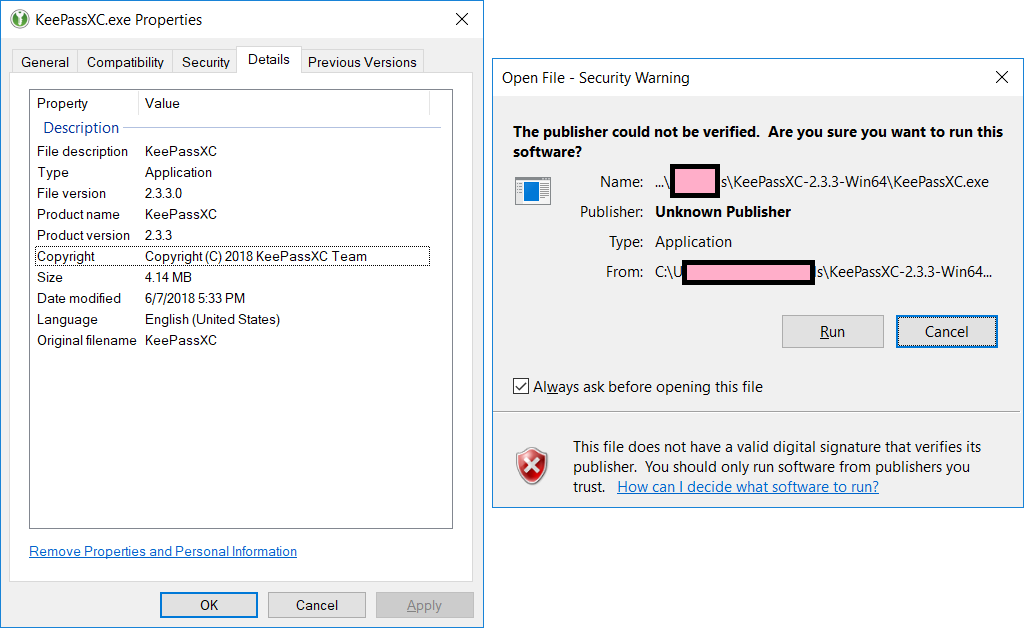
See attached screenshots--one is the Properties of the EXE in 2.2.0, showing both the version, the existence of the cert, and the cert. The other is the Properties of the EXE in 2.3.3--note that there is no Cert tab; also shows the warning displayed when running the exe.

matthewblain
on 8 Jun 2018
The properties have nothing to do with the signature, they are just additional information we add to the binary.
I think for recent releases we only sign the installer (which is sufficient for verifying anything that's extracted from it, but obviously does not detect later modification).
phoerious
on 8 Jun 2018
Well crap... it would appear the cpack process stripped the signatures AGAIN (this affects all Windows installers/zips). What a stupid program. This will not occur in 2.4, at least the installers are signed properly.
droidmonkey
on 8 Jun 2018
Thanks. It's important everything 'executable' be signed or Windows will (rightfully) yell.
The properties 'details' are indeed just added by your build process, I included them as debug info. But the 'Digital Signature' tab being present/missing is one of the simplest diagnostic tools for this, and the details of the sig show that the right cert was used and countersigning is done correctly. You could also use signtool.exe verify as part of a post-build automated testing process. I think you want /pa? It should return 0 on success.
I just checked the versions of keepassxc I have sitting around, it it was correct in 2.2.0 and broken in 2.2.2.
matthewblain
on 8 Jun 2018
Well, as @droidmonkey said before, CPack is to blame and we will fix it for the next version.
phoerious
on 8 Jun 2018
Related issues
 guihkx
·
3Comments
guihkx
·
3Comments
 nfnty
·
3Comments
nfnty
·
3Comments
 MisterY
·
3Comments
MisterY
·
3Comments
 amvasilyev
·
3Comments
amvasilyev
·
3Comments
 haroldm
·
3Comments
haroldm
·
3Comments
Most helpful comment
OK so I just went ahead and started a pledgie campaign: