Keepassxc-browser: Login-Problems at Uservoice
Expected Behavior
The login-fields at uservoice.com are filled by KeePassXC.
This website is used to collect suggestions for many applications like
- Microsoft Outlook.com (https://outlook.uservoice.com/forums/284136-outlook-com)
- Microsoft ToDo (https://todo.uservoice.com/forums/597175-feature-suggestions)
- many other applications
Current Behavior
The login-fields at uservoice.com are not filled by KeePassXC.
The problem is that the field "email address" gets visible after you clicked on "Login".
The field "password" gets visible after you entered the email address and it is verified.
 OLLI-S
All 16 comments
The first link doesn't even have a field or a button where it could appear? Couldn't find anything.
The second link works if you fill the credentials using the context menu. I'm not sure why the icon doesn't appear because the input field is regognized correctly.
 varjolintu
on 7 Jan 2020
varjolintu
on 7 Jan 2020
The first link doesn't even have a field or a button where it could appear? Couldn't find anything.
There is a link, but it is blue in blue background:
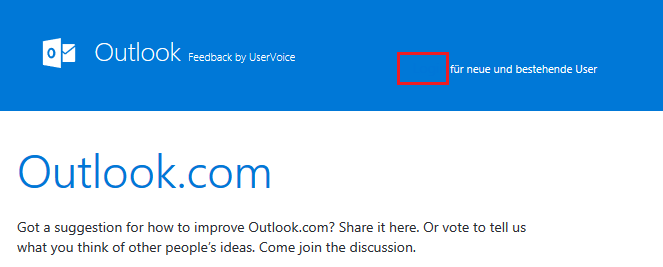
The second link works if you fill the credentials using the context menu. I'm not sure why the icon doesn't appear because the input field is regognized correctly.
Have to try it tonight at home, thank you!
OLLI-S
on 7 Jan 2020
That's... terrible design.
The second site's input field is regognized before it's even visible, so that might be the reason why the icon is not shown. Support for waiting CSS animations is not implemented yet. I'm quite sure that's the case here.
varjolintu
on 7 Jan 2020
@varjolintu you are right, this is an awful design (in my eyes this is a bug).
Logging in via the context menu is working.
But I miss an option "Fill only username" in the context menu.
I ill create a new issue for it.
OLLI-S
on 7 Jan 2020
There's already an issue for it.
Fill username & password fills only the username when needed.
EDIT: We need to change the text to "Fill username" when there's no password field visible.
varjolintu
on 7 Jan 2020
OK, thank you
OLLI-S
on 7 Jan 2020
More sites with problems:
KeePassXC Webchat
https://webchat.freenode.net/#keepassxc
Here the username is not filled, only when I click "I have a password" then the fields are filled
In KeePassXC I have stored the URL: https://webchat.freenode.net/Amazon Smile
https://smile.amazon.de/
Username is not filled
In KeePassXC I have stored the URL: https://www.amazon.de/ap/signinGameStar
https://www.gamestar.de/
If you click on "Anmelden" (right top) then the login panel is shown.
Here I see the kee icon, but when I click it I see the message "Error!Keine Anmeldungen gefunden." (means: Error! No Login-Data found)
In KeePassXC I have stored the URL: http://www.gamestar.de/Jimdo
https://account.e.jimdo.com/de/accounts/login/
Here I see the kee icon, but when I click it I see the message "Error!Keine Anmeldungen gefunden." (means: Error! No Login-Data found)
In KeePassXC I have stored the URL: https://de.jimdo.com/Meine Allianz
https://meine.allianz.de/
Here I see the kee icon, but when I click it I see the message "Error!Keine Anmeldungen gefunden." (means: Error! No Login-Data found)
In KeePassXC I have stored the URL: https://meine.allianz.de/
Edit:
- Added 2 missing URLs for "In KeePassXC I have stored the URL" at 1) and 2)
- Added 5)
OLLI-S
on 12 Jan 2020
More sites with problems:
1. **KeePassXC Webchat**
   https://webchat.freenode.net/#keepassxc
   Here the username is not filled, only when I click "I have a password" then the fields are filled
   In KeePassXC I have stored the URL: https://webchat.freenode.net/
This one's tricky. I'll get back to it later.
2. **Amazon Smile**
   https://smile.amazon.de/
   Username is not filled
   In KeePassXC I have stored the URL: https://www.amazon.de/ap/signin
Use a proper URL in your entry. https://amazon.de or https://amazon.de/ap/signin so it works as a wildcard for any subdomains.
3. **GameStar**
   https://www.gamestar.de/
   If you click on "Anmelden" (right top) then the login panel is shown.
   Here I see the kee icon, but when I click it I see the message "Error!Keine Anmeldungen gefunden." (means: Error! No Login-Data found)
   In KeePassXC I have stored the URL: http://www.gamestar.de/
I couldn't reproduce this. Had no problems with the site.
4. **Jimdo**
   https://account.e.jimdo.com/de/accounts/login/
   Here I see the kee icon, but when I click it I see the message "Error!Keine Anmeldungen gefunden." (means: Error! No Login-Data found)
   In KeePassXC I have stored the URL: https://de.jimdo.com/
Use a proper URL in your entry. Meaning https://account.e.jimdo.com/ or https://jimdo.com instead of wrong subdomain.
5. **Meine Allianz**
   https://meine.allianz.de/
   Here I see the kee icon, but when I click it I see the message "Error!Keine Anmeldungen gefunden." (means: Error! No Login-Data found)
   In KeePassXC I have stored the URL: https://meine.allianz.de/
Use https://allianz.de or https://cim.allianz.de/ as entry URL. That's where the site redirects.
varjolintu
on 16 Jan 2020
Thank you @varjolintu, all your links are working!
For GameStar I found the solution: in KeePassXC the domain begins with http:// (without the "S") and in Chrome it begins with https://
Just needed to add the "S" and it worked.
OLLI-S
on 18 Jan 2020
I really don't understand it.
I had KeePassXC portabale when I wrote my posting above (that everything is working).
About 10 days ago I installed KeePassXC on my PC and now the login to Amazon is not possible (no KeePassXC icon in the login field).
In KeePassXC I have the following URLs stored:
- Page "Entry":
- Page "Browser Integration":
When I open https://smile.amazon.de in Chrome, then the real URL is much longer:
https://smile.amazon.de/ap/signin?_encoding=UTF8&openid.assoc_handle=amzn_smile_desktop_de&openid.claimed_id=http%3A%2F%2Fspecs.openid.net%2Fauth%2F2.0%2Fidentifier_select&openid.identity=http%3A%2F%2Fspecs.openid.net%2Fauth%2F2.0%2Fidentifier_select&openid.mode=checkid_setup&openid.ns=http%3A%2F%2Fspecs.openid.net%2Fauth%2F2.0&openid.ns.pape=http%3A%2F%2Fspecs.openid.net%2Fextensions%2Fpape%2F1.0&openid.pape.max_auth_age=0&openid.return_to=https%3A%2F%2Fsmile.amazon.de%2Fgp%2Fcharity%2Fhomepage.html%3Fie%3DUTF8%26newts%3D1%26orig%3DLw%253D%253D
Here I have to entre my username (email address) manually.
After that the page were I have to enter the password is shown.
Here the URL is https://smile.amazon.de/ap/signin
And here I can select the proper entry.
I really don't understand it because it was working before.
OLLI-S
on 2 Feb 2020
I changed the Title of this issue to Login-Problems at Uservoice
Reason: I plan to make a new issue for every URL where I have problems.
So I also plan to make a separate issue for Amazon.de.
@varjolintu
Is it OK for you when I delete my last posting https://github.com/keepassxreboot/keepassxc-browser/issues/738#issuecomment-581138177 where I described the problems I have with Amazon?
OLLI-S
on 1 Mar 2020
@OLLI-S I just created a pinned thread for the site issues: https://github.com/keepassxreboot/keepassxc-browser/issues/796
Please use that in the future. Making a new issue for every site that doesn't work is not necessary.
You can delete the comment if the issue is no longer valid.
varjolintu
on 1 Mar 2020
@varjolintu OK, I will post my issues there.
But I fear that the issue #796 will get very long and that you will have different "ToDos" from this issue (when you need to change something in KeePassXC or in KeePassXC-Browser).
In this topic here you identified a bug, in the topic #795 I suggested a new feature.
If you have everything in one large topic, then this might get cluttered.
I really love KeePassXC and I want to help making it better and better.
OLLI-S
on 1 Mar 2020
@OLLI-S You are correct. For fixing bugs, one big thread is not good enough.
varjolintu
on 1 Mar 2020
And when I have some login-problems then I don't know
- if this is a bug / missing feature in KeePassXC
- just a common issue like "OLLI has stored the wrong URL"
So it is up to you if I should create separate topics for each URL or post them all in #796
OLLI-S
on 1 Mar 2020
Still having problems with 1.7.3?
varjolintu
on 7 Nov 2020
Related issues
 flibustenet
·
4Comments
flibustenet
·
4Comments
 gwerbin
·
4Comments
gwerbin
·
4Comments
 mrmeszaros
·
3Comments
mrmeszaros
·
3Comments
 derula
·
4Comments
derula
·
4Comments
 christophetd
·
4Comments
christophetd
·
4Comments