Keepassxc-browser: Password selector obscured by Chromium-based native autocomplete
Expected Behavior
When seeing a login form, a green clickable login under the username field normally shows up
Current Behavior
In Chromium-based browsers, this is obscured by some autocomplete suggestions. When all the suggestions are wrong, we can't click on the KeePassXC-provided login.
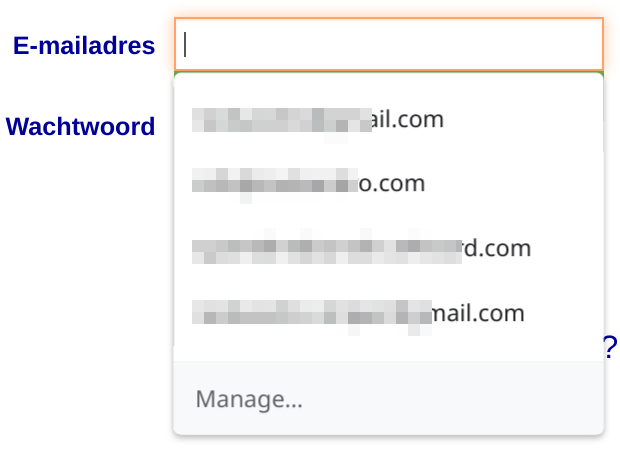
(If you look closely, you can see some pixels from the green button below the list on the foreground.)
Possible Solution
Perhaps the plugin can detect that Chromium already inserted a suggestion, and append the KeePassXC one below that. Otherwise it would help to (have the option to) draw the login button above the input field rather than below.
Debug info
KeePassXC - 2.4.1
KeePassXC-Browser - 1.4.4
Operating system: Linux
Browser: Chrome Unstable
 Redsandro
All 6 comments
I agree with the option to display above the input field! Chrome is very aggressive with its auto complete lately...
 droidmonkey
on 17 May 2019
droidmonkey
on 17 May 2019
AFAIK there's no way to detect if the Chrome's autocomplete list is visible or not. There are no API for it, and it's not visible in DOM.
 varjolintu
on 20 May 2019
varjolintu
on 20 May 2019
AFAIK there's no way to detect if the Chrome's autocomplete list is visible or not
Another possible solution would be to draw a button inside the username input field, much like the "generate password" button.
Possible Solution
detect that Chromium already inserted a suggestion, and append the KeePassXC one below that- (have the option to) draw the login button above the input field rather than below
- (hava the option to) draw a login button inside username input box, just like there is a generate password button inside the password box.
Redsandro
on 20 May 2019
@Redsandro I have a PR that has that kind of button included, so this kind of behaviour could be added.
varjolintu
on 20 May 2019
I agree with the option to display above the input field! Chrome is very aggressive with its auto complete lately...
Seriously.
(hava the option to) draw a login button inside username input box, just like there is a generate password button inside the password box.
Really like this option, especially if the dropdown could be populated from this list.
I think another possible solution (if it worked), would be to disable Chrome's autofill for fields where KeepassXc has at least 1 matching entry.
There are several interesting discussions about using CSS/JS to programmatically disable Chrome's autofill. It seems to be a progressive battle between Chrome (and other browser's stance) that this should be a user-controlled parameter and not able to be set by the actual server/site... and these various approaches would need to be tested. Could be more challenging, but just mentioning it in case there is some potential there.
- https://stackoverflow.com/questions/15738259/disabling-chrome-autofill
- https://stackoverflow.com/questions/50604671/programmatically-disabling-chrome-auto-fill
- https://stackoverflow.com/questions/47775041/disable-autofill-in-chrome-63
- https://stackoverflow.com/questions/50405068/disable-autocomplete-in-chrome-66
 dxdc
on 11 Jun 2019
dxdc
on 11 Jun 2019
@dxdc PR https://github.com/keepassxreboot/keepassxc-browser/pull/351 introduces this kind of icon for the username field. It shouldn't trigger the browser's own autofill.
varjolintu
on 12 Jun 2019
Related issues
 gwerbin
·
4Comments
gwerbin
·
4Comments
 metaxis
·
3Comments
metaxis
·
3Comments
 flibustenet
·
4Comments
flibustenet
·
4Comments
 Ana06
·
4Comments
Ana06
·
4Comments
 Generator
·
5Comments
Generator
·
5Comments
Most helpful comment
@Redsandro I have a PR that has that kind of button included, so this kind of behaviour could be added.