Keepassxc-browser: Is there a way to change this icon?
Hey, I wanted to know if there was a way to change this icon.

KeePassXC - 2.3.4
KeePassXC-Browser - 1.3.0
Operating system: Windows 10
Browser: Chrome
 ghost
ghost
All 10 comments
So the user can change it dynamically to some other icon? Currently there's no way to do that.
 varjolintu
on 28 Oct 2018
varjolintu
on 28 Oct 2018
I'm new to the js environment, but I can see that in the icons folder ( https://github.com/keepassxreboot/keepassxc-browser/blob/develop/keepassxc-browser/icons/key.png )
The key.png can be replaced.
But I have no idea, how to combine it into a chrome extension.
ghost
on 28 Oct 2018
Suggest a new icon in here and we can tell you if we like it. I personally hate that key icon.
 droidmonkey
on 28 Oct 2018
droidmonkey
on 28 Oct 2018
I personally don't hate it or like it. Just used to it. I had a SVG version of it at some point but I didn't make a PR about it. If we really want to replace that icon at some point, I'd suggest a SVG icon instead.
varjolintu
on 29 Oct 2018
What kind of icon do you have in mind?
Generic keys?
Ionic: 
ForkAwesome:  (excuse the screenshot)
Something with arrows (that would indicate some kind of "change" or "generation"), like is used in this app icon? (Probably rotated by 90°)

 whisdol
on 9 Nov 2018
whisdol
on 9 Nov 2018
I like the ForkAwesome one. We could make it the KeePassXC green color.
droidmonkey
on 10 Nov 2018
I like the ForkAwesome icon too. I'll make a PR for this soon.
EDIT: The problem using Fork Awesome (or something similar) is that the CSS must be injected to content scripts, and that's not something we want to do. Instead, we should use the SVG file directly.
varjolintu
on 10 Nov 2018
@droidmonkey Something like this? I added a small border to the SVG but it could be better. The plain green color is not very distinguishable.
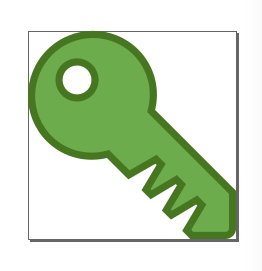
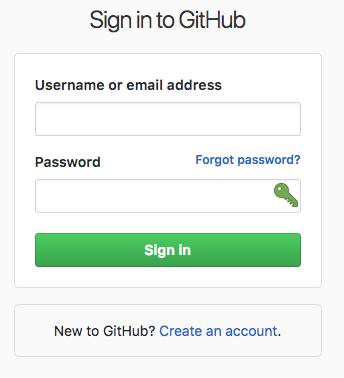
varjolintu
on 10 Nov 2018
The new icon looks nicer on that page. Flipping it horizontally and making it smaller would make it better IMO.
 grenzor
on 10 Nov 2018
grenzor
on 10 Nov 2018
The latest modifications:

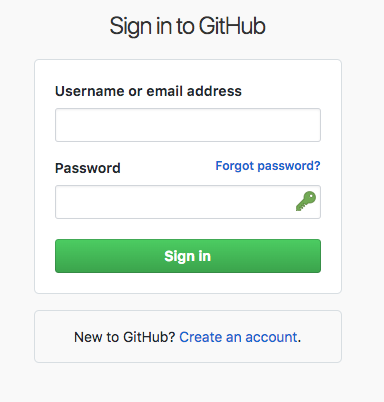
I ended up scaling the SVG itself because in that way centering and adjusting the icon doesn't need any JavaScript magic.
varjolintu
on 16 Nov 2018
Related issues
 flibustenet
·
4Comments
flibustenet
·
4Comments
 sliwowitz
·
5Comments
sliwowitz
·
5Comments
 brwolfgang
·
4Comments
brwolfgang
·
4Comments
 Generator
·
5Comments
Generator
·
5Comments
 kylesorkness
·
5Comments
kylesorkness
·
5Comments
Most helpful comment
The new icon looks nicer on that page. Flipping it horizontally and making it smaller would make it better IMO.