Keepassxc-browser: Timeout or not connected to KeePassXC (Windows 7 & 10, chrome & firefox)
On two computers, one under windows 10 and the other Windows 7, the extension very often loses connection with KeepassXC, displaying "Timeout or not connected to KeePassXC" for both chrome (65) and firefox (58 & the just released 59).
Expected Behavior
The extension should stay connected to keepassxc
Current Behavior
The extension very often displays "Timeout or not connected to keepassxc"
Possible Solution
Keep clicking the reload button until it works, but this is often a very short term as it keeps disconnecting very often.
Steps to Reproduce (for bugs)
- Open database in keepassxc
- Launch firefox or chrome
- Try to use the extension to input credentials in a page.
Debug info
Error 5: Timeout or not connected to KeePassXC  keepass.js: 954:5
Connecting to native messaging host org.keepassxc.keepassxc_browser  keepass.js: 870:5
Server public key: kt2Nx4SyG9WziF6UneSIWfaGLydUdHb4SXEKIeju7gE=  keepass.js: 620:17
error occurred while processing 'sources: TypeError: can't access dead object
Stack: createNonSourceMappedActor@resource://devtools/shared/base-loader.js -> resource://devtools/server/actors/utils/TabSources.js: 313:1
createSourceActors/<@resource://devtools/shared/base-loader.js -> resource://devtools/server/actors/utils/TabSources.js: 401:19
process@resource://gre/modules/Promise.jsm -> resource://gre/modules/Promise-backend.js: 922:23
walkerLoop@resource://gre/modules/Promise.jsm -> resource://gre/modules/Promise-backend.js: 806:7
scheduleWalkerLoop/<@resource://gre/modules/Promise.jsm -> resource://gre/modules/Promise-backend.js: 742:11
Line: 313, column: 1  main.js: 1651
Unchecked lastError value: Error: Frame not found, or missing host permission ExtensionCommon.jsm: 425
    withLastError resource://gre/modules/ExtensionCommon.jsm: 425:9
    wrapPromise/< resource://gre/modules/ExtensionCommon.jsm: 478:11
Erreur dans les liens source : TypeError: NetworkError when attempting to fetch resource.
URL de la ressource : moz-extension://69a2daed-837e-4ad4-9b13-5291a856f337/browser-polyfill.min.js
URL du lien source : browser-polyfill.min.js.map [En savoir plus]  (source inconnue)
Failed to connect: Unknown error  keepass.js: 846:5
Error 5: Timeout or not connected to KeePassXC keepass.js: 954:5
Connecting to native messaging host org.keepassxc.keepassxc_browser  keepass.js: 870:5
Server public key: shjzirl4zNNivb/0V7sCPaekUTSuR9p33M6V0tBzw2I=  keepass.js: 620:17
KeePassXC - 2.3.1
keepassxc-browser - 1.0.1
Operating system: Windows 10 x64 and 7 x64
Browser: Chrome 65.0.3325.162 (64bits), Firefox 58.0.2 (64bits) and Firefox 59.0 (64bits)
Proxy used: tried both On and Off
I followed the instructions in this link:
- the registry keys are there and point to the correct path
- the corresponding json files both point to the correct path for keepassxc-proxy.exe and the values for allowed_extensions are correct
- keepassxc-proxy.exe is running
- See debug message posted above
 smandon
All 24 comments
Can you confirm keepassxc-proxy is really running when this error occurs?
 varjolintu
on 15 Mar 2018
varjolintu
on 15 Mar 2018
I wonder if you have a virus scanner that's killing the proxy executable.
 droidmonkey
on 15 Mar 2018
droidmonkey
on 15 Mar 2018
Same for me on linux, keepassxc-proxy running all the time.
 soredake
on 16 Mar 2018
soredake
on 16 Mar 2018
Same for me on Linux Mint 18.2 / firefox 58.0.2 (64 bits), with KeepassXC running as well as keepassxc-proxy.
Also, Keepassxc-browser ask me if I want to update my creditentials when I change my password but doesn't save it.
 jeromebruzaud
on 16 Mar 2018
jeromebruzaud
on 16 Mar 2018
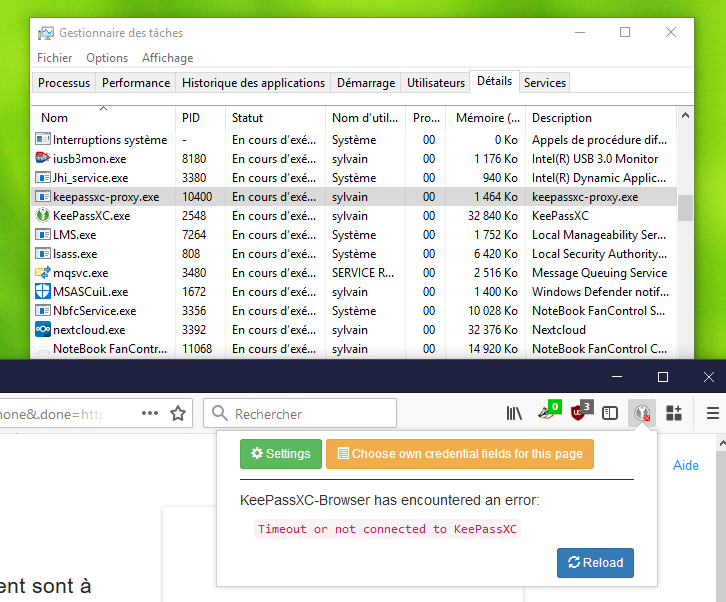
I used it for two days and tried to observe what happened more closely.
The results vary:
- sometimes keepassxc-proxy is running when this happens
- sometimes it's not running anymore until I hit the reload button
- on at least one occasion it was running, hitting reload launched a new one and the first one closed
And no, I don't have an antivirus running (none installed on windows 7 and defender disabled on windows 10).
I guess the issue is more with keepass-proxy than keepassxc-browser.
smandon
on 17 Mar 2018
KeePassXC: 2.3.1
keepassxc-browser: 1.0.1
Operating system: Windows 10 x64
Browser: Vivaldi 1.15.1125.3 (64bits)
I am in trouble with "Timeout or not connected to KeePassXC", too.
Lots of keepassxc-proxy.exe processes are running.
This often happens.

 extrajoker
on 17 Mar 2018
extrajoker
on 17 Mar 2018
I was able to simulate one scenario that kills my keepassxc-proxy.
- I get to page for which I haven't allow access to saved credentials yet
- Popup window shows with the security check to allow access to offered credentials
- I deny access to credentials
- keepassxc-proxy is down
Platform is Linux, used browser is chromium & firefox, locality is czech
 JanSvoboda
on 21 Mar 2018
JanSvoboda
on 21 Mar 2018
I was doing some debugging following this link
This error was printed in console:
(BLESSED_EXTENSION context for oboonakemofpalcgghocfoadofidjkkk) undefined:1: Uncaught SyntaxError: Unexpected end of JSON input{SyntaxError: Unexpected end of JSON input
    at Object.parse (<anonymous>)
    at dispatchOnMessage (extensions::messaging:391:21)}
I have also taped in to the unix socket to see what was actually being send via socket and the last message sent was:
 7b 22 61 63 74 69 6f 6e 22 3a 22 67 65 74 2d 6c  {"action":"get-l
 6f 67 69 6e 73 22 2c 22 65 72 72 6f 72 22 3a 22  ogins","error":"
 4e 65 6e 61 6c 65 7a 65 6e 79 20 c5 be c3 a1 64  Nenalezeny ....d
 6e c3 a9 20 70 c5 99 69 68 6c 61 c5 a1 6f 76 61  n.. p..ihla..ova
 63 c3 ad 20 c3 ba 64 61 6a 65 22 2c 22 65 72 72  c.. ..daje","err
 6f 72 43 6f 64 65 22 3a 22 31 35 22 7d           orCode":"15"}
This message is send right after denial of access to credentials.
Some characters are missing in the output as they are non-ASCII characters, but letter characters with czech diacritical signs
JanSvoboda
on 21 Mar 2018
@JanSvoboda I think this might be related to https://github.com/keepassxreboot/keepassxc/pull/1719.
varjolintu
on 1 Apr 2018
Same problem here
KeePassXC: 2.3.1
keepassxc-browser: 1.0.1
Operating system: Fedora 28
Browser: Firefox 59.0.2 (64 bits)
 Ezwen
on 23 Apr 2018
Ezwen
on 23 Apr 2018
@Ezwen Is it possible for you to try a 2.3.2 snapshot build that you'd compile yourself?
varjolintu
on 23 Apr 2018
Sure! I just did that, and indeed it seems to be much better! I'll keep using the develop build today and let you know if I find any problem.
Ezwen
on 23 Apr 2018
@Ezwen Thank you for trying it out! There should be a few fixes for the error you described so I really hope you won't see it again.
varjolintu
on 23 Apr 2018
Same for me on kde neon system with firefox. Current git version of keepassxc works much better, will wait for the next stable release.
 htower
on 26 Apr 2018
htower
on 26 Apr 2018
Please test if this still happens with KeePassXC 2.3.3 and KeePassXC-Browser 1.1.3.
varjolintu
on 11 May 2018
KeePassXC: 2.3.1
keepassxc-browser: 1.1.3
Operating system: Windows 10 x64
Timeout no longer happens.
But many keepassxc-proxy.exe are running, still now.
extrajoker
on 11 May 2018
@extrajoker Those processes might been there before the upgrade. Please run Taskkill /IM keepassxc-proxy.exe /F from the command prompt to get rid of them.
varjolintu
on 11 May 2018
KeePassXC 2.3.3 + KeePassXC-Browser 1.1.3 now works perfect on my machine. Thanks a lot!
htower
on 11 May 2018
@htower Glad to hear it!
varjolintu
on 11 May 2018
Same issue here, on Ubuntu Linux 16.04/Firefox 60.0
Am I to wait for KeePassXC 2.3.3?
 valdr
on 14 May 2018
valdr
on 14 May 2018
@valdr 2.3.3 is already released. Install it from the PPA.
varjolintu
on 14 May 2018
Anyone still having the issue?
varjolintu
on 15 Jun 2018
Nope, works nicely :)
Ezwen
on 15 Jun 2018
I'm checking now...
PPA was configured.
I get "cannot decrypt message" now...
I keep having to go to Keepass main to get the un/pw manually...
valdr
on 1 Jul 2018
Related issues
 gwerbin
·
4Comments
gwerbin
·
4Comments
 muchqs
·
4Comments
muchqs
·
4Comments
 ForsakenHarmony
·
4Comments
ForsakenHarmony
·
4Comments
 sliwowitz
·
5Comments
sliwowitz
·
5Comments
 maniqui
·
3Comments
maniqui
·
3Comments