Keepassxc-browser: KeePassXC Browser doesn't detect new/changed credentials!
Expected Behavior
Detect credentials change
Current Behavior
Ignores changes
Possible Solution
Detect new/changed credentials
General Info
You are running KeePassXC version: 2.3.1
Latest available version of KeePassXC: 2.3.1
Operating system: WIN7
Browser: FIREFOX 58
Proxy used: NO
 DocMAX
All 44 comments
In which site this happens? Can you give some info do you change the username, password or both when this occurs?
 varjolintu
on 11 Mar 2018
varjolintu
on 11 Mar 2018
I also can verify this issue. Working with Firefox 59.0.2, Debian 8, KeePassXC 2.3.1, KeePassXC-Browser 1.0.1. It's not possible to change the password as the change is not stored in the database.
 robert-franz
on 5 Apr 2018
robert-franz
on 5 Apr 2018
Please check the following:
- Database you want to save credentials is opened
- Database open is connected to the browser extension
- You can receive credentials and autocomplete or filling them from context menu works
varjolintu
on 7 Apr 2018
We checked this allready. I'm back at original KeePass/HTTP for now.
DocMAX
on 7 Apr 2018
No we didn't. I cannot reproduce this.
varjolintu
on 8 Apr 2018
@varjolintu All the three steps work properly. Simply storing changed credentials into the database via keepassxc-browser does not work. In case of changing the credentials in the database via keepassxc, those changed credentials are available directly via keepassxc-browser.
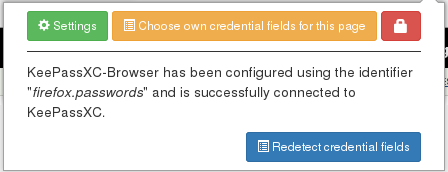
When entering different credentials this popup appears:

But when clicking the activate button or the extension icon there is no way to store the changed password. Also the password is not stored automatically.
robert-franz
on 9 Apr 2018
@robert-franz Does the extension icon blink for several seconds? You have to click it while this happens. If the notification is annoying or it covers the icon, you can disable notifications from the settings.
varjolintu
on 9 Apr 2018
Exactly the same issue here. Firefox 60.0b10 with KDE Plasma under Linux.
 Frederick888
on 9 Apr 2018
Frederick888
on 9 Apr 2018
Hmm... I found that actually I need to click the icon for a second time to make the new/update credentials page show up.
I turned on logging for the event loop...
 kpxcEvent.onMessage = function(request, sender, callback) {
     if (request.action in kpxcEvent.messageHandlers) {
-        //console.log('onMessage(' + request.action + ') for #' + sender.tab.id);
+        if (request.action != 'check_databasehash' && request.action != 'update_available_keepassxc') {
+            console.log('onMessage(' + request.action + ')');
+        }
...and got the following outputs
// click login page link
onMessage(load_settings)
onMessage(page_clear_logins)
onMessage(retrieve_credentials)
onMessage(popup_login)
onMessage(page_clear_logins)
Error: Promised response from onMessage listener went out of scope

// click submit button
onMessage(set_remember_credentials)
JQMIGRATE: Migrate is installed, version 1.4.1
onMessage(load_settings)
onMessage(page_clear_logins)
onMessage(page_clear_logins)

// first click on icon
onMessage(get_status)

// second click on icon
onMessage(stack_add)
onMessage(get_tab_information)
onMessage(get_connected_database)
Why do those events only arrive after the second click? And @robert-franz , does a second click work for you?
The icon page updates in a somewhat weird way... After popup_remember.html has shown up, the first click on "Update" does all the jobs normally, but I need a second click on it to get back to the default view (the one with "Redetect ..." button).
Frederick888
on 9 Apr 2018
The second click happens on popup_remember.html and the first one in popup.html. Still, at the submit the popup_remember.html is already set by onMessage(set_remember_credentials). You could check what happens in browserAction.setRememberPopup after submit.
For me, this issue is still very hard to reproduce. It's probably related to the dynamic switching between different popups.
Thank you so much for debugging this!
varjolintu
on 10 Apr 2018
I tried the things you described above. When double click on the blinking icon directly after entering the new credentials, the new credentials are stored within the keepassxc database. So this works. But imho this behaviour is really confusing ...
robert-franz
on 11 Apr 2018
Confusing for me too. I'm not sure why I cannot reproduce this behaviour. I have tried to do it with all three major OS's. I also recommend that you increase the Redirect Allowance value from the settings and see if it affects to anything.
varjolintu
on 11 Apr 2018
Ok, good news. I found that if I add a breakpoint at browserActions.js:240
browserAction.show(null, {'id': id});
...and hold it until the new page finishes loading, I then don't need a second click to see the popup_remember.html view. Solution is simple: move it to browser.tabs.onUpdated.
The second click for the "Update" button is actually a different issue — _close(); is missing after the click.
So here's the patch. @robert-franz if you could check whether it works for you :)
@varjolintu I'm a bit unsure about the multi-credential part for the update button, does it need a _close() as well somewhere? Please review the patch, thanks.
diff --git a/keepassxc-browser/background/browserAction.js b/keepassxc-browser/background/browserAction.js
index d2fdb7d..35e5109 100755
--- a/keepassxc-browser/background/browserAction.js
+++ b/keepassxc-browser/background/browserAction.js
@@ -236,10 +236,8 @@ browserAction.setRememberPopup = function(tabId, username, password, url, userna
             usernameExists: usernameExists,
             list: credentialsList
         };

-        browserAction.show(null, {'id': id});
-
         if (page.settings.showLoginNotifications) {
             showNotification('Create or modify the credentials by clicking on the extension icon.');
         }
     });
diff --git a/keepassxc-browser/background/init.js b/keepassxc-browser/background/init.js
index 4f6c6af..5c14740 100644
--- a/keepassxc-browser/background/init.js
+++ b/keepassxc-browser/background/init.js
@@ -69,8 +69,9 @@ browser.tabs.onActivated.addListener((activeInfo) => {
  * @param {object} changeInfo
  */
 browser.tabs.onUpdated.addListener((tabId, changeInfo, tab) => {
     if (changeInfo.status === 'complete') {
+        browserAction.show(null, {'id': tabId});
         kpxcEvent.invoke(browserAction.removeRememberPopup, null, tabId, []);
     }
 });

diff --git a/keepassxc-browser/popups/popup_remember.js b/keepassxc-browser/popups/popup_remember.js
index be79328..80b2e38 100644
--- a/keepassxc-browser/popups/popup_remember.js
+++ b/keepassxc-browser/popups/popup_remember.js
@@ -23,8 +23,9 @@ function _initialize(tab) {
         browser.runtime.sendMessage({
             action: 'add_credentials',
             args: [_tab.credentials.username, _tab.credentials.password, _tab.credentials.url]
         }).then(_verifyResult);
+        _close();
     });

     $('#btn-update').click(function(e) {
         e.preventDefault();
@@ -34,8 +35,9 @@ function _initialize(tab) {
             browser.runtime.sendMessage({
                 action: 'update_credentials',
                 args: [_tab.credentials.list[0].uuid, _tab.credentials.username, _tab.credentials.password, _tab.credentials.url]
             }).then(_verifyResult);
+            _close();
         }
         else {
             $('.credentials:first .username-new:first strong:first').text(_tab.credentials.username);
             $('.credentials:first .username-exists:first strong:first').text(_tab.credentials.username);
Please submit as a pull request. Great work!
 droidmonkey
on 11 Apr 2018
droidmonkey
on 11 Apr 2018
@Frederick888 Thanks for the info. In popup_remember.js the _verifyResult already calls _close() if everything works fine. Are you sure you need those extra calls? Because those are asynchronous calls, _close() must be wrapped inside catch().
Also, I don't think moving the browserAction.show() is a correct solution for this. But now I have a better understanding why this may happen. So thank you for that.
varjolintu
on 11 Apr 2018
@varjolintu Do you still need a PR or I can now lie back and wait for it to be fixed? 😆
Edit: Yes, I do need those calls. Otherwise I have to click "Update" twice.
Frederick888
on 11 Apr 2018
@Frederick888 Just lie back :) The thing I noticed is that at error situations _verifyResult() is not called at all, and catch() also doesn't catch the error. So I'm checking the function handling at keepass.js if something's missing. It would be also nice to show a notification when saving or updating credentials fail.
And btw, is your problem fixed if you only comment out the browserAction.show(null, {'id': id}); line and do nothing else?
EDIT: There's a callback('error') missing after keepass.js:186.
varjolintu
on 11 Apr 2018
@varjolintu Just about to say that I couldn't get the breakpoint in _verifyResult after the first "Update" click lol. It seems that you have come up with a far less hacky solution, thanks a lot.
And no, that line can be kept and it still works... simply would like to avoid duplication.
Frederick888
on 11 Apr 2018
Here's my suggestion for the fix, please try it out:
diff --git a/keepassxc-browser/background/browserAction.js b/keepassxc-browser/background/browserAction.js
index d2fdb7d..35e5109 100755
--- a/keepassxc-browser/background/browserAction.js
+++ b/keepassxc-browser/background/browserAction.js
@@ -237,8 +237,6 @@ browserAction.setRememberPopup = function(tabId, username, password, url, userna
             list: credentialsList
         };

-        browserAction.show(null, {'id': id});
-
         if (page.settings.showLoginNotifications) {
             showNotification('Create or modify the credentials by clicking on the extension icon.');
         }
diff --git a/keepassxc-browser/popups/popup_remember.js b/keepassxc-browser/popups/popup_remember.js
index be79328..c53de7c 100644
--- a/keepassxc-browser/popups/popup_remember.js
+++ b/keepassxc-browser/popups/popup_remember.js
@@ -91,9 +91,10 @@ function _connected_database(db) {
 }

 function _verifyResult(code) {
-    if (code === 'success') {
-        _close();
+    if (code === 'error') {
+        showNotification('Error: Credentials cannot be saved or updated.');
     }
+    _close();
 }
diff --git a/keepassxc-browser/background/keepass.js b/keepassxc-browser/background/keepass.js
index 74859d0..3944a2f 100755
--- a/keepassxc-browser/background/keepass.js
+++ b/keepassxc-browser/background/keepass.js
@@ -184,6 +184,7 @@ keepass.updateCredentials = function(callback, tab, entryId, username, password,
             }
             else if (response.error && response.errorCode) {
                 keepass.handleError(tab, response.errorCode, response.error);
+                callback('error');
             }
             else {
                 browserAction.showDefault(null, tab);
@varjolintu No... I still need two clicks for both cases...
Frederick888
on 11 Apr 2018
@Frederick888 Any error messages in the console after the first click? You can also try to set a breakpoint to keepass.js:173 where the response should arrive.
varjolintu
on 11 Apr 2018
@varjolintu
- No, I got no error message through the whole procedure.
- I set a breakpoint at
keepass.js:173and it normally goes the way down tocallback(keepass.verifyResponse(parsed, incrementedNonce) ? 'success' : 'error');(confirmed the argument was'success'), but then my another breakpoint in_verifyResultjust doesn't get triggered. It only works after a second click.
Frederick888
on 11 Apr 2018
I really wonder why that happens. There's no reason. But I'm sure that is the root cause of this problem. Does this happen with both Chromium (or Chromium-based browser) and Firefox?
Of course you can try to add a .catch((e) => { console.log('Error:' + e); }); after the .then(_verifyResult) when calling add_credentials and test if it's catched there.
varjolintu
on 11 Apr 2018
@varjolintu Errrr.... I have only Google Chrome and Firefox Developer Edition installed so I tried it in Chrome. But after loading it in through Extensions -> LOAD UNPACKED it says that it cannot connect to KeePassXC. The one from Chrome web store works normally tho. I'm using VS Code, is it possible to start a debug session directly from the IDE?
And I also tested the .catch()... but no, still no error messages.
Frederick888
on 11 Apr 2018
@varjolintu I installed Firefox 59.0.2 (64-bit), started a debug session from VS Code, and yes, the issue persists.
Frederick888
on 11 Apr 2018
@Frederick888 You need to add the new extension ID (it's generated if you load it manually and is visible under the name) to the native messaging json script. I've never tried anything browser related with VS Code so cannot help you there.
varjolintu
on 11 Apr 2018
Got the same results with the patches in Google Chrome 65.0.3325.181 (Official Build) (64-bit) under Linux. @varjolintu
Frederick888
on 11 Apr 2018
Maybe I've done something stupid???? Could you pack the extension for either Firefox or Chrome and attach it here?
Edit: And which website are you testing against? It must be a website that redirects you to another page after log-on. The issue cannot be reproduced if the website sends an AJAX request and does all the stuff in background. I'm testing against my own WordPress instance. If you could provide an email address then I can actually create an account for you. It's somewhat a personal notebook for me, doesn't really matter.
Frederick888
on 11 Apr 2018
@Frederick888 I've tried against many websites. I also tried against wordpress.com and an instance that uses WordPress. Are there any other pages this error happens? If not, you can make an account for me using my email address sami.[email protected] and mail me the URL so it's kept private.
varjolintu
on 11 Apr 2018
@varjolintu LOL I tried it in my GitLab and the popup_remember showed up normally but the "Update" button still needed two clicks
PS: WP user created, there should be a welcome email sent to you.
Edit: crappy grammar...
Frederick888
on 11 Apr 2018
@Frederick888 Tried it but still cannot reproduce it. Do you mean a situation where you change your password (or it's not saved) and you want to save it after that from the popup?
varjolintu
on 11 Apr 2018
@varjolintu Yup
Steps:
- Sign in to save the credentials to KP first
- Change the password, do not touch KP icon, log out, close the tab straightaway
- Go to the website again, use new password to log in
- Logged in, page loaded, click browser KP icon, there come the problems
Frederick888
on 11 Apr 2018
Finally got it reproduced.
varjolintu
on 12 Apr 2018
Here are the changes I made to get this work:
https://github.com/keepassxreboot/keepassxc-browser/compare/remember_popup_fix?expand=1
You were right about the correct location of browserAction.show(). Please test this.
varjolintu
on 12 Apr 2018
And btw, that patch is not ready. Moving the browserAction.show() causes the popup state to change. For example, if you haven't got any credentials saved for the site, after login the icon stays gray with a cross. And if you already had credentials but you're now updating it, the popup stays at popup_login and shows an empty list. So there's a lot to do.
varjolintu
on 12 Apr 2018
Good to know you've addresses the issue! It's definitely better to get it fixed from the root rather than an ugly hack. I'll stay in loop and if you need any help just shout. Thanks for your great work!
Frederick888
on 12 Apr 2018
I also found some issues with the options saving. Some integers were saved as strings but still used as integers later etc.. messy stuff. While JavaScript "allows" this, it's still wrong. So that will be fixed too. Thanks for helping solving this one!
varjolintu
on 12 Apr 2018
Please test if this still happens with KeePassXC 2.3.3 and KeePassXC-Browser 1.1.3.
varjolintu
on 11 May 2018
@varjolintu I'm afraid it still persists. Using KeePassXC 2.3.3 and KeePassXC-Browser 1.1.3 with Firefox 61.0b3.
Frederick888
on 11 May 2018
@Frederick888 Thank you for testing it!
varjolintu
on 11 May 2018
It solved the problem for me! Thanks @varjolintu!
I had the issue on Linux only (I'm no longer at my computer so I can't tell you my version numbers), not on macOS.
 getkey
on 11 May 2018
getkey
on 11 May 2018
Well, I just tested in macOS with the same setup and reproduced the issue.
Frederick888
on 11 May 2018
@Frederick888 Can you try this branch manually if it finally fixes the issue? It seems to work for me.
varjolintu
on 12 May 2018
@varjolintu Yes it does! 👏
Frederick888
on 12 May 2018
Related issues
 mrmeszaros
·
3Comments
mrmeszaros
·
3Comments
 maniqui
·
3Comments
maniqui
·
3Comments
 ForsakenHarmony
·
4Comments
ForsakenHarmony
·
4Comments
 derula
·
4Comments
derula
·
4Comments
 Ana06
·
4Comments
Ana06
·
4Comments
Most helpful comment
Finally got it reproduced.