Keepassdx: Not reading from or writing to Google Drive file properly
Describe the bug
I store my passwords in a .kdbx file hosted on Google Drive so that I can access them on multiple devices. To open the file in KeePassDX, I open a database and point the location to the remote file in Drive using the Files app. Starting about a month ago, KeePassDX has become out-of-sync with the Drive file. If I download the database directly from the Drive app to my phone and then open it with KeePassDX, none of my changes are there. However, when I open the file normally, all of my changes show up, so it seems like the app is writing to some sort of cache or offline file. Additionally, new changes that I have made on other devices are not being downloaded to KeePassDX. Fetching or saving the database in the app doesn't result in any errors.
To Reproduce
Steps to reproduce the behavior:
- Open database from Google Drive using the Files app
- Add or modify an entry to change the file
- Save the database
- Check Google Drive to see if the file has been updated
Expected behavior
I expected any changes I made to the database to be written to the Drive file when I saved. Sometimes, a similar problem would occur and I would have to manually reopen the database through the Files app, but that isn't working this time.
Keepass Database
- Created with: Windows KeePass 2.36
- Version: 2
- Location: Remote file on Google Drive, accessed through Google's Files app
- Size: 19.2 KB
- Contains attachment: No
KeePassDX (please complete the following information):
- Version: 2.5
- Build: Free
- Language: English
Android (please complete the following information):
- Device: OnePlus 7 Pro
- Version: 10
 aidankay1
All 8 comments
If I download the database directly from the Drive app to my phone and then open it with KeePassDX, none of my changes are there.
Pretty sure your drive has not sent file updates at this level (good info). Or it points to another file.
However, when I open the file normally, all of my changes show up, so it seems like the app is writing to some sort of cache or offline file.
KeePassDX does not manage cache, it only reads the information contained in the URI provided.
I don't know how Google Drive works internally, maybe it keeps the file it provides cached with a different URI than the URI of the updated file. That would explain the problem.
Another thing, be careful, because the File application provides recent files that do not have the same behavior as the files selected in the normal path.
I will try to do more tests on my emulator to define the behavior of Google Drive. But I don't think I can solve problems like this from KeePassDX.
 J-Jamet
on 19 May 2020
J-Jamet
on 19 May 2020
I see, it does make sense that it could be Drive's way of handling files. I do wonder where the data was being saved to... it must be somewhere on my phone.
I have fixed the issue for now by clearing the Drive app's storage and adding the database again, and reading/writing seems to be working properly now. The old database became inaccessible after doing so, unfortunately. I suspected I would have to delete it, though, so I manually transferred all of the new passwords to my PC beforehand. The question now is how to prevent Drive from (presumably) storing the file offline again. Thank you for the response!
aidankay1
on 20 May 2020
I also have had this issue in an outdated version of KeePassDX.
It would be better if there is a button to force sync / reset cache. Otherwise, please recommend a reliable cloud provider...
 patarapolw
on 1 Aug 2020
patarapolw
on 1 Aug 2020
For the moment the merger of concurrent data has not yet been done, I have to go further in this section to propose forced sync.
But the latest version of KeePassDX must work with latest Google Drive app.
If you have a beta version, you just don't have the latest SAF implementation.
J-Jamet
on 1 Aug 2020
@J-Jamet So I'm trying to make keepassDX read files directly from the google drive app, in order to automatically pull the latest updates I make to my database, but somehow, g-drive is not appearing in the list of possible options.
I only see either the default Files app, or another File manager I have installed.
I was using the latter initially, but KeepassDX didn't automatically read the updated file. I had to point to it again if I wanted to pull updates.
I'm using keepassDX v 2.9.1 downloaded from google play, and google drive v 2.20.441.11.35 (latest update as of 18-11-20)
Any idea how I achieve this goal ?
 wtfzambo
on 18 Nov 2020
wtfzambo
on 18 Nov 2020
Gdrive is integrated to the Files app.
All you need to do is select Files when you press the "Open Database" button of KeePassDX and you should see the GDrive related folders on the left panel.
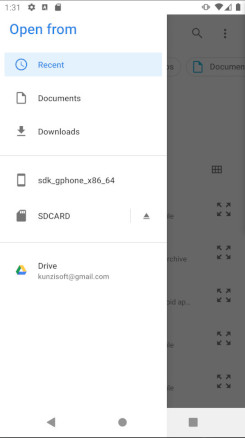
Or more simply open the GDrive app to select your kdbx file.
J-Jamet
on 18 Nov 2020
@J-Jamet got it, thanks!
wtfzambo
on 18 Nov 2020
@J-Jamet Alright I managed to make it work almost 100%.
The only thing that I can't manage to do, and I'm not sure if it's a KeePassDX problem or a "Files app" problem, is that every time I make a change to my database on GDrive, I need to do a manual refresh on my phone, as in:
- open keepassDX
- click "open existing database"
- pull down to refresh the files app and be able to see the latest change
Is there anything one can do to make this operation automatic ?
wtfzambo
on 18 Nov 2020
Related issues
 lkjasdlfwe
·
6Comments
lkjasdlfwe
·
6Comments
 JavaCoder20
·
3Comments
JavaCoder20
·
3Comments
 5a384507-18ce-417c-bb55-d4dfcc8883fe
·
3Comments
5a384507-18ce-417c-bb55-d4dfcc8883fe
·
3Comments
 Wandelstock
·
6Comments
Wandelstock
·
6Comments
 thgoebel
·
3Comments
thgoebel
·
3Comments