Keepassdx: Can't open database after synchronization
Hi! Since weeks I can not open my database through KeePass DX even if I still can open it on my desktop.
I just get the message "unable to read database".
Tell me if there is a way to provide you logs.
 Booteille
All 22 comments
For logs, the easiest way is to connect the device to the PC and watch from Android Studio.
Do you open it from a remote server or cloud? In this case, I still have not tested the content providers and the synchronization has not been coded yet.
 J-Jamet
on 24 Aug 2019
J-Jamet
on 24 Aug 2019
I am syncing the file through NextCloud. So I have the file on my own smartphone.
Edit: And this method was working before. It just stopped working some weeks ago (maybe a couple of months).
Edit²: And when I am trying to copy the database to another folder, I am getting the message: "Unable to load your database. Corrupted file."
Booteille
on 25 Aug 2019
I never used Android Studio. I just installed it. How could I provide you logs?
Booteille
on 28 Aug 2019
Same here on 2.5.0.0.beta22 from f-droid.
Synced with ownclod and everything went smooth in the last weeks but now from one minute to the other I can not open file neither in keePass DX nor in KeePassDroid. Only way is to open in kee.web.
 bastos77
on 2 Sep 2019
bastos77
on 2 Sep 2019
On the desktop, I saved the database under another name, synced it through Nextcloud with my Smartphone and now I can access to it again.
Booteille
on 10 Sep 2019
Same issue here. It works though when I'm fully select the file path _again_ via the path choosing dialogue. Otherwise it breaks everytime the file was synced.
 alexanderadam
on 25 Oct 2019
alexanderadam
on 25 Oct 2019
Same issue here. It works though when I'm fully select the file path again via the path choosing dialogue. Otherwise it breaks everytime the file was synced.
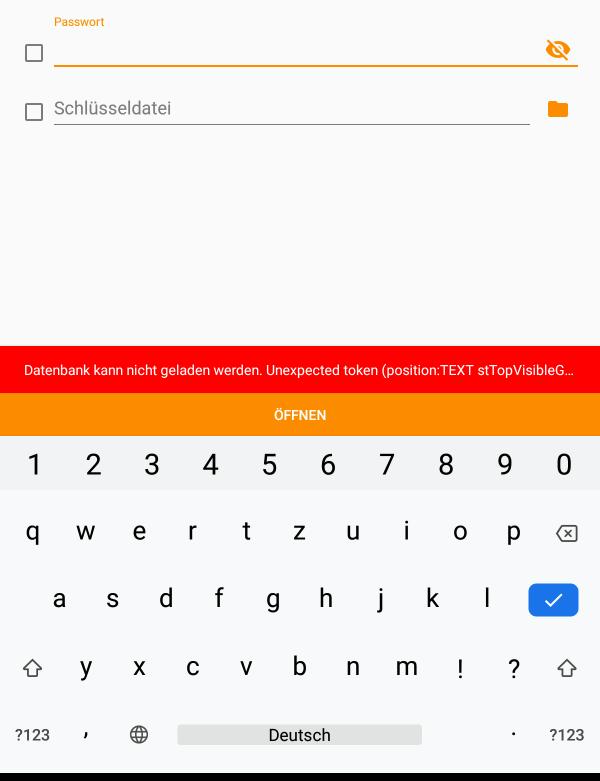
Unfortunately not in my case. I have this message as in screenshot: unexpected Token (Position:TEXT stTop VisibleG...
bastos77
on 25 Oct 2019
I added the elements for the persistence of the links but it seems to not work with many third-party apps..
It is possible that this application does not recognize the flags FLAG_GRANT_PERSISTABLE_URI_PERMISSION and FLAG_GRANT_PREFIX_URI_PERMISSION. https://developer.android.com/reference/android/content/Intent.html#FLAG_GRANT_PERSISTABLE_URI_PERMISSION
You have to ask if the third-party application manages these elements.
In any case, selecting the file from your file manager restores the access rights in KeePass DX
J-Jamet
on 14 Nov 2019
Which third-party apps do you mean? Can you elaborate this a bit?
The bug appears when KeePassDX is directly opened without any third-party apps.
Even if I just replace the KeePass file via USB and open KeePassDX again this bug appears.
I just reproduced it again to be sure:
- I replaced the file (this time over KDE Connect but I don't think it makes a difference, doesn't it?)
- I opened KeePassDX directly
- Even with the correct passphrase the text
Could not find file. Try reopening it from your file browser.appears.
alexanderadam
on 14 Nov 2019
KeePass DX uses the default file manager, or is linked to the file manager that sends the open/create request (by Intent).
By default, the "File" application of the device is called. For new phones, GDrive is directly included to this in-device app. (You can see it when you create or open a new kdbx file)
If your phone's manufacturer has replaced this default file manager app, or if you use another third-party app (owncloud, dropbox, or other). This third-party app may not have the appropriate feature to keep the link (content://... provide by the content provider of the file manager) after an event and may not handle the methods described in my previous post.
This is a strong theory that seems to be true, but I can not know without really looking into it.
For @bastos77 I think that the file is simply not readable, because it is not downloaded entirely or because the internal XML of the file is not formatted correctly. Try to export it to XML from KeePass 2 and re-import it to fix the formatting.
J-Jamet
on 14 Nov 2019
Ah, I see. I'm probably using the standard File manager from Samsung (My Files version 10.1.04.432) but I strongly doubt that they will listen to me if I write them that everything works flawlessly _except_ KeePassDX. :wink:
alexanderadam
on 14 Nov 2019
I understand, that's why I planned to make another File Manager app (with plugins for network connections) that can handle this kind of case, but I must already finish KeePass DX.
I recommend downloading another compatible file manager under free license. (I do not know yet which ones are)
Other apps bypass this problem by integrating all synchronization methods and integrating all third-party APIs but it's dangerous in my opinion and goes against the principle of encapsulation of components.
J-Jamet
on 14 Nov 2019
Another small question: why appeared this problem so suddenly? Everything was totally fine until an update from August (?).
Was it a necessary refactoring or something similar?
alexanderadam
on 14 Nov 2019
In previous versions of the app, the problem was also present but less noticeable if the database was created with the app.
Before, the code included a big deprecated file creation library (which does the job of a file manager) but only for creation. The application knew the direct link of the file created (file: // ..) the first time.
If the file is reopen later, the problem was present. As the library was not very well done, I harmonized the methods that use the intent content provider and remove the deprecated lib.
Direct links are not real solutions because requires to redo a complete file manager in the app.
Actually, you have to see KeePassDX as a file editor. And the links in "recent databases" are only quick references to access historic links provides by file manager (that can be broken if the file manager don't want to provide the element). If the link is broken, reopen the file manager first, then select the .kdbx file from it. (same workflow for each editor in PC).
J-Jamet
on 14 Nov 2019
Did you change something regarding this in November or December?
Because I cannot reproduce this bug anymore.
Nevermind. The problem is _still_ present.
PS: is this issue related to 192?
alexanderadam
on 20 Dec 2019
@alexanderadam Yes I changed several things, that's why there are updates, after I haven't tested the remote databases yet. I resolve errors as I go along. Yes it is related to #192, the content provider of the File Manager application used is often the cause.
J-Jamet
on 20 Dec 2019
I just had to get a password an used the autocomplete thing to open KeePassDX.
But as usuall I ran into this issue here, because I didn't reset the path after the sync.
I wasn't able to reset the path, though because using the 'back arrow' in KeePassDX returns back to the other app. So I guess you could at least check whether the 'stored' path is still existing _before_ the user clicks the Open button, right?
This way it should at least be possible to go to the path selection dialogue first.
Or do I miss something?
alexanderadam
on 13 Feb 2020
If you return to the other app when you click on the back arrow, it means that you have not opened your .kdbx file from the "Open" button in KeePassDX. In this case, the link may be broken because the other app revokes access to the saved link. I visually resolved the problem with version 2.5beta27 by hiding broken links. Just reopen the file from the other app or use the "Open" button.
https://github.com/Kunzisoft/KeePassDX/wiki/File-Manager-and-Sync
J-Jamet
on 7 Mar 2020
Rereading the conversation, it appears that the issues are mixing and that several problems have already been resolved. I therefore close this issue, if you still have special problems, you can open a new issue by filling out the bug form.
J-Jamet
on 26 Mar 2020
@Booteille and @bastos77, may I ask on which devices you had those issues?
alexanderadam
on 26 Mar 2020
Device of the screenshot is Android Lenovo Tab 4 8.
bastos77
on 26 Mar 2020
@Booteille and @bastos77, may I ask on which devices you had those issues?
One Plus One 3T and LineageOS 16 Nightly (Or maybe I was still on the version 15 the last summer... can't remember.)
Booteille
on 27 Mar 2020
Related issues
alexanderadam
·
4Comments
 Wandelstock
·
6Comments
J-Jamet
·
3Comments
Wandelstock
·
6Comments
J-Jamet
·
3Comments
 MisterY
·
7Comments
MisterY
·
7Comments
 Wilker-a
·
6Comments
Wilker-a
·
6Comments