Keepassdx: Custom keyboard to easily enter password
Personally, I do not like the notifications and from a security perspective it is also not nice to have your passwords in your clipboard (which each app can access, so this goes against all the sandboxing effort done in Android) and I think https://github.com/Kunzisoft/KeePassDX/issues/1 is a nice solution, but of course there are older devices without that special API. (or the API does not work with some apps, whatever… don't know, have not tried it yet)
So basically it would be nice of you to also implement the "oldschool" method of using a custom keyboard for passing in the passwords. AFAIK in recent versions you can easily switch the keyboard, so it is a better UX than those notifications.
Either you include the full keyboard (just use AOSP) or just a "thing" where you can tap on the password you want and get it filled into the page…
 rugk
rugk
All 10 comments
A custom keyboard is not, for me, an elegant method, the fact is that many people already use custom keyboard for other features. The ideal solution would be a compatibility library for autofil but
I don't know if it's possible and related to the architecture of the framework. So the best thing would be something light between the autofill and the "thing". My first priority is already finished the standard autofill. ;)
 J-Jamet
on 15 Dec 2017
J-Jamet
on 15 Dec 2017
Yeah it's not ideal, but at least a working method for those not on API 26. Just an idea for the future…
rugk
on 15 Dec 2017
I agree with you @J-Jamet, @rugk with launch of O, the google are worrying a lot about this compatibilities, launching android even simpler to try to keep everyone updated, so it may be that the problem diminishes with time, and honestly, I still use N and I prefer the notification scheme because an additional keyboard would increase the size of the app.
PS. Sorry for my english
 gerardo-junior
on 15 Dec 2017
gerardo-junior
on 15 Dec 2017
In the past goggles compatibly layer added a lot of weight to applications (that would like to run on old devices). So adding a keyboard instead of using a compatibly library might even save some MB. (I might be wrong about this, since I did not make an App since Android Studio)
It doesn't have to be a full fledged keyboard either. This is the one provided by Keypass2Android:

(Screenshot in German, sorry)
You basically need four buttons:
- select another input method (e.g. the original keyboard)
Keypass2Android manages to switch back to the original one somehow, once you're done - enter the username
- enter the password
- submit the form
(They also have a button to enter other fields like URL)
I think this is pretty handy
 User65k
on 27 Dec 2017
User65k
on 27 Dec 2017
A custom keyboard is not, for me, an elegant method
In my mind, this feature is not about elegance or convenience but security. The clipboard is no place where I want my carefully protected passwords to show up.
 ritzmann
on 21 Mar 2018
ritzmann
on 21 Mar 2018
I'm agree with you, the security is the priority ! I think I'm going to use the accessibility API to do like Autofill for Pre-Oreo devices. If it's really not possible, I'll do the keyboard. I also add a parameter to prevent passwords from being copied to the clipboard. This will allow the use of notifications and copies for all other fields.
Link to #1
J-Jamet
on 21 Mar 2018
To answer my old message.
I have investigated and I finally change my mind on the keyboard. The number of devices before Oreo will decrease and the implementation of an Autofill (with accessibility service) will be refused by the PlayStore (because there are new security policies, accessibility is made for accessibility and I agree). In addition, it makes more development time and energy for a feature that already exists.
I will therefore undertake the development of a light custom keyboard that will copy passwords, but also all other custom fields of identity. So not a complete keyboard to keep it light but fully functional.
J-Jamet
on 19 Apr 2018
I worked on the keyboard, it is not yet functional because it depends on several other modules but I have some visuals and basic features work.
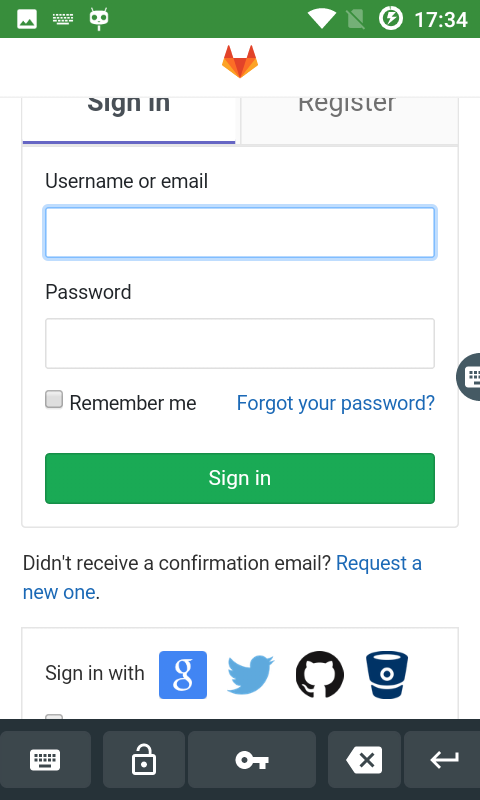
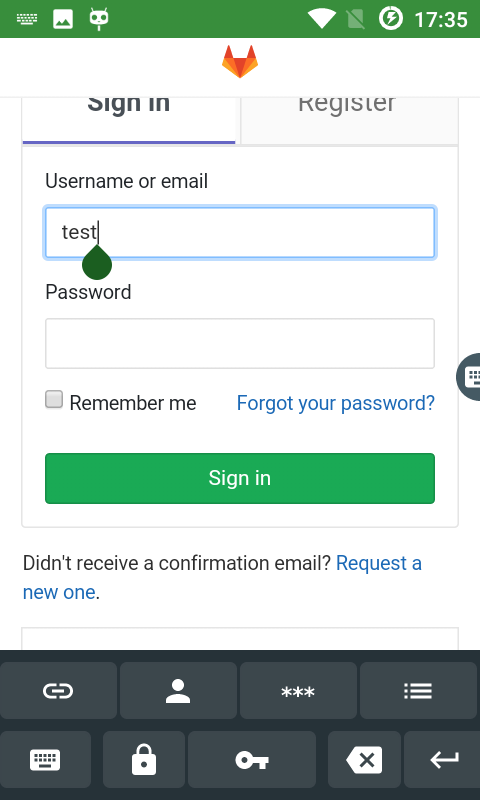
The first image shows the keyboard when no entry is selected. The second one shows the keyboard when an entry is selected after a click on the key.
(bottom to top)
- 1rst line : Change the keyboard | Unlock/lock the database (not implemented) | Choose an entry | Delete | Validate
- 2nd line to manage entry : url | username | password | other fields with list in popup (not implemented)
This first keyboard does not allow to enter letters and numbers like a normal keyboard because other keyboards do it much better.
To better switch between the default keyboard and KeePass DX, I made a separate app Keyboard Switcher that permanently displays a button on the screen. I will probably update it to choose the keyboards with a notification.
I'll later make a full keyboard as a separate application.
Feel free to feedback.
J-Jamet
on 22 Jun 2018
First development for Magikeyboard is done (https://github.com/Kunzisoft/KeePassDX/commit/27b0810688ab001fe81344206d5b6c42bf1bd990)
There is still work for the custom fields, the parameters, the timeout of the input of the keyboard, but it will be for after. (I'll add a new issue for that.)
J-Jamet
on 30 Jun 2018
I open a new issue for further development of the keyboard. #141
(First implementation in beta12)
J-Jamet
on 13 Jul 2018
Related issues
 JavaCoder20
·
3Comments
JavaCoder20
·
3Comments
 thgoebel
·
3Comments
thgoebel
·
3Comments
 stp-ip
·
3Comments
stp-ip
·
3Comments
 kermit-frog
·
4Comments
kermit-frog
·
4Comments
 erwincatt
·
4Comments
erwincatt
·
4Comments
Most helpful comment
In the past goggles compatibly layer added a lot of weight to applications (that would like to run on old devices). So adding a keyboard instead of using a compatibly library might even save some MB. (I might be wrong about this, since I did not make an App since Android Studio)
It doesn't have to be a full fledged keyboard either. This is the one provided by Keypass2Android:

(Screenshot in German, sorry)
You basically need four buttons:
Keypass2Android manages to switch back to the original one somehow, once you're done
(They also have a button to enter other fields like URL)
I think this is pretty handy