Keepass2android: Minor inconveniences on password unlock field
- [x] when you toggle show password, the cursor races back to the left of the field (fixed in #886)
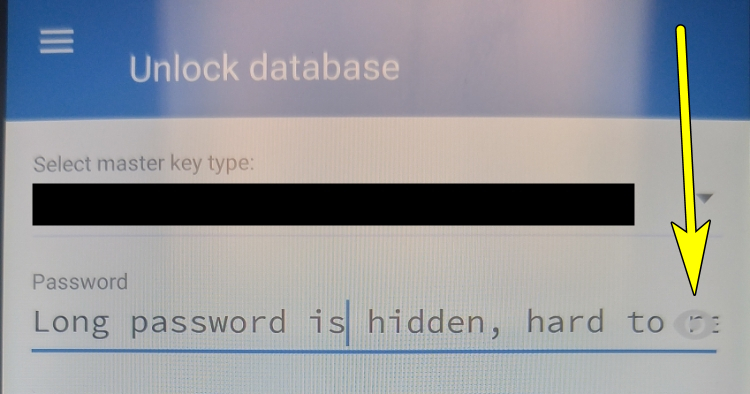
- [ ] with longer passwords, characters gets "hidden" behind the "eye" icon
 mirh
mirh
All 10 comments
I had the same problem with the 1.04b release and thought that seems like an easy issue to solve, maybe it's my time to finally contribute something to an open source project I actually use.
So I went through the the process of setting up the build environment on my machine. Never touched c# before.
Long story short: it already got fixed and will probably be in the next relase.
I just have to find another issue to contribute to.
Thanks Philipp for your hard work!
 pektinasen
on 8 May 2018
pektinasen
on 8 May 2018
@pektinasen - did you ever have a chance to submit the mentioned changes as a PR to this project?
For quite some time, I've had the same 2nd issue as @mirh where a long password chars get hidden behind the eye icon. Just wondering if it's still on the radar to be fixed any time soon.
 numericOverflow
on 13 Aug 2018
numericOverflow
on 13 Aug 2018
* [ ] when you toggle show password, the cursor races back to the left of the field
This issue is bothering me for quite some time. I use a fairly long master password and usually try to enter it with hidden characters in public - but when I make a typo, instead of starting all over, I use the "eye" to reveal my input. Unfortunately this always resets the cursor to the beginning, which then requires to put the cursor back to the end, which (with a long password) needs scrolling and is quite annoying.
 Gromdrengi
on 22 Sep 2018
Gromdrengi
on 22 Sep 2018
Just for reference, this image shows the issue I have. The "eye" icon that makes passwords visible covers the end of long passwords.
This makes it impossible to know if the password wast entered correctly, since there's no good way to get the password out from under the eye. I'm unable to tell if I fat-fingered the end of my password, which happens quite often.
I'd propose making the password box just a few characters shorter and placing the eye next to the field, instead of overlaid on top of the field, thus making the entire contents of the password field visible when scrolled to the right-most position.
Long password is hidden, hard to read... or maybe it's see...or wait, is it view?... I can't tell because that pesky eye is in the way!!
numericOverflow
on 26 Sep 2018
@pektinasen @PhilippC which version was this fixed? I am using the most current version of Keepass2Android Offline from the Google Play Store, which is v1.06g and both of these 2 bugs still exist.
Thank you!
 phpmoli
on 2 Jul 2019
phpmoli
on 2 Jul 2019
@phpmoli It was merged on the 15th of August (see here: #886 - as mentioned in top post of this issue)
Thanks @DDoSolitary for fixing this bug and to @PhilippC for merging it in and this awesome app in in general! 👍
 AmirGamilDev
on 2 Jan 2020
AmirGamilDev
on 2 Jan 2020
@AmirGamilDev I don't think this is fully fixed ; the eye icon still covers the characters (the cursor position is correct now).
 rnc
on 2 Jan 2020
rnc
on 2 Jan 2020
I noticed this.
AmirGamilDev
on 2 Jan 2020
This is still an issue; it just happened to me when I opened KP2A to sign in to say that it's still an issue. I appreciated the irony.
 tarminu
on 11 Jan 2020
tarminu
on 11 Jan 2020
Thank you for the fix! I just got version 1.08b-r1 pushed from play store and the password hidden behind eye issue is finally fixed. Much appreciated 👍
numericOverflow
on 22 Aug 2020
Related issues
 andschwa
·
3Comments
andschwa
·
3Comments
 Erwyn
·
4Comments
Erwyn
·
4Comments
 madjo80
·
5Comments
madjo80
·
5Comments
 vlig
·
5Comments
vlig
·
5Comments
 GuillaumeCz
·
5Comments
GuillaumeCz
·
5Comments
Most helpful comment
@AmirGamilDev I don't think this is fully fixed ; the eye icon still covers the characters (the cursor position is correct now).